|

|
Processed through Paypal No account required. |








Buy our over-priced crap to help pay the bills.



|
|
Processed through Paypal No account required. |
| File - Download Startup Monitor 64 v4.175 | ||||||||
| Description | ||||||||
|
A plea... Deanna and I have been running this site since 2008 and lately we're seeing a big increase in users (and cost) but a decline in percentage of users who donate. Our ad-free and junkware-free download site only works if everyone chips in to offset the revenue that ads on other sites bring in. Please donate at the bottom of the page. Every little bit helps. Thank you so much. Sincerely, your Older Geeks: Randy and Deanna Always scroll to the bottom of the page for the main download link. We don't believe in fake/misleading download buttons and tricks. The link is always in the same place. Startup Monitor 64 v4.175 👉 A portable Windows utility that watches startup locations and alerts you when programs try to add themselves. Startup Monitor 64 is a portable Windows system monitoring utility designed to detect changes to startup folders, Windows Registry startup locations, scheduled tasks and other locations you choose to monitor. When a new or changed item is detected, Startup Monitor 64 presents it for review so you can decide whether it should be allowed or denied. On its first run, the program creates baseline snapshots of existing startup folders and scheduled tasks. Future scans compare the current system against this baseline along with separate Allowed and Denied lists. This helps distinguish legitimate existing startup entries from newly added or changed items. Startup Monitor 64 is not limited to traditional Windows startup locations. You can add your own folders and Registry paths, allowing the program to serve as a general-purpose change monitor for locations you want to keep an eye on. The program is fully portable. Configuration files, baselines, allowed and denied lists, and logs are kept inside an App folder within the program's directory. 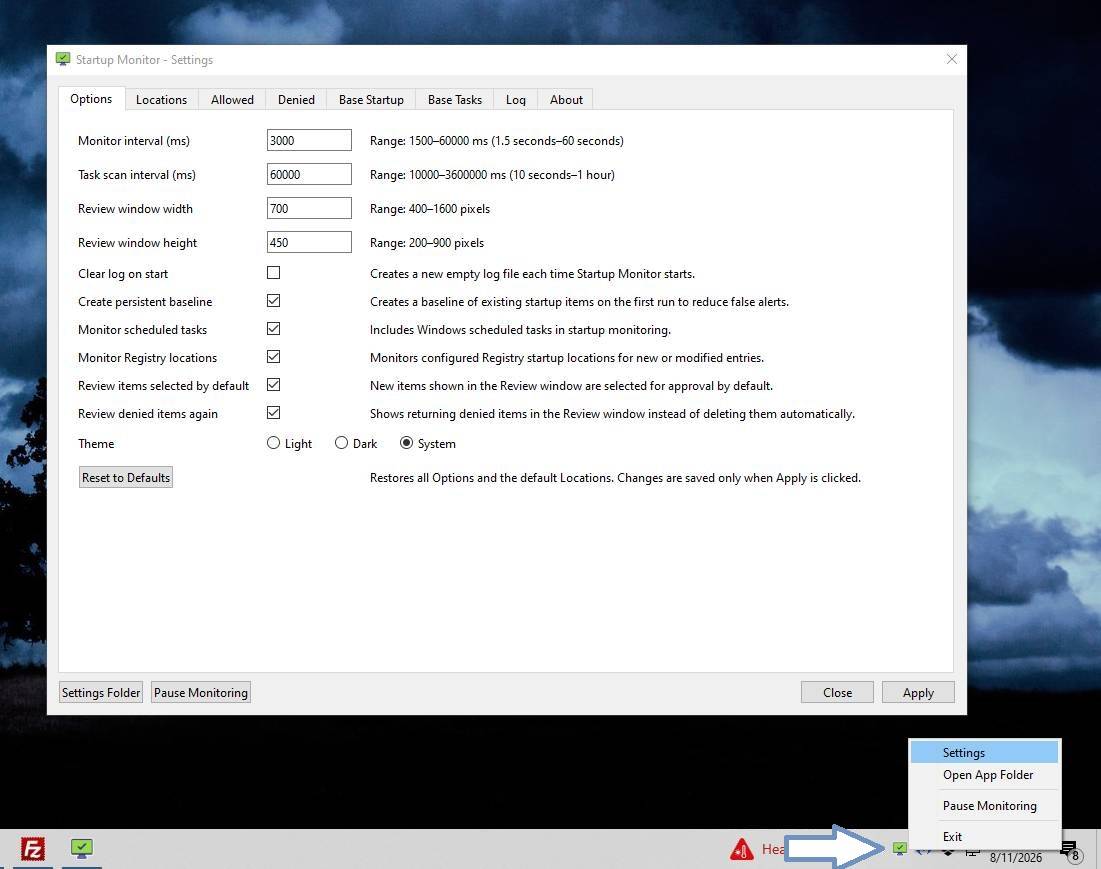 Features: • Monitors Windows startup folders for new or changed items • Monitors common Windows Registry startup locations • Monitors Windows Task Scheduler for newly added or changed scheduled tasks • Allows custom folders to be added to the monitoring list • Allows custom Registry paths to be monitored • Individual monitored locations can be enabled or disabled • Displays a review window when new or changed items are detected • Lets you approve detected items and add them to an Allowed list • Lets you deny detected items and remove them after confirmation • Maintains separate Allowed and Denied lists • Creates a persistent baseline of existing startup items on first run • Creates a baseline of existing scheduled tasks • Provides adjustable startup-location monitoring intervals from 1 to 60 seconds • Provides adjustable scheduled-task scanning intervals from 10 seconds to 1 hour • Can automatically select detected items for review • Can optionally review previously denied items again • Allows the review window width and height to be customized • Logs program actions for later examination • Stores log history in Log.ini • Includes an option to clear the log each time Startup Monitor 64 starts • Includes dedicated tabs for Locations, Allowed items, Denied items, Baseline and Log information • Allows entries to be removed from Allowed and Denied lists • Provides CopyPath commands for quickly copying an item's full path • Includes direct access to Registry Editor when configuring Registry monitoring • Includes a tray icon for quick access • Left-clicking the tray icon opens Settings • Tray menu provides Settings, Open App Folder, Pause Monitoring and Exit commands • Monitoring can be temporarily paused without exiting the program • Supports Light, Dark and System interface themes • Includes a Reset to Defaults option • Provides direct access to the program's settings folder for backup or manual inspection • Stores settings in simple INI files • Fully portable with program data stored beneath its own App folder • No installation is required • Open source under the MIT License Supported operating systems: • Windows 10, Windows 11 Supported languages: English Changes: v4.175 08-12-26 Added context menu to organise items between tabs. Fixed multi-selections still not working correctly. Added item information window, available via context menu in Review and Settings tabs. Note: This file has one hit on VirusTotal. We have confirmed this to be a false positive. The file is safe. Use 7-Zip to unzip this file. Click here to visit the author's website. Continue below for the main download link. |
||||||||
| Downloads | Views | Developer | Last Update | Version | Size | Type | Rank | |
| 224 | 776 | sl2365 | Sep 09, 2026 - 10:52 | 4.175 | 42.5MB | RAR |  , out of 4 Votes. , out of 4 Votes. |
|
| File Tags | ||||||||
| Startup Monitor 64 autorun registry scheduled tasks Windows portable security changes folders baseline logging freeware | ||||||||
Click to Rate File Share it on Twitter → Tweet
|


