|

|
Processed through Paypal No account required. |








Buy our over-priced crap to help pay the bills.



|
|
Processed through Paypal No account required. |
| Files | ||||
| File Name | Rating | Downloads | ||
 |
Firewing 64 v2.1.0 Firewing 64 v2.1.0 A 3D platforming game set in the style of a Nintendo 64 title. You control Firewing, a dragon tasked with collecting all of the Peace Crystal fragments. To do so will require exploration, collectibles, mini-games, and of course, platforming! This game was originally started as a side project of mine as I wanted to try recreating a Nintendo 64-style title. It was then left alone for a number of months until one day I decided to adjust the scope of it (or else it likely never would have been finished) to fit in to a single level. This gave me the motivation to finish it (albeit it with basic menus and a very simplistic story) but still deliver that Nintendo 64 feel! Features Loads of items to collect! Large, expansive level with a variety of gameplay! Mini-games, which includes kart racing! An offering of nostalgia 32/64-bit platforming fans long for! New in version 2 All new (translation: better) textures Smoothing groups added to geometry The jump height is now dependent on how long the player holds down the jump button Player controls were refined to reduce button usage The game is now saved after collecting a crystal fragment Settings and button mappings are now saved automatically as well Added footstep and gliding sounds Changed a handful of things in the main level including adding a new type of enemy Added the ability to control the camera with the mouse Miscellaneous bug fixes Firewing 64 v1.0 Trailer - Indie DB Click here to visit the author's website. |
 |
5,321 | Feb 17, 2019 Studio Besus  |
|
Startup Monitor 64 v4.175 Startup Monitor 64 v4.175 👉 A portable Windows utility that watches startup locations and alerts you when programs try to add themselves. Startup Monitor 64 is a portable Windows system monitoring utility designed to detect changes to startup folders, Windows Registry startup locations, scheduled tasks and other locations you choose to monitor. When a new or changed item is detected, Startup Monitor 64 presents it for review so you can decide whether it should be allowed or denied. On its first run, the program creates baseline snapshots of existing startup folders and scheduled tasks. Future scans compare the current system against this baseline along with separate Allowed and Denied lists. This helps distinguish legitimate existing startup entries from newly added or changed items. Startup Monitor 64 is not limited to traditional Windows startup locations. You can add your own folders and Registry paths, allowing the program to serve as a general-purpose change monitor for locations you want to keep an eye on. The program is fully portable. Configuration files, baselines, allowed and denied lists, and logs are kept inside an App folder within the program's directory. Features: • Monitors Windows startup folders for new or changed items • Monitors common Windows Registry startup locations • Monitors Windows Task Scheduler for newly added or changed scheduled tasks • Allows custom folders to be added to the monitoring list • Allows custom Registry paths to be monitored • Individual monitored locations can be enabled or disabled • Displays a review window when new or changed items are detected • Lets you approve detected items and add them to an Allowed list • Lets you deny detected items and remove them after confirmation • Maintains separate Allowed and Denied lists • Creates a persistent baseline of existing startup items on first run • Creates a baseline of existing scheduled tasks • Provides adjustable startup-location monitoring intervals from 1 to 60 seconds • ... |
|
268 | Sep 09, 2026 sl2365 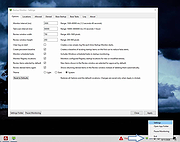 |
 |
Why Can't I Connect? 64 bit Linux debian 1.12.3 ==Official Mirror== Why Can't I Connect? 64 bit Linux debian 1.12.3 "Why Can't I Connect?" makes it easier to resolve TCP/IP connection errors. Use it to diagnose connections to common server types (Microsoft SQL Server, MySQL Server, FTP, SFTP, IMAP, POP3, SMTP, IRC, LDAP, Usenet) and create generic TCP/IP clients and / or servers. “Why Can't I Connect?” is currently supported in Windows and Linux. "Why Can't I Connect?" Features: Network debugging Network diagnostics Email connection debugging Database connection debugging LDAP connection debugging Internet relay chat connection debugging Usenet connection debugging Network intrusion detection Change Info: Release 1.12.3 In this release: 1. Fixed a bug that would occasionally freeze the application when attempting to create a secure connection with an unsecured port. 2. Fixed a bug where "Advanced" sockets where not supporting secure connections. |
|
8,538 | Aug 15, 2019 Chris Ohmstede 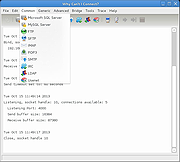 |
|
Why Can't I Connect? 64 bit Linux rpm 1.12.3 ==Official Mirror== Why Can't I Connect? 64 bit Linux rpm 1.12.3 "Why Can't I Connect?" makes it easier to resolve TCP/IP connection errors. Use it to diagnose connections to common server types (Microsoft SQL Server, MySQL Server, FTP, SFTP, IMAP, POP3, SMTP, IRC, LDAP, Usenet) and create generic TCP/IP clients and / or servers. “Why Can't I Connect?” is currently supported in Windows and Linux. "Why Can't I Connect?" Features: Network debugging Network diagnostics Email connection debugging Database connection debugging LDAP connection debugging Internet relay chat connection debugging Usenet connection debugging Network intrusion detection Change Info: Release 1.12.3 In this release: 1. Fixed a bug that would occasionally freeze the application when attempting to create a secure connection with an unsecured port. 2. Fixed a bug where "Advanced" sockets where not supporting secure connections. |
|
8,674 | Aug 15, 2019 Chris Ohmstede |
|
Windows 8 Codecs 64 Bit 1.54 Windows 8 Codecs 64 Bit 1.54 Windows 8 Codecs is an audio and video codec package for Windows 8. The installer will automatically remove most other popular codec releases from your computer before installing this concise yet comprehensive package. You won't need to make any adjustments or tweaks to enjoy your media content immediately. Windows Media Player and Media Center will instantly recognize all your files as playable. It does not contain a media player and it does not associate file-types. With this package installed you will be able to use any media player, limited only by the players' capabilities, to play all movies and video clips. Streaming video is supported in several formats in all popular web browsers. Users of the Windows 8 Codecs have the ability to choose what is installed and where to install it using the public redistributable. After installation you can select to remove specific portions without removing the entire package. You can also re-add the removed items at any time. Changelog: - downgrade LAV filters 55.2+ - update x264 encoder 2273 - improve MKV DLNA playback - improve MKV playback Xbox360 MC |
 |
9,704 | Sep 22, 2021 Shark007 |
| Showing rows 1 to 5 of 5 | Showing Page 1 of 1 | 1 |
OlderGeeks.com Copyright (c) 2026
