|

|
Processed through Paypal No account required. |








Buy our over-priced crap to help pay the bills.



|
|
Processed through Paypal No account required. |
| Files | ||||
| File Name | Rating | Downloads | ||
 |
DebugView v5.02 DebugView v5.02 👉 Monitor local and remote Windows debug output in real time. DebugView is a Sysinternals utility that captures and displays both Win32 and kernel-mode debug output from your local system or from remote computers you can reach over TCP/IP. It is designed for developers, administrators, and troubleshooters who want to view debug messages without attaching a traditional debugger. DebugView can also recover kernel-mode debug output from crash dump files when it was capturing at the time of the crash, and it includes tools for filtering, logging, searching, printing, and managing captured output. Features: • Captures Win32 OutputDebugString output • Captures kernel-mode DbgPrint output • Captures all kernel-mode DbgPrint variants implemented in Windows and Windows Server • Monitors debug output from local or remote computers over TCP/IP • Supports simultaneous monitoring of multiple remote systems • Recovers kernel-mode debug output from crash dump files when capture was active • Includes filtering and highlighting options for debug output • Lets you toggle display of process IDs for Win32 debug output • Copies selected output lines to the clipboard • Logs captured debug output to a file • Loads saved log files back into the output window • Prints all or part of captured output • Runs as a single executable file • Requires administrative privileges to view kernel-mode debug output Supported operating systems: • Windows Vista, Windows 7, Windows 8, Windows 10, Windows 11, Server Supported languages: English Changes: v5.02 06-17-26 Command-line interface (DbgViewCLI): A new standalone command-line tool (dbgviewcli.exe) provides full debug capture capabilities from the terminal. Designed for scripted, automated, and AI-agent-driven workflows with bounded execution, machine-readable output, and process-specific filtering. See the DbgViewCLI section below for full details. AI-agent automation parameters: New CLI options (--duration, --max-lines, --wait-for, --tail, --no-banner, --status, --pid-filter, --process-filter) guarantee bounded execution and clean output for programmatic use by coding agents. Embedded agent skills with one-command install: DbgViewCLI embeds agent skill files as a binary resource and can ... |
 |
746 | Aug 04, 2026 Microsoft Corp. 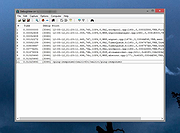 |
|
NetworkConnectLog v1.18 NetworkConnectLog v1.18 👉 Monitor and log devices connecting to and disconnecting from your local network. NetworkConnectLog is a lightweight, portable network monitoring utility that continuously scans your local area network using ARP and NetBIOS protocols, recording every device that connects to or disconnects from your network. It is ideal for home users, technicians, and network administrators who want to keep track of network activity, identify unknown devices, or troubleshoot intermittent connection issues. The program immediately performs an initial scan to detect all currently connected devices, then continues monitoring in the background for connection and disconnection events. Each log entry includes useful information such as the event time, IP address, computer name, workgroup, MAC address, and network adapter manufacturer. Logs can be searched, sorted, filtered, and exported to several common formats for documentation or further analysis. Features: • Portable application requiring no installation • Automatically detects computers and devices joining or leaving your network • Uses ARP and NetBIOS protocols for device detection • Displays connection and disconnection timestamps • Shows IP address, computer name, workgroup, MAC address, and network adapter manufacturer • Performs continuous background monitoring • Configurable network adapter and IP address scanning range • Adjustable scan interval • Automatically export logs whenever changes are detected • Export logs to TXT, CSV, HTML, XML, or tab-delimited files • Search and sort recorded events • Customizable font and MAC address display format • System tray support • Optional always-on-top mode • Optional black background display mode • High DPI display support Supported operating systems: • Windows 2000, Windows XP, Windows Vista, Windows 7, Windows 8, Windows 8.1, Windows 10, Windows 11 (32-bit and 64-bit) Supported languages: • English, Arabic, Brazilian Portuguese, Dutch, French, German, Greek, Hungarian, Italian, Japanese, Persian, Polish, Romanian, Russian, Simplified Chinese, Slovak, Spanish, Traditional Chinese, Turkish, Valencian Changes: v1.18 07-01-26 Updated the internal MAC addresses database. Click here to visit the author's website. |
|
7,268 | Jul 03, 2026 Nir Sofer 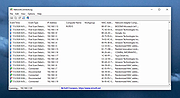 |
|
Startup Monitor 64 v4.175 Startup Monitor 64 v4.175 👉 A portable Windows utility that watches startup locations and alerts you when programs try to add themselves. Startup Monitor 64 is a portable Windows system monitoring utility designed to detect changes to startup folders, Windows Registry startup locations, scheduled tasks and other locations you choose to monitor. When a new or changed item is detected, Startup Monitor 64 presents it for review so you can decide whether it should be allowed or denied. On its first run, the program creates baseline snapshots of existing startup folders and scheduled tasks. Future scans compare the current system against this baseline along with separate Allowed and Denied lists. This helps distinguish legitimate existing startup entries from newly added or changed items. Startup Monitor 64 is not limited to traditional Windows startup locations. You can add your own folders and Registry paths, allowing the program to serve as a general-purpose change monitor for locations you want to keep an eye on. The program is fully portable. Configuration files, baselines, allowed and denied lists, and logs are kept inside an App folder within the program's directory. Features: • Monitors Windows startup folders for new or changed items • Monitors common Windows Registry startup locations • Monitors Windows Task Scheduler for newly added or changed scheduled tasks • Allows custom folders to be added to the monitoring list • Allows custom Registry paths to be monitored • Individual monitored locations can be enabled or disabled • Displays a review window when new or changed items are detected • Lets you approve detected items and add them to an Allowed list • Lets you deny detected items and remove them after confirmation • Maintains separate Allowed and Denied lists • Creates a persistent baseline of existing startup items on first run • Creates a baseline of existing scheduled tasks • Provides adjustable startup-location monitoring intervals from 1 to 60 seconds • ... |
|
268 | Sep 09, 2026 sl2365 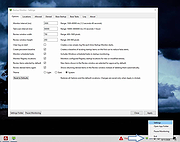 |
| Showing rows 1 to 3 of 3 | Showing Page 1 of 1 | 1 |
OlderGeeks.com Copyright (c) 2026
