|

|
Processed through Paypal No account required. |








Buy our over-priced crap to help pay the bills.



|
|
Processed through Paypal No account required. |
| Files | ||||
| File Name | Rating | Downloads | ||
 |
DeepTaskScan v1.0.0 DeepTaskScan v1.0.0 👉 Portable Windows forensics tool for detecting hidden and persistent scheduled tasks. DeepTaskScan is an advanced Windows scheduled task viewer and forensics tool designed to uncover scheduled tasks that may be hidden from standard Windows utilities. Unlike Task Scheduler, schtasks, PowerShell and similar tools, it uses a different scanning method rather than relying on Windows API calls to discover scheduled tasks. This can help system administrators, technicians and security researchers identify tasks concealed through techniques involving deleted task files or registry keys. The developer notes that such techniques have been used by state-backed Advanced Persistent Threat (APT) groups. DeepTaskScan is completely portable, requires no installation and is available in both 32-bit and 64-bit versions. Features: • Deeply scans Windows for scheduled tasks using an alternative detection method • Detects scheduled tasks hidden through advanced techniques • Does not rely on Windows API calls for scheduled task detection • Helps uncover tasks that may not appear in Windows Task Scheduler • Can detect more scheduled task entries than Task Scheduler, PowerShell and other standard tools • Highlights hidden or persistent entries • Can help detect APT activity involving hidden Task Scheduler entries • Allows discovered information to be extracted to a file • Useful for system administration, troubleshooting and security forensics • Available as separate 32-bit and 64-bit executables • Completely portable with no installation required Supported operating systems: • Windows 7 or newer Supported languages: • English Changes: v1.0.0 08-16-26 Initial release. This download is for the Windows 64bit version (very bottom of page). If you need the Windows 32bit version, download here. Click here to visit the author's website. |
 |
309 | Aug 20, 2026 Emir Alp Kocak 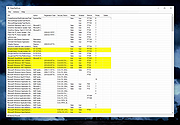 |
 |
FluentTaskScheduler v1.9.0 FluentTaskScheduler v1.9.0 👉 A modern, fluent UI-based task scheduler for Windows. FluentTaskScheduler is a Windows task scheduling utility that provides a clean and modern interface for creating, managing, and monitoring scheduled tasks. Built with a fluent design approach, it simplifies interaction with the Windows Task Scheduler by offering an intuitive graphical interface while still exposing advanced configuration options. It is designed for both casual users and advanced users who want more control over automation without navigating the default Windows scheduler. Features: • Create, edit, and delete scheduled tasks with ease • Modern fluent UI design for improved usability • View detailed task information and status • Support for triggers, actions, and conditions • Simplified interface compared to Windows Task Scheduler • Lightweight and easy to use Supported operating systems: • Windows 10, Windows 11 Supported languages: English Changes: v1.9.0 07-26-26 New Features Task Chaining (Completion Actions): Chain tasks together and configure a task to automatically start other tasks when it succeeds or fails, right from a new "Completion Actions" section in the task editor. FluentTaskScheduler watches the Task Scheduler event log in real time (no polling) and includes built-in loop protection so you can't accidentally chain a task into itself. Global & Per-Task Snooze: Need a break? Hit "Snooze All Tasks" to pause task execution app-wide for 30 minutes, 1 hour, 3 hours, until your next reboot, or a custom time. You can also now snooze individual tasks (including a working custom time option). Optionally suspends scheduled triggers at the OS level too, and un-suspends exactly what it suspended when the snooze ends. Dashboard Analytics: The Dashboard got a serious upgrade: a 24-hour execution heatmap, a health-score ring, average/longest run duration, and a live, filterable execution log (Success / Failed / Snoozed). Task Template Library: 17 ready-to-deploy templates (temp cleanup, restore points, ... |
|
1,046 | Sep 16, 2026 TRGamer-tech 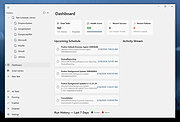 |
|
HelixNotes v1.3.3 HelixNotes v1.3.3 👉 A fast, local-first Markdown note-taking application with powerful organization tools. HelixNotes is a privacy-focused, open-source Markdown note-taking application that stores your notes as standard .md files on your own computer instead of locking them into a proprietary database or cloud service. Built with Rust and Tauri for excellent performance and low resource usage, it combines a clean WYSIWYG editor with the flexibility of raw Markdown editing. Features such as wiki links, graph visualization, task management, version history, full-text search, Mermaid diagrams, KaTeX math, optional WebDAV synchronization, and optional AI integration make it suitable for everything from simple note-taking to large personal knowledge bases. Features: • Plain Markdown (.md) file storage with no proprietary database • Clean WYSIWYG editor with optional raw Markdown source mode • Slash commands, tables, syntax-highlighted code blocks, and live KaTeX math • Wiki links with automatic interactive graph view • Centralized task management with priorities, due dates, and calendar view • Daily notes with integrated calendar • Fast local full-text search • Native Mermaid diagram rendering • Version history with automatic backups and diff viewer • Optional WebDAV synchronization • Optional AI integration using Ollama or your own API key • Obsidian import support • Outline panel and tag autocomplete • Custom themes, fonts, accent colors, and interface scaling • Built with Rust and Tauri for fast startup and low memory usage Supported operating systems: • Windows 10, Windows 11 • macOS (Apple Silicon and Intel with Rosetta 2) • Linux (AppImage, Debian/Ubuntu APT, Arch Linux, Fedora 43+, openSUSE Tumbleweed, Solus) • Android 16 or later Supported languages: • English Changes: v1.3.3 06-30-26 Android: removed the Updates tab from Settings, since updates are handled by the ArkHost F-Droid repo or Obtainium. Editor: the inline task tokens (!high, due:2026-06-12) are now dimmed in the rich editor so they're less distracting while staying readable. Fixed the desktop app showing the mobile layout (no sidebar or top bar) on some Linux systems such as CachyOS. (community ... |
|
426 | Jul 03, 2026 ArkHost 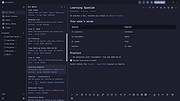 |
|
Microsoft Autoruns v14.3 Microsoft Autoruns v14.3 👉 See everything that starts automatically with Windows. Microsoft Autoruns is a powerful Sysinternals utility that shows what programs, drivers, services, browser add-ons, scheduled tasks, codecs, shell extensions, Winlogon entries, and other components are configured to run automatically during system boot, login, or when Windows applications start. Features: • Displays one of the most complete views of Windows auto-start locations • Shows startup programs, drivers, services, Explorer extensions, browser helper objects, toolbars, codecs, scheduled tasks, Winsock providers, and more • Hide Signed Microsoft Entries option helps focus on third-party items • View auto-start entries for different user accounts • Disable entries by unchecking them • Delete unwanted auto-start configuration entries • Jump directly to Registry or file system locations • Verify digital signatures • VirusTotal integration for hash checking • Includes Autorunsc command-line version with CSV, tab-delimited, XML, hash, signature, and offline Windows scan options Supported operating systems: • Windows Supported languages: Operating system language. Changes: v14.3 06-17-26 Not provided. Click here to visit the author's website. |
|
11,516 | Sep 16, 2026 Microsoft Corp. 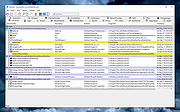 |
|
Repair Tasks v3.3 Repair Tasks v3.3 This project is a utility that makes repairs to the Windows Task schedule. In particular, it fixes problems where opening the Task Scheduler, or trying to configure Windows Backup, results in the message "The task image is corrupt or has been tampered with" (0x80041321). Searching the web reveals that this message has been seen from time to time, and the (rather laborious) set of steps that can be taken to correct it are fairly well-documented. However, it turns out that reverting to Windows 7 from Windows 10 generates this problem in spades. It can leave more than 40 scheduled tasks in a corrupt state. This is because many task registry keys and the task definitions to which they refer are updated by a Windows 10 upgrade, but only the registry keys are restored on reversion, so Task Scheduler finds that, for these tasks, the task registry keys and task definitions are now inconsistent. The general recommendation in response to this reversion problem seems to be to restore the system from backups. However, I'm never sure about overwriting chunks of my system from backups, and would rather go forwards. So, since the fix is well-known, and the main problem is just repeated execution, I decided to write a utility to automate the set of steps required. And now, I'm sharing my work in case it is of use to fellow sufferers, pending Microsoft getting their act together and fixing reversion. Open source is particularly appropriate for this type of project, as the code necessarily delves into system settings, making complete transparency as to what it does crucial. You are encouraged to download the source, which is actually not huge, and understand what it does. However, I also provide a download of the executable, and a description of how to use the program on ... |
|
6,973 | Jun 20, 2016 Dijji 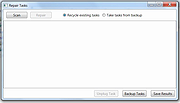 |
|
Startup Monitor 64 v4.175 Startup Monitor 64 v4.175 👉 A portable Windows utility that watches startup locations and alerts you when programs try to add themselves. Startup Monitor 64 is a portable Windows system monitoring utility designed to detect changes to startup folders, Windows Registry startup locations, scheduled tasks and other locations you choose to monitor. When a new or changed item is detected, Startup Monitor 64 presents it for review so you can decide whether it should be allowed or denied. On its first run, the program creates baseline snapshots of existing startup folders and scheduled tasks. Future scans compare the current system against this baseline along with separate Allowed and Denied lists. This helps distinguish legitimate existing startup entries from newly added or changed items. Startup Monitor 64 is not limited to traditional Windows startup locations. You can add your own folders and Registry paths, allowing the program to serve as a general-purpose change monitor for locations you want to keep an eye on. The program is fully portable. Configuration files, baselines, allowed and denied lists, and logs are kept inside an App folder within the program's directory. Features: • Monitors Windows startup folders for new or changed items • Monitors common Windows Registry startup locations • Monitors Windows Task Scheduler for newly added or changed scheduled tasks • Allows custom folders to be added to the monitoring list • Allows custom Registry paths to be monitored • Individual monitored locations can be enabled or disabled • Displays a review window when new or changed items are detected • Lets you approve detected items and add them to an Allowed list • Lets you deny detected items and remove them after confirmation • Maintains separate Allowed and Denied lists • Creates a persistent baseline of existing startup items on first run • Creates a baseline of existing scheduled tasks • Provides adjustable startup-location monitoring intervals from 1 to 60 seconds • ... |
|
219 | Sep 09, 2026 sl2365 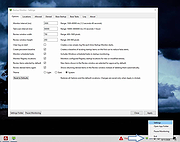 |
|
Super Productivity v18.19.0 Super Productivity v18.19.0 👉 A privacy-focused task manager with time tracking and Pomodoro timer. Super Productivity is an open-source productivity app designed to help users manage tasks, track time, and improve focus using built-in techniques like the Pomodoro timer. It integrates with popular issue tracking platforms such as Jira, GitHub, and GitLab, making it especially useful for developers and teams. The application emphasizes privacy by storing all data locally with no required sign-up or cloud dependency. Features: • Task management with subtasks, attachments, and notes • Built-in Pomodoro timer and break reminders • Time tracking with detailed statistics and reports • Integration with Jira, GitHub, GitLab, and other issue trackers • Offline-first design with local data storage • Distraction blocking and focus mode • Daily schedule planning and timeboxing • Keyboard shortcuts and command palette • Data import/export and backup support • Cross-platform synchronization options (optional) • Customizable themes and dark mode • Open-source with no ads or tracking Supported operating systems: • Windows 10, Windows 11 • macOS 11 or higher • Linux (AppImage, Snap, Flatpak, Debian/Ubuntu) • Android • iOS Supported languages: English, German, Spanish, French, Italian, Portuguese, Russian, Chinese, Japanese, Korean Changes: v18.19.0 08-07-26 Highlights Added search to global settings and a ? keyboard shortcut cheat sheet (#9302, #9318). Added crash-safe local drafts for project notes (#8982). Added interval recurrence phrases such as @every 2 weeks and @every 2 fridays (#9328). Added URL scheme actions for creating and completing tasks (#9121). Completed translations across all locales (#9360). Security and sync Enforced encrypted-only SuperSync uploads when E2EE is required and stopped clients from accepting plaintext downloads when encrypted sync is expected (GHSA-vrc7-775g-ggqc, #8903, #9457). Added diagnostics and recovery guidance for encrypted-operation integrity failures (#9331, #9439, #9444). Prevented stale-key uploads after server state replacements (#8730, #9330). Resolved ... |
|
665 | Aug 12, 2026 Super Productivity Org 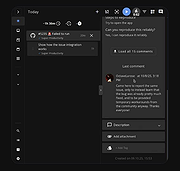 |
|
ToDoList v9.2.0 ToDoList v9.2.0 👉 Flexible and powerful task management software for organizing projects of any size. ToDoList is a highly configurable task management application that helps you organize everything from simple daily to-do lists to complex, multi-level projects. It lets you create unlimited task hierarchies with subtasks, allowing even the largest projects to remain organized and easy to navigate. ToDoList includes a wide range of customizable task attributes such as priorities, categories, tags, due dates, start dates, dependencies, recurrence, risk levels, percentages complete, file links, comments, and time tracking. Multiple task views, advanced filtering, searching, sorting, and reporting tools make it easy to focus on your work and monitor progress. Support for plugins, numerous import and export formats, and a portable edition make ToDoList suitable for both personal and professional project management. Features: • Unlimited task hierarchy with nested subtasks • Fully customizable task attributes and layouts • Priorities, categories, tags, status, and risk tracking • Start dates, due dates, recurring tasks, and dependencies • Built-in time tracking and time estimates • Powerful filtering, searching, sorting, and reporting • File attachments, links, and rich text comments • Multiple import and export formats • Plugin support for additional functionality • Portable version available Supported operating systems: • Windows 7, Windows 8, Windows 8.1, Windows 10, Windows 11 Supported languages: English Changes: v9.2.0 06-22-26 • Added new task creation options, including creating subtasks within existing tasks. • Added single-click editing to the Attribute Editor. • Added sub-expressions to Find Task rulesets. • Added Persian (Jalali) calendar support. • Added counters for remaining User Defined Tools and Custom Task Attributes. • Added spell checking support for Markdown comments. • Added drag-and-drop reordering of Task View tabs. • Added improved keyboard navigation for Week Planner and Logged Time. • Added drag-and-drop and paste support for files, images, and content in HTML and Markdown comments. • Added Cut, Copy, and Paste icons to the Rich Text Comments toolbar and context menu. • Added a UI Language ... |
|
10,903 | Jun 29, 2026 AbstractSpoon Software 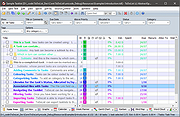 |
| Showing rows 1 to 8 of 8 | Showing Page 1 of 1 | 1 |
OlderGeeks.com Copyright (c) 2026
