|

|
Processed through Paypal No account required. |








Buy our over-priced crap to help pay the bills.



|
|
Processed through Paypal No account required. |
| File - Download FlyOutNotepad v1.05 | ||||||||
| Description | ||||||||
|
Always scroll to the bottom of the page for the main download link. We don't believe in fake/misleading download buttons and tricks. The link is always in the same place. FlyOutNotepad v1.05 👉 Smart docking notepad for storing text, code snippets, and images. FlyOutNotepad is a lightweight Windows productivity tool that docks to any screen edge and gives you fast access to notes, code snippets, text, and images. It supports drag and drop, up to 20 tabs, auto-save, and fast C++/WTL performance in a very small package. 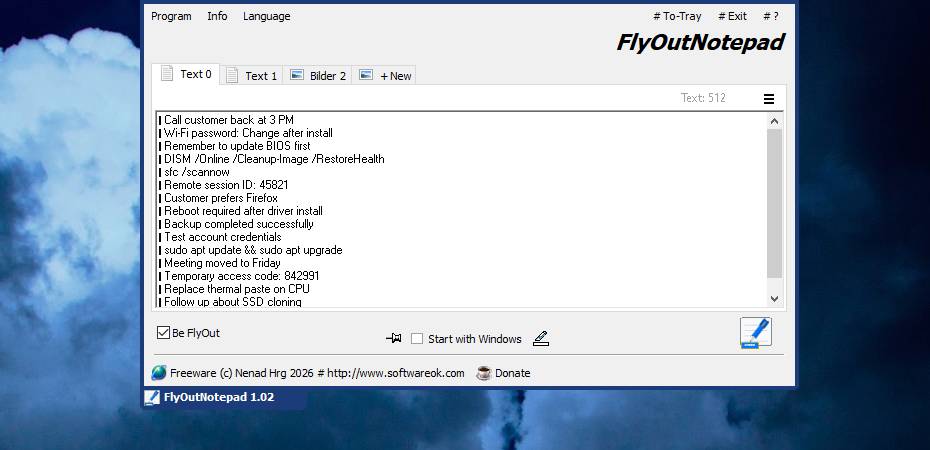  Features: • Dock to any of the 4 screen edges • Smooth flyout access when needed • Store text, code snippets, and images • Bi-directional drag and drop for text and images • Up to 20 tabs for organizing content • Auto-save support • Remembers state on shutdown or logoff • Tab renaming support • Lightweight, under 500 KB • Built in C++ with Windows Template Library • Optional portable mode by renaming the EXE with _p Supported operating systems: • Windows 11, Windows 10, Windows 8.1, Windows 7, Windows Server 2012 through 2025, 32-bit and 64-bit Supported languages: English, German, Italian, Traditional Chinese, Korean, Polish, Russian, Spanish, Portuguese, French Changes: v1.05 08-17-26 • Update of language files in FlyOut NotePad for MS Windows • Optimization and various fixes under Windows 11 and 10 Click here to visit the author's website. Continue below for the main download link. |
||||||||
| Downloads | Views | Developer | Last Update | Version | Size | Type | Rank | |
| 1,502 | 3,887 | Nenad Hrg | Oct 01, 2026 - 13:03 | 1.05 | 234.8KB | ZIP |  , out of 7 Votes. , out of 7 Votes. |
|
| File Tags | ||||||||
| FlyOutNotepad notes clipboard dock tabs snippets images productivity SoftwareOK Nenad Hrg Windows portable text editor auto save drag drop | ||||||||
Click to Rate File Share it on Twitter → Tweet
|


