|

|
Processed through Paypal No account required. |








Buy our over-priced crap to help pay the bills.



|
|
Processed through Paypal No account required. |
| File - Download Win11Debloat v2026.08.24 | ||||||||
| Description | ||||||||
|
A plea... Deanna and I have been running this site since 2008 and lately we're seeing a big increase in users (and cost) but a decline in percentage of users who donate. Our ad-free and junkware-free download site only works if everyone chips in to offset the revenue that ads on other sites bring in. Please donate at the bottom of the page. Every little bit helps. Thank you so much. Sincerely, your Older Geeks: Randy and Deanna Always scroll to the bottom of the page for the main download link. We don't believe in fake/misleading download buttons and tricks. The link is always in the same place. Win11Debloat v2026.08.24 👉 Declutter and customize Windows 10 or 11 by removing unwanted apps, telemetry, ads, AI features and other annoyances. Win11Debloat is a lightweight PowerShell utility for cleaning up and customizing Windows without installation. It can remove preinstalled apps, disable telemetry and advertising, change privacy settings, disable unwanted Windows AI features, modify the Start menu, taskbar and File Explorer, and adjust many other Windows behaviors. It includes an interactive graphical interface as well as command-line options for administrators and automated deployments. The OlderGeeks.com download contains the official Get.ps1 quick-launch script. An Internet connection is required because this launcher downloads the current Win11Debloat release directly from the official GitHub repository before starting it. The downloaded files are placed temporarily under %TEMP%\Win11Debloat and are cleaned up when the program closes, while configuration files, logs and backups are preserved. Most changes made by Win11Debloat can be reversed, and most removed Microsoft Store applications can be reinstalled. Because the utility makes substantial changes to Windows, users should carefully review the selected options before applying them. 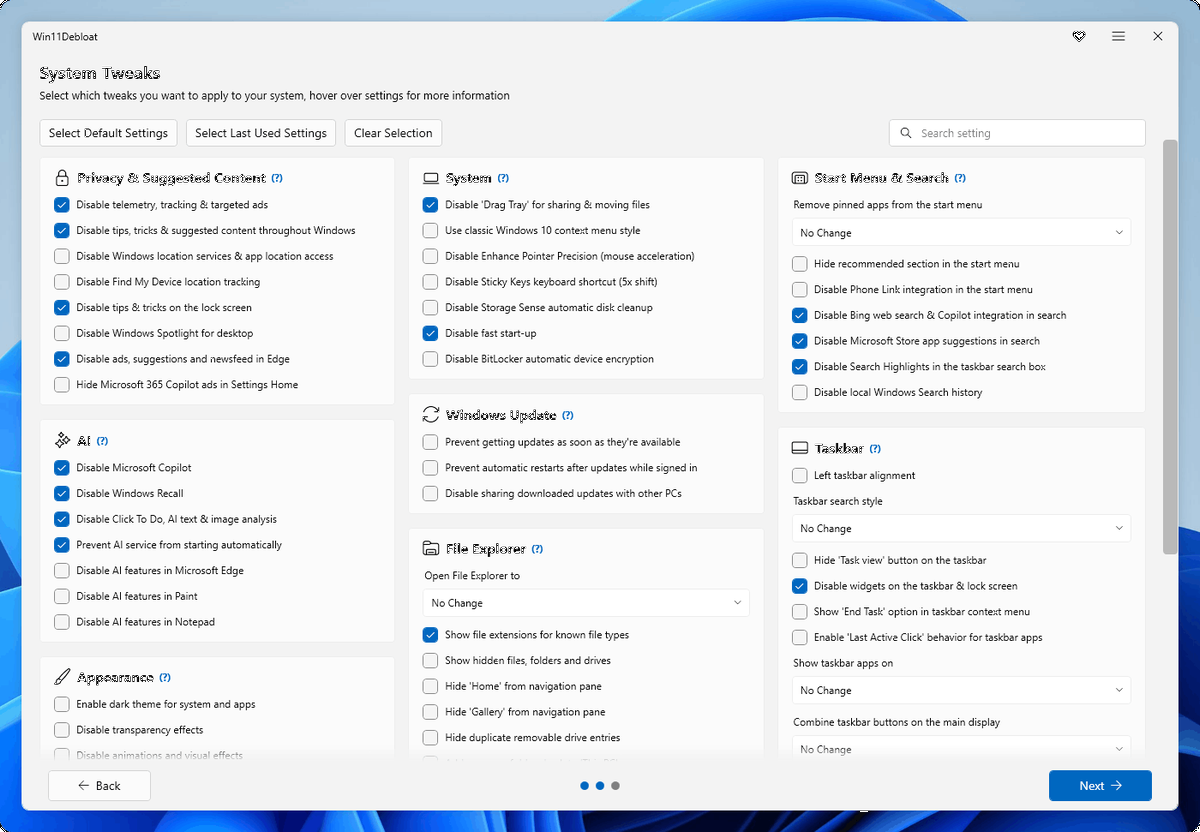 Features: • Remove a wide variety of preinstalled Windows applications • Disable telemetry, diagnostic data collection, activity history, app-launch tracking and targeted advertising • Disable Windows tips, suggestions, lock-screen promotions and Microsoft Edge advertising • Disable Windows location services, application location access and Find My Device tracking • Hide Microsoft 365 advertising on the Settings Home page or hide the Home page completely • Disable or remove Microsoft Copilot, Windows Recall and Click to Do • Prevent the Windows AI service from starting automatically • Disable AI features in Microsoft Edge, Paint and Notepad • Restore the classic Windows 10-style context menu • Disable mouse acceleration, Sticky Keys shortcuts, Storage Sense and Fast Startup • Disable automatic BitLocker device encryption • Disable network connectivity during Modern Standby • Prevent Windows from automatically restarting after updates while a user is signed in • Disable Windows Delivery Optimization • Prevent automatic installation of device companion applications • Enable Windows dark mode and disable transparency, animations and other visual effects • Customize the Start menu, pinned applications, recommendations and All Apps view • Disable Phone Link integration in the Start menu • Disable Bing web results, Copilot integration and Microsoft Store suggestions in Windows Search • Change taskbar alignment and customize or hide Search, Task View and other taskbar buttons • Disable taskbar and lock-screen widgets • Add an End Task option to the taskbar right-click menu • Customize taskbar button grouping and multi-monitor taskbar behavior • Change the default File Explorer startup location • Show known file extensions, hidden files, folders and drives • Hide Home, Gallery, OneDrive and duplicate removable-drive entries from File Explorer • Add common folders such as Desktop and Downloads back to This PC • Change drive-letter position or hide drive letters • Disable window snapping, Snap Assist and Snap Layout suggestions • Control whether tabs appear when using Alt+Tab or snapping windows • Enable Windows Sandbox • Enable Windows Subsystem for Linux • Disable Xbox Game Bar integration and game/screen recording • Disable selected AI, cryptocurrency and news features in Brave • Apply changes to another Windows user account • Sysprep support for applying changes to the Windows Default user profile • Export and import configurations for repeatable setups on multiple computers • Command-line interface for administration, scripting and automated deployment • Registry backup and restore support for safer configuration changes • Supports skipping selected registry backups when specifically requested • Improved application-removal verification and error reporting • Includes options to hide the desktop Spotlight icon without disabling wallpaper rotation Supported operating systems: • Windows 10, Windows 11 Supported languages: English Changes: v2026.08.24 08-24-26 Fixed cancellation handling while changes are being applied. Fixed Windows Terminal path escaping. Registry restore now rejects registry Data/Kind mismatches before restoration begins. Added a comprehensive test suite. Renamed functions and files to use approved PowerShell verbs. Renamed the NoRestartExplorer parameter to SkipExplorerRestart. NoRestartExplorer is deprecated but still supported temporarily. Widget processes are now forcibly stopped to prevent prompts. Improved registry backup safety and added an option to skip registry backups. Added QWord, ExpandString and MultiString support to the .reg fallback writer. Script files now have Mark-of-the-Web removed at startup. Added a timeout for WinGet uninstall operations to prevent hangs. Improved application-removal verification and error reporting. Fixed handling of the ForceRemoveEdge parameter. Tweak presets and app-removal scope now use stable IDs instead of translatable text. Improved error handling for Microsoft Store search suggestions. Added FeatureId and launcher parameter contract tests. Improved error reporting when downloading files from GitHub. Added an option to hide the desktop Spotlight icon without disabling wallpaper rotation. Improved general error reporting and handling. Click here to visit the author's website. Continue below for the main download link. |
||||||||
| Downloads | Views | Developer | Last Update | Version | Size | Type | Rank | |
| 295 | 1,249 | Jeffrey Raphire | Aug 25, 2026 - 12:34 | 2026.08.24 | 3.8KB | ZIP |  , out of 4 Votes. , out of 4 Votes. |
|
| File Tags | ||||||||
| Win11Debloat Windows debloat PowerShell privacy telemetry bloatware cleanup optimizer tweaks Copilot Recall taskbar Explorer automation | ||||||||
Click to Rate File Share it on Twitter → Tweet
|


