|

|
Processed through Paypal No account required. |








Buy our over-priced crap to help pay the bills.



|
|
Processed through Paypal No account required. |
| Files | ||||
| File Name | Rating | Downloads | ||
 |
Chris Titus Tech's Windows Utility v26.08.19 Chris Titus Tech's Windows Utility v26.08.19 👉 All-in-one PowerShell toolbox for installs, tweaks, repairs, and update control. Chris Titus Tech's Windows Utility is a PowerShell-based utility that combines application installs, system tweaks, repair tools, and Windows Update controls into a single graphical interface. It is designed to simplify Windows setup and maintenance tasks while giving users more control over performance, privacy, and system behavior. Because it makes system-level changes, it must be run with administrator privileges. Features: • Install popular applications from a curated software list • Apply privacy, performance, and usability tweaks • Built-in repair and troubleshooting functions • Manage and control Windows Update behavior • Quick access to Windows tools and configuration panels • Debloat options for removing unnecessary Windows components Supported operating systems: • Windows 10 • Windows 11 Supported languages: English Changes: v26.08.19 08-19-26 Changes fix(apps): warp prettify @FluffyPunk (#5013) Link apps to their own site instead of a repo or store page @MyDrift-user (#5010) Remove Fullscreen Optimizations disable tweak @mewclouds (#5000) chore(deps): bump js-yaml from 4.3.0 to 4.3.1 in /docs @dependabot[bot] (#4970) Add Roblox entry to applications.json @ValeThReal (#4931) Features Show preset JSON key in app, tweak, and feature tooltips @malinfossum (#4995) feat(github): revival of triage tools @FluffyPunk (#5007) Add EmulationStation and Tailscale entries to applications.json @WilliamWaldrop (#4973) Add Cloudflare WARP to Pro Tools @untitledmag (#5011) feat(apps): Added Battle.net @FluffyPunk (#4996) Update issue templates with prefilled titles @seanh1995 (#4960) Containerize docs site tooling for security and update documentation @seanh1995 (#4942) Adding Mullvad to DNS @voyager2saturn (#4927) Make MPO tweak a three-state control @mewclouds (#4897) Turn the Install category filters into toggle chips @MyDrift-user (#4926) ... |
 |
3,720 | Aug 24, 2026 Chris Titus 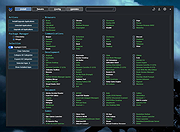 |
 |
Fixyfier v8.1.1 Fixyfier v8.1.1 👉 Free all-in-one Windows repair and optimization tool. Fixyfier is a free Windows utility designed to help users repair, clean, and optimize their system using a collection of built-in tools and automated fixes. It provides quick access to common maintenance tasks and troubleshooting options in a simple interface, making it useful for resolving everyday Windows issues and improving overall system performance. Features: • One-click automated repair routines for common Windows issues • System file repair tools including SFC and DISM integration • Network troubleshooting and reset tools (Winsock, IP stack, DNS flush) • Windows Update repair and reset functionality • Temporary file cleanup and system junk removal • Performance optimization tools to improve responsiveness • Access to essential Windows utilities and administrative tools • Registry-related repair and cleanup options • Privacy and system configuration tweaks • Quick-launch shortcuts for advanced repair commands • Organized interface grouping tools by category for easy navigation • Designed for both novice users and advanced technicians Supported operating systems: Windows 10 (version 17763.0 or higher), Windows 11 Supported languages: English, Spanish, Spanish (Latin America and the Caribbean), French, German, Portuguese (Brazil), Portuguese (Portugal), Italian, Dutch, Russian, Chinese (Simplified), Chinese (Traditional), Japanese, Korean, Arabic, Hindi, Greek, Turkish, Polish, Swedish, Norwegian, Danish, Finnish, Czech, Hungarian, Bulgarian, Romanian, Ukrainian, Serbian, Croatian, Albanian, Vietnamese, Thai, Indonesian, Filipino, Bengali, Persian, Swahili, Hebrew. Changes: v8.1.1 07-23-26 Corrected a fault in the BAT generation process that caused improper output. Click here to visit the author's website. |
|
3,162 | Aug 10, 2026 Aris Vardakas 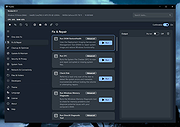 |
 |
FlyOOBE v2.4 FlyOOBE v2.4 👉 A guided Windows setup assistant for upgrading unsupported PCs to Windows 11 and customizing the OOBE experience. FlyOOBE is a Windows setup assistant designed to help users upgrade from Windows 10 to Windows 11 on unsupported hardware while also giving more control over the Out-of-Box Experience, personalization, tweaks, debloating, and setup extensions. It evolved from Flyby11 into a more complete toolkit focused on both upgrade flexibility and post-install customization, with options to skip Microsoft’s usual setup friction and better shape Windows around the user’s preferences. Features: • Windows 10 to Windows 11 upgrade assistance • Helps bypass TPM, Secure Boot, and unsupported CPU setup checks using the Windows Server setup method • Full OOBE customization tools • Tweaks and debloat tools • Scriptable setup extensions • Automatic ISO download and mounting support via Fido script • Compatibility checker to warn about unsupported systems • Browser OOBE detection improvements • Personalization OOBE theme detection • Expanded global search across sections • Optional deep cleanup support through external tooling such as RemoveWindowsAI Supported operating systems: • Windows 10, Windows 11 Supported languages: Language of OS. Changes: v2.4 01-04-25 This update improves detection of AI-related (Slopilot) features across Windows 11 and adds optional deep cleanup capabilities via external tooling such as RemoveWindowsAI. Users can now better understand, review, and disable AI components they dont want, transparently and on their own terms Improved browser detection in the Browser OOBE Updated Extensions engine for better coverage and accuracy Global search functionality expanded and refined across all sections Improved theme detection in the Personalization OOBE Minor core optimizations and internal cleanups Note: This is a new program. Your browser may block it's download as "not commonly downloaded" until you allow it. The program is safe. Click here to visit the author's website. |
|
3,607 | Mar 26, 2026 Builtbybel 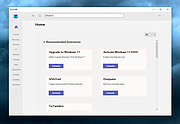 |
|
Win11Debloat v2026.08.24 Win11Debloat v2026.08.24 👉 Declutter and customize Windows 10 or 11 by removing unwanted apps, telemetry, ads, AI features and other annoyances. Win11Debloat is a lightweight PowerShell utility for cleaning up and customizing Windows without installation. It can remove preinstalled apps, disable telemetry and advertising, change privacy settings, disable unwanted Windows AI features, modify the Start menu, taskbar and File Explorer, and adjust many other Windows behaviors. It includes an interactive graphical interface as well as command-line options for administrators and automated deployments. The OlderGeeks.com download contains the official Get.ps1 quick-launch script. An Internet connection is required because this launcher downloads the current Win11Debloat release directly from the official GitHub repository before starting it. The downloaded files are placed temporarily under %TEMP%\Win11Debloat and are cleaned up when the program closes, while configuration files, logs and backups are preserved. Most changes made by Win11Debloat can be reversed, and most removed Microsoft Store applications can be reinstalled. Because the utility makes substantial changes to Windows, users should carefully review the selected options before applying them. Features: • Remove a wide variety of preinstalled Windows applications • Disable telemetry, diagnostic data collection, activity history, app-launch tracking and targeted advertising • Disable Windows tips, suggestions, lock-screen promotions and Microsoft Edge advertising • Disable Windows location services, application location access and Find My Device tracking • Hide Microsoft 365 advertising on the Settings Home page or hide the Home page completely • Disable or remove Microsoft Copilot, Windows Recall and Click to Do • Prevent the Windows AI service from starting automatically • Disable AI features in Microsoft Edge, Paint and Notepad • Restore the classic Windows 10-style context menu • Disable mouse acceleration, Sticky Keys shortcuts, Storage Sense and Fast Startup • Disable automatic BitLocker device encryption • Disable network connectivity during Modern Standby • Prevent Windows from automatically restarting after updates while a user is signed in • Disable Windows Delivery Optimization • ... |
|
140 | Aug 25, 2026 Jeffrey Raphire 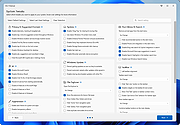 |
| Showing rows 1 to 4 of 4 | Showing Page 1 of 1 | 1 |
OlderGeeks.com Copyright (c) 2026
