|

|
Processed through Paypal No account required. |








Buy our over-priced crap to help pay the bills.



|
|
Processed through Paypal No account required. |
| File - Download KillerScan v1.5.4 | ||||||||
| Description | ||||||||
|
Always scroll to the bottom of the page for the main download link. We don't believe in fake/misleading download buttons and tricks. The link is always in the same place. KillerScan v1.5.4 👉 Fast portable network scanner for field techs and administrators. KillerScan is a fast network scanner built for field techs that combines ARP and ping discovery, TCP port probing, active fingerprinting, vendor lookup, and weighted-score device classification in a single portable Windows executable. It is designed to quickly identify devices on a subnet, gather service and fingerprint details such as HTTP, SSH, TLS, NetBIOS, and SNMP data, and help you classify systems like Windows PCs, Linux servers, printers, NAS devices, cameras, and other network hardware without requiring a separate runtime installation. 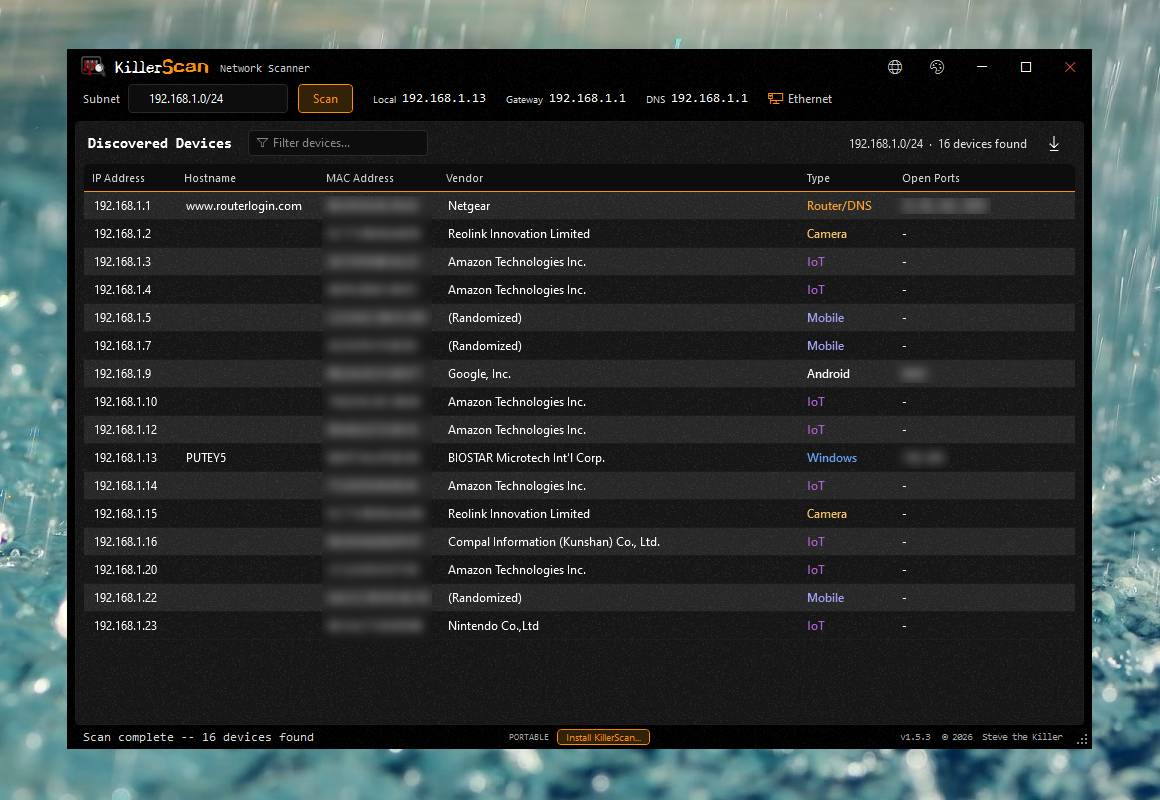 Features: • Fast network discovery using both ARP cache inspection and parallel ICMP ping sweeps • Detects devices that ignore ping by combining ARP and ICMP discovery methods • Scans 24 common TCP service ports in parallel for rapid host identification • Performs active fingerprinting using HTTP titles and server headers • Retrieves SSH server banners for Linux, Unix, and network appliance identification • Extracts TLS certificate subject information from HTTPS services • Queries NetBIOS names over UDP port 137 when available • Reads SNMP v1 sysDescr information from compatible devices• Uses ICMP Time-To-Live (TTL) values as an additional fingerprinting signal • Identifies hardware manufacturers using the IEEE MAC OUI registry • Uses a weighted scoring engine instead of simple port matching for more accurate device classification • Automatically classifies Windows PCs, Linux systems, NAS devices, printers, hypervisors, cameras, mobile devices, Home Assistant systems, IoT devices, and more • Right-click shortcuts to copy IP addresses, MAC addresses, and hostnames • Launches RDP, SSH, or a web browser directly from discovered devices • Allows manual device type overrides when automatic classification is incorrect • Exports scan results to both CSV and HTML formats • Portable single executable with no installer required • Open source under the GPLv3 license Supported operating systems: • Windows 10 (x64), Windows 11 (x64) Supported languages: English, Bengali, German, Spanish, French, Japanese, Turkish, Simplified Chinese, Traditional Chinese Changes: v1.5.4 07-25-26 Added Scan several networks at once: the subnet box now takes a comma-separated list, so 192.168.9.0/24, 192.168.10.0/24 sweeps both in one pass, with overlapping targets counted once. Alongside CIDR blocks each entry can be a single host (192.168.1.7) or a range, written either in full (192.168.1.10-192.168.1.50) or with just the last octet on the right (192.168.1.10-50). Spacing is forgiving: whitespace inside an entry is ignored and empty entries are skipped, so 192.168.9.0 /24 , , 192.168.10.10 - 50 reads the same as the tight form, and semicolons work as separators too. A malformed entry now names itself in the status bar instead of throwing a scan error, and a range larger than 65,536 addresses is refused with its actual size rather than locking the app up. The tab caption shows the first target plus a count. App-wide size control: roll the mouse wheel over the KillerScan wordmark in the title bar to scale the whole interface from 70% to 250%, in fine 2% steps. The scan toolbar and the devices pane grow together while the title bar and footer stay put, so the wordmark you are scrolling over never moves under the pointer. Text reflows and re-renders at the new size rather than being stretched, and the chosen size is remembered for the next launch. Matches the accessibility zoom already in KillerNotes and KillerPDF. Czech (cs-CZ) interface translation, selectable from the language picker, bringing KillerScan to ten languages. Czech translation of killerscan.net as well, across the landing, about, and technical pages. Keyboard shortcuts, with a ? button in the title bar next to the language picker and F1 to open the list: F5 scan/stop, Esc cancel, Ctrl+R deep rescan the selection, Ctrl+F jump to the subnet box, Ctrl+A select all devices, Ctrl+E export, and Ctrl+Shift+plus/minus/0 for the app size. Kept to a plain list rather than the drawn keyboard KillerNotes and KillerPDF use, since KillerScan has ten shortcuts rather than eighty. Typing in the subnet or filter box keeps that box's own Ctrl+A behavior. Right-clicking the title bar (and Alt+Space) now opens a themed window menu instead of Windows' stock white one. The custom chrome makes the title bar a real native caption, which is what gives KillerScan free snap and drag, but it also meant Windows answered with its own unstyleable Win32 menu. Those two messages are now intercepted and answered with a normal themed menu that sends back the identical system commands, so Move, Size, snap and everything else behave exactly as before. Install for all users checkbox on the install confirmation. Ticking it puts KillerScan in Program Files with a Start Menu entry and an Add/Remove Programs entry for every account on the PC, rather than just yours. It routes through the same machine-wide install winget and Chocolatey already use, and Windows asks for permission only when the box is ticked, so the default per-user install still needs no admin rights. Declining that prompt leaves the app running as it was. Installing for all users removes an existing per-user copy so there is only ever one install, one Start Menu entry, and one uninstall entry; your theme, accent, language and window placement are kept. Changed Context menus now carry icons in a left gutter: the export menu, every action on the right-click device menu, all 21 device types under Set Device Type, and the new window menu. Menu items without an icon are unaffected - the gutter collapses - so nothing else shifted. Set Device Type now ticks the type the selected device currently has, so the menu shows where it stands before you change it. The tick follows the device's effective type, whether that came from the classifier or a manual override, and is recomputed each time the submenu opens so a rescan or Clear Override is reflected. Bundled MAC vendor database refreshed from the current Wireshark OUI list: 57,700 entries (was 57,644). TRANSLATING.md now lists all ten shipping languages; it had never been updated for Japanese, which shipped back in 1.5.2. killerscan.net: the Technical page gained a Keyboard & app size section covering all ten shortcuts and the wordmark scroll zoom, and the Phase 0 and Install sections were rewritten for multiple scan targets and the all-users install. The landing page's install card says the same. All of it is translated in the nine site languages. Status bar: "Scan cancelled" and "Install cancelled" now read "canceled" (American spelling, matching the rest of the app). A handful of stray British spellings on killerscan.net were corrected too. Fixed The top of the Scan button and the subnet box could not be clicked. WindowChrome measures its 36px caption from below the 8px resize border, so the caption region actually reaches 44px down the window - past the 36px title row and 9px into the scan toolbar. Windows swallows anything in that region as caption, so the upper third of both controls was dead and only their lower part responded. The toolbar now opts into chrome hit-testing, which hands those pixels back; dragging the bar is unaffected. Submenus could never open. The shared MenuItem style overrides the default template, which discards WPF's own submenu popup along with it, and nothing replaced it - so a parent item highlighted on hover and did nothing. This is why Set Device Type appeared dead. The template now supplies its own popup, using the same chrome as the context menu, plus a chevron on items that have children. The PORTABLE badge and the Install button appeared on machine-wide installs. IsPortable() compared the running exe against the per-user install path only, so a copy installed to Program Files by winget, Chocolatey, or an RMM never matched and was reported as portable. It now recognizes both install locations. killerscan.net: the Deep rescan section on the Technical page, added with the feature in 1.5.3, had never been added to the site's translation file, so it fell back to English in every language. It is now translated in all nine, and every key on all three pages resolves in every language. The self-update prompt now uses the themed KillerScan dialog instead of the plain Windows message box. Click here to visit the author's website. Continue below for the main download link. |
||||||||
| Downloads | Views | Developer | Last Update | Version | Size | Type | Rank | |
| 891 | 4,341 | SteveTheKiller | Aug 09, 2026 - 15:29 | 1.5.4 | 2.7MB | EXE |  , out of 6 Votes. , out of 6 Votes. |
|
| File Tags | ||||||||
| network KillerScan diagnostics devices rescan probe deep security scanner portable network scanner Windows scanner subnet scanner discovery network discovery port scanning fingerprinting SNMP NetBIOS OUI administrator | ||||||||
Click to Rate File Share it on Twitter → Tweet
|


