|

|
Processed through Paypal No account required. |








Buy our over-priced crap to help pay the bills.



|
|
Processed through Paypal No account required. |
| Files | ||||
| File Name | Rating | Downloads | ||
 |
KillerScan v1.5.4 KillerScan v1.5.4 👉 Fast portable network scanner for field techs and administrators. KillerScan is a fast network scanner built for field techs that combines ARP and ping discovery, TCP port probing, active fingerprinting, vendor lookup, and weighted-score device classification in a single portable Windows executable. It is designed to quickly identify devices on a subnet, gather service and fingerprint details such as HTTP, SSH, TLS, NetBIOS, and SNMP data, and help you classify systems like Windows PCs, Linux servers, printers, NAS devices, cameras, and other network hardware without requiring a separate runtime installation. Features: • Fast network discovery using both ARP cache inspection and parallel ICMP ping sweeps • Detects devices that ignore ping by combining ARP and ICMP discovery methods • Scans 24 common TCP service ports in parallel for rapid host identification • Performs active fingerprinting using HTTP titles and server headers • Retrieves SSH server banners for Linux, Unix, and network appliance identification • Extracts TLS certificate subject information from HTTPS services • Queries NetBIOS names over UDP port 137 when available • Reads SNMP v1 sysDescr information from compatible devices • Uses ICMP Time-To-Live (TTL) values as an additional fingerprinting signal • Identifies hardware manufacturers using the IEEE MAC OUI registry • Uses a weighted scoring engine instead of simple port matching for more accurate device classification • Automatically classifies Windows PCs, Linux systems, NAS devices, printers, hypervisors, cameras, mobile devices, Home Assistant systems, IoT devices, and more • Right-click shortcuts to copy IP addresses, MAC addresses, and hostnames • Launches RDP, SSH, or a web browser directly from discovered devices • Allows manual device type overrides when automatic classification is incorrect • Exports scan results to both CSV and HTML formats • Portable single executable with no installer required • Open source under the GPLv3 license Supported operating systems: • Windows 10 (x64), Windows 11 (x64) Supported languages: English, Bengali, German, Spanish, French, Japanese, Turkish, Simplified Chinese, Traditional Chinese Changes: v1.5.4 ... |
 |
888 | Aug 09, 2026 SteveTheKiller 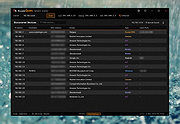 |
|
LibreWolf v153.0.4-1 LibreWolf v153.0.4-1 👉 Privacy-focused Firefox-based web browser with hardened security settings and built-in content blocking. LibreWolf is a custom and independent version of Firefox focused on privacy, security, and user freedom. It is designed to increase protection against tracking and fingerprinting techniques through privacy and security oriented settings and patches. It also removes telemetry, data collection, and various annoyances while disabling anti-freedom features such as DRM. LibreWolf includes uBlock Origin, uses privacy-respecting search engines, and stays aligned with current Firefox stable releases for up-to-date security and stability. Features: • No telemetry, experiments, adware, or unnecessary distractions • Includes uBlock Origin with custom default filter lists • Uses privacy-respecting search engines such as DuckDuckGo, Searx, and Qwant • Enables Total Cookie Protection and anti-fingerprinting protections • Deletes cookies and website data on close • Disables WebGL, form autofill, form history, link prefetching, and speculative connections • Enables HTTPS-Only mode and stricter TLS/SSL negotiation rules • Disables Firefox Sync unless explicitly enabled by the user • Removes Pocket and Mozilla VPN ads • Disables DRM by default • Provides a LibreWolf-specific UI for privacy and security controls • Open source and community-driven project Supported operating systems: • Windows 10 or later, Windows 11 • macOS • Linux • OpenBSD Supported languages: English, Additional languages via Firefox language packs Changes: v153.0.4-1 08-12-26 Upstream release based on Firefox 153.0.4. Notable Changes: • Search engines have moved away from using policies and now use the bundled remote-settings dump. • The included search engines have been overhauled. This may cause the default search engine for some users to reset to DuckDuckGo No-AI. • Fixed slow startup that some users experienced when starting a session. Infrastructure Changes: • Migration to LibreWolf's own Forgejo instance at librewolf.dev has begun. • Releases will continue to be published to Codeberg during the transition to give downstream packagers time to update. • The signing key for RPM releases has been changed to LibreWolf's repository signing key. This download is for the ... |
|
3,513 | Aug 13, 2026 LibreWolf Core Contributors  |
| Showing rows 1 to 2 of 2 | Showing Page 1 of 1 | 1 |
OlderGeeks.com Copyright (c) 2026
