|

|
Processed through Paypal No account required. |








Buy our over-priced crap to help pay the bills.



|
|
Processed through Paypal No account required. |
| Files | ||||
| File Name | Rating | Downloads | ||
 |
KillerScan v1.5.4 KillerScan v1.5.4 👉 Fast portable network scanner for field techs and administrators. KillerScan is a fast network scanner built for field techs that combines ARP and ping discovery, TCP port probing, active fingerprinting, vendor lookup, and weighted-score device classification in a single portable Windows executable. It is designed to quickly identify devices on a subnet, gather service and fingerprint details such as HTTP, SSH, TLS, NetBIOS, and SNMP data, and help you classify systems like Windows PCs, Linux servers, printers, NAS devices, cameras, and other network hardware without requiring a separate runtime installation. Features: • Fast network discovery using both ARP cache inspection and parallel ICMP ping sweeps • Detects devices that ignore ping by combining ARP and ICMP discovery methods • Scans 24 common TCP service ports in parallel for rapid host identification • Performs active fingerprinting using HTTP titles and server headers • Retrieves SSH server banners for Linux, Unix, and network appliance identification • Extracts TLS certificate subject information from HTTPS services • Queries NetBIOS names over UDP port 137 when available • Reads SNMP v1 sysDescr information from compatible devices • Uses ICMP Time-To-Live (TTL) values as an additional fingerprinting signal • Identifies hardware manufacturers using the IEEE MAC OUI registry • Uses a weighted scoring engine instead of simple port matching for more accurate device classification • Automatically classifies Windows PCs, Linux systems, NAS devices, printers, hypervisors, cameras, mobile devices, Home Assistant systems, IoT devices, and more • Right-click shortcuts to copy IP addresses, MAC addresses, and hostnames • Launches RDP, SSH, or a web browser directly from discovered devices • Allows manual device type overrides when automatic classification is incorrect • Exports scan results to both CSV and HTML formats • Portable single executable with no installer required • Open source under the GPLv3 license Supported operating systems: • Windows 10 (x64), Windows 11 (x64) Supported languages: English, Bengali, German, Spanish, French, Japanese, Turkish, Simplified Chinese, Traditional Chinese Changes: v1.5.4 ... |
 |
891 | Aug 09, 2026 SteveTheKiller 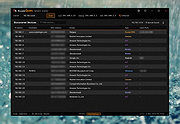 |
 |
NETworkManager v2026.2.22.0 NETworkManager v2026.2.22.0 👉 Powerful open-source network management and troubleshooting tool. NETworkManager is a comprehensive open-source application designed to help administrators and power users manage, analyze, and troubleshoot network environments. It provides a wide range of built-in tools within a single, modern interface, making it easier to monitor connections, configure network settings, and diagnose connectivity issues without switching between multiple utilities. NETworkManager supports remote connections and offers advanced features for managing IP addresses, DNS, WiFi networks, ports, and more. With its modular design and extensive toolset, it is well-suited for both everyday network diagnostics and more advanced administrative tasks. Supported languages: • English, German, Spanish, French, Italian, Russian, Chinese (Simplified), Chinese (Traditional), Japanese, Korean, Portuguese, Polish Changes: v2026.2.22.0 02-22-26 Breaking Changes Migrated from .NET 8.0 (LTS) to .NET 10.0 (LTS). Upgrade your .NET Desktop Runtime to version 10.0 (LTS) - x64 before you install this version. AWS Session Manager feature has been removed. Profile and settings files have been migrated from XML to JSON. Existing files will be automatically converted to JSON on first load after the update. You should back up your settings and profile file before installing. New Features System-Wide Policies for enterprise deployment and management. Administrators can now configure system-wide policies via a config.json file in the application directory to control specific settings for all users. DNS Lookup now allows direct input for dns server ip|host:port (port - is optional) Remote Desktop connect admin (console) session Migrated Dialogs to ChildWindows This download is for the Windows portable version (very bottom of page). If you need the Windows installer version, download here. Click here to visit the author's website. |
|
4,096 | Jul 05, 2026 BornToBeRoot 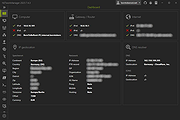 |
| Showing rows 1 to 2 of 2 | Showing Page 1 of 1 | 1 |
OlderGeeks.com Copyright (c) 2026
