|

|
Processed through Paypal No account required. |








Buy our over-priced crap to help pay the bills.



|
|
Processed through Paypal No account required. |
| Files | ||||
| File Name | Rating | Downloads | ||
 |
Advanced PortChecker v2.3.0 Advanced PortChecker v2.3.0 👉 Scan your network for open ports quickly and easily. Advanced PortChecker is a free and open source port checker that lets you scan hosts and networks for open ports in seconds. It supports multiple platforms, offers a clean graphical interface, and can export scan results in HTML, JSON, CSV or plain text formats. Features: • Scan TCP/IP ports on hosts or networks • Check whether ports are open or closed • Fast scanning performance • Export results as HTML, JSON, CSV or plain text • Similar interface across desktop platforms • Theme and preference options • Automatic update control • Open source and free to modify • Privacy-friendly: no ads, trackers or data collection • Can be compiled manually for other platforms Supported operating systems: • Windows • macOS • Linux • Android Supported languages: English, Dutch, French, Spanish, Chinese, Italian, Japanese Changes: v2.3.0 11-15-25 Added Japanese localization. Updated dependencies. Included Linux ARM preview builds and tests. Upgraded Yarn and Rust version. Added minor design upgrades. Changed runner actions. Improved stability across all platforms. This download is for the Windows version (very bottom of page). All other download assets are below: macOS: advanced-portchecker_2.3.0_aarch64.dmg advanced-portchecker_2.3.0_x64.dmg Linux: advanced-portchecker_2.3.0_amd64.deb advanced-portchecker_2.3.0_arm64.deb advanced-portchecker-2.3.0-1.x86_64.rpm advanced-portchecker-2.3.0-1.aarch64.rpm advanced-portchecker_2.3.0_amd64.AppImage advanced-portchecker_2.3.0_aarch64.AppImage advanced-portchecker_x64.app.tar.gz advanced-portchecker_aarch64.app.tar.gz Click here to visit the author's website. |
 |
6,490 | Jun 11, 2026 CodeDead 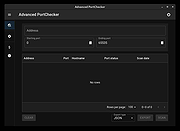 |
 |
Bitvise SSH Client v9.66 Bitvise SSH Client v9.66 👉 A powerful Windows SSH client for secure remote access, file transfer, tunneling, and terminal emulation. Bitvise SSH Client is a secure, flexible SSH (Secure Shell) client for Windows. It lets users connect to remote systems securely for terminal access, encrypted file transfers, dynamic and static port forwarding, and other SSH-based operations. Its graphical and command-line interfaces make securely managing remote servers, transferring files, and setting up secure tunnels easy for both casual and advanced users. It supports advanced protocols, customizable authentication methods, and a robust set of features to meet modern secure networking needs. Features: • Graphical SFTP client with advanced file transfer features. • Terminal emulator supporting bvterm, xterm, and VT100 protocols. • Powerful SSH2 port forwarding and tunneling (SOCKS/HTTP). • Dynamic tunneling and proxy support (SOCKS4/5, HTTP CONNECT). • Drive-mapping support for SFTP remote directories. • Command-line clients for scripted file transfer, execution, terminal, and tunneling. • Integrated authentication with public keys, Kerberos/GSSAPI, and NTLM. • Single-click remote desktop forwarding. Supported operating systems: • Windows XP SP3, Vista, 7, 8.1, 10, Windows 11 • Windows Server 2003 through Windows Server 2025 Supported languages: English Changes: v9.66 07-20-26 SSH: Improved multiple avenues which a server could use to exert disproportionate memory pressure on the client. SFTP drive: The SSH Client now includes WinFsp version 2.2.26194. This addresses CVE-2026-7162, which is a local privilege escalation. Users who install the SSH Client with the SFTP drive feature are recommended to update, especially on multi-user systems. The SFTP drive feature is available if Install WinFsp is selected when installing. The UNC path used by the SFTP drive is now configurable. This makes it practical to configure a UNC path for access by other users on the system. The SFTP drive can now be configured to expose only the UNC path, without assigning a ... |
|
6,289 | Sep 16, 2026 Bitvise Limited 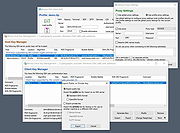 |
|
CoolTerm v2.4.0 CoolTerm v2.4.0 👉 Easy-to-use serial port terminal for communicating with connected hardware. CoolTerm is a simple serial port terminal application, with no terminal emulation, for hobbyists and professionals who need to exchange data with devices connected to serial ports, such as servo controllers, robotic kits, GPS receivers, microcontrollers, and other hardware. Written in Xojo. Features: • Multiple concurrent connections on separate serial ports • Display received data as plain text, hexadecimal, or graphic chart • Special receive and transmit character handling • Send data by keypress, Send String dialog, copy/paste, or file transfer • Send text and binary files by dialog or drag-and-drop • Capture received data to text or binary files • Local echo for transmitted and received data • Hardware and software flow control • Visual line status indicators • Manual control of RTS, DTR, and serial BREAK • Configurable character, line, and packet delays • Transmit macros, saved connection options, and scripting support Installation CoolTerm comes without an installer and can be placed anywhere on the hard-drive as long as the correct folder structure is maintained. I.e. the included "Libs" and "Resources" folders must reside in the same location as the CoolTerm application. Supported operating systems: Windows 8.1, 10, 11 macOS Mojave 10.14.x and higher Changes v2.4.0 05-19-25 NEW FEATURES: - Added the same "wait for termination string" options to the timestamp settings for received data as for captured data. This makes it possible to specify the termination string to wait for before timestamping and displaying received data. - Added option to include the timestamps added to received data in the data forwarded to other terminals. - Added support for relative and local paths in .CoolTermSession files. Paths beginning with .. and . will be considered relative and local paths, respectively. Saving a session will write absolute paths for all open terminals to the session file. However, a session file can be edited with a text editor and paths can be ... |
|
3,978 | May 07, 2026 Roger Meier 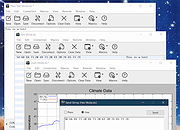 |
|
KillerScan v1.5.4 KillerScan v1.5.4 👉 Fast portable network scanner for field techs and administrators. KillerScan is a fast network scanner built for field techs that combines ARP and ping discovery, TCP port probing, active fingerprinting, vendor lookup, and weighted-score device classification in a single portable Windows executable. It is designed to quickly identify devices on a subnet, gather service and fingerprint details such as HTTP, SSH, TLS, NetBIOS, and SNMP data, and help you classify systems like Windows PCs, Linux servers, printers, NAS devices, cameras, and other network hardware without requiring a separate runtime installation. Features: • Fast network discovery using both ARP cache inspection and parallel ICMP ping sweeps • Detects devices that ignore ping by combining ARP and ICMP discovery methods • Scans 24 common TCP service ports in parallel for rapid host identification • Performs active fingerprinting using HTTP titles and server headers • Retrieves SSH server banners for Linux, Unix, and network appliance identification • Extracts TLS certificate subject information from HTTPS services • Queries NetBIOS names over UDP port 137 when available • Reads SNMP v1 sysDescr information from compatible devices • Uses ICMP Time-To-Live (TTL) values as an additional fingerprinting signal • Identifies hardware manufacturers using the IEEE MAC OUI registry • Uses a weighted scoring engine instead of simple port matching for more accurate device classification • Automatically classifies Windows PCs, Linux systems, NAS devices, printers, hypervisors, cameras, mobile devices, Home Assistant systems, IoT devices, and more • Right-click shortcuts to copy IP addresses, MAC addresses, and hostnames • Launches RDP, SSH, or a web browser directly from discovered devices • Allows manual device type overrides when automatic classification is incorrect • Exports scan results to both CSV and HTML formats • Portable single executable with no installer required • Open source under the GPLv3 license Supported operating systems: • Windows 10 (x64), Windows 11 (x64) Supported languages: English, Bengali, German, Spanish, French, Japanese, Turkish, Simplified Chinese, Traditional Chinese Changes: v1.5.4 ... |
|
891 | Aug 09, 2026 SteveTheKiller 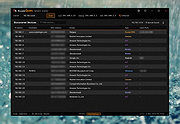 |
|
Multi File Port Monitor v1.5.2.1604 Multi File Port Monitor v1.5.2.1604 MFILEMON is a print monitor for 32 and 64 bit MS Windows (2000/XP/2003/2008/2012/Vista/7/8/10). It automates "print to file" jobs choosing the filename according to a pattern. It can redirect data to an external program (e.g. Ghostscript, to produce PDF). Features Rich file naming scheme supporting many run-time variables, including auto-increment counters Can redirect print jobs to an external process Can "run as" a regular user (e.g. to access network resources) Log facility for debugging rel. 1.5.2 oct 31, 2017 ------------------------ * Added external program wait timeout * Added flag to hide or show external program * Widened configuration dialog * Fixed various "run as" bugs Click here to visit the author's website. |
|
5,987 | Oct 24, 2019 Lorenzo Monti 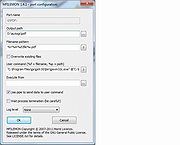 |
|
NETworkManager v2026.2.22.0 NETworkManager v2026.2.22.0 👉 Powerful open-source network management and troubleshooting tool. NETworkManager is a comprehensive open-source application designed to help administrators and power users manage, analyze, and troubleshoot network environments. It provides a wide range of built-in tools within a single, modern interface, making it easier to monitor connections, configure network settings, and diagnose connectivity issues without switching between multiple utilities. NETworkManager supports remote connections and offers advanced features for managing IP addresses, DNS, WiFi networks, ports, and more. With its modular design and extensive toolset, it is well-suited for both everyday network diagnostics and more advanced administrative tasks. Supported languages: • English, German, Spanish, French, Italian, Russian, Chinese (Simplified), Chinese (Traditional), Japanese, Korean, Portuguese, Polish Changes: v2026.2.22.0 02-22-26 Breaking Changes Migrated from .NET 8.0 (LTS) to .NET 10.0 (LTS). Upgrade your .NET Desktop Runtime to version 10.0 (LTS) - x64 before you install this version. AWS Session Manager feature has been removed. Profile and settings files have been migrated from XML to JSON. Existing files will be automatically converted to JSON on first load after the update. You should back up your settings and profile file before installing. New Features System-Wide Policies for enterprise deployment and management. Administrators can now configure system-wide policies via a config.json file in the application directory to control specific settings for all users. DNS Lookup now allows direct input for dns server ip|host:port (port - is optional) Remote Desktop connect admin (console) session Migrated Dialogs to ChildWindows This download is for the Windows portable version (very bottom of page). If you need the Windows installer version, download here. Click here to visit the author's website. |
|
4,096 | Jul 05, 2026 BornToBeRoot 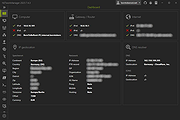 |
|
Port Alert v5.4 Port Alert v5.4 Why monitoring TCP ports - Server services such as FTP Server is using TCP port 21, SSH server port 22, TELNET server(23), SMTP Server(25), DNS server(53), Http server(80), POP3 server(110), IMAP server(443), MS SQL(1433), Oracle server(1521), MYSQL server(3306) or self defined port #. TCP Ports are numerical identifiers in host to host communications. Monitoring TCP port # is monitoring these services. Technical Article on ghacks.net for the Port_Alert software Setup any # of consecutive connection timeout to alert you at the RIGHT time - Monitoring TCP ports and alert you only when the TCP ports connect timeout on a continuous time period. You can setup any # of consecutive 1 or 2 or 3,...10.. or..20..100.. connect timeout to send you alerts. Setup a small # to alert you when the server connect timeout for bad performance before it goes down or a big # at the server down with no false alert. Easy to monitor your internet or local TCP applications "Enable sending mail alerts via 2nd SMTP server" - Mail will be sent out from our mail server and has option to send out from your own or public SMTP server such as Yahoo, Hotmail ..etc at the same time to let you get mail alerts independent of our server. Save timeout detail information to log file and separate the logs file by date automatically. Alert you once only - Alert you when the # of consecutive timeout # reached. No keep sending you alerts when it keeps connection timeout. Alert once again when it back to normal Allow to limit maximum SMS sending a day - Cap maximum # of SMS sending a ... |
|
6,668 | Dec 05, 2018 SMS4Mail 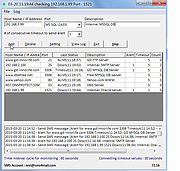 |
|
Port Triggering Initiator 1.0.0 ==Official Mirror== Port Triggering Initiator 1.0.0 What is Port Triggering Initiator? When you use port triggering on your router a connection attempt must be made from your computer to an address on the trigger port. When you router detects the connection attempt your router then turns on the ports, thus you have port triggering, a on/off switch for port forwarding. Well the problem comes if you are using port trigging for a program that doesn't make a connection attempt, such as say a ftp server or hosting a game. If a connection is never detected the router never enables the ports. Well that's what Port Triggering Initiator is designed for. You enter the triggering port to make a connection on and give it a address outside your network. Any address will do even if the connection fails its the attempt that triggers the ports. Some quick notes: The program doesn't need any information about your router. The 'Local IP To Connect With' is your local IP, if you have more than one IP on your system it will be detected there. The triggering address can be any site or IP you like as long as it is a real address. When setting up a triggering port in your router make sure to use a port that isn't being used on your system. The program has to use that triggering port to make the connection and if it is already in use it can't make the connection. Triggering ports can be anything you like from 1 - 65535, the triggering port is just a 'on' switch. |
 |
9,969 | Dec 21, 2013 PcWinTech |
|
Simple Port Forwarding Portable v3.8.5 ==Official Mirror== Simple Port Forwarding v3.8.5 Portable 2000, XP SP3, 2003, Vista, 2008, 7, 8 & Requires Internet Explorer 6.0 or higher Simple Port Forwarding works with WebPages and not directly with your router. Making it a safe program to use. Its no different than using Firefox, IE or any other browser to setup port forwarding yourself. The program works by automating the process for you. So whether you don't understand how to forward ports, or you're simply looking for an easier way to forward ports then this program is for you. Its port forwarding made simple. The main interface of the program is small and clean. Giving options of seeing what is going to be forwarded to the router and how many entries and ports it will use in the process. You have the ability to save your list and send it to another user of the program. An example would be, lets say you have a family member who lives far from you and doesn't really understand port forwarding, so instead of spending a lot of time over the phone walking them through it you can simply have them use the program and have them load the list and update their router, then your all done. Now that's a time saver. The program has a large database of known ports for over 700+ games and programs, so finding the port you need is made a little easier. The program will also remember custom applications you put in, so you don't have to reenter them. The program remembers the last IP address you use to forward to, this helps not having to set it every time you load new ports! The program has many extra tools, such as a tool to set your IP to static or back to DHCP. When port forwarding the router ... |
|
10,262 | Jan 30, 2014 PcWinTech |
|
Simple Port Forwarding v3.8.5 ==Official Mirror== Simple Port Forwarding v3.8.5 2000, XP SP3, 2003, Vista, 2008, 7, 8 & Requires Internet Explorer 6.0 or higher Simple Port Forwarding works with WebPages and not directly with your router. Making it a safe program to use. Its no different than using Firefox, IE or any other browser to setup port forwarding yourself. The program works by automating the process for you. So whether you don't understand how to forward ports, or you're simply looking for an easier way to forward ports then this program is for you. Its port forwarding made simple. The main interface of the program is small and clean. Giving options of seeing what is going to be forwarded to the router and how many entries and ports it will use in the process. You have the ability to save your list and send it to another user of the program. An example would be, lets say you have a family member who lives far from you and doesn't really understand port forwarding, so instead of spending a lot of time over the phone walking them through it you can simply have them use the program and have them load the list and update their router, then your all done. Now that's a time saver. The program has a large database of known ports for over 700+ games and programs, so finding the port you need is made a little easier. The program will also remember custom applications you put in, so you don't have to reenter them. The program remembers the last IP address you use to forward to, this helps not having to set it every time you load new ports! The program has many extra tools, such as a tool to set your IP to static or back to DHCP. When port forwarding the router forwards ... |
|
13,754 | Jan 30, 2014 PcWinTech |
|
Tcp Port Forwarding 1.1.2 Tcp Port Forwarding 1.1.2 Tcp Port Forwarding tool allows to capture and redirect TCP traffic that flows through a particular port. Tcp Port Forwarding software also can work as network bridge for redirecting TCP network traffic from one network card to another one. This tool is used for testing some services, firewall and intrusion detection systems. The program can also be used for debugging programs and configuring other network tools. |
|
9,018 | Apr 08, 2014 Nsasoft LLC |
|
TCP/IP Port Scanner 1.5 TCP/IP Port Scanner 1.5 Tcp Port Scanner is the software that helps to find TCP/IP opened ports. It can scan up to 10,000 ports per second. License: Freeware. Installation and use: 1) You must have administrator privileges 2) Install "Tcp Port Scanner\WinPcap\WinPcap.exe" 3) Run "Tcp Port Scanner\Bin\TcpScanner.exe" Attention: The Program does not work with PPP/PPPoE/PPTP/L2TP connection directly (Modem, ADSL, WiFi, VPN) . You need to install the router and configure it for PPP/PPPoE/PPTP/L2TP connection, then connect computer to router by network cable. If program does not work or work very slow, then you must disable all firewalls, antiviruses and ndis filters. |
|
6,733 | May 04, 2016 S.K. Software 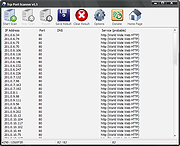 |
| Showing rows 1 to 12 of 12 | Showing Page 1 of 1 | 1 |
OlderGeeks.com Copyright (c) 2026
