|

|
Processed through Paypal No account required. |








Buy our over-priced crap to help pay the bills.



|
|
Processed through Paypal No account required. |
| Files | ||||
| File Name | Rating | Downloads | ||
 |
Better Windows Services v0.4.0 Better Windows Services v0.4.0 👉 Search, manage, and audit Windows services with a desktop app or command line tool. Better Windows Services gives administrators a searchable view of the local machine’s services and drivers. Its desktop app and command line tool use the same query language, so a search such as start:auto !status:running can find services set to start automatically that are currently stopped. Before starting, stopping, restarting, or changing a service’s startup type, the program shows a plan of the steps it will take, including affected dependent services. The command line can also save a snapshot of service settings and compare it with another snapshot or the live machine. The comparison separates configuration changes from ordinary changes in running state. Snapshots are available through the command line, not the desktop app. Features: • Search services and drivers by name, status, startup type, account, file, signature, publisher, dependencies, and other fields. • Preview service actions and their effects on dependent services before applying them. • Start, stop, restart, and change the startup type of services. • Offer a force stop that first requests a normal stop, then ends the process if necessary, with other services sharing that process identified in the preview. • Show details including triggers, required privileges, security descriptors, process information, and file signatures. • Export service lists from the desktop app. • Create and compare JSON snapshots with the command line tool to identify service configuration changes. • Provide JSON command output and exit codes for scripts. Supported operating systems: • Windows 10 version 1809 or later 64-bit, Windows Server 2019 or later 64-bit Supported languages: English Changes: v0.4.0 10-07-26 CHANGELOGBWS.txt Note: The GUI and CLI come in separate portable ZIP files. They include their own .NET runtime and work offline. Administrator rights are needed to make changes; viewing services without elevation may show fewer entries. 👉 This download is for the Windows 64bit GUI version (very bottom of page). All other download assets are below: Other ... |
 |
158 | Oct 08, 2026 DonislawDev 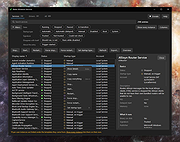 |
|
DeepTaskScan v1.0.0 DeepTaskScan v1.0.0 👉 Portable Windows forensics tool for detecting hidden and persistent scheduled tasks. DeepTaskScan is an advanced Windows scheduled task viewer and forensics tool designed to uncover scheduled tasks that may be hidden from standard Windows utilities. Unlike Task Scheduler, schtasks, PowerShell and similar tools, it uses a different scanning method rather than relying on Windows API calls to discover scheduled tasks. This can help system administrators, technicians and security researchers identify tasks concealed through techniques involving deleted task files or registry keys. The developer notes that such techniques have been used by state-backed Advanced Persistent Threat (APT) groups. DeepTaskScan is completely portable, requires no installation and is available in both 32-bit and 64-bit versions. Features: • Deeply scans Windows for scheduled tasks using an alternative detection method • Detects scheduled tasks hidden through advanced techniques • Does not rely on Windows API calls for scheduled task detection • Helps uncover tasks that may not appear in Windows Task Scheduler • Can detect more scheduled task entries than Task Scheduler, PowerShell and other standard tools • Highlights hidden or persistent entries • Can help detect APT activity involving hidden Task Scheduler entries • Allows discovered information to be extracted to a file • Useful for system administration, troubleshooting and security forensics • Available as separate 32-bit and 64-bit executables • Completely portable with no installation required Supported operating systems: • Windows 7 or newer Supported languages: • English Changes: v1.0.0 08-16-26 Initial release. This download is for the Windows 64bit version (very bottom of page). If you need the Windows 32bit version, download here. Click here to visit the author's website. |
|
358 | Aug 20, 2026 Emir Alp Kocak  |
|
DISMTools v0.8.1 DISMTools v0.8.1 👉 Graphical interface for managing Windows images using DISM. DISMTools is a free, open-source graphical front-end for Microsoft's Deployment Image Servicing and Management (DISM) tools that makes managing Windows images and installations considerably easier than working entirely from the command line. Its project-based interface stores mounted images, unattended answer files, scratch directories, and other resources together for easier management. The program can work with WIM, SWM, ESD, and FFU images and provides tools for applying, capturing, mounting, unmounting, splitting, optimizing, exporting, and servicing images. It can add or remove packages, drivers, AppX packages, capabilities, and Windows features, perform component cleanup and repair operations, manage Windows editions, work with boot configuration data, and retrieve extensive information about images and installed components. DISMTools can manage both the currently running Windows installation and offline Windows installations on other drives. It also includes tools for creating unattended answer files, generating detailed image information reports, managing mounted images, creating bootable ISO files, preparing Windows PE environments, working with Windows Deployment Services, testing images in virtual machines, and performing Active Directory domain-join tasks. The program uses both the DISM API and DISM executable, allowing it to combine the capabilities of Microsoft's servicing technologies while providing a graphical workflow for technicians, administrators, deployment specialists, and advanced Windows users. Features: • Free and open-source graphical front-end for Microsoft DISM • Project-based interface for organizing mounted images, answer files, scratch directories, and deployment tools • Apply, capture, mount, unmount, split, optimize, export, and service WIM, SWM, ESD, and FFU images • Convert Windows images between WIM and ESD formats • Add and remove Windows packages, drivers, capabilities, features, and provisioned AppX applications • Manage both the currently running Windows system and offline Windows installations • Perform component cleanup and component store repair operations • Retrieve detailed information about images, packages, features, drivers, capabilities, and applications • Generate and save detailed image ... |
|
1,108,251 | Sep 10, 2026 CodingWonders 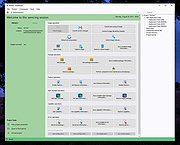 |
 |
KillerScan v1.5.4 KillerScan v1.5.4 👉 Fast portable network scanner for field techs and administrators. KillerScan is a fast network scanner built for field techs that combines ARP and ping discovery, TCP port probing, active fingerprinting, vendor lookup, and weighted-score device classification in a single portable Windows executable. It is designed to quickly identify devices on a subnet, gather service and fingerprint details such as HTTP, SSH, TLS, NetBIOS, and SNMP data, and help you classify systems like Windows PCs, Linux servers, printers, NAS devices, cameras, and other network hardware without requiring a separate runtime installation. Features: • Fast network discovery using both ARP cache inspection and parallel ICMP ping sweeps • Detects devices that ignore ping by combining ARP and ICMP discovery methods • Scans 24 common TCP service ports in parallel for rapid host identification • Performs active fingerprinting using HTTP titles and server headers • Retrieves SSH server banners for Linux, Unix, and network appliance identification • Extracts TLS certificate subject information from HTTPS services • Queries NetBIOS names over UDP port 137 when available • Reads SNMP v1 sysDescr information from compatible devices • Uses ICMP Time-To-Live (TTL) values as an additional fingerprinting signal • Identifies hardware manufacturers using the IEEE MAC OUI registry • Uses a weighted scoring engine instead of simple port matching for more accurate device classification • Automatically classifies Windows PCs, Linux systems, NAS devices, printers, hypervisors, cameras, mobile devices, Home Assistant systems, IoT devices, and more • Right-click shortcuts to copy IP addresses, MAC addresses, and hostnames • Launches RDP, SSH, or a web browser directly from discovered devices • Allows manual device type overrides when automatic classification is incorrect • Exports scan results to both CSV and HTML formats • Portable single executable with no installer required • Open source under the GPLv3 license Supported operating systems: • Windows 10 (x64), Windows 11 (x64) Supported languages: English, Bengali, German, Spanish, French, Japanese, Turkish, Simplified Chinese, Traditional Chinese Changes: v1.5.4 ... |
|
895 | Aug 09, 2026 SteveTheKiller 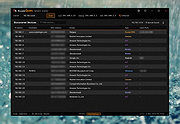 |
|
Right-Click Tools v2.0.4 Right-Click Tools v2.0.4 👉 Add powerful administrative and maintenance tools to the Windows Explorer right-click menu. Right-Click Tools adds a collection of useful commands to the Windows File Explorer context menu, providing quick access to command prompts, PowerShell, Registry Editor, ownership controls, elevated file managers, shell maintenance tools and other frequently needed Windows functions. The tools can be accessed by right-clicking a folder, drive or the background of an open Explorer window. Features: • Adds a customizable collection of tools to the Windows Explorer context menu • Opens Command Prompt or PowerShell in the selected folder • Opens Command Prompt or PowerShell with Administrator privileges • Opens Command Prompt or PowerShell with TrustedInstaller privileges • Supports Windows Terminal, Console Host and optional PowerShell Core configuration • Opens Registry Editor as a standard user, Administrator or TrustedInstaller • Takes ownership of folders and grants access using SetACL • Supports folders containing Unicode characters and long file paths • Adds or removes the selected folder from the user or system PATH variable • Toggles the display of hidden and protected system files • Clears recent items, auto-suggest entries, temporary files and Windows Defender history • Clears the Windows Defender quarantine folder • Refreshes the Windows shell after icon or display changes • Resets the Windows icon and thumbnail caches • Restarts Windows Explorer and reopens the selected folder • Opens a preferred file manager with Administrator or TrustedInstaller privileges • Supports both standard and administrator Windows accounts • Supports multiple user accounts on the same computer • Optional scheduled task reduces repeated UAC prompts • Uses registry-based menu entries instead of a continuously running context menu handler • Adds no background process or significant overhead when opening the context menu • Supports the Windows 11 modern context menu through Custom Context Menu • Automatically detects and supports Windows dark mode • Allows context menu labels and translations to be edited in Language.ini • Available as an installer or portable application • ... |
|
976 | Oct 13, 2026 LesFerch 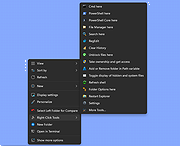 |
| Showing rows 1 to 5 of 5 | Showing Page 1 of 1 | 1 |
OlderGeeks.com Copyright (c) 2026
