|

|
Processed through Paypal No account required. |








Buy our over-priced crap to help pay the bills.



|
|
Processed through Paypal No account required. |
| File - Download NixThis v0.40 | ||||||||
| Description | ||||||||
|
A plea... Deanna and I have been running this site since 2008 and lately we're seeing a big increase in users (and cost) but a decline in percentage of users who donate. Our ad-free and junkware-free download site only works if everyone chips in to offset the revenue that ads on other sites bring in. Please donate at the bottom of the page. Every little bit helps. Thank you so much. Sincerely, your Older Geeks: Randy and Deanna Always scroll to the bottom of the page for the main download link. We don't believe in fake/misleading download buttons and tricks. The link is always in the same place. NixThis v0.40 👉 A portable tool for blocking unwanted Windows ads, suggestions, and interface clutter. NixThis helps you find and disable unwanted Windows features by pointing at them on your screen. Instead of searching through Settings or sorting through hundreds of unfamiliar tweaks, you select an interface element and let NixThis look for the Windows setting behind it. Click “Pick an element” or press Ctrl + Shift + Space, then move your pointer over the item you want to remove. A green outline means NixThis recognizes the element. Click it to review what will change before deciding whether to block it. NixThis intercepts the click so you do not accidentally activate the button underneath. A gray outline means the element is not recognized; its signature is recorded locally, and no settings are changed. You can also use the searchable filter list to review available changes, including features that are not currently visible on your screen. Each entry explains where the item appears and what its filter changes. Select the entries you want and choose “Apply changes.” NixThis remembers previous registry values so you can restore settings through “What you blocked” and “Bring it back.” Uninstalled Microsoft Store apps work differently: NixThis opens the matching Store page so you can reinstall them. The program is portable. Extract the download into a folder you can write to and run NixThis.exe. Its normal blocking features work locally. Optional AI explanations require your own API key and send only the selected setting’s name and technical details to the provider. 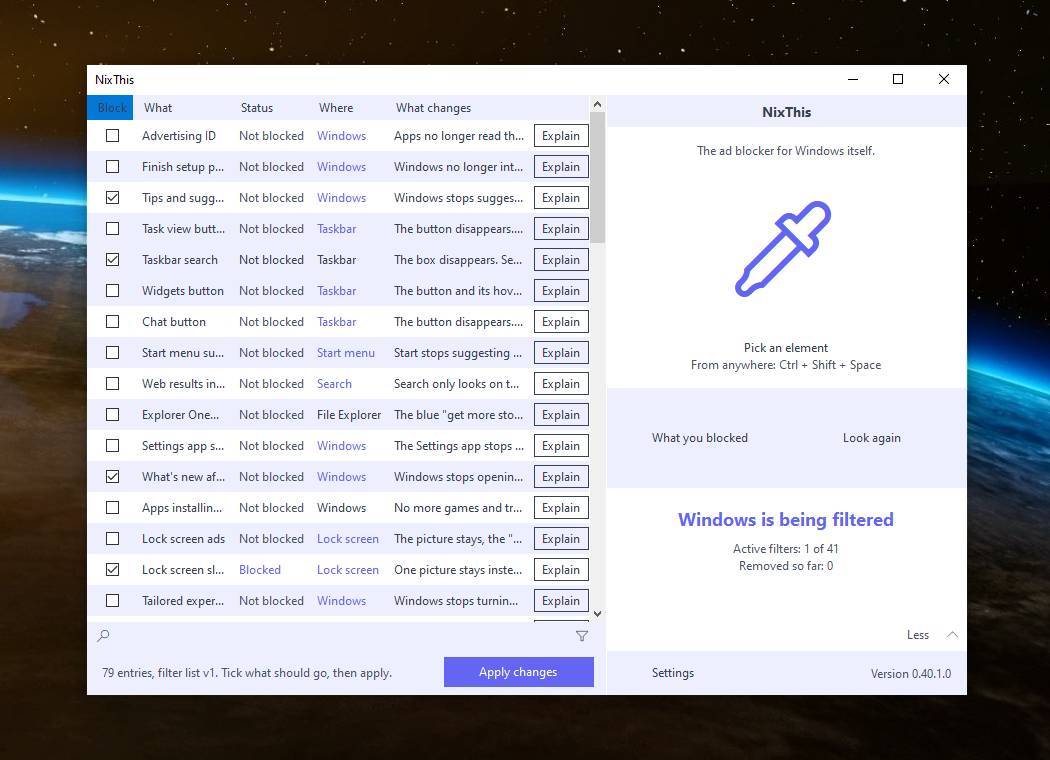 Features: • Point-and-click element picker for identifying recognized Windows interface features. • Green and gray outlines distinguish recognized elements from unknown ones. • Review the proposed setting change before applying a filter. • Searchable filter list includes items that are not currently visible on screen. • Apply multiple selected filters together. • Each filter explains where its target appears and what will change. • Restore previous registry values through the blocked-items history. • Remove selected preinstalled apps using Windows PowerShell. • Protected package list prevents core components, including Microsoft Store, App Installer, and Windows runtimes, from being offered for removal. • Open the corresponding Microsoft Store page to reinstall a removed Store app. • Most filters change individual Windows registry values. • Explains when a setting requires administrator rights and can restart with those rights. • Uses Windows UI Automation to identify elements and their surrounding interface structure. • Stores filter definitions in Data/Filters.ini, allowing the filter list to develop independently from the application. • Records unknown element signatures locally in Data/Sightings.log. • Optional AI explanations remain disabled until you supply an API key. • Ctrl + Shift + Space opens the element picker; Ctrl + Shift + A opens the filter list. • Portable operation without installation. Supported operating systems: • Windows 10, Windows 11 • Requires .NET Framework 4.8 Supported languages: English, German Changes: v0.40 09-29-26 - Initial release Click here to visit the author's website. Continue below for the main download link. |
||||||||
| Downloads | Views | Developer | Last Update | Version | Size | Type | Rank | |
| 18 | 117 | Builtbybel | Sep 30, 2026 - 11:12 | 0.40 | 449.9KB | ZIP |  , out of 1 Votes. , out of 1 Votes. |
|
| File Tags | ||||||||
| NixThis Windows ads suggestions blocker debloat privacy tweaks taskbar search registry portable customization utilities freeware | ||||||||
Click to Rate File Share it on Twitter → Tweet
|


