|

|
Processed through Paypal No account required. |








Buy our over-priced crap to help pay the bills.



|
|
Processed through Paypal No account required. |
| File - Download RsyncZilla v1.3.0 | ||||||||
| Description | ||||||||
|
Always scroll to the bottom of the page for the main download link. We don't believe in fake/misleading download buttons and tricks. The link is always in the same place. RsyncZilla v1.3.0 👉 A modern FileZilla-style Windows file transfer client powered by rsync over SSH. RsyncZilla is a free and open-source file transfer client for Windows that combines a familiar dual-pane, FileZilla-style interface with the reliability and efficiency of rsync. Browse local files on one side and remote servers over SFTP on the other, then upload or download files and folders using drag and drop. RsyncZilla uses portable rsync over SSH for transfers, allowing it to send only new files and modified byte blocks instead of retransmitting entire files. Transfers use temporary files to help prevent incomplete files from replacing good copies, while rsync exit codes and detailed logs make failed transfers clearly visible instead of silently ignoring problems. It also includes remote file editing, an integrated SSH terminal, saved server profiles, transfer queues, failed-transfer retries and real-time transfer information. Passwords are not stored on disk; credentials are passed to the SSH process in memory when needed. 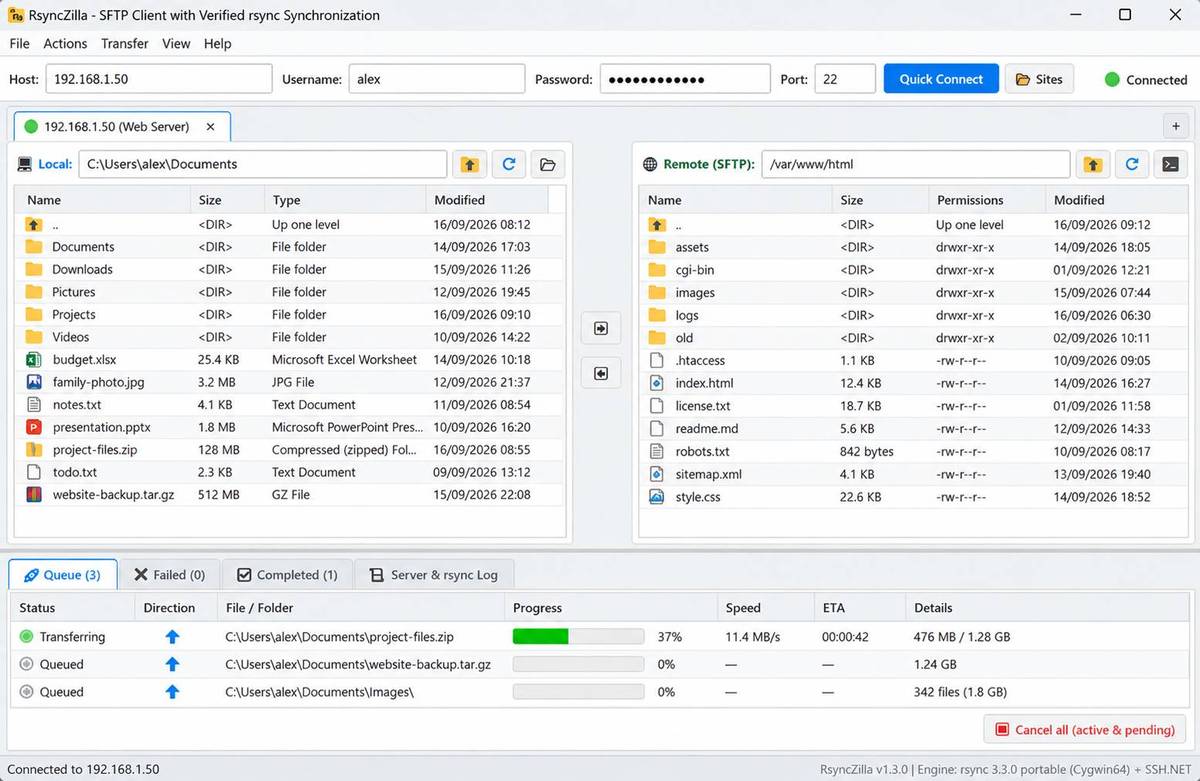 Features: • Familiar dual-pane interface with local Windows files on the left and remote server files on the right • Remote filesystem browsing over SFTP using SSH.NET • Upload and download files and folders with bidirectional drag and drop • Drag files and folders directly from Windows Explorer into the remote pane • Multi-selection using Shift, Ctrl or selection-box dragging • Double-click navigation for directories • Open local files using their associated Windows applications • Show local files and folders directly in Windows Explorer • Portable rsync and SSH components are bundled with the application • Delta transfers send new files and modified byte blocks instead of retransmitting unchanged data • Configurable handling of existing files including size/date comparison, newer-only updates, overwrite and checksum modes • Atomic rsync writes help prevent interrupted transfers from leaving corrupted or partially written destination files • Resumable synchronization with clear reporting when a transfer is interrupted or rejected • Integrated KiTTY SSH terminal accessible with Ctrl+T • SSH terminal automatically opens in the currently selected remote directory • Live remote file editing with F4 or by double-clicking a remote file • Edit remote files using a preferred local editor such as VS Code, Notepad++ or Sublime Text • Automatically detects saved changes to remotely edited files and uploads them • SHA256 hashing is used to detect changes during remote editing • Site Manager stores frequently used server host, username and port information • Passwords are never saved to disk • Credentials are supplied to OpenSSH subprocesses in memory through the included RsyncAskPass helper • Automatically navigates to the remote user's home directory after login • Transfer queue displays active transfers with progress, speed and estimated time remaining • Cancel All option terminates active rsync processes and clears pending transfer tasks • Dedicated Failed Transfers tab displays rsync exit codes and error output • Retry individual failed transfers or retry all failed transfers at once • Completed Transfers history provides a record of successful operations • Live log console displays SFTP activity, rsync commands and diagnostic information • Expandable folder transfer tasks display individual files directly beneath their parent folder • Real-time sub-file progress shows completion, file size, transfer rate and overall folder progress • Dynamic folder counters show completed files versus total files • Local directory hierarchies are pre-enumerated for accurate file counts and sizes • Files discovered during remote folder downloads are dynamically added to the transfer container • Completed Transfers includes a dedicated Size column for files and sub-files Supported operating systems: • Windows 64-bit Supported languages: English Changes: v1.3.0 09-17-26 New Features & Improvements: Integrated Flat-Tree Directory Transfer Queue: Folders in transfer queues (Active, Completed, and Failed) are now treated as expandable container tasks. Expanding a folder inserts individual file items directly into the main table beneath the parent folder, sharing the exact same columns, headers, and main scrollbar. Sub-files feature a clear visual indentation indicator (↳) and shaded background styling. Folder expand/collapse is accessible via the chevron toggle button or by double-clicking the folder row. Real-Time Sub-File Progress Tracking: Live progress display reflects individual sub-file completion, file size, transfer rate, and container percentage in real time. Dynamic folder item counter (📁 folder_name (X/Y)). Pre-enumeration of local directory hierarchies prior to transfer for accurate file count and sizing. Dynamic discovery during remote folder downloads seamlessly adds discovered files to the container. Dedicated Size Column in Completed Tab: Added a Size column to the Completed Transfers table for easy visibility into individual file and sub-file transfer sizes. Click here to visit the author's website. Continue below for the main download link. |
||||||||
| Downloads | Views | Developer | Last Update | Version | Size | Type | Rank | |
| 106 | 669 | kanowins | Sep 17, 2026 - 12:49 | 1.3.0 | 10.59MB | ZIP |  , out of 3 Votes. , out of 3 Votes. |
|
| File Tags | ||||||||
| RsyncZilla rsync SFTP SSH transfer synchronization backup remote files server Windows portable FileZilla client FTP | ||||||||
Click to Rate File Share it on Twitter → Tweet
|


