|

|
Processed through Paypal No account required. |








Buy our over-priced crap to help pay the bills.



|
|
Processed through Paypal No account required. |
| Files | ||||
| File Name | Rating | Downloads | ||
 |
AnyViewer Free v5.8.0 WARNING: If someone you don’t know called you... or you dialed a number that suddenly appeared on your screen... and they told you to download this program... IT IS A SCAM. HANG UP IMMEDIATELY! AnyViewer Free v5.8.0 👉 Free remote desktop software for accessing and supporting computers from another computer, tablet, or phone. AnyViewer Free is remote desktop software for personal use that lets you remotely access and support devices, whether attended or unattended, from another computer, tablet, or smartphone. It is designed for fast remote control, stable connections, high-quality image display, remote file transfer, chat, multiple monitor support, screen mirroring, and secure remote sessions using end-to-end encryption. Features: • Remotely access personal devices from a PC, Mac, tablet, or smartphone • Supports attended and unattended remote access • Fast remote control with stable connection routing • High-quality image display with low latency • In-session and off-session remote file transfer • Chat during remote support sessions • Multiple monitor support • Display multiple remote screens in separate windows • Adaptive screen scaling • Mirror Android or iOS screens to a computer • Remote reboot and reconnect • Shortcuts to tools such as Command Prompt and Task Manager • Blacklist and whitelist access permissions by account or device ID • 256-bit asymmetric ECC end-to-end encryption • Two-factor authentication support Supported operating systems: • Windows 8.1, Windows 10, Windows 11 • Windows Server 2012 R2, Windows Server 2016, Windows Server 2019, Windows Server 2022 • macOS 10.15 or later • iOS 10.0 to iOS 16 • Android 6.0 or later Supported languages: English, French, German Changes: v5.8.0 07-07-26 Enhanced: Support for quick file transfer between My Devices on Windows. Simply drag and drop files into the Send Files area to send them directly to the target device without the need to open the File Transfer window. This download is for the Windows portable version (very bottom of page). All other download assets are below: Other Windows: AnyViewerSetup_x64.exe AnyViewerSetup.exe (32bit) macOS: AnyViewer.dmg iOS: App Store Android: AnyViewerSetup.apk Google Play Click here to visit the author's website. |
 |
1,312 | Sep 16, 2026 AOMEI Technology Co., Ltd 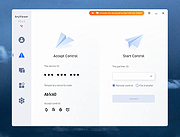 |
|
Bitvise SSH Client v9.66 Bitvise SSH Client v9.66 👉 A powerful Windows SSH client for secure remote access, file transfer, tunneling, and terminal emulation. Bitvise SSH Client is a secure, flexible SSH (Secure Shell) client for Windows. It lets users connect to remote systems securely for terminal access, encrypted file transfers, dynamic and static port forwarding, and other SSH-based operations. Its graphical and command-line interfaces make securely managing remote servers, transferring files, and setting up secure tunnels easy for both casual and advanced users. It supports advanced protocols, customizable authentication methods, and a robust set of features to meet modern secure networking needs. Features: • Graphical SFTP client with advanced file transfer features. • Terminal emulator supporting bvterm, xterm, and VT100 protocols. • Powerful SSH2 port forwarding and tunneling (SOCKS/HTTP). • Dynamic tunneling and proxy support (SOCKS4/5, HTTP CONNECT). • Drive-mapping support for SFTP remote directories. • Command-line clients for scripted file transfer, execution, terminal, and tunneling. • Integrated authentication with public keys, Kerberos/GSSAPI, and NTLM. • Single-click remote desktop forwarding. Supported operating systems: • Windows XP SP3, Vista, 7, 8.1, 10, Windows 11 • Windows Server 2003 through Windows Server 2025 Supported languages: English Changes: v9.66 07-20-26 SSH: Improved multiple avenues which a server could use to exert disproportionate memory pressure on the client. SFTP drive: The SSH Client now includes WinFsp version 2.2.26194. This addresses CVE-2026-7162, which is a local privilege escalation. Users who install the SSH Client with the SFTP drive feature are recommended to update, especially on multi-user systems. The SFTP drive feature is available if Install WinFsp is selected when installing. The UNC path used by the SFTP drive is now configurable. This makes it practical to configure a UNC path for access by other users on the system. The SFTP drive can now be configured to expose only the UNC path, without assigning a ... |
|
6,289 | Sep 16, 2026 Bitvise Limited 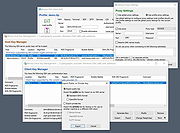 |
|
FastCopy v5.12.0 FastCopy v5.12.0 👉 High-speed file copy and backup software for Windows. FastCopy is a fast file copy and backup utility for Windows designed to maximize transfer performance by using multi-threaded read, write, and verify operations together with Overlapped I/O and Direct I/O. It supports Unicode file names, paths longer than MAX_PATH, and include or exclude filtering using UNIX-style wildcards. FastCopy is built to reduce the load on other running applications while delivering very high copy performance on modern storage devices. Features: • Fast file copy and backup software for Windows • Verification support for more reliable copying • Can record hash values for each file • Uses multi-threaded read, write, and verify processing • Uses Overlapped I/O and Direct I/O for high performance • Supports Unicode file names • Supports file paths longer than MAX_PATH (260 characters) • Supports include and exclude filters using UNIX-style wildcards • Lightweight design built with Win32 API only Supported operating systems: • Windows 7, Windows 8, Windows 8.1, Windows 10, Windows 11 • Windows Server 2012, Windows Server 2012 R2, Windows Server 2016, Windows Server 2019, Windows Server 2022, Windows Server 2025 Supported languages: • English, Japanese, Chinese Changes: v5.11.3 08-18-26 Added an option to Shell Extension to replace Explorer's standard drag & drop / paste with FastCopy. (Default: OFF) Various security enhancements. - Enabled CET Shadow Stack (/CETCOMPAT). - Enabled Control Flow Guard (/guard:cf). - Stricter DLL loading (added /DEPENDENTLOADFLAG:0x800). - (Already enabled: /GS, /NXCOMPAT (DEP), /SAFESEH (x86), /DELAYLOAD, /DYNAMICBASE, /HIGHENTROPYVA, SetDefaultDllDirectories) Note: This file has one hit on VirusTotal. We have confirmed this to be a false positive. The file is safe. Note: If you need the portable version, use the "Extract" button in the installer. Click here to visit the author's website. |
|
12,523 | Aug 21, 2026 SHIROUZU Hiroaki 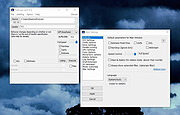 |
|
HopToDesk v1.46.50 WARNING: If someone you don’t know called you... or you dialed a number that suddenly appeared on your screen... and they told you to download this program... IT IS A SCAM. HANG UP IMMEDIATELY! HopToDesk v1.46.50 👉 Free and secure remote desktop software with screen sharing, remote control, file transfer, and live chat. HopToDesk is a free remote desktop tool that lets you share your screen, remotely control computers and devices, transfer files, and chat during support sessions. It is free for personal and commercial use, open source, and uses end-to-end encryption for screen sharing, chats, and file transfers. Features: • Remote desktop control • Screen sharing • File transfer • Live chat • End-to-end encrypted traffic • Free for personal and commercial use • Open source • Portable mode on Windows • Installed mode with background service support • Unattended access with permanent password • Direct IP access • IP whitelisting • SOCKS5 proxy connections • Remote terminal • Port forwarding • Camera / view-only mode • Quick Support mode • Address book and tags • LAN discovery • Multiple screen support • Remote printing on Windows and macOS • Audio streaming • Session recording • Screenshots • Switch sides during a session • Privacy mode on Windows and macOS • Two-factor authentication • Clipboard sync permission control • File transfer permission control • Remote restart permission control • TCP tunneling permission control • Wake On LAN permission support Supported operating systems: • Windows XP, Windows 7 or newer • macOS 10.14 Mojave or newer • Ubuntu 18.04 or newer, Debian 9 or newer, CentOS 7 or newer, openSUSE 42/15 or equivalent, Fedora, Manjaro, AppImage, Flatpak • FreeBSD 13 or newer • Raspberry Pi 2 and newer • ChromeOS devices compatible with Google Play • Android 5.0 or newer • iOS 11.0 or newer Supported languages: English, French, Spanish, Portuguese, German, Dutch, Polish, Czech, Norwegian, Swedish, Russian, Turkish, Hebrew, Arabic, Bahasa, Vietnamese, Simplified Chinese, Traditional Chinese, Japanese, Korean, Thai Changes v1.46.50 09-12-2026 Wayland, Windows Server and other Linux improvements, translation updates. This download is for the Windows 64bit version (very bottom of ... |
|
4,657 | Sep 16, 2026 HopToDesk 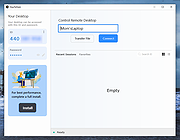 |
|
LocalSend v1.18.2 LocalSend v1.18.2 👉 Fast, private file sharing between nearby devices without the cloud. LocalSend is a free and open-source, cross-platform application for securely transferring files, folders, photos, videos, documents, text and other data between devices connected to the same local network. It provides an AirDrop-style experience that works across Windows, macOS, Linux, Android and iOS without requiring an account, an Internet connection or an external server. Devices running LocalSend automatically discover one another on the local network, allowing you to select what you want to send, choose a nearby device and begin the transfer. Data stays on your local network instead of being uploaded to a cloud service, and transfers are protected using HTTPS encryption. LocalSend can transfer any file type and is designed to take advantage of the speed of your local Wi-Fi or wired network without artificial bandwidth limits. It can also send text messages and links between devices, making it useful for quickly moving clipboard-style information from a phone to a computer or between computers. Files are saved to the receiving device's Downloads folder by default, although the destination can be changed in LocalSend's settings. Frequently used devices can be marked as favorites, and LocalSend can be configured to automatically accept transfers from trusted favorite devices. The application also includes a Share via Link feature for making selected files available through a web browser on the local network. Recent versions can receive files through links as well. No account or login is required, and LocalSend contains no advertising or tracking. Features: • Transfers files directly between nearby devices over the local network • Works across Windows, macOS, Linux, Android and iOS • No Internet connection, cloud storage or external server required • No account, registration or login required • Automatic discovery of nearby LocalSend devices • Send individual files, multiple files and folders • Supports photos, videos, documents and other file ... |
|
2,120 | Sep 29, 2026 LocalSend 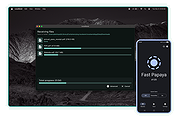 |
 |
MobileFileSearch v1.51 MobileFileSearch v1.51 👉 Search files inside smartphones and tablets connected through USB MTP mode. MobileFileSearch is a lightweight utility that allows you to search files stored on smartphones, tablets, and other portable devices connected to your computer through USB using the Media Transfer Protocol (MTP). It can quickly scan connected devices and display matching files based on filename, extension, size, date, and other search filters. MobileFileSearch is especially useful for locating photos, videos, documents, music, APK files, and other content stored on Android devices or portable media players without manually browsing through folders. Search results can be copied, exported, or opened directly from the interface for easier file management. Be aware that this tool is useful if your Smartphone/Tablet uses the Media Transfer Protocol (MTP) to view and transfer files via USB. Features: • Search files on smartphones and tablets connected through USB • Works with devices using the Media Transfer Protocol (MTP) • Filter results by filename, extension, size, and modified date • View full file paths and file details • Open files directly from search results • Export search results to text, CSV, HTML, JSON, or XML • Lightweight and portable utility with no installation required • Supports drag-and-drop exporting of files • Command-line support for advanced usage Supported operating systems: • Windows 7, Windows 8, Windows 8.1, Windows 10, Windows 11 Supported languages: • English Changes: v1.51 05-11-26 • Fixed bug: MobileFileSearch crashed when using the 'Open Folder In Explorer' option and the folder path contained a slash character ('/'). This download is for the Windows 64bit version (very bottom of page). If you need the Windows 32bit version, download here. Click here to visit the author's website. |
|
5,292 | Jun 03, 2026 Nir Sofer 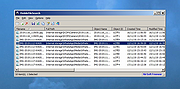 |
|
OnionShare v2.6.5 OnionShare v2.6.5 👉 Securely and anonymously share files, receive files, host websites and chat over the Tor network. OnionShare is a free, open-source privacy tool that lets you securely and anonymously share files, receive files, host websites and chat with others using the Tor network. Instead of uploading your data to a third-party file-sharing service, OnionShare runs a Tor onion service directly on your computer and provides a unique .onion address that others can open using Tor Browser. OnionShare provides separate modes for sending and receiving files, publishing an onion website and creating anonymous chat rooms. The application handles the Tor connection for you and can create temporary or persistent onion services depending on how you want to use it. Because transfers take place through the Tor network, users do not need to expose their public IP addresses to one another. Features: • Securely and anonymously shares files through the Tor network • Receives files directly from other users without relying on a conventional cloud storage provider • Hosts websites as Tor onion services directly from your computer • Creates private anonymous chat rooms • Generates .onion addresses that recipients can open with Tor Browser • Allows multiple Share, Receive, Website and Chat tabs to be used at the same time • Supports persistent onion addresses for services you want to reuse • Provides ephemeral onion services when a permanent address is not needed • Keeps chat history from being permanently stored by OnionShare • Assigns chat participants random names, which they can change • Includes its own Tor connectivity for normal desktop use • Supports Tor bridges for networks where direct Tor connections are restricted • Provides a graphical desktop application and command-line interface • Open-source software released under the GNU GPLv3 license • Does not require users to create accounts with OnionShare Supported operating systems: • Windows • macOS • Linux Supported languages: Afrikaans, Albanian, Arabic, Belarusian, Bengali, Bulgarian, Catalan, Chinese (Simplified), ... |
|
5,565 | Aug 19, 2026 Lockdown Systems 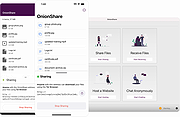 |
|
Orzeszek Transfer v2.5 Orzeszek Transfer v2.5 Orzeszek Transfer is a simple file transfer utility that allows you to send larger files to anyone with a web browser without using buggy IM file transfers. Orzeszek Transfer works as a simple HTTP server that serves only the files you have explicitly specified. When you add a file, it creates a URL that you can send to anyone who has a web browser or a download manager. They can then download that file directly from you. It’s a convenient way to transfer larger files without using an intermediary. And it supports resuming broken transfers and multi-part transfers, so long as the client does. To use Orzeszek Transfer, you’ll need to forward an external port, 30000 by default, to your local IP address. Your external IP address is detected automatically, though you can override this behaviour if you want. Orzeszek Transfer does not support UPnP. You must have Microsoft .NET Framework 3.5 installed to use Orzeszek Transfer. Transfer History 2.5 Check if port is open on settings page Do not add port 80 to file URLs when using that port Click here to visit the author's website. |
|
5,981 | Mar 08, 2019 Chris Dziemborowicz 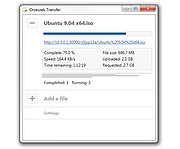 |
|
Rclone v1.75.0 Rclone v1.75.0 👉 Command-line tool for syncing, copying, mounting, and managing files across cloud storage and local systems. Rclone is a command-line program to manage files on cloud storage. It can sync files and directories to and from many different cloud storage providers, copy new or changed files, perform one-way or two-way synchronization, mount cloud storage as a disk, verify file integrity with hashes, and serve local or remote files over HTTP, WebDAV, FTP, SFTP, and DLNA. It is widely used for backup, restore, migration, and cloud-to-cloud transfers, with support for encryption, compression, chunking, and many standard transfer protocols. Features: • Syncs files and directories to and from cloud storage • Copies only new or changed files • Supports one-way sync and two-way bisync • Verifies file integrity with MD5 and SHA-1 hashes • Preserves timestamps on files • Mounts cloud storage as a network disk • Serves files over HTTP, WebDAV, FTP, SFTP, and DLNA • Supports encryption, compression, chunking, hashing, and union backends • Works with local filesystems, cloud services, and standard protocols • Useful for backup, restore, migration, and cloud-to-cloud transfers View instructions here. Supported operating systems: • Windows 10 or higher, Windows Server 2016 or higher • macOS 12 Monterey or higher • Linux Kernel 3.2 or higher • FreeBSD 12.2 or higher • OpenBSD 6.9 or higher • NetBSD • Plan 9 • Solaris Supported languages: English Changes: v1.75.0 07-31-26 New S3 Providers Scality (RING / ARTESCA) Zero Services (ZERO-Z3) Security archive: Don't crash on malformed squashfs images GHSA-6jcg-q3wp-x2f4 CVE-PENDING (Nick Craig-Wood) ftp: Fix ftp command injection when encoding doesn't include CRLF GHSA-8c48-q9wj-3w37 CVE-PENDING (Nick Craig-Wood) lib/http: Use TLS on all --addr listeners when --cert and --key are set ... |
|
5,176 | Aug 03, 2026 Nick Craig-Wood 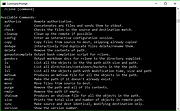 |
|
RsyncZilla v1.3.0 RsyncZilla v1.3.0 👉 A modern FileZilla-style Windows file transfer client powered by rsync over SSH. RsyncZilla is a free and open-source file transfer client for Windows that combines a familiar dual-pane, FileZilla-style interface with the reliability and efficiency of rsync. Browse local files on one side and remote servers over SFTP on the other, then upload or download files and folders using drag and drop. RsyncZilla uses portable rsync over SSH for transfers, allowing it to send only new files and modified byte blocks instead of retransmitting entire files. Transfers use temporary files to help prevent incomplete files from replacing good copies, while rsync exit codes and detailed logs make failed transfers clearly visible instead of silently ignoring problems. It also includes remote file editing, an integrated SSH terminal, saved server profiles, transfer queues, failed-transfer retries and real-time transfer information. Passwords are not stored on disk; credentials are passed to the SSH process in memory when needed. Features: • Familiar dual-pane interface with local Windows files on the left and remote server files on the right • Remote filesystem browsing over SFTP using SSH.NET • Upload and download files and folders with bidirectional drag and drop • Drag files and folders directly from Windows Explorer into the remote pane • Multi-selection using Shift, Ctrl or selection-box dragging • Double-click navigation for directories • Open local files using their associated Windows applications • Show local files and folders directly in Windows Explorer • Portable rsync and SSH components are bundled with the application • Delta transfers send new files and modified byte blocks instead of retransmitting unchanged data • Configurable handling of existing files including size/date comparison, newer-only updates, overwrite and checksum modes • Atomic rsync writes help prevent interrupted transfers from leaving corrupted or partially written destination files • Resumable synchronization with clear reporting when a transfer is interrupted or rejected • Integrated KiTTY SSH terminal ... |
|
89 | Sep 17, 2026 kanowins 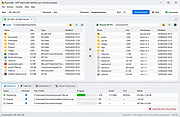 |
| Showing rows 1 to 10 of 10 | Showing Page 1 of 1 | 1 |
OlderGeeks.com Copyright (c) 2026
