|

|
Processed through Paypal No account required. |








Buy our over-priced crap to help pay the bills.



|
|
Processed through Paypal No account required. |
| Files | ||||
| File Name | Rating | Downloads | ||
 |
FileZilla Client Portable v3.70.6 FileZilla Client Portable v3.70.6 👉 Portable FTP, FTPS, and SFTP client for fast and reliable file transfers. FileZilla Client Portable is a portable edition of FileZilla that lets you connect to FTP, FTPS, and SFTP servers for uploading, downloading, and managing files without a traditional installation. It is designed to run from portable storage or local folders and includes drag and drop transfers, resume support, firewall and proxy support, and a tabbed interface for handling file transfer tasks more easily. Features: • Portable package that runs without traditional installation • Supports FTP, FTP over SSL/TLS (FTPS), and SFTP • Resume support for uploads and downloads • Timeout detection • Firewall support • SOCKS4/5 and HTTP/1.1 proxy support • Intuitive drag and drop interface • Tabbed user interface • IPv6 support • Supports transfer of large files over 4GB • Powerful Site Manager and transfer queue • Bookmark support • Configurable speed limits • Filename filters • Directory comparison • Network configuration wizard Supported operating systems: • Windows 7, Windows 8, Windows 10, Windows 11 Supported languages: Aragonese, Arabic, Azerbaijani, Bulgarian, Catalan, Corsican, Czech, Welsh, Danish, German, Greek, Spanish, Estonian, Basque, Persian, Finnish, French, Galician, Hebrew, Croatian, Hungarian, Armenian, Indonesian, Icelandic, Italian, Japanese, Kabyle, Georgian, Khmer, Korean, Kurdish, Kirghiz, Lao, Lithuanian, Latvian, Macedonian, Norwegian Bokmεl, Nepali, Dutch, Norwegian, Occitan, Polish, Portuguese, Romanian, Russian, Slovak, Slovenian, Serbian, Swedish, Tamil, Thai, Turkish, Ukrainian, Vietnamese, Chinese Changes: v3.70.6 06-04-26 New features: SFTP: Added compatibility flag to Site Manager to ignore invalid bits in file attributes flags received from non-compliant servers Bugfixes and minor changes: SFTP: Updated to fzssh 1.3.0 Updated to libfilezilla 0.56.1 Removed autodetection of FTP server type governing the remote path syntax. Exotic server types now need to be set explicitly on the advanced page in the Site Manager Click here to visit the author's website. |
 |
5,188 | Aug 14, 2026 FileZilla Project & PortableApps.com (John T. Haller) 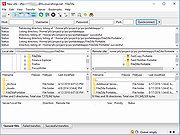 |
 |
RsyncZilla v1.3.0 RsyncZilla v1.3.0 👉 A modern FileZilla-style Windows file transfer client powered by rsync over SSH. RsyncZilla is a free and open-source file transfer client for Windows that combines a familiar dual-pane, FileZilla-style interface with the reliability and efficiency of rsync. Browse local files on one side and remote servers over SFTP on the other, then upload or download files and folders using drag and drop. RsyncZilla uses portable rsync over SSH for transfers, allowing it to send only new files and modified byte blocks instead of retransmitting entire files. Transfers use temporary files to help prevent incomplete files from replacing good copies, while rsync exit codes and detailed logs make failed transfers clearly visible instead of silently ignoring problems. It also includes remote file editing, an integrated SSH terminal, saved server profiles, transfer queues, failed-transfer retries and real-time transfer information. Passwords are not stored on disk; credentials are passed to the SSH process in memory when needed. Features: • Familiar dual-pane interface with local Windows files on the left and remote server files on the right • Remote filesystem browsing over SFTP using SSH.NET • Upload and download files and folders with bidirectional drag and drop • Drag files and folders directly from Windows Explorer into the remote pane • Multi-selection using Shift, Ctrl or selection-box dragging • Double-click navigation for directories • Open local files using their associated Windows applications • Show local files and folders directly in Windows Explorer • Portable rsync and SSH components are bundled with the application • Delta transfers send new files and modified byte blocks instead of retransmitting unchanged data • Configurable handling of existing files including size/date comparison, newer-only updates, overwrite and checksum modes • Atomic rsync writes help prevent interrupted transfers from leaving corrupted or partially written destination files • Resumable synchronization with clear reporting when a transfer is interrupted or rejected • Integrated KiTTY SSH terminal ... |
|
43 | Sep 17, 2026 kanowins 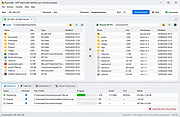 |
| Showing rows 1 to 2 of 2 | Showing Page 1 of 1 | 1 |
OlderGeeks.com Copyright (c) 2026
