|

|
Processed through Paypal No account required. |








Buy our over-priced crap to help pay the bills.



|
|
Processed through Paypal No account required. |
| Files | ||||
| File Name | Rating | Downloads | ||
 |
Bitvise SSH Client v9.66 Bitvise SSH Client v9.66 👉 A powerful Windows SSH client for secure remote access, file transfer, tunneling, and terminal emulation. Bitvise SSH Client is a secure, flexible SSH (Secure Shell) client for Windows. It lets users connect to remote systems securely for terminal access, encrypted file transfers, dynamic and static port forwarding, and other SSH-based operations. Its graphical and command-line interfaces make securely managing remote servers, transferring files, and setting up secure tunnels easy for both casual and advanced users. It supports advanced protocols, customizable authentication methods, and a robust set of features to meet modern secure networking needs. Features: • Graphical SFTP client with advanced file transfer features. • Terminal emulator supporting bvterm, xterm, and VT100 protocols. • Powerful SSH2 port forwarding and tunneling (SOCKS/HTTP). • Dynamic tunneling and proxy support (SOCKS4/5, HTTP CONNECT). • Drive-mapping support for SFTP remote directories. • Command-line clients for scripted file transfer, execution, terminal, and tunneling. • Integrated authentication with public keys, Kerberos/GSSAPI, and NTLM. • Single-click remote desktop forwarding. Supported operating systems: • Windows XP SP3, Vista, 7, 8.1, 10, Windows 11 • Windows Server 2003 through Windows Server 2025 Supported languages: English Changes: v9.66 07-20-26 SSH: Improved multiple avenues which a server could use to exert disproportionate memory pressure on the client. SFTP drive: The SSH Client now includes WinFsp version 2.2.26194. This addresses CVE-2026-7162, which is a local privilege escalation. Users who install the SSH Client with the SFTP drive feature are recommended to update, especially on multi-user systems. The SFTP drive feature is available if Install WinFsp is selected when installing. The UNC path used by the SFTP drive is now configurable. This makes it practical to configure a UNC path for access by other users on the system. The SFTP drive can now be configured to expose only the UNC path, without assigning a ... |
 |
6,281 | Sep 16, 2026 Bitvise Limited 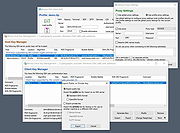 |
|
PuTTY CAC v0.84 Update 1 PuTTY CAC v0.84 Update 1 👉 Enhanced PuTTY SSH client with CAC, smart card, certificate and FIDO authentication support. PuTTY CAC is an advanced fork of the well-known PuTTY SSH and Telnet client designed to provide enterprise-grade authentication features for secure remote access environments. It extends the standard PuTTY toolset with support for Common Access Cards (CAC), smart cards, Windows Certificate Store integration, PKCS #11 middleware and modern FIDO authenticators such as security keys and passkeys. Built for administrators, government agencies, enterprise users and security-conscious professionals, PuTTY CAC allows secure SSH authentication without relying solely on password-based logins. The software can interface directly with certificates stored in Windows or on external authentication hardware, enabling secure public key authentication through hardware-backed credentials. The package includes the familiar PuTTY ecosystem tools including PuTTY terminal, Pageant authentication agent, PSFTP secure file transfer client, PSCP SCP utility and additional companion tools. PuTTY CAC also introduces enhanced certificate management options, PIN caching, auto-loading of certificates and better handling of hardware token authentication workflows. Support for FIDO security devices makes PuTTY CAC especially useful in modern zero-trust and multi-factor authentication environments. Users can authenticate using compatible FIDO2/U2F hardware keys while benefiting from PuTTY’s lightweight and portable design philosophy. Features: • Full SSH terminal emulation based on the official PuTTY codebase • Supports Common Access Cards (CAC) for secure authentication • Windows CAPI certificate store integration • PKCS #11 middleware support for hardware security devices • FIDO/U2F and passkey authentication support • Compatible with YubiKey and other hardware authenticators • Includes PuTTY, PSFTP, PSCP, Pageant and related utilities • Pageant certificate auto-loading and management features • Optional PIN caching for supported devices • Secure public key authentication without storing private keys on disk • Certificate filtering for trusted or valid certificates only • Portable configuration support using putty.dat • Supports x86, x64 and ARM64 Windows systems • MSI installer and portable ZIP distributions available • Lightweight and ... |
|
528 | Jun 09, 2026 Bryan Berns 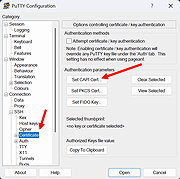 |
 |
RsyncZilla v1.3.0 RsyncZilla v1.3.0 👉 A modern FileZilla-style Windows file transfer client powered by rsync over SSH. RsyncZilla is a free and open-source file transfer client for Windows that combines a familiar dual-pane, FileZilla-style interface with the reliability and efficiency of rsync. Browse local files on one side and remote servers over SFTP on the other, then upload or download files and folders using drag and drop. RsyncZilla uses portable rsync over SSH for transfers, allowing it to send only new files and modified byte blocks instead of retransmitting entire files. Transfers use temporary files to help prevent incomplete files from replacing good copies, while rsync exit codes and detailed logs make failed transfers clearly visible instead of silently ignoring problems. It also includes remote file editing, an integrated SSH terminal, saved server profiles, transfer queues, failed-transfer retries and real-time transfer information. Passwords are not stored on disk; credentials are passed to the SSH process in memory when needed. Features: • Familiar dual-pane interface with local Windows files on the left and remote server files on the right • Remote filesystem browsing over SFTP using SSH.NET • Upload and download files and folders with bidirectional drag and drop • Drag files and folders directly from Windows Explorer into the remote pane • Multi-selection using Shift, Ctrl or selection-box dragging • Double-click navigation for directories • Open local files using their associated Windows applications • Show local files and folders directly in Windows Explorer • Portable rsync and SSH components are bundled with the application • Delta transfers send new files and modified byte blocks instead of retransmitting unchanged data • Configurable handling of existing files including size/date comparison, newer-only updates, overwrite and checksum modes • Atomic rsync writes help prevent interrupted transfers from leaving corrupted or partially written destination files • Resumable synchronization with clear reporting when a transfer is interrupted or rejected • Integrated KiTTY SSH terminal ... |
|
76 | Sep 17, 2026 kanowins 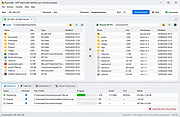 |
|
Submarine v0.3.8 Submarine v0.3.8 👉 An SSH and SFTP client that puts terminals, file transfers, tunnels, and server tools in one window. Submarine is a free, open-source client for connecting to and managing remote servers. Each server session can bring together a tabbed terminal, an SFTP file browser, port forwarding, saved commands, server information, and Docker tools. You can keep multiple sessions open, view two side by side, or pin terminals from different hosts to a monitoring wall. The SFTP browser shows local and remote files, supports drag and drop and bulk operations, and can open a remote file in your usual editor. When you save an edited file, Submarine uploads it back to the server. On desktop systems, Folder Mirror can synchronize a local folder with a remote folder, preview possible overwrites, and apply your chosen conflict rule. Saved server profiles and credentials are encrypted locally. Optional profile sync uploads the encrypted data so you can access your saved connections on another device. The Android app includes terminal, SFTP, port forwarding, server information, and Docker tools; Folder Mirror is limited to desktop systems. Features: • Open tabbed SSH terminals, including multiple shells for a server. • View two sessions side by side or arrange terminals from several hosts on the Wall. • Broadcast typed input to selected sessions. • Browse local and remote files with SFTP, drag and drop files, and select multiple files for bulk operations. • Edit remote files in your default editor and upload changes when you save. • Confirm overwrites before replacing files during uploads or downloads. • Create local, remote, and dynamic port forwarding tunnels, including SOCKS and HTTP proxy options. • Mirror a local folder to a remote server on desktop systems, with ... |
|
57 | Sep 29, 2026 Sina Xhpm 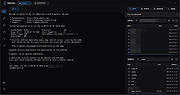 |
|
WinSCP v6.5.6 WinSCP v6.5.6 👉 A secure and powerful SFTP, SCP, and FTP client for Windows with an easy-to-use interface. WinSCP is a popular open-source file transfer client for Windows that supports secure protocols such as SFTP and SCP over SSH, along with standard FTP and WebDAV. It provides both a familiar dual-panel file manager style interface and an Explorer-like view, making it easy to transfer, synchronize, and manage files between a local computer and remote servers. WinSCP also includes scripting and automation capabilities, strong encryption support, and deep integration with PuTTY for advanced SSH features. Features: • Secure file transfers using SFTP, SCP, and FTP over SSH • Dual-panel and Explorer-style interfaces for flexible workflows • File synchronization for keeping local and remote directories in sync • Built-in text editor and remote file editing support • Scriptable and command-line automation for advanced users • Strong encryption and authentication using SSH keys • Integration with PuTTY for terminal access • Support for WebDAV and Amazon S3 Supported operating systems: • Windows 7, Windows 8, Windows 8.1, Windows 10, Windows 11 Supported languages: English, Arabic, Bulgarian, Chinese, Croatian, Czech, Danish, Dutch, Finnish, French, German, Greek, Hebrew, Hungarian, Italian, Japanese, Korean, Norwegian, Polish, Portuguese, Romanian, Russian, Slovak, Slovenian, Spanish, Swedish, Turkish, Ukrainian Changes: v6.5.5 11-19-25 Translation updated: Vietnamese. Bug fix: Pasting files using local directory tree context menu pastes them to the current directory, instead of the selected one. Bug fix: Failure when opening site imported from PuTTY with unsupported SSH proxy. 2407 Bug fix: Incorrect hostname validation when connecting to S3 endpoint with certificate that does not cover root S3 hostname. 2409 Note: This file has two hits on VirusTotal. We have confirmed these to be false positives. The file is safe. This download is for the Windows portable version (very bottom of page). If you need the Windows ... |
|
8,187 | Jun 18, 2026 WinSCP 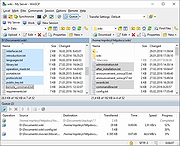 |
| Showing rows 1 to 5 of 5 | Showing Page 1 of 1 | 1 |
OlderGeeks.com Copyright (c) 2026
