|

|
Processed through Paypal No account required. |








Buy our over-priced crap to help pay the bills.



|
|
Processed through Paypal No account required. |
| File - Download Lanemu v0.14.1 | ||||||||
| Description | ||||||||
|
A plea... Deanna and I have been running this site since 2008 and lately we're seeing a big increase in users (and cost) but a decline in percentage of users who donate. Our ad-free and junkware-free download site only works if everyone chips in to offset the revenue that ads on other sites bring in. Please donate at the bottom of the page. Every little bit helps. Thank you so much. Sincerely, your Older Geeks: Randy and Deanna Always scroll to the bottom of the page for the main download link. We don't believe in fake/misleading download buttons and tricks. The link is always in the same place. Lanemu v0.14.1 👉 Server-less (decentralized) Virtual Private Network (Open-source alternative to Hamachi, Radmin, ZeroTier, etc.) Lanemu is a free, open-source peer-to-peer virtual LAN emulator that allows computers on different Internet connections to communicate as though they were connected to the same local network. It is designed for multiplayer games, legacy software, file sharing, remote administration, and any application that relies on LAN connectivity. Unlike traditional VPN services that route traffic through a central server, Lanemu establishes encrypted peer-to-peer connections between participating computers whenever possible, reducing latency while eliminating the need for dedicated servers. Networks are created using invitations that can be shared with other users, making setup straightforward while keeping access limited to invited participants. 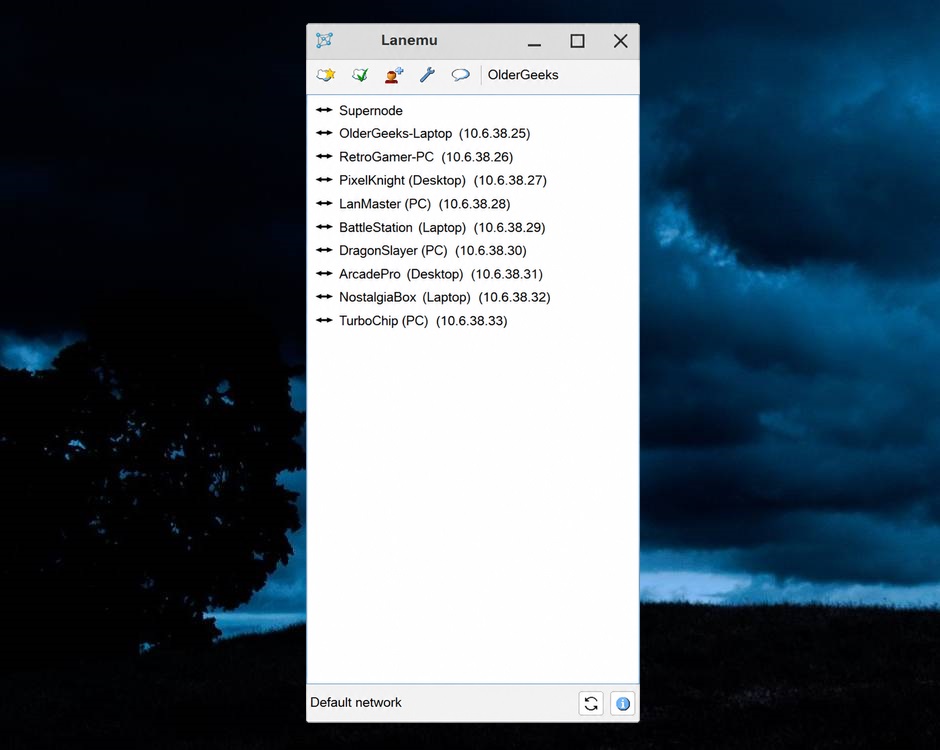 Features: • Create private virtual LAN networks across the Internet. • Peer-to-peer architecture without requiring dedicated relay servers for normal operation. • Encrypted communications between participating computers. • Reliable UDP (RUDP) transport protocol enabled by default. • Invite-based network membership. • Works with many LAN multiplayer games and LAN-aware applications. • Automatic discovery of peers within a virtual network. • Supports multiple virtual networks. • Cross-platform support between Windows and Linux. • Automatically installs the TAP-Windows driver on supported Windows editions. • Includes an integrated Java runtime in supported Windows packages. • Open-source software released under the GPLv3 license. Supported operating systems: • Windows 11 (64-bit) • Windows 10 (64-bit) • Windows 10 (32-bit) • Windows 8.1 (32-bit and 64-bit) • Windows 8 (32-bit and 64-bit) • Windows 7 (32-bit and 64-bit) • Windows Vista (32-bit and 64-bit) • Windows XP (32-bit and 64-bit) • Linux (64-bit) Supported languages: • English Changes: v0.14.1 08-01-26 Fixed issues in the RUDP library: memory leaks when using shutdownHook, deadlocks, handling of corrupted UDP packets, and many other issues that were identified during testing. @Monsterovich Added the display of the connection protocol to the peer list. @Monsterovich Added an experimental build that compiles a .jar file into an executable using native-image in GraalVM. For now, this is for the headless version of the application on Linux x86_64. To avoid running Lanemu as root, you also need to do sudo setcap cap_net_admin=eip Lanemu-headless. @Monsterovich Updated dependencies. @Monsterovich How to install Lanemu Lanemu is distributed as portable ZIP archives. Download the package that matches your operating system, extract it to a folder of your choice, then run Lanemu from that folder. Each package contains the files required for its supported operating system. Windows 11 / Windows 10 (64-bit) 1. Extract the ZIP archive. 2. Run Lanemu.exe.3. On first launch, Lanemu automatically installs the TAP-Windows driver if it is not already present. Administrator privileges may be required. 4. Restart Lanemu if prompted. 5. Create a new virtual LAN or join one using an invitation. This package includes an embedded OpenJDK runtime, so no separate Java installation is required. Windows 10 / Windows 8.1 / Windows 8 / Windows 7 (32-bit) 1. Extract the ZIP archive. 2. Run Lanemu.exe.3. Allow the TAP-Windows driver to be installed if prompted. 4. Restart Lanemu if requested. 5. Create or join a virtual LAN. macOS 1. Extract the ZIP archive. 2. Move Lanemu to your preferred location (such as the Applications folder). 3. Open Lanemu. If macOS displays a security warning because the application was downloaded from the Internet, approve it in System Settings > Privacy & Security and choose Open Anyway. 4. If prompted, allow Lanemu to access the required networking components. 5. Create a new virtual LAN or join one using an invitation. Linux (64-bit) 1. Extract the ZIP archive. 2. Open a terminal in the extracted folder. 3. Start Lanemu using the included launcher. 4. Run as root or grant the executable the required CAP_NET_ADMIN capability so it can create virtual network interfaces.5. Install the optional AppIndicator libraries if your desktop environment does not display the system tray icon. 6. Create or join a virtual LAN. Windows XP / Windows Vista (64-bit) 1. Extract the ZIP archive. 2. Run Lanemu.exe.3. Install the TAP-Windows driver when prompted. 4. Restart Lanemu if necessary. 5. Create or join a virtual LAN. Windows XP / Windows Vista (32-bit) 1. Extract the ZIP archive. 2. Run Lanemu.exe.3. Install the TAP-Windows driver if prompted. 4. Restart Lanemu. 5. Create or join a virtual LAN. Using Lanemu Once Lanemu is running, you can either create your own virtual LAN or join one that another user has created. Creating a virtual LAN 1. Start Lanemu. 2. Create a new network. 3. Give the network a name. 4. Share the generated invitation with the people you want to connect. 5. Keep Lanemu running while others join your network. Joining an existing network 1. Start Lanemu. 2. Select the option to join a network. 3. Import or paste the invitation supplied by the network owner. 4. Wait for the connection to complete. 5. Connected computers will appear in the main window. Understanding the interface • Supernode - Displays the currently connected supernode used to help establish peer connections. • Computer List - Shows computers currently connected to the virtual LAN along with their assigned virtual IP addresses. • Toolbar - Provides quick access to creating networks, joining networks, invitations, settings, chat, and other functions. • Network Name - The status bar displays the currently selected virtual network. Using LAN applications and games 1. Start Lanemu on every computer before launching the application or game. 2. Make sure every participant has joined the same virtual network. 3. Start the game or application. 4. Select its LAN or Local Network multiplayer mode. 5. One computer hosts while the others join through the game's normal LAN browser or by entering the host's virtual IP address if supported. Troubleshooting Other computers do not appear Verify that everyone joined the same virtual network using the same invitation and that Lanemu is running on every computer. Games cannot find LAN servers Some games use ICMP (ping) packets to discover hosts. If ICMP traffic is blocked by a firewall, automatic LAN discovery may fail even though Lanemu is connected. TAP-Windows adapter problems Restart Lanemu and allow the TAP-Windows driver to be installed if prompted. Administrator privileges may be required. Linux permission errors Lanemu must have permission to create virtual network interfaces. Run it as root or grant the required CAP_NET_ADMIN capability.Unable to establish connections Ensure that your firewall or router is not blocking Lanemu's communication port. Reliable UDP (RUDP) is used by default in version 0.14. High latency or connection issues Peer-to-peer connections depend on each participant's Internet connection and firewall configuration. Performance is generally best when direct peer connections can be established. This download is for the Windows 10/11 64-bit version (very bottom of page). All other download assets are below: Other Windows: Lanemu_0.14.1_Windows7-10_x32.zip Lanemu_0.14.1_WindowsXP-Vista_x32.zip Lanemu_0.14.1_WindowsXP-Vista_x64.zip MacOS: Lanemu_0.14.1.zip (Java) Linux: Lanemu_0.14.1_Linux_x64.zip Lanemu_f9e8ec5a_Linux_x64_Headless_Binary.zip Click here to visit the author's website. Continue below for the main download link. |
||||||||
| Downloads | Views | Developer | Last Update | Version | Size | Type | Rank | |
| 409 | 1,911 | Nikolay Borodin | Sep 08, 2026 - 12:20 | 0.14.1 | 33.24MB | ZIP |  , out of 3 Votes. , out of 3 Votes. |
|
| File Tags | ||||||||
| virtual p2p vpn network lan Lanemu multiplayer gaming tap ethernet emulator tunnel crossplatform java openjdk gpl Hamachi | ||||||||
Click to Rate File Share it on Twitter → Tweet
|


