|

|
Processed through Paypal No account required. |








Buy our over-priced crap to help pay the bills.



|
|
Processed through Paypal No account required. |
| Files | ||||
| File Name | Rating | Downloads | ||
 |
Addtron AE-660 (AE660) Ethernet PC Card (PCMCIA) driver for Windows 2000 Addtron AE-660 (AE660) Ethernet PC Card (PCMCIA) driver for Windows 2000 addtron_ae660.zip |
 |
9,837 | May 22, 2009 Addtron |
|
Dell Dimension 4700C Network / Ethernet / LAN Driver for Windows XP Dell Dimension 4700C Network / Ethernet / LAN Driver for Windows XP Broadcom |
|
9,966 | Mar 07, 2013 Broadcom |
 |
IBM Rev 1.5 motherboard Drivers- Ethernet Driver IBM Rev 1.5 motherboard Drivers- Ethernet Driver qh7z14us.exe |
 |
16,273 | Aug 02, 2009 IBM |
|
Lanemu v0.14.1 Lanemu v0.14.1 👉 Server-less (decentralized) Virtual Private Network (Open-source alternative to Hamachi, Radmin, ZeroTier, etc.) Lanemu is a free, open-source peer-to-peer virtual LAN emulator that allows computers on different Internet connections to communicate as though they were connected to the same local network. It is designed for multiplayer games, legacy software, file sharing, remote administration, and any application that relies on LAN connectivity. Unlike traditional VPN services that route traffic through a central server, Lanemu establishes encrypted peer-to-peer connections between participating computers whenever possible, reducing latency while eliminating the need for dedicated servers. Networks are created using invitations that can be shared with other users, making setup straightforward while keeping access limited to invited participants. Features: • Create private virtual LAN networks across the Internet. • Peer-to-peer architecture without requiring dedicated relay servers for normal operation. • Encrypted communications between participating computers. • Reliable UDP (RUDP) transport protocol enabled by default. • Invite-based network membership. • Works with many LAN multiplayer games and LAN-aware applications. • Automatic discovery of peers within a virtual network. • Supports multiple virtual networks. • Cross-platform support between Windows and Linux. • Automatically installs the TAP-Windows driver on supported Windows editions. • Includes an integrated Java runtime in supported Windows packages. • Open-source software released under the GPLv3 license. Supported operating systems: • Windows 11 (64-bit) • Windows 10 (64-bit) • Windows 10 (32-bit) • Windows 8.1 (32-bit and 64-bit) • Windows 8 (32-bit and 64-bit) • Windows 7 (32-bit and 64-bit) • Windows Vista (32-bit and 64-bit) • Windows XP (32-bit and 64-bit) • Linux (64-bit) Supported languages: • English Changes: v0.14.1 08-01-26 Fixed issues in the RUDP library: memory leaks when using shutdownHook, deadlocks, handling of corrupted UDP packets, and many other issues that were identified during testing. @Monsterovich Added the display of the connection protocol to the peer list. @Monsterovich Added an experimental build that compiles a .jar file into an executable using native-image in GraalVM. For now, this is for the headless version ... |
 |
409 | Sep 08, 2026 Nikolay Borodin 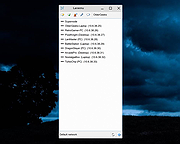 |
|
MACAddressView v1.55 MACAddressView v1.55 👉 Find the manufacturer and details behind any MAC address. MACAddressView is a lightweight MAC address lookup utility that lets you quickly identify the company name, address, and country associated with a network device's MAC address. Instead of querying an online service, it uses a built-in IEEE OUI database stored inside the executable, allowing lookups to be performed entirely offline. The program can search by MAC address, company name, company address, or country, making it useful for network administrators, technicians, security professionals, and anyone troubleshooting or documenting network hardware. Results can be copied to the clipboard or exported to TXT, CSV, HTML, XML, and other formats for reporting or further analysis. MACAddressView is fully portable, requires no installation, and supports command-line operation for automation and scripting. Features: • Offline MAC address lookup using an internal IEEE OUI database • Find vendor information by MAC address, company name, address, or country • Display company name, address, country, and assigned MAC address range • Search multiple MAC addresses simultaneously • Lookup complete MAC addresses or vendor prefixes (OUI) • View the MAC addresses assigned to the current computer • Export results to TXT, CSV, HTML, XML, and tab-delimited formats • Copy results directly to the clipboard • Command-line support for automated lookups and exports • Portable with no installation required • Supports custom language translation files Supported operating systems: • Windows 98, Windows ME, Windows 2000, Windows XP, Windows Server 2003, Windows Vista, Windows 7, Windows 8, Windows 8.1, Windows 10, Windows 11 Supported languages: • Arabic, Bulgarian, Chinese (Simplified), Chinese (Traditional), Czech, Dutch, English, French, German, Greek, Hungarian, Italian, Japanese, Korean, Polish, Portuguese (Brazil), Romanian, Russian, Slovak, Spanish, Turkish, Ukrainian Changes: v1.55 07-01-26 Updated the internal MAC Addresses database. Note: This file has two hits on VirusTotal. We have confirmed these to be false positives. The file is safe. Click here to visit the author's website. |
|
10,164 | Jul 10, 2026 Nir Sofer 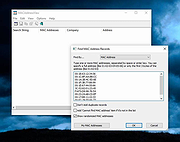 |
|
Wireshark v4.6.7 Wireshark v4.6.7 👉 Analyze and troubleshoot network traffic with the industry's leading protocol analyzer. Wireshark is a free and open-source network protocol analyzer used by network administrators, security professionals, developers, students, and IT enthusiasts to capture, inspect, and analyze network traffic in real time or from previously saved capture files. It supports hundreds of protocols and provides powerful filtering, coloring, and statistical analysis tools to help diagnose network problems, investigate security issues, debug applications, and understand how network protocols work. Wireshark can capture traffic from wired and wireless network interfaces, display packet details down to the individual protocol fields, reconstruct conversations, and export captured data in multiple formats. Its flexible display filters, extensive protocol support, customizable interface, and built-in analysis tools make it an essential utility for anyone working with computer networks. Features: • Capture live network traffic from Ethernet, Wi-Fi, Bluetooth, USB, and many other interface types • Open and analyze previously captured packet trace files • Decode hundreds of network protocols with detailed packet inspection • Powerful display filters for quickly isolating specific traffic • Colorize packets for improved readability and faster analysis • Follow TCP, UDP, HTTP, HTTP/2, TLS, QUIC, WebSocket, and other protocol streams • Generate protocol hierarchy, endpoint, conversation, I/O, and flow graphs • Inspect packet contents down to individual protocol fields • Search captured traffic by protocol, address, port, payload, or custom criteria • Support for decryption of supported encrypted protocols when appropriate keys are available • Extensive capture and display customization options • Export captured packets and analysis results in multiple formats • Extensible through Lua scripting and plugins • Cross-platform interface with consistent functionality Supported operating systems: • Windows 10, Windows 11 • macOS 12 Monterey or higher • Linux (major distributions including Debian, Ubuntu, Fedora, Red Hat Enterprise Linux, openSUSE, Arch Linux, and others) • FreeBSD, NetBSD, OpenBSD Supported languages: English, Chinese (Simplified), Chinese (Traditional), French, German, Italian, Japanese, Korean, Polish, Russian Changes: v4.6.7 07-02-26 Bug Fixes The ... |
|
10,974 | Jul 09, 2026 Gerald Combs 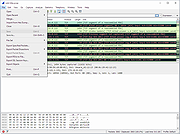 |
| Showing rows 1 to 6 of 6 | Showing Page 1 of 1 | 1 |
OlderGeeks.com Copyright (c) 2026
