|

|
Processed through Paypal No account required. |








Buy our over-priced crap to help pay the bills.



|
|
Processed through Paypal No account required. |
| Files | ||||
| File Name | Rating | Downloads | ||
 |
adb-tools-mac v1.1 adb-tools-mac v1.1 👉 A handy macOS menu bar app for common Android ADB tools. adb-tools-mac is a lightweight macOS menu bar app written in SwiftUI that gives Android users quick access to common ADB functions without needing to run commands manually in Terminal. It can connect to Android devices over TCP, take screenshots, record the screen, open deeplinks and capture logcat output. The app includes the adb executable internally, helping avoid common ADB setup and installation problems. Features: • Runs from the macOS menu bar • Connect Android devices over TCP • Take screenshots from connected devices • Record Android device screens • Open deeplinks for testing apps and links • Capture logcat output • Includes adb internally to reduce setup problems • Written in SwiftUI • Free and open source under the GPL Supported operating systems: • macOS Supported languages: English Changes: v1.1 03-12-21 Moved adb commands to background thread to avoid adb daemon stalling the app process. Click here to visit the author's website. |
 |
3,548 | Jun 14, 2026 Naman Dwivedi 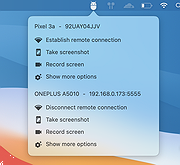 |
|
Advanced PortChecker v2.3.0 Advanced PortChecker v2.3.0 👉 Scan your network for open ports quickly and easily. Advanced PortChecker is a free and open source port checker that lets you scan hosts and networks for open ports in seconds. It supports multiple platforms, offers a clean graphical interface, and can export scan results in HTML, JSON, CSV or plain text formats. Features: • Scan TCP/IP ports on hosts or networks • Check whether ports are open or closed • Fast scanning performance • Export results as HTML, JSON, CSV or plain text • Similar interface across desktop platforms • Theme and preference options • Automatic update control • Open source and free to modify • Privacy-friendly: no ads, trackers or data collection • Can be compiled manually for other platforms Supported operating systems: • Windows • macOS • Linux • Android Supported languages: English, Dutch, French, Spanish, Chinese, Italian, Japanese Changes: v2.3.0 11-15-25 Added Japanese localization. Updated dependencies. Included Linux ARM preview builds and tests. Upgraded Yarn and Rust version. Added minor design upgrades. Changed runner actions. Improved stability across all platforms. This download is for the Windows version (very bottom of page). All other download assets are below: macOS: advanced-portchecker_2.3.0_aarch64.dmg advanced-portchecker_2.3.0_x64.dmg Linux: advanced-portchecker_2.3.0_amd64.deb advanced-portchecker_2.3.0_arm64.deb advanced-portchecker-2.3.0-1.x86_64.rpm advanced-portchecker-2.3.0-1.aarch64.rpm advanced-portchecker_2.3.0_amd64.AppImage advanced-portchecker_2.3.0_aarch64.AppImage advanced-portchecker_x64.app.tar.gz advanced-portchecker_aarch64.app.tar.gz Click here to visit the author's website. |
|
6,488 | Jun 11, 2026 CodeDead 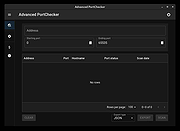 |
 |
Android Webcam System v1.0.6 Android Webcam System v1.0.6 👉 Turn an Android phone into a high-quality Windows webcam over USB or Wi-Fi. Android Webcam System is a free and open-source webcam solution that uses an Android smartphone as a webcam for a Windows computer. The system consists of the AWA Android app, which streams video from the phone, and the AWC desktop client, which receives the stream and provides a virtual webcam device that can be selected by compatible Windows applications. Everything operates locally without requiring a cloud streaming service. The project supports both USB and Wi-Fi connections. USB provides lower latency and improved stability without requiring Wi-Fi, while wireless mode lets the phone and computer communicate over the same local network. The Android app supports resolutions from 480p through 4K and allows switching between the phone's front and rear cameras. The virtual webcam can be used with programs such as Zoom, Microsoft Teams, Google Meet, Discord, OBS Studio and Skype, as well as other Windows programs capable of selecting a webcam device. Features: • Turns an Android smartphone into a Windows webcam • Includes AWA, a Kotlin-based Android camera and streaming application • Includes AWC, the desktop client that receives the phone's video stream • Creates a virtual webcam device for compatible Windows applications • Supports USB and Wi-Fi connections • USB mode offers lower latency and improved connection stability • Wi-Fi mode provides completely wireless operation over the local network • Supports 480p, 720p, 1080p and 4K video resolutions • Supports front and rear Android cameras • Displays real-time connection status • Provides desktop connection statistics • Designed for low battery usage on the Android device • Works with Zoom, Microsoft Teams, Google Meet, Discord, OBS Studio and Skype • Can be used by other applications that support standard webcam devices • Uses a fully local, serverless architecture • No cloud video relay is required • No advertisements • Free and open-source under the ... |
|
265 | Aug 09, 2026 Soubhagyajit Borah  |
|
Audacity v4.0.1 Audacity v4.0.1 👉 Free, open-source, multi-track audio editor and recorder for recording, editing, mixing and producing audio. Audacity is a powerful, free and open-source audio editor and recorder for Windows, macOS and Linux. It can handle everything from quick voice recordings and simple edits to multi-track music production, podcast creation, audio restoration and more involved sound projects. Audacity provides a visual waveform-based editing environment where audio can be recorded, cut, copied, moved, trimmed and arranged across multiple tracks. Music, speech, sound effects and other recordings can be combined into a single project, with precise control over individual clips and their placement on the timeline. The program includes a wide collection of audio processing tools for adjusting volume, compression, equalization, pitch and tempo. Noise removal and repair tools can help clean up recordings, while delay, reverb, distortion, modulation, fading and other effects provide additional options for shaping sound. Real-time effects can be applied without permanently altering the original audio, allowing settings to be adjusted while continuing to work on a project. Effects can be applied to individual tracks or to the master output. Audacity also includes a plugin manager for enabling, disabling and organizing available effects. Audacity supports third-party plugins and includes support for VST3 and Nyquist effects. Optional FFmpeg support expands compatibility with additional audio formats. Finished projects can be exported to common formats such as WAV, MP3, FLAC and Ogg. The program is useful for recording microphones and other audio sources, digitizing older recordings, cleaning up noisy audio, editing interviews, assembling podcasts, creating sound effects, working with music and preparing finished audio for publishing or archiving. Features: • Record live audio through microphones, mixers and other input devices • Edit and arrange multiple audio tracks within a single project • Cut, copy, paste, trim, split and move audio clips ... |
|
11,295 | Oct 02, 2026 Audacity 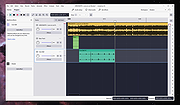 |
|
Bean Network Tester v0.8.0 Bean Network Tester v0.8.0 👉 Simulate slow, unreliable, or broken network conditions on Windows to test how applications respond. Bean Network Tester is a free and open-source network testing and emulation tool for Windows designed for software testers, developers, QA professionals, and power users. It deliberately introduces poor network conditions such as latency, jitter, packet loss, bandwidth restrictions, connection resets, outages, and other problems so you can see how an application behaves when its connection is less than perfect. Traffic can be targeted by process name, PID, IP address, port, or address family, allowing one application to be tested without necessarily disrupting the rest of the computer. The program uses the WinDivert driver to intercept and manipulate network traffic and provides both a graphical interface and a command-line interface suitable for scripts and CI/CD testing. Along with network impairment, it includes live statistics, throughput monitoring, a searchable connections table, event logging, configurable profiles and presets, reproducible seeded tests, CSV exports, and reproduction reports. Bean Network Tester is portable, requires administrator privileges to manipulate network traffic, and contains no telemetry or update-checking network client. It is released under the GNU General Public License v3.0. Features: • Add fixed or random network latency and jitter • Introduce latency spikes to simulate unstable connections and packet reordering • Drop packets randomly or in bursts to reproduce real-world wireless network failures • Corrupt or duplicate packets • Limit download and upload bandwidth in KB/s • Simulate network buffering and queuing delays • Tear down existing TCP connections using TCP resets • Prevent new connections from being established • Simulate a completely dead network link • Flap the connection on and off to reproduce intermittent outages • Simulate MTU black holes and NAT-style idle timeouts • Block selected IP addresses or ports with the built-in firewall controls • LAN mode allows local network traffic while blocking Internet access • Internet-only mode blocks ... |
|
113 | Oct 08, 2026 DonislawDev  |
|
BES – Battle Encoder Shirasι v1.8.0.39 BES – Battle Encoder Shirasι v1.8.0.39 👉 Limit CPU usage of individual processes to improve system responsiveness and reduce game stuttering. BES – Battle Encoder Shirasι is a lightweight, portable open-source utility that allows you to throttle the CPU usage of individual processes. Instead of allowing a program to consume 100% of your processor time, BES can reduce its CPU usage to a user-defined percentage, making it easier to use other applications while demanding tasks continue running in the background. Originally created as a simple CPU-limiting tool, BES has become popular with gamers and power users for reducing stuttering, preventing certain games from monopolizing CPU resources, and improving responsiveness on older or lower-core-count systems. It requires no installation, stores its settings locally, and can be run directly from any folder or USB drive. Features: • Limit CPU usage for individual processes • Adjustable throttling percentage • Portable with no installation required • Monitor and manage multiple target processes • Watch processes and automatically reapply limits • Command-line support for automation • Optional background image customization • Low resource usage • Open source under the GNU GPL v2 license • Useful for reducing game stutters and improving multitasking Supported operating systems: • Windows XP, Windows Vista, Windows 7, Windows 8, Windows 8.1, Windows 10, Windows 11 Supported languages: • English, French, Japanese, Finnish, Chinese, Russian, German Changes: v1.8.0.39 03-30-25 • Increased the maximum number of watched targets from 8 to 32. Click here to visit the author's website. |
|
4,948 | Jun 26, 2026 mion  |
|
Cinecred v1.8.1 Cinecred v1.8.1 👉 Create beautiful film credits without the pain. Cinecred is a free and open source program for creating professional film credits from spreadsheet data. It reads credits from Excel, LibreOffice, Apple Numbers, CSV, or Google Sheets, then lets you interactively arrange, style, preview, and export title cards or rolling credits. Features: • Create title cards and rolling film credits • Reads Microsoft Excel, LibreOffice Calc, Apple Numbers, CSV, and Google Sheets credit data • Live visual preview while editing • Interactive styling with contextual controls and easy reverts • Default project template for quick setup • Flexible layouts and pixel-level customization • Use custom fonts, logos, images, and videos • Runtime fine adjustment for matching a desired credit roll length • Integrated real-time playback • DeckLink preview playout support • Export to video files, image sequences, stills, PDFs, and production formats • Supports ProRes, DNxHR, CineForm, H.264, H.265, Theora, PNG sequences, TIFF, and more • Free software licensed under GPLv3 Supported operating systems: • Windows • macOS • Linux Supported languages: English, German, Czech, Spanish, French, Chinese (China) Changes: v1.8.1 Not provided. This download is for the Windows version (very bottom of page). All other download assets are below: macOS: cinecred-1.8.1-arm64.pkg cinecred-1.8.1-x86_64.pkg Linux: cinecred-1.8.1-x86_64.deb cinecred-1.8.1-x86_64.rpm cinecred-1.8.1-x86_64.appimage Click here to visit the author's website. |
|
494 | Jun 15, 2026 Felix Mujkanovic  |
|
DeadLock v1.5.1 DeadLock v1.5.1 👉 Unlock files and folders that Windows refuses to release. DeadLock can be used to unlock files and folders that are locked by the system or other applications. This is especially useful when Windows will not let you delete, move, copy or rename something because it claims the file is still in use. DeadLock can unlock files and folders, take ownership, and help remove stubborn items without digging through Task Manager or command-line tools. DeadLock also supports command-line arguments, so advanced users can unlock files or folders directly from PowerShell or CMD without opening the full graphical interface. It is open source, lightweight, free to use and designed specifically for Windows. Features: • Unlock files and folders locked by Windows or other applications • Delete, move or copy locked files and folders • Take full ownership of stubborn files and folders • Command-line support for PowerShell and CMD use • Optional Windows Explorer integration • Theme and preference settings • Optional automatic update functionality • Open-source GPL-3.0 licensed software • No ads, trackers or user data collection Supported operating systems: • Windows 7 SP1, Windows 8, Windows 8.1, Windows 10, Windows 11 • Windows Server 2008 R2 SP1, Windows Server 2012, Windows Server 2012 R2, Windows Server 2016, Windows Server 2019, Windows Server 2022, Windows Server 2025 Supported languages: English, Chinese Simplified, Chinese Traditional, Russian, Bulgarian Changes: v1.5.1 02-15-26 Create Chinese simp. locale. Create a language file for Traditional Chinese. Fix Chinese Traditional locale. Updated russian translate. Added OS + updated link to HTTPS. Create bg.xml. Note: This file has two hits on VirusTotal. We have confirmed these to be false positives. The file is safe. Click here to visit the author's website. |
|
7,679 | Jun 11, 2026 CodeDead 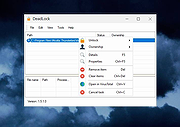 |
|
FineTune v1.9.0 FineTune v1.9.0 👉 Per-app volume control, audio routing, multi-device output and EQ for macOS. FineTune is a free and open-source macOS menu bar app that lets you control the volume of individual apps, boost quiet apps up to 4x, route apps to different speakers, use multi-device output, adjust input and output devices, and shape sound with a 10-band EQ and headphone correction. Features: • Per-app volume sliders and mute controls • Per-app volume boost with 2x, 3x and 4x gain presets • Global hotkeys for app volume up, app volume down, app mute and popup toggle • Configurable volume step size • Keyboard navigation for the menu bar popup • Multi-device output support • Route apps to different audio outputs • Auto-restore app volume, routing and EQ when devices reconnect • 10-band EQ with presets • Custom user EQ presets • AutoEQ headphone correction support • Loudness compensation using ISO 226:2023 equal-loudness contours • Input device and microphone level control • macOS alert volume control • Bluetooth device management from the menu bar • External monitor speaker control via DDC • Dynamic menu bar icon styles • Light and Dark theme support • Adjustable popup size: Compact, Comfortable or Spacious • URL schemes for automation Supported operating systems: • macOS 15.0 Sequoia or later Supported languages: English, Simplified Chinese Changes: v1.9.0 07-09-26 Pick your own icon for any device, and the menu bar icon stops nudging its neighbors. Two DDC fixes land alongside, including the crash on external-monitor volume changes that shipped in v1.8.0. New Features Choose Any Device's Icon Open edit mode in the popup and click a device's icon to pick a new one from a catalog of 85 symbols across five categories — Headphones & Earbuds, Speakers, Computers & Displays, Microphones, and Connectors & Other — or search by keyword ("soundbar", "projector", "aux"). A Suggested section leads with FineTune's automatic guess from the device's name and connection type, so the right ... |
|
812 | Oct 07, 2026 Ronit Singh 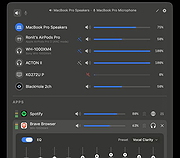 |
|
FreePlane v1.13.3 FreePlane v1.13.3 👉 Free and open-source mind mapping, knowledge management and project planning software. Freeplane is a free and open-source application for mind mapping, knowledge management, project management, note taking, outlining and organizing ideas. It helps you capture thoughts, structure information, analyze relationships, create visual maps and manage personal, school or work projects. Features: • Create and edit mind maps, concept maps and information maps • Organize ideas, notes, tasks, projects and research • Navigate large maps with folding, filtering and searching • Add links, notes, icons, attributes and formatted content • Supports add-ons and scripting for extended functionality • Can run installed or from removable storage • AI integration support in newer Java environments • Open-source and community-developed Supported operating systems: • Windows with Java 8 to 22, or Windows installer with embedded Java • macOS Intel and Apple Silicon using DMG builds with embedded Java • Linux using DEB installer or ZIP archive, requires Java 11 to 21 Supported languages: Multilingual, English source language, Freeplane is translated into 40 languages using Weblate Changes: v1.13.3 07-14-26 Tag category AI tools Tag category scripting API Copying selected chat messages as markdown Options to show root node text or bookmark titles on tab titles and map menu labels - Preferences…->Appearance->Look and Feel->Tab titles - Preferences…->Appearance->Look and Feel->Maximum tab title length Bookmarks outline and bookmark toolbar can follow the view root Switch AI Chat tool availability between reading, editing and disabled Add reusable AI prompts that are managed in a dialog like assistant profiles, exposed as dynamic actions - Tools->AI prompts->Edit prompts... Thinking effort and temperature configuration Search and filter AI model selectors in chat, reusable prompts and assistant profiles - Keep one session-wide filter across selectors - Navigate filtered models with Up and Down and confirm a model with Enter Configure OpenAI, OpenRouter, Requesty, custom OpenAI-compatible, Gemini and Ollama providers concurrently - Manage provider and model settings in the separate AI models ... |
|
6,129 | Oct 02, 2026 Dimitry Polivaev 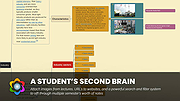 |
|
HateArena v0.0.3 HateArena v0.0.3 👉 A fast-paced multiplayer and singleplayer arena shooter built on the Cube engine. HateArena is a free and open source arena FPS focused on speed, movement and classic deathmatch-style combat. Built from the original Cube engine, it offers wall-jumping, shotgun-boosting, Quake-style ground blasts, bots, dedicated server support, modernized visuals and a built-in map editor for creating and editing arenas. Features: • Fast-paced multiplayer and singleplayer arena shooter gameplay • Built on the original Cube engine • Wall-jumping, forward boosts and recharge-based movement • Quake-style ground blasts and shotgun-boosting combat • Deathmatch, team deathmatch and infected game modes • Server-side bots for offline or low-player matches • Master server support and dedicated game server support • Modern HUD with animations and TrueType font support • Native 1080p renderer with god rays, FXAA, MSAA, bloom and improved shading • MD2 model support with MD3 support in progress • Built-in map editor with texture eyedropper, mass select and cube editing • RCON/server administration support including ban, kick, list and maxping options • Dynamic crosshair and improved scoreboard rendering • GPL-3.0 free and open source license Supported operating systems: • Windows x64 • Linux x86_64 • macOS arm64 Supported languages: English Changes: v0.0.3-b 06-11-26 Improved server stability with numerous networking and packet handling fixes. Added macOS compatibility improvements and app bundle generation. Added initial Windows build support with additional Windows-specific fixes. Migrated the project to a CMake-based build system with automated release workflows. Improved server-side bots by fixing memory corruption and buffer overflow issues. Updated player assets, including retextured player models and improved glow effects. Added weapon and gameplay fixes, including improved ammo switching behavior. Improved water visual effects and sound handling. Enhanced server administration and intermission behavior. Updated documentation, packaging and build scripts with numerous maintenance improvements. This download is for the Windows version (very bottom of page). If you need the macOS version, download here. If you need the Linux version, download here. Click here to visit the author's website. |
|
510 | Jun 19, 2026 endseven  |
|
Lanemu v0.14.1 Lanemu v0.14.1 👉 Server-less (decentralized) Virtual Private Network (Open-source alternative to Hamachi, Radmin, ZeroTier, etc.) Lanemu is a free, open-source peer-to-peer virtual LAN emulator that allows computers on different Internet connections to communicate as though they were connected to the same local network. It is designed for multiplayer games, legacy software, file sharing, remote administration, and any application that relies on LAN connectivity. Unlike traditional VPN services that route traffic through a central server, Lanemu establishes encrypted peer-to-peer connections between participating computers whenever possible, reducing latency while eliminating the need for dedicated servers. Networks are created using invitations that can be shared with other users, making setup straightforward while keeping access limited to invited participants. Features: • Create private virtual LAN networks across the Internet. • Peer-to-peer architecture without requiring dedicated relay servers for normal operation. • Encrypted communications between participating computers. • Reliable UDP (RUDP) transport protocol enabled by default. • Invite-based network membership. • Works with many LAN multiplayer games and LAN-aware applications. • Automatic discovery of peers within a virtual network. • Supports multiple virtual networks. • Cross-platform support between Windows and Linux. • Automatically installs the TAP-Windows driver on supported Windows editions. • Includes an integrated Java runtime in supported Windows packages. • Open-source software released under the GPLv3 license. Supported operating systems: • Windows 11 (64-bit) • Windows 10 (64-bit) • Windows 10 (32-bit) • Windows 8.1 (32-bit and 64-bit) • Windows 8 (32-bit and 64-bit) • Windows 7 (32-bit and 64-bit) • Windows Vista (32-bit and 64-bit) • Windows XP (32-bit and 64-bit) • Linux (64-bit) Supported languages: • English Changes: v0.14.1 08-01-26 Fixed issues in the RUDP library: memory leaks when using shutdownHook, deadlocks, handling of corrupted UDP packets, and many other issues that were identified during testing. @Monsterovich Added the display of the connection protocol to the peer list. @Monsterovich Added an experimental build that compiles a .jar file into an executable using native-image in GraalVM. For now, this is for the headless version ... |
|
409 | Sep 08, 2026 Nikolay Borodin 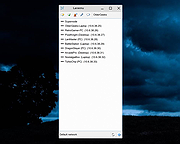 |
|
Pixel Wheels v1.0.1 Pixel Wheels v1.0.1 👉 A retro top-down racing game for PC (Linux, Intel-based Mac, Windows) and Android. Pixel Wheels is a pixel-art, top-down racing game where you race for first place across multiple tracks, collect bonuses, and use weapons to boost your position or slow down your opponents. Features: • Retro top-down racing gameplay • Multiple tracks and championships • Multiple vehicles with different handling • Pickups, bonuses, and weapons • Turbo boosts, mines, guns, missiles, and other race-changing items • Single-player racing • Split-screen multiplayer on PC • Up to 4-player split-screen support • Difficulty levels: Casual, Pro, and Legendary • Keyboard support and configurable controls • Gamepad support • Android touch controls • HUD button zoom option • Pixel-art graphics and arcade-style racing action Supported operating systems: • Windows, Linux, macOS Intel-based Mac, Android Supported languages: English, French, Bengali, Chinese, Polish, Russian, Spanish, Basque, German, Swedish, Hungarian, Esperanto, Turkish, Italian, Dutch, Galician, Indonesian Changes: v1.0.1 12-18-25 Fixed: • Make HUD zoom persistent. • Fixed HUD buttons overlapping when HUD zoom is too high. This download is for the Windows version (very bottom of page). All other download assets are below: macOS: pixelwheels-macos-stable.zip Linux: pixelwheels-linux-stable.zip Android: pixelwheels-itchio-1.0.1.apk Google Play Click here to visit the author's website. |
|
2,141 | Jun 29, 2026 Aurelien Gateau  |
|
Process Governor v1.3.1 Process Governor v1.3.1 👉 Automate Windows process and service priority, I/O priority, and CPU affinity rules. Process Governor is a free Python-based Windows utility that automates the management of processes and services by applying user-defined rules for priority, I/O priority, and CPU core affinity. It can be used to fine-tune system responsiveness, control how selected programs use CPU cores, and automatically apply preferred settings to matching processes or services. Features: • Adjust process and service priorities • Control I/O priorities for better resource management • Set CPU core affinity for selected processes • Create rules for processes by name, path, or command line • Create rules for Windows services by service name • Supports wildcards in process and service rules • Optional force mode for continuous rule application • Optional delay before applying rules • View running process details including PID, executable path, service name, and command line • Search, sort, and filter process and service lists • System tray menu with access to settings, config file, log file, updates, startup option, and quit • Open file locations, file properties, and service properties from the process list • Undo, redo, hotkeys, and inline rule editing • Error highlighting for invalid rule entries • Optional auto-start with Windows Supported operating systems: • Windows 10 • Windows 11 Supported languages: English Changes: v1.3.1 04-19-25 Bug Fixes Fixed error messages: Resolved occasional error messages in the garbage collection process. Click here to visit the author's website. |
|
1,027 | Jun 15, 2026 System X - Files 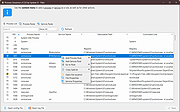 |
|
qBittorrent Portable v5.2.3 qBittorrent Portable v5.2.3 👉 Lightweight portable BitTorrent client with search, RSS, WebUI, and advanced torrent controls. qBittorrent Portable is the lightweight qBittorrent torrent client packaged as a portable app, so you can run it from a cloud folder, removable drive, or local folder without installing it on the PC. It includes a familiar interface, built-in search engine, support for BitTorrent extensions, WebUI remote control, RSS downloading with filters, bandwidth scheduling, IP filtering, IPv6 support, and torrent creation tools. Features: • Polished, familiar user interface • Well-integrated and extensible search engine • Simultaneous search across popular BitTorrent search sites • Category-specific search requests • Supports DHT, Peer Exchange, full encryption, Magnet URIs, and BitComet URIs • Remote control through a Web user interface • Advanced control over trackers, peers, and torrents • Torrent queueing and prioritizing • UPnP and NAT-PMP port forwarding support • Torrent creation tool • Advanced RSS support with download filters, including regex • Bandwidth scheduler • IP filtering compatible with eMule and PeerGuardian • IPv6 compliant • PortableApps.com format for easy portable use and automatic updates through the PortableApps.com Platform Supported operating systems: Windows 10/11 (64-bit Only) Supported operating systems: • Windows 10, Windows 11 64-bit only Supported languages: Multilingual, approximately 25 languages Changes: v5.2.3 07-07-26 BUGFIX: Fix MIME header encoding in email to require ASCII (quinot) #24382 BUGFIX: Fix potential invalid migration procedure (Chocobo1) #24502 BUGFIX: Resolve relative UI theme paths (TurboTheTurtle) #24514 BUGFIX: Clear transfer filters when sections collapse (TurboTheTurtle) #24517 BUGFIX: Fix potential deadlock when database transaction failed (Chocobo1) #24542 BUGFIX: Fix wrong torrent tracker conversion (Chocobo1) #24546 BUGFIX: Fix wrong encoding for Web Seeds (Chocobo1) #24593 BUGFIX: Use stricter parsing for Peer Address inputs (Chocobo1) #24595 BUGFIX: Revise regex expression for parsing HTML links (Chocobo1) #24597 WEBUI: Correctly escape CSS query selector so the UI won't break (vafada) #24539 RSS: Fix feeds not following the specified interval (vafada) #24553 SEARCH: Fix plugin counting when updating (Chocobo1) #24544 WINDOWS: Avoid using invalid file attributes when renaming files (Chocobo1) #24543 Note: This program will ... |
|
7,683 | Oct 02, 2026 qBittorrent Team & PortableApps.com  |
|
Quetoo v1.0.18 Quetoo v1.0.18 👉 A fast, free, open-source arena FPS built for glorious old-school fragging. Quetoo is a free first-person shooter based on id Tech 2, built to bring classic arena deathmatch action roaring back for modern players. Jump into Deathmatch, Team Deathmatch, Capture the Flag, Instagib, and Rocket Arena gameplay with high-speed movement, rocket fights, rail shots, bot support, legendary Quake-inspired maps, original battlegrounds, and cross-platform multiplayer for Windows, macOS, and Linux. Features: • Free first-person shooter based on id Tech 2 • Classic arena gameplay with Deathmatch, Team Deathmatch, Capture the Flag, Instagib, and Rocket Arena modes • Bot support for instant action • High-quality remakes of legendary Quake deathmatch levels • Original maps and game content • Modern rendering with real-time lighting, soft shadow mapping, bump mapping, parallax occlusion, and volumetric fog • In-game light editor for level artists • TrenchBroom support • Cross-platform multiplayer • Free to download, play, and modify • Open-source GPL v2 licensed engine Supported operating systems: • Windows 10 64bit or later. • Apple Silicon for macOS Sequoia or later. • Linux for modern x86-64 distros. • Linux for modern aarch64 distros. • Linux server packages for x86-64 servers • Linux server packages for aarch64 servers. Supported languages: English Changes: v1.0.18 09-30-26 7527533c9 Return why an item is hidden from the cull functions faa7ca6c5 Count visible BSP entities in the diagnostics 2a95fe51a Read a query as visible on the frame it re-enters the frustum 4cc8543f7 Count culled BSP entities apart from occluded ones 2d7d8f457 Read a query drawn outside the frustum as visible e178f9bb9 Give each portal and reflection its own occlusion query a1bbcd286 Count culled apart from occluded in the diagnostics cf9a9bbaa Rename RenderViewStats and SoundStageStats to *Diagnostics 8209f5a6a Rebuild the Docker SDL3 layer when the tag moves c9e5afdfe Fix stupid comments. 576c30e78 List the SDL3 sibling checkout in AGENTS.md 50c40f88c Read only the occlusion results that were downloaded 1a03024cc Skip the occlusion query download when no queries were drawn 5e87814b2 Warn when SDL3 lacks the query API 024252722 Build ... |
|
3,016 | Oct 01, 2026 Quetoo contributors  |
|
SMPlayer v26.8.29 SMPlayer v26.8.29 👉 A free media player with built-in codecs that plays virtually all video and audio formats. SMPlayer is a free media player for Windows, Linux and Mac OS with built-in codecs, YouTube playback, subtitle search and download, a thumbnail generator, and audio and video filters. Features: • Plays virtually all video and audio formats • Built-in codecs, no external codec packs required • Remembers playback position and settings for each file • Supports YouTube video playback • Searches and downloads subtitles • Includes video and audio filters • Playback speed control • Audio and subtitle delay adjustment • Video equalizer • Skins and icon themes • Supports Chromecast • Free and open source Supported operating systems: • Windows 8 and above • Windows XP and other 32-bit systems via alternative package • Linux • Mac OS 10.15 and above Supported languages: English, Espaρol, Franηais, Portuguκs, Portuguκs (Brasil), Euskara, Galego, Catalΰ, Lietuvių, Русский, Українська, Hrvatski, Polski, Deutsch, 日本語, 正體中文, 简体中文, 한국어, Bahasa Indonesia, Bahasa Melayu, Tόrkηe, Български, العربية, Dansk, Nederlands Changes: v26.8.29 Added an option to show a thumbnail preview when hovering over the seek bar (Preferences -> Interface). Playlist positions/progress are now remembered between sessions. Added a pause button to the playlist. Added an option to enable/disable secondary subtitles. Fixed zoom behavior. Fixed playlist item numbering after removing items. Playlist is now re-sorted automatically after adding files. Fixed the add black borders option. Improved retrieval of the track (song) title for internet radio streams (icy-title). Fixed video aspect ratio override support. Added support for additional network URI schemes (KDE integration). Forced the xcb backend on Linux to avoid display issues. macOS builds are now available for arm64 (Apple Silicon), in addition to the existing x86_64 builds. Experimental packages compiled with Qt 6 are now available for Windows and macOS. Various translation updates (German, Italian, Spanish, English UK/US, and others) Use 7-Zip to unzip this file. 👉 This download is for the Windows 64bit version (very bottom of page). All other download assets are below: Other Windows: smplayer-26.8.29-win32-qt5.6-unsigned.exe ... |
|
3,459 | Sep 28, 2026 Ricardo Villalba  |
| Showing rows 1 to 17 of 17 | Showing Page 1 of 1 | 1 |
OlderGeeks.com Copyright (c) 2026
