|

|
Processed through Paypal No account required. |








Buy our over-priced crap to help pay the bills.



|
|
Processed through Paypal No account required. |
| File - Download MultiOS-USB v0.12.1 | ||||||||
| Description | ||||||||
|
Always scroll to the bottom of the page for the main download link. We don't believe in fake/misleading download buttons and tricks. The link is always in the same place. MultiOS-USB v0.12.1 👉 Create a multiboot USB flash drive capable of launching multiple operating system installers and utilities directly from ISO/WIM images. MultiOS-USB is a utility that allows you to build a single bootable USB flash drive containing multiple operating system installers and recovery tools. Instead of keeping separate installation media for different systems, MultiOS-USB organizes ISO images on one device and presents them through a boot menu so you can choose which system or tool to launch. MultiOS-USB simplifies system deployment, testing environments, and recovery workflows by letting technicians keep a portable library of operating systems and utilities on one drive. The program prepares the USB drive, installs the bootloader, and configures the menu structure required to boot the selected ISO images. This makes it particularly useful for technicians, system administrators, and repair professionals who frequently install or troubleshoot operating systems. 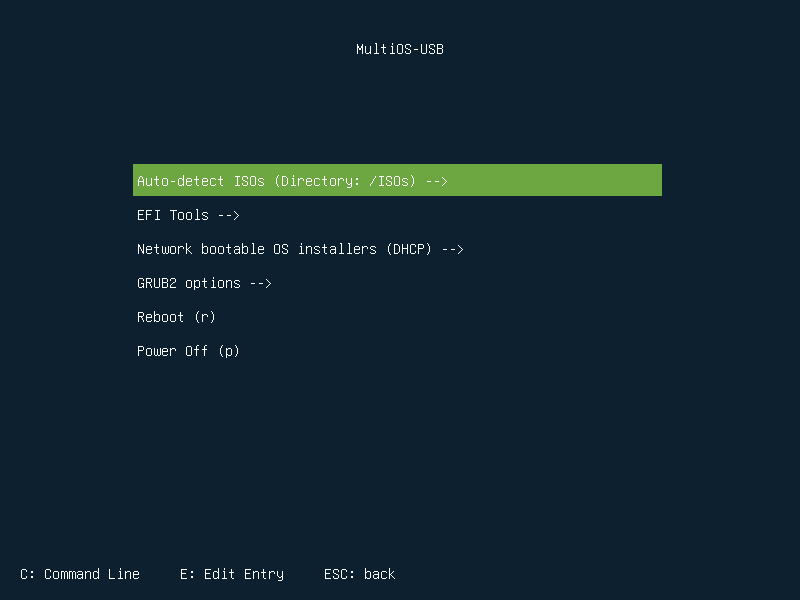 Features: • Create a multiboot USB flash drive • Store multiple operating system installers on a single drive • Boot different ISO images from a unified menu • Useful for operating system installation, testing, and recovery • Portable tool for technicians and system administrators • Simple process for adding or removing ISO images Installation and usage: 1. Prepare the USB drive Extract the MultiOS-USB archive and run the program. Insert the USB flash drive you want to use and follow the prompts to prepare the drive and install the bootloader. 2. Copy operating system ISO images After the USB drive is prepared, copy supported ISO images into the appropriate folders on the flash drive as described in the documentation. 3. Boot from the USB drive Restart the computer and select the USB device in your system's boot menu. MultiOS-USB will display a menu allowing you to select which operating system installer or utility to launch. 4. Secure Boot note Some systems with Secure Boot enabled may display a Machine Owner Key (MOK) management screen or security verification warning when booting the USB drive. Example screen: 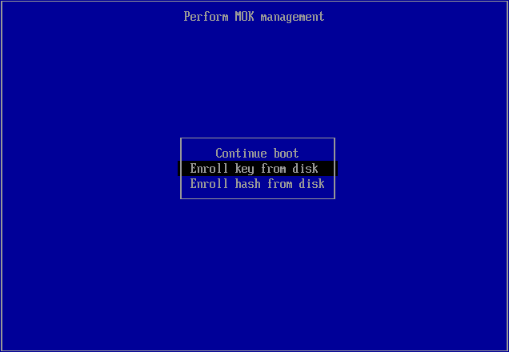 Example verification message: 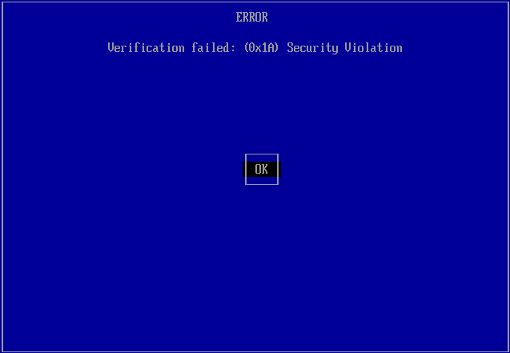 If this occurs, Secure Boot may need to be disabled in the system firmware (BIOS/UEFI) before booting the drive. Supported operating systems (Host): • Windows 10/11 (host system required to create the USB drive) Supported operating systems (on USB): • Windows XP, Windows Vista, Windows 7, Windows 8, Windows 10, Windows 11 • Ubuntu • Kubuntu • Xubuntu • Lubuntu • Linux Mint • Fedora • Debian • Kali Linux • Arch Linux • openSUSE • CentOS • Elementary OS • Zorin OS • Manjaro • Puppy Linux • SystemRescue • Hiren’s BootCD PE • Clonezilla • GParted Live • Ultimate Boot CD Supported languages: English Changes: v0.12.1 07-12-26 8d13889: Install Windows without disabling Secure Boot dc6f4b8: Set exfat as default filesystem (sorry Ubuntu) 88828af: Add info how to bypass the Microsoft account Note: This file has one hit on VirusTotal. We have confirmed this to be a false positive. The file is safe. This download is for the Windows version (very bottom of page). If you need the Linux version, download here. Click here to visit the author's website. Continue below for the main download link. |
||||||||
| Downloads | Views | Developer | Last Update | Version | Size | Type | Rank | |
| 896 | 4,337 | MexIT | Jul 13, 2026 - 12:44 | 0.12.1 | 5.3MB | ZIP |  , out of 10 Votes. , out of 10 Votes. |
|
| File Tags | ||||||||
| MultiOS USB MultiOS-USB multiboot usb multiboot installer usb boot utility iso boot tool usb os installer bootable usb creator system recovery usb multi boot tool | ||||||||
Click to Rate File Share it on Twitter → Tweet
|


