|

|
Processed through Paypal No account required. |








Buy our over-priced crap to help pay the bills.



|
|
Processed through Paypal No account required. |
| File - Download Kdenlive v26.04.3 | ||||||||
| Description | ||||||||
|
Always scroll to the bottom of the page for the main download link. We don't believe in fake/misleading download buttons and tricks. The link is always in the same place. Kdenlive v26.04.3 👉 Free and open-source non-linear video editor packed with powerful professional editing tools. Kdenlive is a free and open-source non-linear video editor from KDE designed for everything from simple video projects to complex multi-track productions. Built around the MLT Framework and FFmpeg, it can work directly with almost any audio and video format supported by FFmpeg without requiring clips to be converted first. Kdenlive combines flexible timeline editing, effects, transitions, titles, subtitles, color and audio analysis tools, proxy editing, multicam support, keyframing, automatic backups and extensive interface customization. 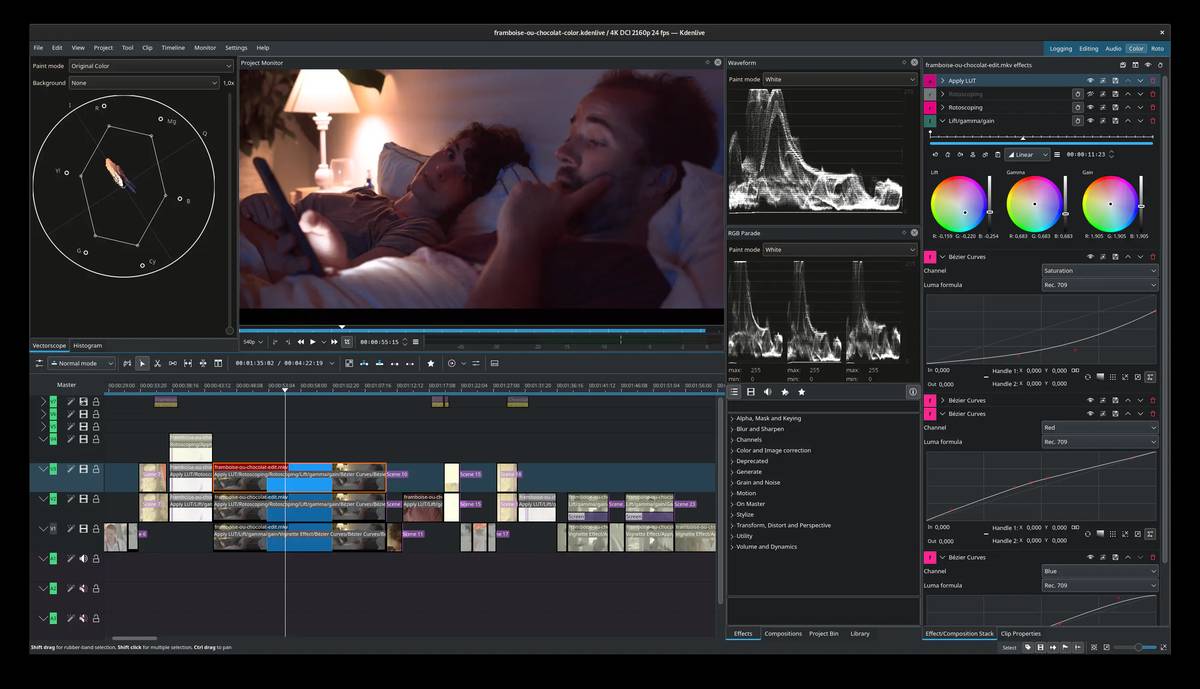 Features: • Unlimited video and audio tracks with individual hiding, muting, resizing, collapsing and custom track names • Direct editing of almost any audio or video format supported by FFmpeg without first converting or re-encoding clips • Industry-standard 3-point editing with clip In/Out points and insert or overwrite editing modes • Flexible non-linear timeline for arranging, trimming and combining video and audio clips • Customizable interface with movable and resizable panels to fit different editing workflows • Save different workspace layouts for logging, editing, color grading and audio editing • Customizable keyboard shortcuts for creating a personalized workflow or adapting from another editor • Built-in 2D Title Editor for titles, callouts, scrolling credits and other text • Title formatting includes installed system fonts, character and line spacing, colors, alignment and positioning • Typewriter title effect with character-by-character, word-by-word or line-by-line text display • Glaxnimate integration for creating and working with SVG vector animations • Dozens of video and audio effects supplied through MLT, avfilter, frei0r and LADSPA • Video effects include color correction, blur, sharpening, artistic effects and transformations • Audio effects and adjustment tools for improving and modifying sound • Keyframe support for changing most effect parameters over time • Linear, discrete and smooth-curve keyframe types • Multi-camera editing with simultaneous viewing of multiple camera angles or other footage • Quickly switch between multicam sources while adding selected footage to the timeline • Audio Meter for monitoring audio levels • Histogram, Waveform, Vectorscope and RGB Parade scopes for video and color analysis • Automatic proxy editing creates lower-resolution copies of source footage for smoother editing on less powerful computers • Final rendering automatically uses the original full-resolution source material instead of proxy files • Timeline preview rendering provides smooth playback of sections containing high-resolution footage or complex effects • Automatic project backups created periodically with older project versions retained for recovery • Automatic subtitle generation using VOSK and Whisper speech recognition • Whisper support for translating recognized speech to English and other languages • Online access to KDE Store content including effects, title templates, keyboard layouts and projects • Search for and download media from supported online resource repositories including Pexels, Pixabay, Freesound and Internet Movie Archive • Monitor mirroring allows a monitor view to be duplicated to another display while working in fullscreen • Animated previews help show how transitions will look before they are applied • Transitions dropped onto the timeline can automatically adjust their duration to the clips above and below • Change the playback speed of multiple selected clips at once • Import a clip directly through the timeline context menu and insert it at the selected position • Option to make timeline zoom follow the mouse position instead of the playhead • Audio thumbnail generation for sequences Supported operating systems: • Windows 10, Windows 11 • macOS 13 Ventura or higher, Intel and Apple Silicon • Linux, AppImage and Flatpak • BSD Supported languages: English, Albanian, Arabic, Assamese, Asturian, Azerbaijani, Basque, Bengali, Bosnian, Brazilian Portuguese, British English, Bulgarian, Burmese, Catalan, Catalan (Valencian), Simplified Chinese, Traditional Chinese, Croatian, Czech, Danish, Dutch, Esperanto, Estonian, Finnish, French, Frisian, Galician, German, Greek, Gujarati, Hebrew, Hindi, Hungarian, Icelandic, Indonesian, Interlingua, Interlingue, Irish, Italian, Japanese, Kabyle, Kannada, Kazakh, Khmer, Korean, Latvian, Lithuanian, Luganda, Macedonian, Maithili, Malay, Malayalam, Marathi, Northern Sami, Norwegian Bokmεl, Norwegian Nynorsk, Occitan, Persian, Polish, Portuguese, Punjabi, Romanian, Russian, Sanskrit, Scottish Gaelic, Serbian, Sinhala, Slovak, Slovenian, Spanish, Swahili, Swedish, Tajik, Tamil, Tatar, Telugu, Thai, Toki Pona, Turkish, Ukrainian, Uyghur, Vietnamese, Walloon Changes: v26.04.3 07-06-26 Compact summary of official release notes: • Fixed possible crash when exiting • Fixed crash when recording without an audio device • Fixed crash when undoing creation of a sequence from a selection • Fixed Rectangular Alpha Mask keyframes • Fixed moving a Rotoscoping shape after playing the monitor • Fixed effects containing multiple color pickers • Fixed video stream enforcement with multi-stream video clips • Fixed clips with mixes remaining on the wrong sub-playlist after cutting • Fixed timeline playhead moving out of view during playback • Fixed audio thumbnails attempting to save to an invalid empty path • Fixed history not being cleared when clearing and closing the splash • Improved security by preventing unwanted command execution with MLT versions below 7.40 This is a compact summary. Click here for the complete official changelog. This download is for the Windows Standalone version (very bottom of page). All other download assets are below: Other Windows: kdenlive-26.04.3.exe (Installer) macOS: kdenlive-26.04.3-x86_64.dmg (Intel) kdenlive-26.04.3-arm64.dmg (Apple Silicone) Linux: kdenlive-26.04.3-x86_64.AppImage https://flathub.org/en/apps/org.kde.kdenlive Click here to visit the author's website. Continue below for the main download link. |
||||||||
| Downloads | Views | Developer | Last Update | Version | Size | Type | Rank | |
| 5,373 | 14,852 | Kdenlive Team | Aug 20, 2026 - 11:03 | 26.04.3 | 128.4MB | EXE |  , out of 87 Votes. , out of 87 Votes. |
|
| File Tags | ||||||||
| Kdenlive video transitions effects timeline nonlinear video editing video multimedia editing FFmpeg MLT video production editing subtitles keyframes rendering proxy open-source cross-platform audio | ||||||||
Click to Rate File Share it on Twitter → Tweet
|


