|

|
Processed through Paypal No account required. |








Buy our over-priced crap to help pay the bills.



|
|
Processed through Paypal No account required. |
| Files | ||||
| File Name | Rating | Downloads | ||
 |
Aegisub v3.4.2 Aegisub v3.4.2 👉 Advanced cross-platform subtitle creation, timing, and editing software. Aegisub is a free, open-source subtitle editor designed for creating, modifying, timing, and styling subtitles for video content. It provides powerful tools for subtitle synchronization, visual typesetting, karaoke effects, and subtitle formatting while offering a built-in real-time video preview. Aegisub is widely used by subtitle creators, translators, fansub groups, and video editors who need precise control over subtitle appearance and timing. The program supports Advanced SubStation Alpha (ASS) subtitles and can import and export multiple subtitle formats. Its audio waveform display, timing tools, automation scripting support, and advanced styling features make it suitable for both beginners and professional subtitle authors. Features: • Create and edit subtitle files with precise timing controls • Advanced SubStation Alpha (ASS) subtitle support • Built-in real-time video preview window • Audio waveform and spectrogram displays for accurate synchronization • Powerful subtitle styling and typesetting tools • Karaoke timing and visual effects creation • Visual positioning and subtitle placement tools • Multiple subtitle format import and export support • Automation support through Lua and MoonScript scripting • Spell checking and text editing tools • Frame-by-frame subtitle adjustment capabilities • Video, audio, and subtitle synchronization tools • Cross-platform open-source design • Unicode and multilingual subtitle support Supported operating systems: • Windows 10/11 • macOS 10.15 and newer • Linux (Most major distributions via package manager.) Supported languages: English, Czech, German, Spanish, Finnish, French, Hungarian, Italian, Japanese, Catalan, Brazilian Portuguese, Traditional Chinese, Simplified Chinese, Russian, Bulgarian, Serbian, Greek, Turkish Changes: v3.4.2 01-12-25 Internationalization Fix more locale-dependent path issues Discard MRU entries with invalid encodings instead of crashing Linux Work around wxGTK crash when clicking “Show Original” Round instead of truncating in float audio converter to pass 32-bit tests Stuff Fix error “ERROR in finalizer: wrong number of arguments for function ... |
 |
659 | May 31, 2026 Rodrigo Braz Monteiro & contributers 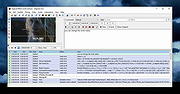 |
 |
Drift v0.1.1 Drift v0.1.1 👉 A free, open-source video editor for creating polished videos without subscriptions or watermarks. Drift is a beginner-friendly desktop video editor that combines a straightforward workflow with a full collection of creative tools. Import video clips, photographs and music, then arrange everything on a multi-track timeline with tools for trimming, splitting, snapping and ripple editing. Add effects, transitions, titles, shapes, stickers and emoji without leaving the editor. Drift can also generate editable captions from speech, isolate subjects, create masks, remove green-screen backgrounds, adjust playback speed and clean up noisy audio. The preview and export systems use the same compositor, helping the completed video match what you saw while editing. Drift is completely free and open source with no account, subscription, telemetry or watermark. Optional fonts, stickers, effects and speech-recognition models can be installed through the built-in Addon Manager as needed. Features: • Multi-track timeline for video, audio, text and shapes • Trim, split, snap and ripple editing tools • Mute or hide individual timeline tracks • Full undo and redo support • GPU-powered video effects • Adjustable transitions between overlapping clips • Reusable effect and appearance templates • Customizable titles with fonts, colors, outlines, shadows and alignment • Stickers, emoji and optional content packs • Speech-to-text caption generation • Edit caption wording and timing directly on the timeline • Subject cutout and masking tools • Green-screen background removal • Playback speed adjustment and reversing • Custom speed ramps, fades and beat-based animation • Audio mixing and effect chains • Background-noise cleanup • Project bundles that include associated media • Optional downloadable fonts, effects, stickers and speech models • Export quality and bitrate controls • H.264, H.265, AV1, ProRes and additional export formats • Preview and export use the same compositor • No account, subscription, telemetry or watermark Supported operating systems: • Windows • Linux • macOS, build from source only Supported languages: English Changes: v0.1.1 07-31-26 A small fix-up release on top of the first public version. Curves in the keyframe editor are now ... |
|
329 | Aug 03, 2026 CutWire Studios 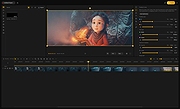 |
|
FotoSketcher v4.50 FotoSketcher Studio v4.50 👉 Turn photos into paintings, sketches, and artistic effects with a free image editing tool. FotoSketcher Studio is a free creative image editor that transforms photos into artwork using artistic effects such as pencil sketches, painting styles, drawing effects, and photo filters. It also includes tools to enhance original images, add frames and text, batch process multiple images, manually retouch selected areas, combine multiple filters, and create custom effects with scripts. It is free to use, including for commercial use. Features: • Turn photos into paintings, sketches, drawings, and photo effects • Includes 14 artistic effects spanning pencil, drawing, painting, and photo filter styles • Batch processing for applying effects to multiple images at once • Manual brush for selectively applying effects to chosen areas of an image • Can improve original photos with contrast, sharpening, luminosity, saturation, and other adjustments • Lets you add simple or realistic frames and text to images • Can combine multiple filters for mixed artistic results • Supports custom effect creation through scripts • Includes Vintage Sepia and Retro Film photo effects in v4.10 • Automatic system language detection with a keyboard shortcut to change interface language • Manual brush panning with CTRL + Left Mouse Button drag • Digitally signed Windows and macOS releases Supported operating systems: • Windows 10, Windows 11 • macOS (Intel, Apple Silicon) Supported languages: • Chinese, German, English, Spanish, French, Italian, Japanese, Korean, Dutch, Polish, Portuguese Changes: v4.50 07-27-26 This version brings a new painting effect, an image watermark tool, full keyboard navigation and a rather long list of improvements and fixes. New Gouache Painting effect 🎨 A new Gouache Painting effect joins the Painting category. Gouache sits somewhere between watercolour and oil paint: thick, opaque, with a matte finish and visible brushstrokes. Watermark and logo tool The "Add text" window has been expanded into "Add text/watermark". You can now load any image file (PNG with transparency, JPG, or other formats) ... |
|
10,835 | Aug 12, 2026 David Thoiron 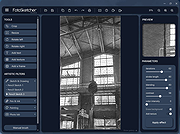 |
|
Kdenlive v26.04.3 Kdenlive v26.04.3 👉 Free and open-source non-linear video editor packed with powerful professional editing tools. Kdenlive is a free and open-source non-linear video editor from KDE designed for everything from simple video projects to complex multi-track productions. Built around the MLT Framework and FFmpeg, it can work directly with almost any audio and video format supported by FFmpeg without requiring clips to be converted first. Kdenlive combines flexible timeline editing, effects, transitions, titles, subtitles, color and audio analysis tools, proxy editing, multicam support, keyframing, automatic backups and extensive interface customization. Features: • Unlimited video and audio tracks with individual hiding, muting, resizing, collapsing and custom track names • Direct editing of almost any audio or video format supported by FFmpeg without first converting or re-encoding clips • Industry-standard 3-point editing with clip In/Out points and insert or overwrite editing modes • Flexible non-linear timeline for arranging, trimming and combining video and audio clips • Customizable interface with movable and resizable panels to fit different editing workflows • Save different workspace layouts for logging, editing, color grading and audio editing • Customizable keyboard shortcuts for creating a personalized workflow or adapting from another editor • Built-in 2D Title Editor for titles, callouts, scrolling credits and other text • Title formatting includes installed system fonts, character and line spacing, colors, alignment and positioning • Typewriter title effect with character-by-character, word-by-word or line-by-line text display • Glaxnimate integration for creating and working with SVG vector animations • Dozens of video and audio effects supplied through MLT, avfilter, frei0r and LADSPA • Video effects include color correction, blur, sharpening, artistic effects and transformations • Audio effects and adjustment tools for improving and modifying sound • Keyframe support for changing most effect parameters over time • Linear, discrete and smooth-curve keyframe types • Multi-camera editing with simultaneous viewing of multiple camera angles or other footage • Quickly switch between multicam sources while adding selected ... |
|
5,373 | Aug 20, 2026 Kdenlive Team 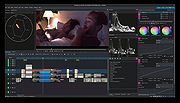 |
|
ocenaudio v3.20.4 ocenaudio v3.20.4 👉 Fast, cross-platform audio editor for recording, editing, analyzing, and exporting audio files. ocenaudio is a cross-platform, easy to use, fast, and functional audio editor designed for people who need to edit and analyze audio files without complications. It supports audio editing and analysis across major desktop platforms, offers real-time effect previews, multi-selection editing, and tools for working with audio in a responsive interface. Features: • Cross-platform audio editor for Windows, macOS, and Linux • Multi-selection editing for working on different parts of an audio file at the same time • Real-time effect preview to hear changes while adjusting controls • Support for VST effects for expanded audio processing • Spectral analysis and waveform editing tools • Responsive interface that keeps working while opening, saving, or applying effects • Recording, editing, and exporting tools for common audio workflows • Annotation tracks, region editing, channel routing, and trim/split tools in v3.18.0 Supported operating systems: • Windows 10, Windows 11 • macOS 13.3 or higher • macOS 10.14 to 14 (legacy build) • Debian 11, Debian 12, Debian 13 • Ubuntu 20.04, Ubuntu 22.04, Ubuntu 24.04 • Fedora 39, Fedora 40 • Rocky Linux 9.3 • openSUSE Leap 15 • Arch Linux Supported languages: English, Portuguese, French, German, Spanish, Italian, Japanese, Hungarian, Simplified Chinese Changes: v3.20.4 08-13-26 Adds copy, paste and drag of audio directly between two ocenaudio windows Improves VST plugin support on Linux: VST3 editors now open correctly, standard system folders are recognized and JACK is loaded on demand, including through PipeWire Fixes crashes and noise caused by VST and VST3 plugins Fixes plugins that changed the system decimal separator, corrupting parameters and presets Fixes crashes with ASIO devices on Windows when disconnecting the device during recording Other bug fixes and improvements This download is for the Windows 64Bit portable version (very bottom of page). All other download assets are below: Other Windows: ocenaudio_windows64_3.20.4.exe macOS: ocenaudio_universal_3.20.4.dmg ocenaudio_universal_legacy_3.20.4.dmg Linux: ocenaudio_debian13_3.20.4.deb ocenaudio_debian12_3.20.4.deb ocenaudio_debian11_3.20.4.deb ocenaudio_ubuntu24.04_3.20.4.deb ocenaudio_ubuntu22.04_3.20.4.deb ocenaudio_ubuntu20.04_3.20.4.deb ocenaudio_fedora40_3.20.4.rpm ocenaudio_fedora39_3.20.4.rpm ocenaudio_archlinux_3.20.4.pkg.tar.zst ocenaudio_opensuse15_3.20.4.rpm ocenaudio_rockylinux9.3_3.20.4.rpm ocenaudio_3.20.4.AppImage Click here to visit the author's website. |
|
7,141 | Aug 13, 2026 ocenaudio Development Team 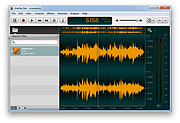 |
|
PolyHostInterface v3.1.1 PolyHostInterface v3.1.1 👉 A lightweight, portable Windows host for loading, chaining and controlling VST2 and VST3 audio plugins. PolyHostInterface is a standalone and VST3 plugin host designed for musicians, synthesizer programmers and audio users who want a compact way to load multiple instruments and effects without the overhead of a full DAW. Plugins are organized in tabs, with synths operating in parallel and effects arranged in a serial processing chain. The routing view provides an overview of each loaded plugin and lets you reorder, bypass, mute, solo and select individual tabs. PolyHostInterface can also operate as a VST3 plugin inside another host. Its 128 host-visible macros can be mapped to parameters of hosted plugins, allowing those parameters to be automated from a DAW. A built-in MIDI Monitor displays notes, CC messages, pitch bend, aftertouch, system messages and other incoming MIDI data, with filtering, copy and export capabilities. A distinctive feature is Pointer Control, which lets a MIDI controller manipulate the mouse pointer over a plugin interface. MIDI controls can move the pointer horizontally and vertically and adjust the parameter beneath it using scrolling or dragging. Editable Pointer Maps provide reusable jump points for individual plugins, including multiple maps for plugins with different skins, pages or layouts. The standalone application can record audio to WAV files or MIDI to MID files. Presets can store plugin configurations, and a missing-plugin repair function helps locate moved plugins when loading an existing preset. PolyHostInterface is fully portable, keeping its settings alongside the program instead of using AppData or the Windows Registry. Features: • Hosts multiple VST2 and VST3 plugins in a tabbed interface • Available as a standalone Windows application and a VST3 plugin for use inside other hosts • 64-bit VST2 and VST3 plugin support • Separate 32-bit standalone version supports 32-bit VST2/VST3 plugins • Routing view shows plugin order, synth/effect type, bypass ... |
|
91 | Oct 14, 2026 sl2365 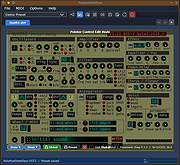 |
|
Windows Malware Effects Remediation Tool v2.0 Windows Malware Effects Remediation Tool v2.0 A portable set of tools to helps users remediate the effects of malware. Features Re-enable Windows Command Prompt Re-enable Windows Task Manager Re-enable Registry Editor Re-enable User Account Control Change .exe default icon Change .txt default icon Reset the Userinit key Reset the Shell key Automatically Repair (WIP) Stable 2.0 8-12-21 Added Automatic Repair, which lets the app scan for things to fix, and will help repair them for you. Added dark mode support for the critical process property stripper App will now use Segoe UI Variable on Windows 11. Added ability to remove keyboard restrictions (Scancode Map) Click here to visit the author's website. |
|
3,624 | Aug 12, 2021 Orange Group Tech 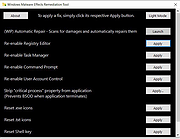 |
| Showing rows 1 to 7 of 7 | Showing Page 1 of 1 | 1 |
OlderGeeks.com Copyright (c) 2026
