|

|
Processed through Paypal No account required. |








Buy our over-priced crap to help pay the bills.



|
|
Processed through Paypal No account required. |
| Files | ||||
| File Name | Rating | Downloads | ||
 |
Drift v0.1.1 Drift v0.1.1 👉 A free, open-source video editor for creating polished videos without subscriptions or watermarks. Drift is a beginner-friendly desktop video editor that combines a straightforward workflow with a full collection of creative tools. Import video clips, photographs and music, then arrange everything on a multi-track timeline with tools for trimming, splitting, snapping and ripple editing. Add effects, transitions, titles, shapes, stickers and emoji without leaving the editor. Drift can also generate editable captions from speech, isolate subjects, create masks, remove green-screen backgrounds, adjust playback speed and clean up noisy audio. The preview and export systems use the same compositor, helping the completed video match what you saw while editing. Drift is completely free and open source with no account, subscription, telemetry or watermark. Optional fonts, stickers, effects and speech-recognition models can be installed through the built-in Addon Manager as needed. Features: • Multi-track timeline for video, audio, text and shapes • Trim, split, snap and ripple editing tools • Mute or hide individual timeline tracks • Full undo and redo support • GPU-powered video effects • Adjustable transitions between overlapping clips • Reusable effect and appearance templates • Customizable titles with fonts, colors, outlines, shadows and alignment • Stickers, emoji and optional content packs • Speech-to-text caption generation • Edit caption wording and timing directly on the timeline • Subject cutout and masking tools • Green-screen background removal • Playback speed adjustment and reversing • Custom speed ramps, fades and beat-based animation • Audio mixing and effect chains • Background-noise cleanup • Project bundles that include associated media • Optional downloadable fonts, effects, stickers and speech models • Export quality and bitrate controls • H.264, H.265, AV1, ProRes and additional export formats • Preview and export use the same compositor • No account, subscription, telemetry or watermark Supported operating systems: • Windows • Linux • macOS, build from source only Supported languages: English Changes: v0.1.1 07-31-26 A small fix-up release on top of the first public version. Curves in the keyframe editor are now ... |
 |
346 | Aug 03, 2026 CutWire Studios 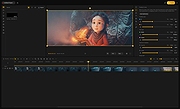 |
|
FleshNote v1.2.0 FleshNote v1.2.0 👉 A minimalist writing and worldbuilding app for novelists who want to finish their draft. FleshNote is an advanced writing tool built for novelists and worldbuilders, combining a manuscript editor with planning tools like timelines, entity tracking, plot mapping, export options, and specialized focus modes designed to keep writers moving forward. Features: • Smart Janitor assistant for passive local analysis of spelling, passive voice, weak adverbs, and show-don't-tell patterns • Hardcore sprint modes including Hemingway Mode, Zen Mode, Kamikaze Mode, and Fog Mode • Entity inspector for tracking character knowledge, goals, and narrative deception • Timeline and plot planner for mapping story beats, arcs, and foreshadowing • World history timeline for organizing backstory events before the main story begins • Unified manager for characters, locations, twists, and quick notes with inline tagging • Export support for PDF, DOCX, and EPUB output • Sketchboards, fictional calendars, relationship tracking, annotations, footnotes, writing prompts, achievements, and other quality-of-life tools Supported operating systems: • Windows, Linux Supported languages: English Changes: v1.2.0 04-26-26 New Features Location Name Generator Naming locations is hard. That's why i built this tool that will attempt to give you a decent starting point based on your answers Context-Aware Naming: The generator looks at your location's geography, history, and founder to propose names that feel earned. A coastal village might become Morskie-klify, while a site of an ancient magic disaster might evolve into something more cryptic. Cultural Roots: Full support for English, Polish and Hungarian naming traditions. The system understands complex rules like adjective gender matching (Stary Las vs Stara Gσra) and correct grammatical possessives, so your world feels linguistically consistent. Evolutionary "Drift": Use the "Phonetic Drift" slider to simulate the passing of centuries. At higher settings, names start to slur and shift, mimicking how real-world languages evolve over generations. Character Name Generator Creating names for specific genres is now ... |
|
804 | Aug 03, 2026 ArtFacility 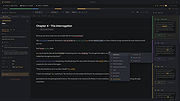 |
|
Kdenlive v26.04.3 Kdenlive v26.04.3 👉 Free and open-source non-linear video editor packed with powerful professional editing tools. Kdenlive is a free and open-source non-linear video editor from KDE designed for everything from simple video projects to complex multi-track productions. Built around the MLT Framework and FFmpeg, it can work directly with almost any audio and video format supported by FFmpeg without requiring clips to be converted first. Kdenlive combines flexible timeline editing, effects, transitions, titles, subtitles, color and audio analysis tools, proxy editing, multicam support, keyframing, automatic backups and extensive interface customization. Features: • Unlimited video and audio tracks with individual hiding, muting, resizing, collapsing and custom track names • Direct editing of almost any audio or video format supported by FFmpeg without first converting or re-encoding clips • Industry-standard 3-point editing with clip In/Out points and insert or overwrite editing modes • Flexible non-linear timeline for arranging, trimming and combining video and audio clips • Customizable interface with movable and resizable panels to fit different editing workflows • Save different workspace layouts for logging, editing, color grading and audio editing • Customizable keyboard shortcuts for creating a personalized workflow or adapting from another editor • Built-in 2D Title Editor for titles, callouts, scrolling credits and other text • Title formatting includes installed system fonts, character and line spacing, colors, alignment and positioning • Typewriter title effect with character-by-character, word-by-word or line-by-line text display • Glaxnimate integration for creating and working with SVG vector animations • Dozens of video and audio effects supplied through MLT, avfilter, frei0r and LADSPA • Video effects include color correction, blur, sharpening, artistic effects and transformations • Audio effects and adjustment tools for improving and modifying sound • Keyframe support for changing most effect parameters over time • Linear, discrete and smooth-curve keyframe types • Multi-camera editing with simultaneous viewing of multiple camera angles or other footage • Quickly switch between multicam sources while adding selected ... |
|
5,386 | Aug 20, 2026 Kdenlive Team 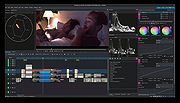 |
|
WannaCut v0.2.0 WannaCut v0.2.0 👉 A lightweight, open source video editor for fast, simple video cutting and editing. WannaCut is a lightweight, open source desktop video editor designed to make trimming, cutting, and assembling videos quick and straightforward. It focuses on an intuitive editing experience that lets you import video clips, arrange them on a timeline, trim unwanted sections, and export the finished result without the complexity of professional editing suites. Built with a modern interface, WannaCut is suitable for creating short videos, social media clips, tutorials, and other basic editing projects while remaining fast and easy to learn. Features: • Lightweight and open source video editor. • Simple timeline-based editing. • Trim and cut video clips with precision. • Rearrange clips by drag-and-drop. • Import multiple video files into a project. • Export completed videos. • Clean, modern user interface. • Designed for quick editing without unnecessary complexity. • Cross-platform application. Supported operating systems: • Windows 10, Windows 11 • macOS • Linux Supported languages: • English Changes: v0.2.0 06-18-26 Modern and fluid UI redesign Different colors per clip for easier navigation Split tool precision fix Move playhead in decimals of seconds Seek to next/previous cut Speed system for clips with keyframes This download is for the Windows 64bit version (very bottom of page). All other download assets are below: Debian/Ubuntu: WannaCut_0.2.0_amd64.deb Fedora/RPM: WannaCut-0.2.0-1.x86_64.rpm Arch Linux: wanna-cut-0.2.0-1-x86_64.pkg.tar.zst Click here to visit the author's website. |
|
488 | Jun 19, 2026 Gabriel Martins 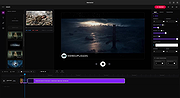 |
| Showing rows 1 to 4 of 4 | Showing Page 1 of 1 | 1 |
OlderGeeks.com Copyright (c) 2026
