|

|
Processed through Paypal No account required. |








Buy our over-priced crap to help pay the bills.



|
|
Processed through Paypal No account required. |
| File - Download LocalSend v1.18.2 | ||||||||
| Description | ||||||||
|
Always scroll to the bottom of the page for the main download link. We don't believe in fake/misleading download buttons and tricks. The link is always in the same place. LocalSend v1.18.2 👉 Fast, private file sharing between nearby devices without the cloud. LocalSend is a free and open-source, cross-platform application for securely transferring files, folders, photos, videos, documents, text and other data between devices connected to the same local network. It provides an AirDrop-style experience that works across Windows, macOS, Linux, Android and iOS without requiring an account, an Internet connection or an external server. Devices running LocalSend automatically discover one another on the local network, allowing you to select what you want to send, choose a nearby device and begin the transfer. Data stays on your local network instead of being uploaded to a cloud service, and transfers are protected using HTTPS encryption. LocalSend can transfer any file type and is designed to take advantage of the speed of your local Wi-Fi or wired network without artificial bandwidth limits. It can also send text messages and links between devices, making it useful for quickly moving clipboard-style information from a phone to a computer or between computers. Files are saved to the receiving device's Downloads folder by default, although the destination can be changed in LocalSend's settings. Frequently used devices can be marked as favorites, and LocalSend can be configured to automatically accept transfers from trusted favorite devices. The application also includes a Share via Link feature for making selected files available through a web browser on the local network. Recent versions can receive files through links as well. No account or login is required, and LocalSend contains no advertising or tracking. 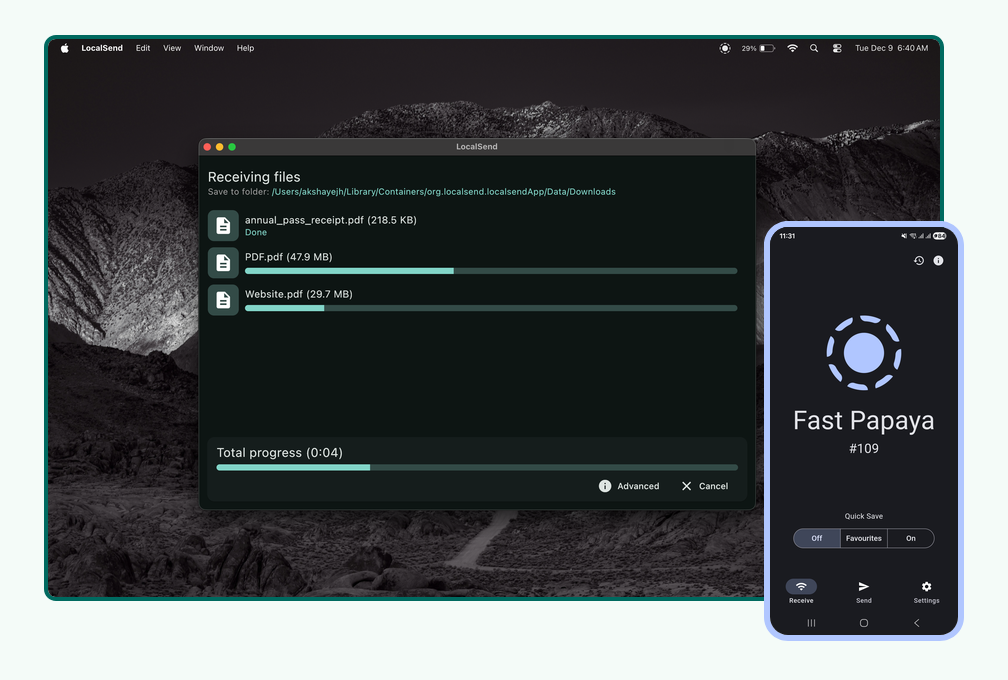 Features: • Transfers files directly between nearby devices over the local network • Works across Windows, macOS, Linux, Android and iOS • No Internet connection, cloud storage or external server required • No account, registration or login required • Automatic discovery of nearby LocalSend devices • Send individual files, multiple files and folders • Supports photos, videos, documents and other file types • Send text and links between devices • HTTPS-encrypted communication and file transfers • Optional PIN verification for additional transfer security • Uses the available speed of your local Wi-Fi or wired network • Send to multiple recipients • Transfer history for previously received items • Favorite frequently used devices • Automatically accept files from favorite devices • Share files through a link accessible from a web browser • Receive files through links • IPv6 support • File checksum verification enabled by default • Improved performance when transferring large numbers of files • Background file transfers on Android • Android Quick Settings tile for quickly launching LocalSend • Windows Share integration • Command-line interface introduced with v1.18.0 • Desktop command-line support for starting text shares • Customizable color theme • Configurable download location • Portable mode available on Windows by placing a settings.json file beside the executable • Completely free and open source • No advertising or trackers Supported operating systems: • Windows 10, Windows 11 • macOS 11 Big Sur or higher • Linux • Android 5.0 or higher • iOS 12.0 or higher Supported languages: English, Belarusian, Bengali, Danish, Dutch, Finnish, French, German, Indonesian, Irish, Italian, Japanese, Khmer, Korean, Malay, Persian, Filipino, Polish, Portuguese (Brazil), Romanian, Russian, Serbian, Slovak, Spanish, Thai, Turkish, Ukrainian, Vietnamese, Chinese, Armenian Changes: v1.18.2 08-21-26 feat: drag and drop files into the "Receive via link" browser page feat(desktop): allow customizing the web share pages by placing HTML files in a web folder next to the executable feat(cli): add version info to the Windows executable feat(linux): set actual version in the AppImage security: do not follow HTTP redirects sent by peers fix: restore compatibility with 1.17.0 and earlier versions on missing multicast networks fix: devices running 1.17.0 and earlier could not add 1.18.0+ device as favorite fix: ignore proxies, fixes "TLS info not found" when a system proxy (e.g. Shadowrocket) is enabled fix: automatically restart the HTTP / multicast server when it dies or when the app resumes fix: drag and drop with a mix of folders and files fix: during transfer, add bottom padding when Advanced is open (@Chethan616) fix: do not crash at startup when the executable path cannot be resolved (@Shlomo116) fix(android): ignore unknown or invalid file modification times when reading files i18n: add Armenian 👉 This download is for the Windows portable version. All other download assets are below: Other Windows: LocalSend-1.18.2-windows-arm-64.zip LocalSend-1.18.2-windows-x86-64.exe macOS: LocalSend-1.18.2.dmg Apple App Store Linux: LocalSend-1.18.2-linux-x86-64.AppImage LocalSend-1.18.2-linux-x86-64.deb LocalSend-1.18.2-linux-arm-64.deb LocalSend-1.18.2-linux-x86-64.tar.gz LocalSend-1.18.2-linux-arm-64.tar.gz Android: LocalSend-1.18.2-android-google-play.apk LocalSend-1.18.2-android-arm64v8.apk LocalSend-1.18.2-android-arm32v7.apk LocalSend-1.18.2-android-x64.apk Google Play F-Droid iOS: Apple App Store Click here to visit the author's website. Continue below for the main download link. |
||||||||
| Downloads | Views | Developer | Last Update | Version | Size | Type | Rank | |
| 2,120 | 9,983 | LocalSend | Sep 29, 2026 - 11:49 | 1.18.2 | 24.9MB | ZIP |  , out of 43 Votes. , out of 43 Votes. |
|
| File Tags | ||||||||
| LocalSend transfer file sharing wireless network AirDrop privacy encrypted offline cross-platform Android Windows macOS Linux iOS open-source | ||||||||
Click to Rate File Share it on Twitter → Tweet
|


