|

|
Processed through Paypal No account required. |








Buy our over-priced crap to help pay the bills.



|
|
Processed through Paypal No account required. |
| Files | ||||
| File Name | Rating | Downloads | ||
 |
AOMEI Partition Assistant Standard v10.4.2 AOMEI Partition Assistant Standard v10.4.2 Free disk partition software for home and personal use. Manage and Redistribute Partition Flexibly Easily and flexibly adjust partition size, change partition file systems, delete partition data, or transfer partition data to another location. • Resize partition to make it bigger or smaller than now by reallocating disk space. • Move partition to make unallocated space adjacent to the partition you wish to extend. • Merge two partitions/unallocated space to another partition without data loss. • Delete or wipe partition to erase all data on the selected partition for privacy protection. • Clone partition to another partition or disk for easy and quick data transfer. • Convert file systems between NTFS and FAT32 without reformatting the partition. • Format partition to different file systems like NTFS/FAT32/exFAT/Ext4/Ext3/Ext2. Organize and Optimize Hard Disk Effortlessly AOMEI Partition Assistant Standard allows you to realize disk upgrade/replacement, partition style conversion, remove junk files and other disk managements without any difficulties. • Clone hard disk to another smaller or larger disk via two different clone methods. • Convert data disk from MBR to GPT, or GPT to MBR style without deleting partitions or any data loss. You can upgrade to Windows 11 easily and safely! • Wipe an entire hard disk completely and safely to prevent private information leakage. • Efficiently clean up junk files from computer to optimize OS and speed up computer. • Rebuild damaged MBR on the hard disk to solve some severe Windows boot issues. • Check the hard disk for bad sectors regularly to prevent potential ... |
 |
1,452 | Aug 21, 2024 AOMEI 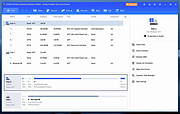 |
 |
DiskGenius Free v6.2.0.1829 DiskGenius Free v6.2.0.1829 👉 Free partition management, data recovery, backup, and disk utility software. DiskGenius Free Edition is an all-in-one disk utility designed to help users manage partitions, recover lost files, back up important data, and maintain storage devices. The free version provides a powerful set of tools for partition creation, formatting, resizing, cloning, and file recovery while remaining suitable for home users, technicians, and advanced PC enthusiasts. DiskGenius Free Edition supports hard drives, SSDs, USB flash drives, memory cards, and virtual disks. It can recover deleted files, restore lost partitions, inspect SMART information, clone disks and partitions, securely erase drives, and convert partition tables between MBR and GPT. The free version also includes hexadecimal disk editing tools, bad sector checking, and support for numerous file systems. Features: • Create, delete, format, resize, split, and merge partitions • Recover deleted files from HDDs, SSDs, USB drives, and memory cards • Recover lost or damaged partitions • Clone disks and partitions • Backup and restore partition tables • Convert disks between MBR and GPT formats • Check and repair bad sectors • View and monitor SMART disk information • Securely erase files and partitions • Supports NTFS, FAT32, exFAT, EXT2, EXT3, and EXT4 file systems • Browse and edit files directly from partitions • Includes a hexadecimal disk editor • Supports virtual disk files including VMware, VirtualBox, and Hyper-V formats • Create bootable USB drives for disk recovery tasks • Analyze disk usage and partition structure Supported operating systems: • Windows XP, Windows Vista, Windows 7, Windows 8, Windows 8.1, Windows 10, Windows 11, Windows Server 2003, Windows Server 2008, Windows Server 2012, Windows Server 2016, Windows Server 2019, Windows Server 2022 Supported languages: English, German, French, Spanish, Italian, Portuguese, Russian, Japanese, Korean, Chinese Traditional, Chinese Simplified, Turkish, Czech Changes: v6.2.0.1829 08-04-26 New Add the "Disk Speed Test" feature. Add the "Windows Boot Repair and Conversion" feature. ... |
|
16,825 | Aug 04, 2026 Eassos Ltd. 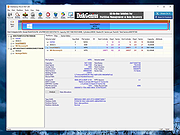 |
 |
Foxclone v55 Foxclone v55 👉 Simple Linux-based backup, restore and drive cloning tool. Foxclone is a Linux based image backup, restore and clone tool using a simple point and click interface. It takes images of partitions on your HDD or SSD and stores them for later restoration, with image files compressed to save space. Features: • Backup and restore Windows and Linux filesystems, such as NTFS and ext4 • Supports GPT and MBR/legacy/MSDOS partition tables • Automatically backs up the partition table and bootloader when a backup is taken • Clone directly from drive to drive • Clone to a drive from a full backup • Simple point and click interface • Compressed image files help save storage space • Bootable ISO designed to run from USB Supported operating systems: • Bootable 64-bit Linux live ISO • Backs up and restores Windows and Linux filesystems Supported languages: English Changes: v55 01-07-26 Fixes a bug specific to the noble version of the ISO where a clone drive-to-drive completes but the finish message shows failed. Burning the ISO to a USB Stick: To use Foxclone, you must first create a bootable USB flash drive from the downloaded ISO image. We recommend the following free utilities: • Rufus (Windows) – A fast and easy-to-use utility for creating bootable USB drives from ISO images. • balenaEtcher (Windows, Linux, macOS) – A simple cross-platform tool that writes ISO images to USB drives with minimal configuration. • Ventoy (Windows, Linux) – Allows multiple ISO files to be stored on a single USB drive. Simply copy the Foxclone ISO to the Ventoy USB drive and boot from it. After creating the USB drive, restart your computer, enter the boot menu or BIOS/UEFI setup, and select the USB device as the boot source. Foxclone will then load into its graphical interface, where you can create backups, restore images, or clone drives. This download is for the Linux-based ISO version (very bottom of page). ... |
|
486 | Jun 15, 2026 Andy Hardwick, Larry Hale  |
|
Hasleo Disk Clone v5.8.2.1 Hasleo Disk Clone v5.8.2.1 👉 Free Windows disk, partition, and system cloning software. Hasleo Disk Clone is a free and all-in-one disk cloning software for Windows that can migrate Windows to another disk, clone an entire disk, or clone a partition to another location quickly and efficiently. Features: • Migrate Windows to another disk without reinstalling Windows, apps, drivers, or user settings • Clone an entire disk to another disk • Clone individual partitions while keeping data intact • Resize and move destination partitions before cloning • Convert MBR to GPT or GPT to MBR during cloning • Sector-by-sector cloning support • Intelligent sector copy technology for faster cloning • Delta Clone support in paid editions • Rapid exFAT and ReFS cloning support • Multiple disk alignment modes • Native support for Windows X86, X64, and ARM64 • Create bootable WinPE media for cloning operations • Supports HDD, SSD, external HDD, Thunderbolt, dynamic disk, and more • Supports FAT12, FAT16, FAT32, NTFS, exFAT, ReFS, and other file systems in sector-by-sector mode Supported operating systems: • Windows Vista, Windows 7, Windows 8, Windows 8.1, Windows 10, Windows 11, Windows Server 2008 or later Supported languages: English, Arabic, Bulgarian, Chinese Traditional, Czech, Dutch, French, German, Hungarian, Italian, Japanese, Korean, Polish, Portuguese Brazilian, Russian, Simplified Chinese, Slovak, Slovenian, Spanish, Swedish, Turkish, Ukrainian Changes: v5.8.2.1 06-17-26 • Fixed an issue that caused disk enumeration to fail • Fixed an issue where WinPE created under Windows ARM64 26H1 did not work properly Click here to visit the author's website. |
|
4,652 | Sep 17, 2026 Hasleo Software 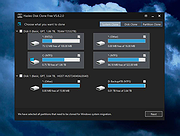 |
|
Macrorit Disk Partition Wiper 1.6.0 Macrorit Disk Partition Wiper 1.6.0 If you want to clean up your data from your hard disk drive, formatting or deleting the hard drive is not enough to prevent your personal information or company documents from recovering. What you need is a professional disk wiper to completely and permanently erase data on the hard drive or partition. Macrorit Disk Partition Wiper is a bran-new free disk wiper software tool which can help you wipe hard disk drive inside and out. With powerful algorithms and comprehensive wipe ability, Macrorit Disk Partition Wiper provides the easy-to-follow solution for permanently destroy data which has no possibility to recover. This easy-to-use hard drive eraser is compatible with all Windows operating systems. As a 100% free disk wiper, Macrorit Disk Partition Wiper is also 100% Free of malware, spyware and adware. |
 |
9,673 | Feb 21, 2014 Macrorit Tech Development Co., Ltd. |
|
Macrorit Partition Expert Free Edition v8.4.0 Macrorit Partition Expert Free Edition v8.4.0 A free Partition Magic alternative, Macrorit Disk Partition Expert Home Edition is powerful free partition software allows you to extend partition (especially for system partition), settle low disk space problem, manage disk space easily on MBR and GUID partition table (GPT) disk. Besides the basic disk partitioning ability, it is also the only one free disk partition management software possesses advanced technology of power-off protection and data disaster recovery, this means you never worry about data loss any longer while executing the partition operations, you should just let your hair down and relax. Features: For free, forever: It could assist you to solve common disk partition problems WITHOUT ANY CHARGE. Extremely easy-to-use: All tasks could be easily operated, undo/redo/commit operations with several mouse click. Feature-rich: HASSLE-FREE partition software fixes for your computer common disk partition problems. Macrorit New Technology: Although it is freeware, it possesses all the unique technology of power-off protection and data disaster recovery. Enjoy continual practical features, for free: There will be more practical features added based on users' needs. Wide compatibility: *Support > 2T hard drive , 1024 sector size and MBR/GPT partition. *Support Windows native environment, any partition can be locked. *Support Multi- operating system environment. Fast working speed: The speed to resize/move, copy, wipe, surface test can reach the limit of IO devices. Free Edition offers Basic Partitioning: Create Partition, Format Partition and more. Advanced Partitioning: Resize/Move Partition, Explore Partition, Wipe Partition Changes: November 26, 2024 (Version 8.4.0) Fixed an assertion when creating partitions. Fixed an installation package error. Fixed a driver installation error. Fixed Spanish and Catalan/Korean/Russian translations. Improvements to activation codes. Improved clean up disk. Click here to visit the author's website. |
|
11,291 | Nov 26, 2024 Macrorit Tech Development Co., Ltd 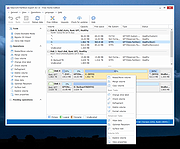 |
|
MiniTool Partition Wizard Free v12.8 MiniTool Partition Wizard Free v12.8 All-inclusive free partition manager to organize disk partitions to get the best of your hard drive. • Measure drive performance and analyze disk space usage in simple ways • Fully compatible with Windows 11/10/8.1/8/7 all editions As the best free disk partition software favored by over tens of millions of users, MiniTool Partition Wizard Free helps users to repartition hard drive, format partition, check file system, align SSD partition, measure SSD performance, convert FAT to NTFS, and more on Windows 11/10/8/7. Aiming to become the most powerful free partition manager in the long term, it keeps offering ever-increasing new features like Disk Benchmark and Space Analyzer to bring users the best experience. Create/Delete/Format Partition Create/delete partition in simple steps. Format inaccessible hard drive and convert RAW to NTFS to revive your hard drive. Move/Resize Partition Move non-adjacent partitions together for extending purpose; enlarge C drive to remove low disk space warning on Windows 10. Wipe Disk/Partition Erase the data on the partition completely and ensure that the data removed cannot be recovered by any data recovery solution. Merge/Split Partition Combine two partitions into one without losing data. Split a hard drive into two partitions for various data saving purposes. Convert FAT to NTFS Quickly convert hard drive or flash drive from FAT to NTFS without losing data so that you can handle files larger than 4GB. Copy Disk/Partition Free copy the non-system disk and partition for instant usage. While to copy OS disk/partition, use the Pro edition. Disk Benchmark Measure the transfer (read & write) speed under various disk access scenarios like sequential and random. Disk/Partition Surface Test Check hard drive/partition to see if there are read errors on the disk blocks when you find the disk write takes too long. Disk/Partition Properties View disk properties to see device name, total size, physical sectors. View partition properties to ... |
|
10,914 | Jan 19, 2024 MiniTool Solution Ltd. 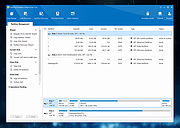 |
|
Partition Logic 0.72 Partition Logic 0.72 Partition Logic is a free hard disk partitioning and data management tool. It can create, delete, erase, format, defragment, resize, copy, and move partitions and modify their attributes. It can copy entire hard disks from one to another. Partition Logic is free software, available under the terms of the GNU General Public License. It is based on the Visopsys operating system. It boots from a CD or floppy disk and runs as a standalone system, independent of your regular operating system. Partition Logic is intended to become a free alternative to such commercial programs as Partition Magic, Drive Image, and Norton Ghost. Partition logic has the following limitations: Does not work with some SATA hard disks No hardware support for non-USB SCSI hard disks No support for Sun or BSD disk labels. Cannot format partitions as NTFS or EXT3. Cannot resize FAT or EXT filesystems. No hardware support for serial mice No hardware support for PCMCIA |
|
9,731 | Dec 27, 2013 J. Andrew McLaughlin |
|
Ranish Partition Manager v2.40 (Stable) Ranish Partition Manager is a powerful hard disk partitioning tool. It gives users high level of control for running multiple operating systems, such as Linux, Windows 98/XP, FreeDOS, and FreeBSD on a single disk. Partition Manager can create, copy, and resize primary and extended partitions. It includes command line interface and simulation mode that works with large files so you can safely experiment before working on the real hard drive partition tables. XOSL is a graphical boot manager released by Geurt Vos under GPL. XOSL can dual boot over 30 various operating systems on a single disk. After XOSL web site www.xosl.org went down I setup this XOSL mirror. |
|
13,928 | Apr 04, 2012 Mikhail Ranish |
|
Rescuezilla v2.6.2 Rescuezilla v2.6.2 👉 Easy-to-use bootable backup, disk imaging, cloning, and system recovery environment. Rescuezilla is a free, open-source system recovery and disk imaging solution that boots from a USB flash drive or optical media, allowing you to back up, restore, clone, and recover Windows, macOS, and Linux systems even when the installed operating system will not boot. Built as a graphical front end for Clonezilla, Rescuezilla combines a straightforward point-and-click interface with powerful backup and recovery capabilities while remaining fully compatible with Clonezilla images. In addition to creating complete disk and partition backups, Rescuezilla can restore images created by Clonezilla and several other supported imaging tools, browse backup images to recover individual files, clone drives directly to replacement disks, and work with many popular virtual machine disk formats. Because it runs as a live operating system, it also includes useful utilities such as a web browser, file manager, partition editor, and recovery tools for troubleshooting damaged systems. Features: • Bootable live recovery environment with no installation required • Easy-to-use graphical interface suitable for beginners and professionals • Create complete disk and partition image backups • Restore previously created backup images • Clone entire drives directly to another disk • Fully compatible with Clonezilla backup images • Supports images from Clonezilla and other supported open-source imaging frontends • Browse backup images and recover individual files • Supports VirtualBox (VDI), VMware (VMDK), Hyper-V (VHD/VHDX), QEMU (QCOW2), raw images, and other virtual disk formats • Works with Windows, macOS, and Linux systems • Includes partition editing and disk management utilities • Built-in file manager for copying and editing files • Includes a web browser for downloading drivers and documentation • Open source software released under the GNU GPL v3 license Supported operating systems: • Boots on PCs and Intel-based Macs from USB or optical media to back up and restore Windows, macOS, and Linux systems Supported languages: • Arabic, Bengali, Brazilian Portuguese, Catalan, Chinese (Simplified), ... |
|
4,866 | Jul 08, 2026 Rescuezilla  |
|
SystemRescue v13.01 SystemRescue v13.01 Formerly known as SystemRescueCd 👉 Bootable Linux rescue toolkit for repairing systems, recovering data, and performing disk administration tasks. SystemRescue is a Linux system rescue toolkit available as a bootable medium for administrating or repairing your system and data after a crash. It is designed to help with tasks such as creating and editing hard disk partitions, recovering files, working with important file systems, and using a wide range of system utilities from a live environment. It can be used on both Linux and Windows computers, on desktops as well as servers, and it can be booted from a DVD or USB stick, or installed on a hard disk if needed. Features: • Boots as a live rescue environment from CD/DVD, USB, or local disk • Includes disk and partitioning tools for administration and recovery tasks • Provides utilities such as GParted, fsarchiver, file system tools, editors, Midnight Commander, and network tools • Supports important file systems including ext4, xfs, btrfs, vfat, and ntfs, plus network filesystems such as Samba and NFS • Can be used on both Linux and Windows computers, including desktops and servers • Supports configurable keyboard layouts with the setkmap option and command • Can copy the live system fully into memory for improved responsiveness using copytoram • Includes scripting support with Bash, Perl, Python, and Ruby • Includes Firefox with bookmark configuration support through SystemRescue configuration files Supported operating systems: • Linux, Windows Supported languages: • English Changes: v13.01 06-06-26 Updated the kernel to the Long-Term-Supported linux-6.18.34 Updated bcachefs tools and kernel module to version 1.38.3 Add ‘checksum’ to the boot options to check integrity when ‘copytoram’ is used Added packages: reflector + b3sum Recommended USB installation method on Windows • Download SystemRescue • Download Rufus and install it on Windows • Plug in your USB-stick and wait a few seconds to allow enough time for the system ... |
|
11,613 | Jul 05, 2026 SystemRescueCd 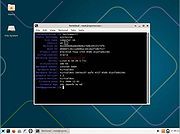 |
| Showing rows 1 to 11 of 11 | Showing Page 1 of 1 | 1 |
OlderGeeks.com Copyright (c) 2026
