|

|
Processed through Paypal No account required. |








Buy our over-priced crap to help pay the bills.



|
|
Processed through Paypal No account required. |
| File - Download Edgetree v1.5.0 | ||||||||
| Description | ||||||||
|
Always scroll to the bottom of the page for the main download link. We don't believe in fake/misleading download buttons and tricks. The link is always in the same place. Edgetree v1.5.0 👉 A lightweight file explorer that docks to the edge of your Windows desktop. Edgetree provides a quick, always-available view of your files and folders without requiring a full Windows File Explorer window. Inspired by the Explorer panel in Visual Studio Code, it docks to the left or right edge of the screen and can automatically hide as a thin strip until you move the mouse over it. The tree begins at This PC and displays all available drives. Folders load as they are expanded, and the program remembers your previous location and expanded folders between sessions. Files can be opened, renamed, copied, cut, pasted, compressed, extracted, deleted, dragged into other programs and managed through a full right-click menu. Edgetree also includes favorites, persistent bookmarks, folder searching, file-type filtering, image previews, network drive support and extensive appearance controls. It is portable and distributed as a single executable with no installation required.  Features: • Docks to the left or right edge of the screen • Auto-hide mode reduces the program to a thin screen-edge strip • Floating mode provides a normal movable window • Starts at This PC and displays local, removable and mapped network drives • Remembers expanded folders, window position and previous location • Opens folders with a single click and files with a double-click • Limits the number of initially displayed items in large folders for faster performance • Supports Ctrl-click and Shift-click multiple selection • Cut, copy, paste, rename, delete and drag-and-drop file operations • Creates new folders and ZIP archives • Extracts ZIP archives • Deletes files and folders to the Windows Recycle Bin • Opens files with their default program or another selected application • Opens folders in Windows File Explorer or Windows Terminal • Displays image previews and file information in the right-click menu • Sorts files by name, date, type or size • Provides global sorting and separate sorting for individual folders • Searches selected folders using partial names or * and ? wildcards • Saves search indexes for faster searches during later sessions • Continues searching while a folder is being indexed • Supports favorites for frequently used folders • Supports persistent bookmarks with keyboard navigation • Hides unwanted folders or entire drives from the tree • Filters displayed files by code, image, document, media, archive, program and other categories • Automatically detects files that are created, renamed or deleted outside the program • Handles temporarily unavailable network drives without freezing the window • Includes Windows Explorer and Material icon styles • Provides separate customizable dark and light color palettes • Adjusts font size, font weight, indentation, row spacing and scrollbar width • Supports high-DPI display scaling • Exports and imports settings, favorites and appearance options • Can export and import color palettes separately • Optional always-on-top, system tray and start-with-Windows settings • Displays a notification when a newer release is available • Portable single-file program with no installation required Supported operating systems: • Windows 10, Windows 11 Supported languages: English, Korean Changes: v1.5.0 08-04-26 • Colors are now applied immediately while using the color picker. • Recently selected colors are saved below the picker. • Pressing Esc restores the previous color. • Color palettes can now be exported and imported separately. • Bookmarks can be removed by clicking the blue ribbon. • Color setting labels now display using their assigned color. • Hover previews now show background and text colors. • Bookmark management interface improved. • Theme and palette color handling made more consistent. • Fixed folder repositioning after changing filters or row limits. • Fixed indentation guide lines responding to mouse clicks. • Fixed renaming behavior when clicking outside the edit field. 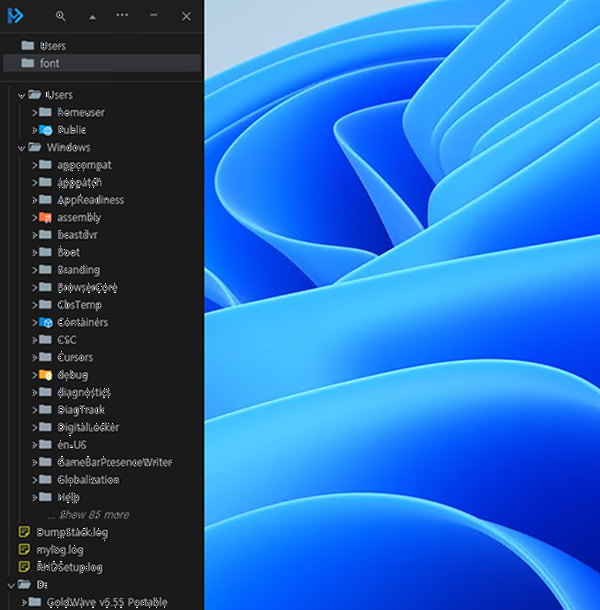 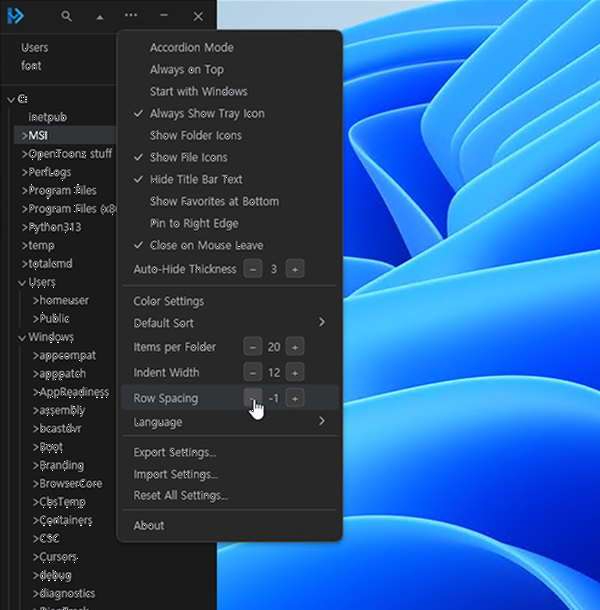 Click here to visit the author's website. Continue below for the main download link. |
||||||||
| Downloads | Views | Developer | Last Update | Version | Size | Type | Rank | |
| 340 | 1,397 | legendsteel11 | Aug 05, 2026 - 12:34 | 1.5.0 | 155.37MB | EXE |  , out of 3 Votes. , out of 3 Votes. |
|
| File Tags | ||||||||
| Edgetree explorer sidebar files folders bookmarks favorites search portable Windows manager productivity dock tree | ||||||||
Click to Rate File Share it on Twitter → Tweet
|


