|

|
Processed through Paypal No account required. |








Buy our over-priced crap to help pay the bills.



|
|
Processed through Paypal No account required. |
| File - Download Chris Titus Tech's Windows Utility v26.10.07 | ||||||||
| Description | ||||||||
|
Always scroll to the bottom of the page for the main download link. We don't believe in fake/misleading download buttons and tricks. The link is always in the same place. Chris Titus Tech's Windows Utility v26.10.07 👉 All-in-one PowerShell toolbox for installs, tweaks, repairs, and update control. Chris Titus Tech's Windows Utility is a PowerShell-based utility that combines application installs, system tweaks, repair tools, and Windows Update controls into a single graphical interface. It is designed to simplify Windows setup and maintenance tasks while giving users more control over performance, privacy, and system behavior. Because it makes system-level changes, it must be run with administrator privileges. 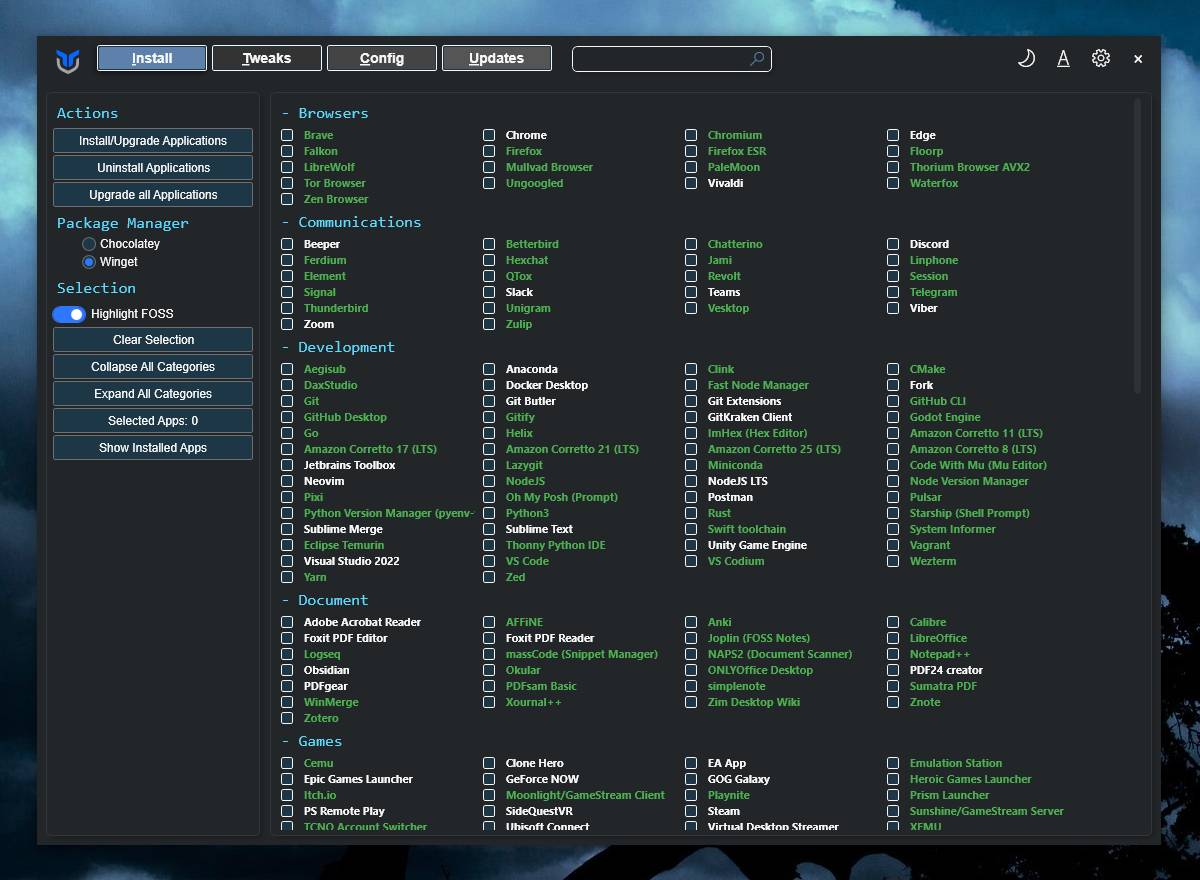 Features: • Install popular applications from a curated software list • Apply privacy, performance, and usability tweaks • Built-in repair and troubleshooting functions • Manage and control Windows Update behavior • Quick access to Windows tools and configuration panels • Debloat options for removing unnecessary Windows components Supported operating systems: • Windows 10 • Windows 11 Supported languages: English Changes: v26.10.07 10-07-26 Changes Remove redundant DisableFileSyncNGSC write that FirstLogon.ps1 immediately overrides @CozREV (#5086) chore(deps): bump astral-sh/setup-uv from 10.1.0 to 10.2.0 @dependabot[bot] (#5120) chore(deps): bump sharp from 0.35.3 to 0.35.4 in /docs @dependabot[bot] (#5077) chore(deps): bump astro from 7.1.6 to 7.3.2 in /docs @dependabot[bot] (#5075) chore(deps): bump nanoid from 3.3.16 to 3.3.19 in /docs @dependabot[bot] (#5103) chore(deps): bump svgo from 4.0.2 to 4.1.0 in /docs @dependabot[bot] (#5074) chore(deps): bump devalue from 5.9.0 to 5.9.2 in /docs @dependabot[bot] (#5099) chore(deps): bump astral-sh/setup-uv from 9.0.0 to 10.1.0 @dependabot[bot] (#5085) chore(deps): bump js-yaml from 4.3.1 to 4.3.2 in /docs @dependabot[bot] (#5083) Add File Converter application to multimedia tools @catsmoker (#5036) Kitchen sink changes @aguashui (#5040) Features feat(dns): Add real-time DNS speed benchmark and \Fastest\ auto-selection option @MADHACKER85 (#4935) Fix CurseForge entry naming in applications.json @brxndonnn (#5072) Add SyncTrayzor @KarimBenkirane (#5065) Add AB Download Manager @KarimBenkirane (#5066) Add Syncthing @KarimBenkirane (#5064) feat(appx): add Movies & TV to appx.json @eduardodepaiva (#5055) feat: add automated environment report export @mewclouds (#5025) Add tweak to block Logitech Download Assistant auto-install @malinfossum (#5034) Bug Fixes fix(tweaks): skip missing services instead of aborting the run @mewclouds (#5140) Fix WaaSMedicSvc restoration using direct registry write @CozREV (#5096) fix(updates): notify before installing downloaded updates @eduardodepaiva (#5105) Add friendly explanations for common DISM exit codes @CozREV (#5087) fix(win11creator): update UI labels and screenshot @mewclouds (#5107) Warn instead of logging \tweak completed\ after a tweak step error @malinfossum (#5090) fix: inject Setup storage into boot.wim @mewclouds (#5102) Fix CurseForge entry naming in applications.json @brxndonnn (#5072) fix(tweaks): rename lock screen key to WPFToggle prefix @mewclouds (#5061) Inject extension-class drivers in Win11 Creator @mewclouds (#5058) Improve UI startup after runspace overhaul @ChrisTitusTech (#5056) Consolidate background work into one job layer @MyDrift-user (#5002) Preserve clipboard history when disabling activity history @mewclouds (#5035) Fix icacls tweaks on localized Windows installations @Companion (#5045) Inject Win11 Creator drivers per package instead of one batch @mewclouds (#5048) Filter unserviceable and stale drivers before Win11 Creator injection @mewclouds (#5016) Documentation fix(updates): notify before installing downloaded updates @eduardodepaiva (#5105) docs: align LTSC FAQ with Windows 11 support @TokhirjonYuldoshev (#5111) fix(win11creator): update UI labels and screenshot @mewclouds (#5107) docs(win11creator): correct architecture and guide @mewclouds (#5106) fix: inject Setup storage into boot.wim @mewclouds (#5102) chore(dns): remove Mullvad DNS providers @mewclouds (#5057) Inject Win11 Creator drivers per package instead of one batch @mewclouds (#5048) feat(github): Prettify bug report template @FluffyPunk (#5050) feat(github): let people know about dotnet for sponsors @FluffyPunk (#5044) UI/UX Improvements style(ui): clarify scope in the note @eduardodepaiva (#5053) style(ui): replace \Get\ with \Select\ @eduardodepaiva (#5054) fix(updates): notify before installing downloaded updates @eduardodepaiva (#5105) fix(win11creator): update UI labels and screenshot @mewclouds (#5107) Rework the Win11 Creator tab into a three step wizard @MyDrift-user (#4925) Improve UI startup after runspace overhaul @ChrisTitusTech (#5056) Consolidate background work into one job layer @MyDrift-user (#5002) feat: add automated environment report export @mewclouds (#5025) Preserve clipboard history when disabling activity history @mewclouds (#5035) 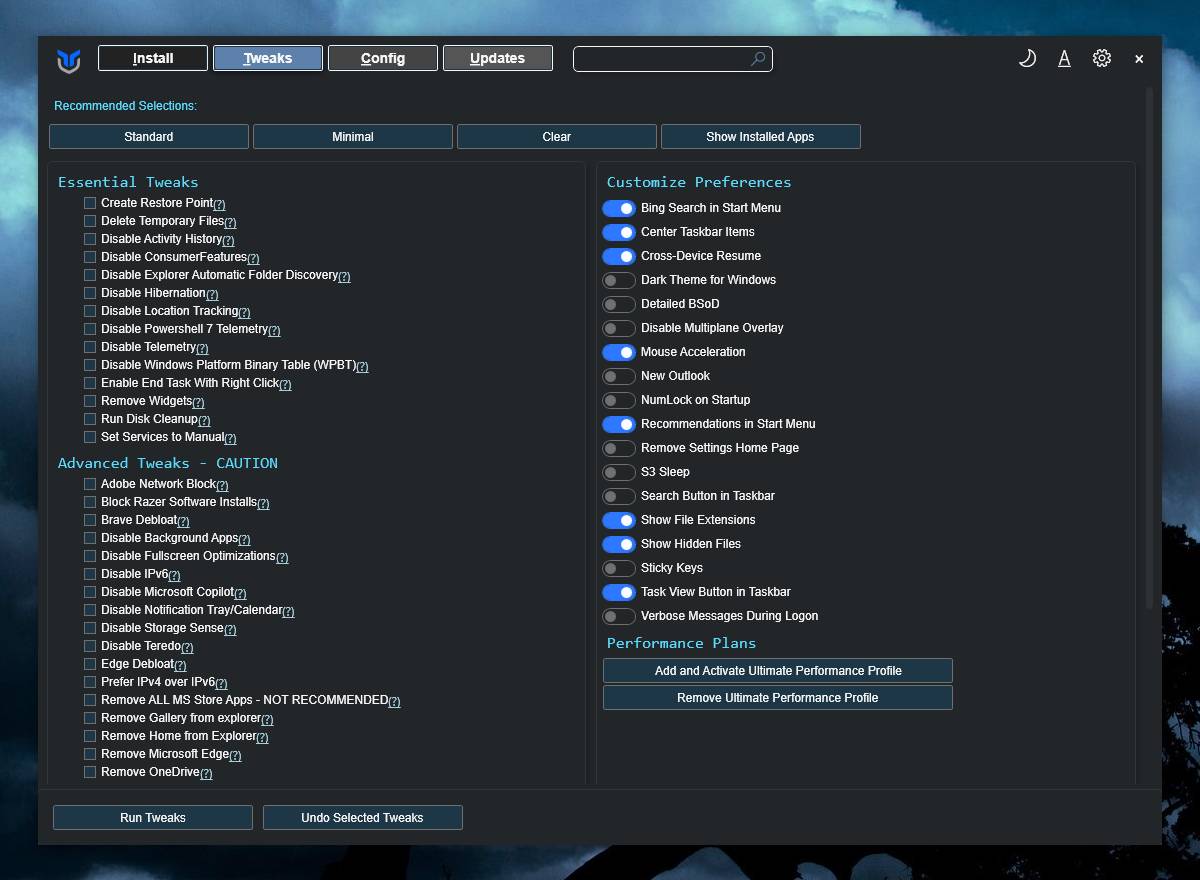 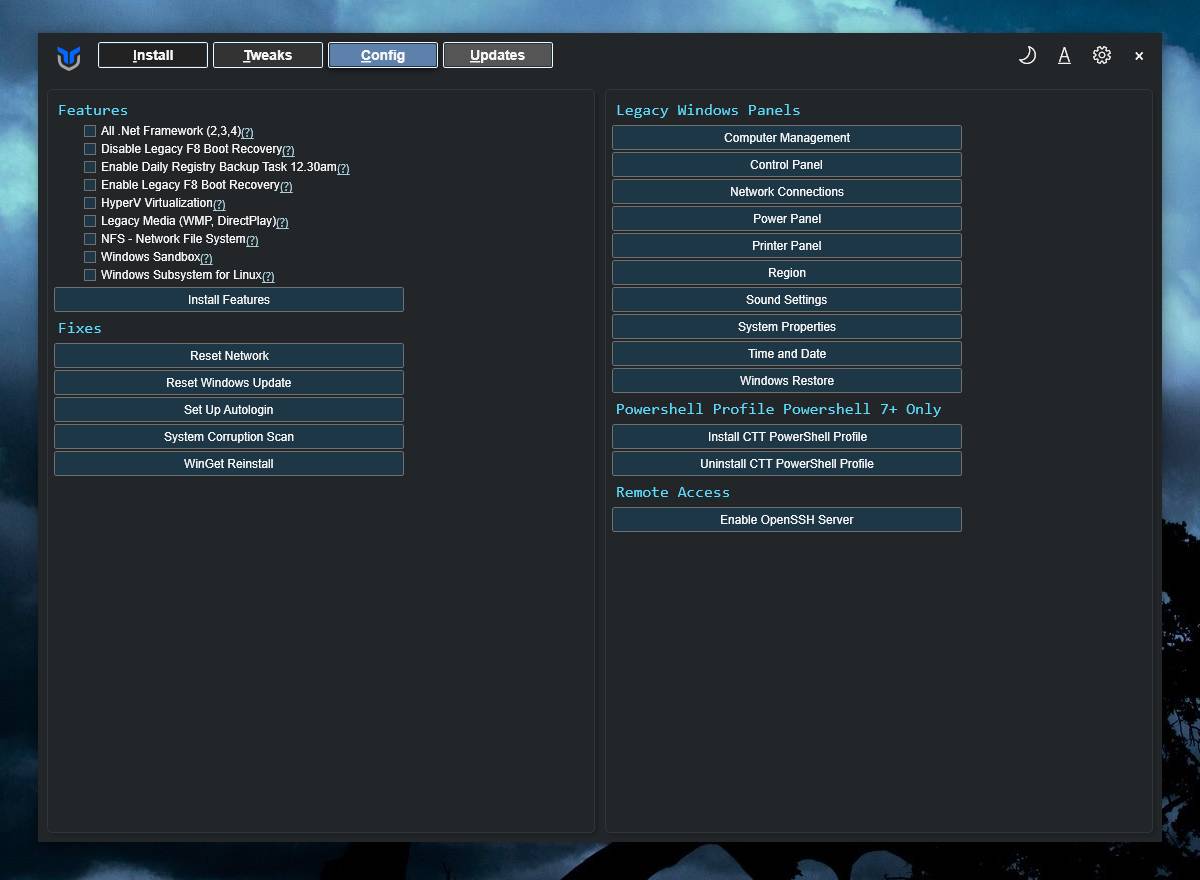 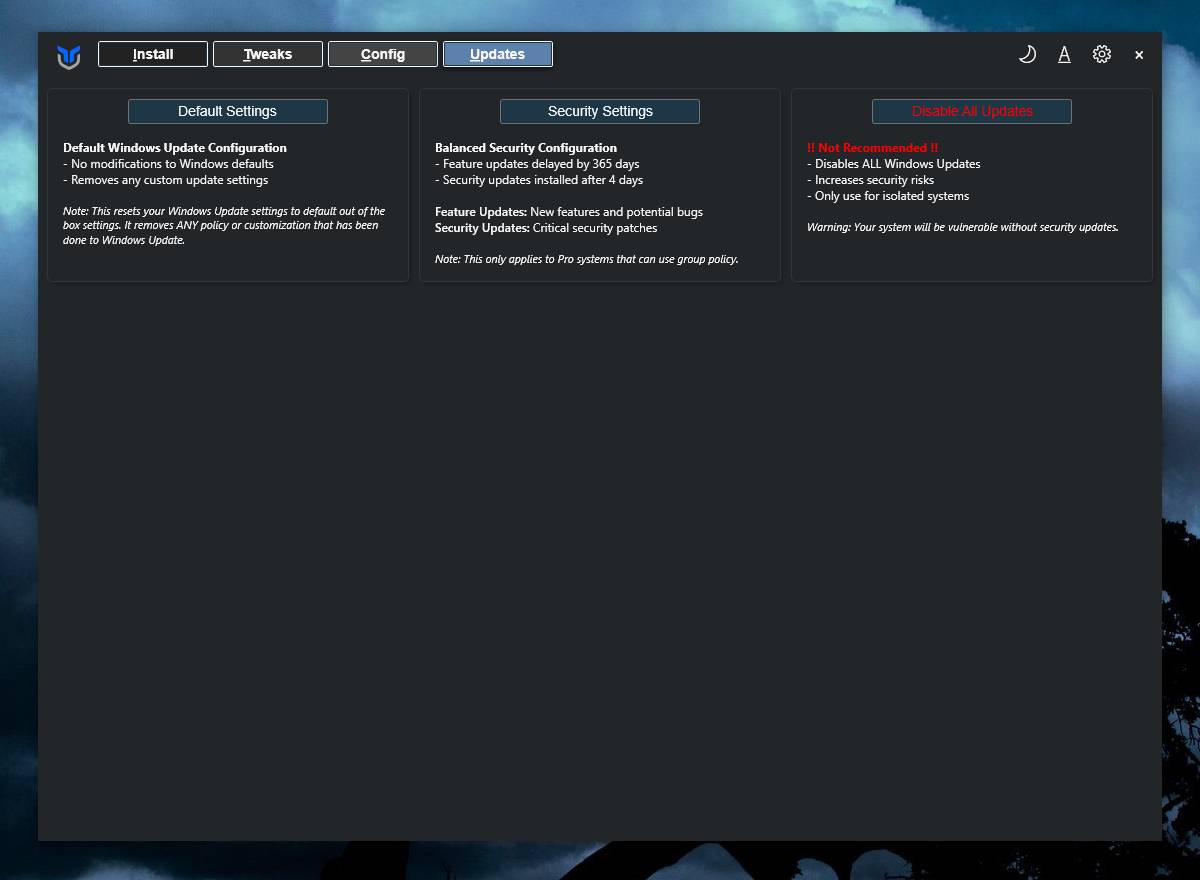 Launch instructions (Admin required): Run directly from the web: • Right-click Start and choose Windows PowerShell (Admin) on Windows 10 or Terminal (Admin) on Windows 11 • Run: irm "https://christitus.com/win" | iexRun locally using the downloaded winutil.ps1 file: • Download winutil.ps1 below. • Save the file to a known folder such as Downloads • Right-click Start and open Windows PowerShell (Admin) or Terminal (Admin) • Navigate to the folder containing the script, for example: cd $env:USERPROFILE\Downloads• If script execution is blocked, temporarily allow it for the session: Set-ExecutionPolicy -Scope Process -ExecutionPolicy Bypass• Run the script: .\winutil.ps1Important: To download this script file, you MUST right-click on "Download Your File" below and choose to Save Link As. Click here to visit the author's website. Continue below for the main download link. |
||||||||
| Downloads | Views | Developer | Last Update | Version | Size | Type | Rank | |
| 4,529 | 23,107 | Chris Titus | Oct 14, 2026 - 12:36 | 26.10.07 | 906.1KB | PS1 |  , out of 16 Votes. , out of 16 Votes. |
|
| File Tags | ||||||||
| updates installer repair privacy optimization tweaks debloat PowerShell Windows WinUtil ChrisTitusTech maintenance troubleshooting customization utility software | ||||||||
Click to Rate File Share it on Twitter → Tweet
|


