|

|
Processed through Paypal No account required. |








Buy our over-priced crap to help pay the bills.



|
|
Processed through Paypal No account required. |
| File - Download KillWindowsAI v2.0.0 | ||||||||
| Description | ||||||||
|
Always scroll to the bottom of the page for the main download link. We don't believe in fake/misleading download buttons and tricks. The link is always in the same place. KillWindowsAI v2.0.0 👉 Safely Remove Copilot, Recall and More in Windows 11. KillWindowsAI is a free utility designed to help users disable or remove AI-related features and components from Windows 11. It provides an easy-to-use interface for managing features such as Microsoft Copilot, Recall, Widgets, telemetry-related components, and other integrated AI services that some users may prefer not to use. KillWindowsAI includes both graphical and command-line modes, making it suitable for casual users as well as advanced administrators who want more control over Windows AI functionality. 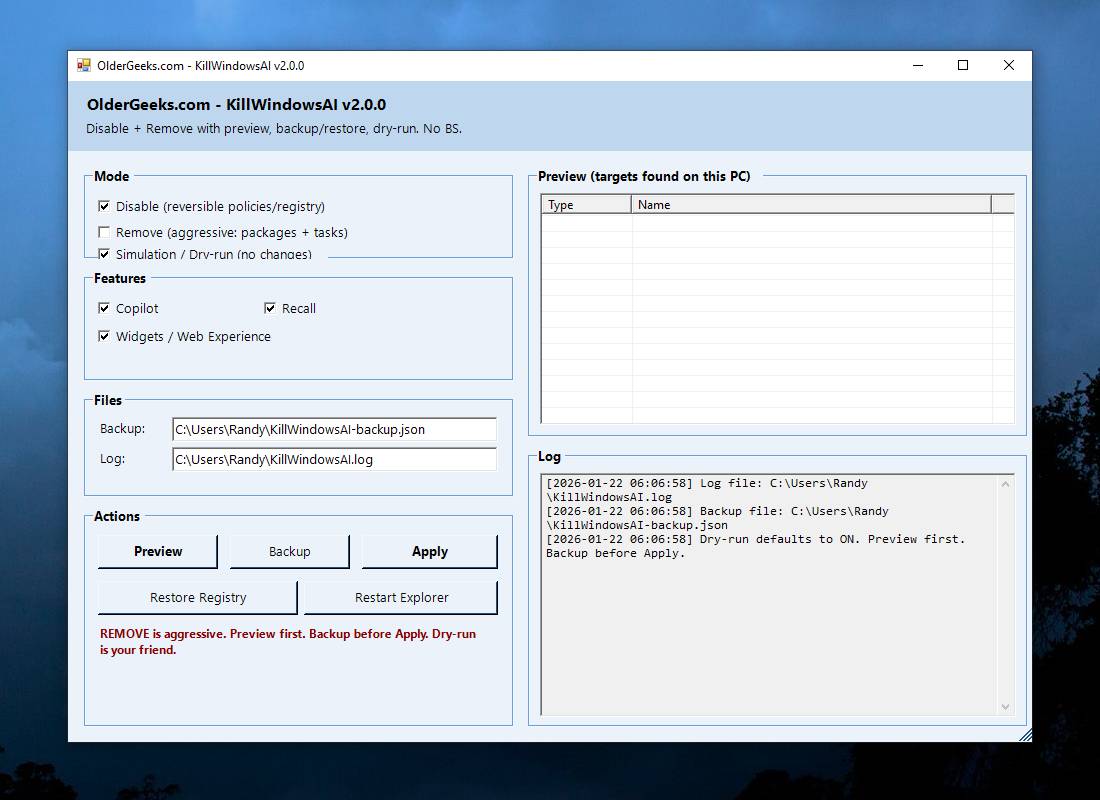 • Disable or remove Microsoft Copilot components • Remove or disable Windows Recall functionality • Manage Widgets and AI-related Windows features • Supports graphical user interface and command-line usage • Includes dry-run simulation mode before applying changes • Backup and restore options for safer configuration changes • Simple one-file PowerShell-based utility • Designed for advanced Windows privacy and customization control • Portable operation without traditional installation Supported operating systems: Windows 11 Disable vs Remove (Important): • Disable Uses supported registry and policy settings. Reversible and generally safe across Windows updates. • Remove Removes AppX and provisioned packages and disables related tasks. Some components may be reinstalled by future Windows updates and may require repair or reinstall to fully undo. The UI clearly labels these options and shows what will be affected. How to use:: 1) Unzip folder. 2) Run KillWindowsAI.cmd.3) Allow PowerShell prompt. If Windows SmartScreen appears: • Click More info • Click Run anyway The program will automatically request administrator privileges if required. Changes: v2.0.0 01-22-26 Major reliability update for Windows 11 24H2 / 25H2 Fixed Fixed issue where a PowerShell window briefly appeared and closed with no interface. Fixed failure caused by users selecting “Run with PowerShell” from Explorer. Fixed failure when script is launched from inside the Windows ZIP preview (virtual temp path issue). Fixed UI failing to initialize due to PowerShell not running in STA mode. Fixed silent exits caused by restricted PowerShell host launched by Explorer. Changed KillWindowsAI now launches only through KillWindowsAI.cmd. PowerShell script moved to Resource\KillWindowsAI-UI.ps1 (no direct user interaction). Launcher automatically handles: STA mode ExecutionPolicy bypass ZIP self-extraction to a real folder Removed README to eliminate alternate run methods. Improved Much more novice-friendly: double-click the CMD and it works. No more dependency on user knowing how to open PowerShell correctly. Consistent behavior across all Windows 11 builds. Internal Enforced -NoProfile -ExecutionPolicy Bypass -Sta Added environment detection for ZIP virtual path Hardened script startup sequence User instructions (now simply) Extract the ZIP and double-click KillWindowsAI.cmd Click here to visit the author's website. Continue below for the main download link. |
||||||||
| Downloads | Views | Developer | Last Update | Version | Size | Type | Rank | |
| 1,066 | 4,222 | OlderGeeks.com | May 24, 2026 - 13:53 | 2.0.0 | 6.4KB | ZIP |  , out of 14 Votes. , out of 14 Votes. |
|
| File Tags | ||||||||
| Windows KillWindowsAI 11 AI Copilot Recall Widgets telemetry privacy remover utility PowerShell portable tweak optimization Microsoft system tool free software OlderGeeks | ||||||||
Click to Rate File Share it on Twitter → Tweet
|


