|

|
Processed through Paypal No account required. |








Buy our over-priced crap to help pay the bills.



|
|
Processed through Paypal No account required. |
| File - Download MacOSCleaner v2.3.0 | ||||||||
| Description | ||||||||
|
Always scroll to the bottom of the page for the main download link. We don't believe in fake/misleading download buttons and tricks. The link is always in the same place. MacOSCleaner v2.3.0 👉 Free, privacy-focused macOS cleaner, app uninstaller, duplicate finder, disk analyzer and system maintenance utility. MacOSCleaner is a native macOS cleaning and maintenance utility designed to help reclaim storage space while giving you control over exactly what is removed. It can scan caches, developer files, application leftovers, duplicate files, old installers and many other types of unnecessary data. It also includes a forensic application uninstaller, disk space analyzer, process manager and startup service manager. Files identified by the uninstaller and disk analyzer are moved to the Trash where possible, while protected system locations are blocked from deletion. MacOSCleaner runs locally with no telemetry or cloud transmission and includes optional on-device Apple Intelligence explanations and Siri/Shortcuts automation. 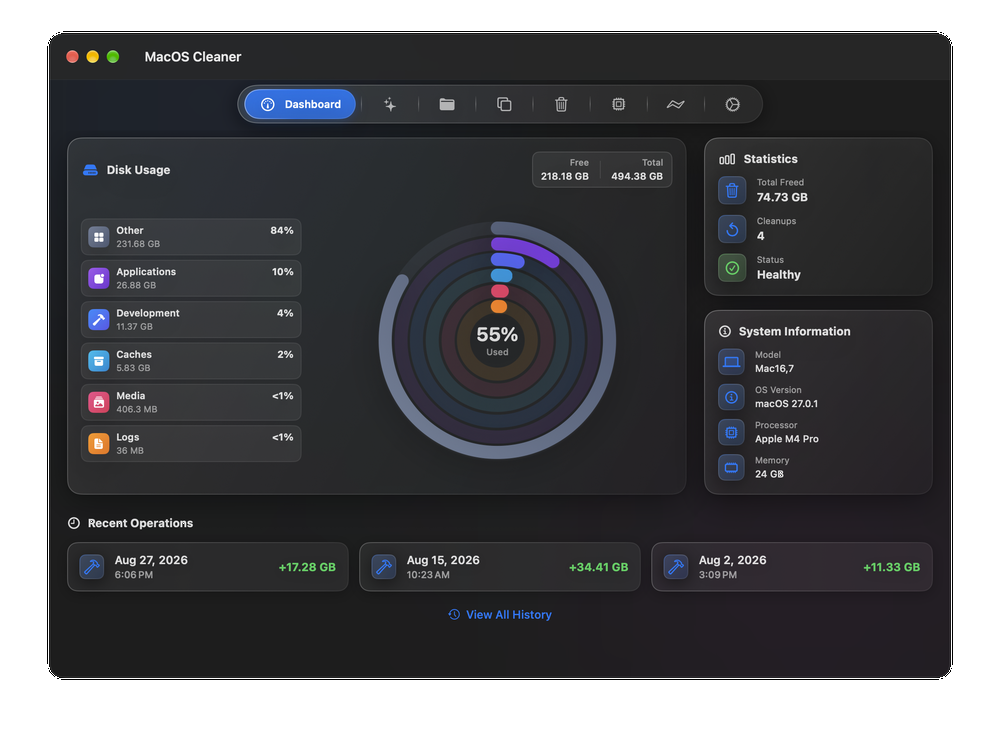 Features: • Smart Cleanup scans 55 categories and more than 1,880 defined locations covering over 275 applications and 86 developer toolchains • Cleans application and browser caches, developer files, package manager data, crash reports, Mail downloads and other unnecessary files • Forensic App Uninstaller examines application-related files using bundle IDs, Team IDs, Spotlight data, property lists, Launch Services and other evidence • Post-uninstall verification lets you inspect and selectively remove remaining files after uninstalling an application • Dedicated orphan scanner finds remnants from applications that were previously removed • Orphaned files are grouped by confidence level as Guaranteed, Very Likely or Possible • Duplicate File Finder uses file size, partial hashing and full SHA-256 hashing to identify exact duplicates • Disk Space Analyzer lets you navigate folders using an interactive directory tree and breadcrumb navigation • Uses APFS allocated-size information to more accurately report physical disk usage • Built-in Quick Look support lets you preview files directly from the disk analyzer • Protects cloud-only iCloud items from being downloaded unintentionally during analysis • Project Build Artifacts category detects regenerable folders such as node_modules, target, .venv, .dart_tool and build • Build artifact age filters can target files older than 30, 60, 90 or 180 days • Supports cleanup of numerous development tools, AI utilities, package managers, IDEs and programming environments • Process Manager can display and sort running processes by CPU, memory, name or thread count • Startup Services manager handles LaunchAgents and LaunchDaemons and separates user, third-party and system items • Siri and macOS Shortcuts integration can trigger cleanup, storage scans and application uninstall operations • Optional on-device Apple Intelligence explains files, caches, processes and startup agents without sending data to the cloud • Time Machine maintenance uses snapshot thinning based on reclaimable space rather than simply deleting every local snapshot • Includes privileged DNS cache flushing • Critical locations including /System, /usr and ~/.ssh are protected from cleanup operations • No telemetry, analytics or cloud transmission Supported operating systems: • macOS 26.0 or higher, Apple Silicon M1 or newer Supported languages: English, Russian, Ukrainian, German, French, Spanish, Italian, Japanese, Simplified & Traditional Chinese, Korean, Polish, Brazilian Portuguese, Arabic Changes: v2.3.0 10-01-26 What's New in 2.3.0 macOS 27 Liquid Glass & System Integration Refined Liquid Glass Design System: Fully aligned with macOS 27 HIG — chrome-focused glass navigation with glassEffectUnion pill transitions, opaque content cards for maximum readability, and specular button styles (ProminentGlassButtonStyle, SecondaryGlassButtonStyle). Native Keyboard Shortcuts & Menu Bar: Instant tab switching via ⌘1–⌘8, dedicated native Settings scene via ⌘,, and quick access to Cleanup History via ⌘Y. Dedicated Cleanup History Window (⌘Y): Inspect detailed past cleanup records with instant search, sorting, and category breakdown. Revamped Dashboard: Redesigned "Recent Operations" widget featuring a clean horizontal card layout with quick drill-down to the complete audit journal. Pure On-Device Apple Intelligence Structured File & App Explanations: Leverages Apple's on-device FoundationModels (SystemLanguageModel) with @Generable structured verdicts ([SAFE], [CAUTION], [DANGER]) directly in uninstaller and residual sheets. Streaming Token Response: Real-time streaming generation via streamSession for instant feedback without UI stutter. Zero Cloud Leakage: Runs strictly local without sending file paths or metadata to Private Cloud Compute or third-party APIs. System Locale Pre-Flight: Intelligent device locale detection prevents perpetual model initialization states on unsupported system languages. Authenticated Siri App Intents: CleanCategoryIntent and CleanDeveloperCachesIntent now enforce biometric/system authentication (.requiresAuthentication) and explicit confirmation dialogs. Master-Detail Duplicate Finder & Redesigned Cleanup Master-Detail Duplicate Workspace: Redesigned on HSplitView with categorized duplicate groups on the left and itemized paths on the right with middle-truncated readability. High-Resolution Previews & Quick Look: Instant media previews for images and full-fidelity Quick Look (Space) integration. Streamlined Cleanup View: Clean 880 pt layout featuring a 4-item base cleanup row and an expanded 2Χ2 parameters grid. Safe Media Maintenance: Removed dangerous cloud/voice memo toggles; GarageBand/Logic and iMovie/Final Cut cleanups strictly target cache directories without touching user sound or video libraries. Forensic Lifecycle, Trash & Safety Engine 3-Second Graceful App Quitting: Uninstallation and cleanup first issue a standard soft terminate() before enforcing a 3-second timeout for forceTerminate(), completely aborting force quit if canceled. Granular Trash Control: Optional Settings toggle (emptyTrashDuringCleanup) scans and allows selective deletion of specific items within ~/.Trash, leaving unselected files and the .Trash directory itself strictly intact. Deep Protection Matrix: Hardened SafetyManager with absolute refusals for iCloud Drive (Mobile Documents), Messages (chat.db), Safari/Firefox credentials, and active IDE project configurations (.vscode, .idea, .zed). Intel Architecture Deprecation Badges: Flags Rosetta/Intel-only legacy apps and plugins ahead of future macOS deprecations. Startup Services & High-Concurrency Engine Direct Startup Daemon Uninstaller: Unload (launchctl bootout) and safely delete user/system LaunchAgents and LaunchDaemons straight from the app, with quick jump to Finder (showInFinder). Lag-Free Process Monitoring: Chunked lazy pagination (60 processes / 30 groups) with memoized filtering eliminates UI frame drops on large process trees. Non-Blocking PosixScanner: Real-time batch emission avoids memory overhead during deep recursive scans. Vast Knowledge Base Expansion: Expanded to 304 applications, 92 developer toolchains, and 2,343 cataloged artifact paths. Global Localization (14 Languages) Full localization across all screens, dialogs, and menu items: English, Ukrainian, Russian, German, French, Spanish, Italian, Japanese, Portuguese (BR), Simplified Chinese, Traditional Chinese (zh-Hant), Korean (ko), Polish (pl), and Arabic (ar with native RTL layout). 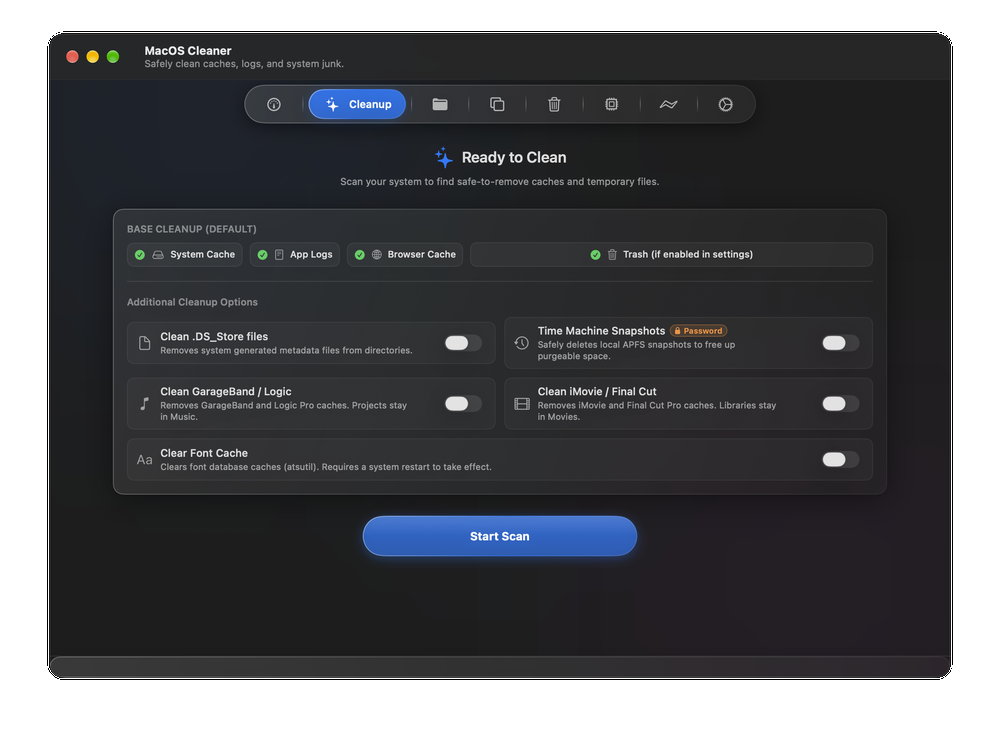 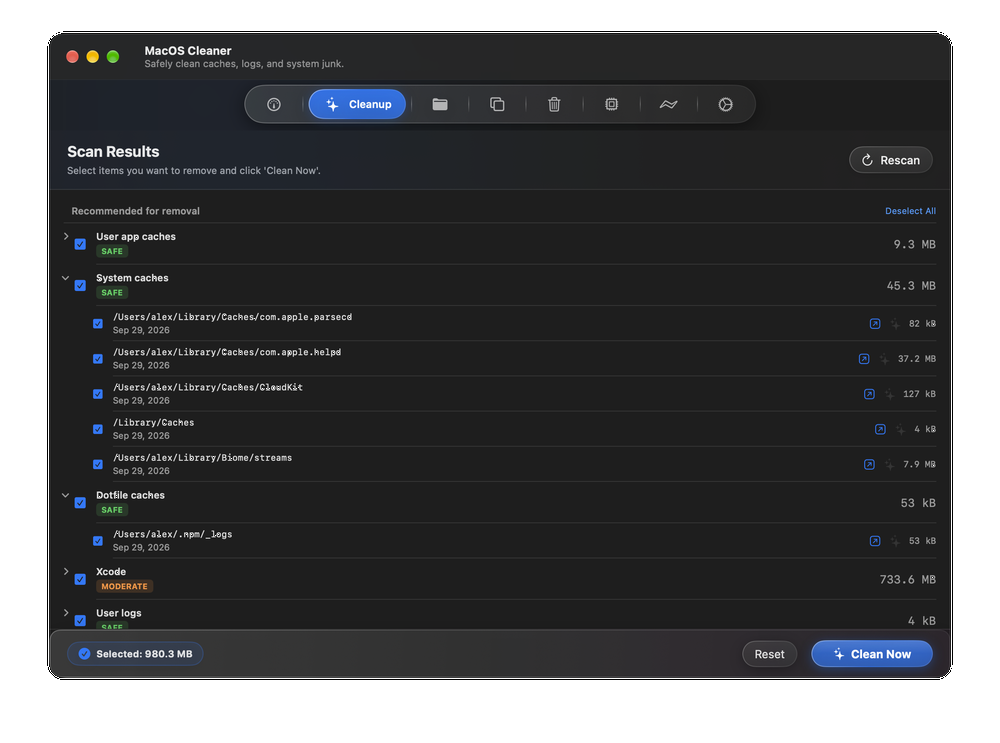 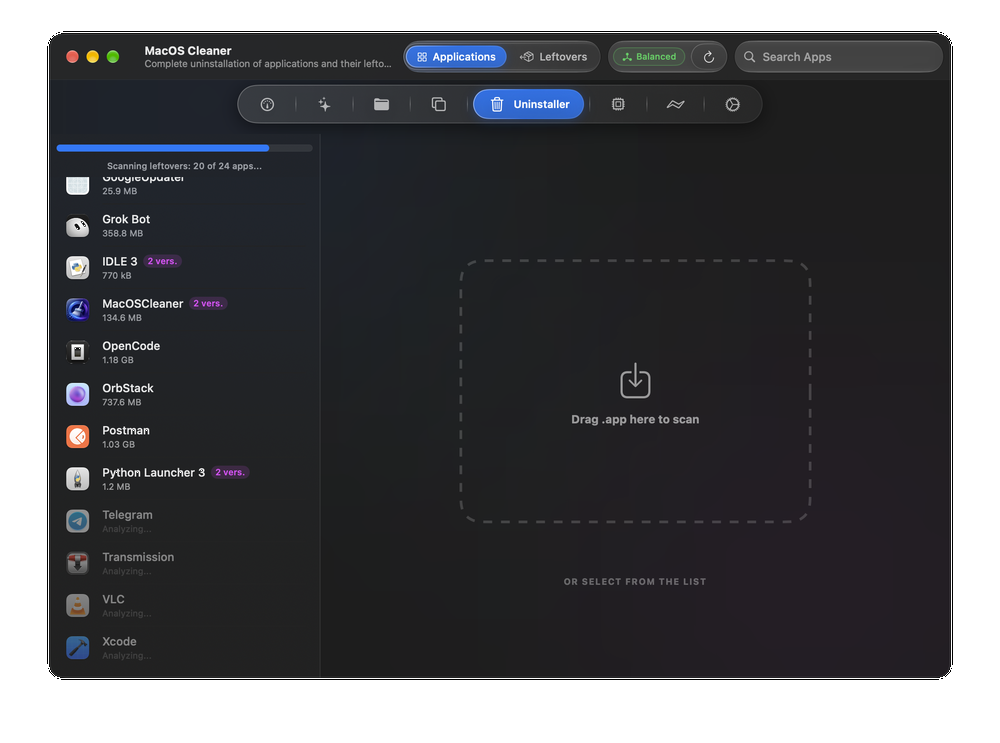 Note: This file has one hit on VirusTotal. We have confirmed this to be a false positive. The file is safe. Click here to visit the author's website. Continue below for the main download link. |
||||||||
| Downloads | Views | Developer | Last Update | Version | Size | Type | Rank | |
| 128 | 748 | AlexTkDev | Oct 05, 2026 - 10:51 | 2.3.0 | 9.89MB | DMG |  , out of 3 Votes. , out of 3 Votes. |
|
| File Tags | ||||||||
| MacOSCleaner macOS cleaner cleanup uninstaller storage disk duplicate cache privacy SwiftUI Apple Silicon utility | ||||||||
Click to Rate File Share it on Twitter → Tweet
|


