|

|
Processed through Paypal No account required. |








Buy our over-priced crap to help pay the bills.



|
|
Processed through Paypal No account required. |
| File - Download Overcaption v0.4.0 | ||||||||
| Description | ||||||||
|
A plea... Deanna and I have been running this site since 2008 and lately we're seeing a big increase in users (and cost) but a decline in percentage of users who donate. Our ad-free and junkware-free download site only works if everyone chips in to offset the revenue that ads on other sites bring in. Please donate at the bottom of the page. Every little bit helps. Thank you so much. Sincerely, your Older Geeks: Randy and Deanna Always scroll to the bottom of the page for the main download link. We don't believe in fake/misleading download buttons and tricks. The link is always in the same place. Overcaption v0.4.0 👉 A free, private subtitle studio for transcribing, editing, translating and adding captions to videos. Overcaption is a desktop subtitle and captioning application that can transcribe video and audio, edit and retime subtitles, translate captions and export finished subtitles or burn them directly into video. Its core processing runs locally on your computer, so videos do not need to be uploaded to an online service. The free version has no time limit, requires no account and produces watermark-free output. Overcaption combines automatic speech recognition with a subtitle editor featuring waveform-based timing, a frame filmstrip and live checks for reading speed and line length. It can work with video, audio-only recordings and standalone subtitle files. 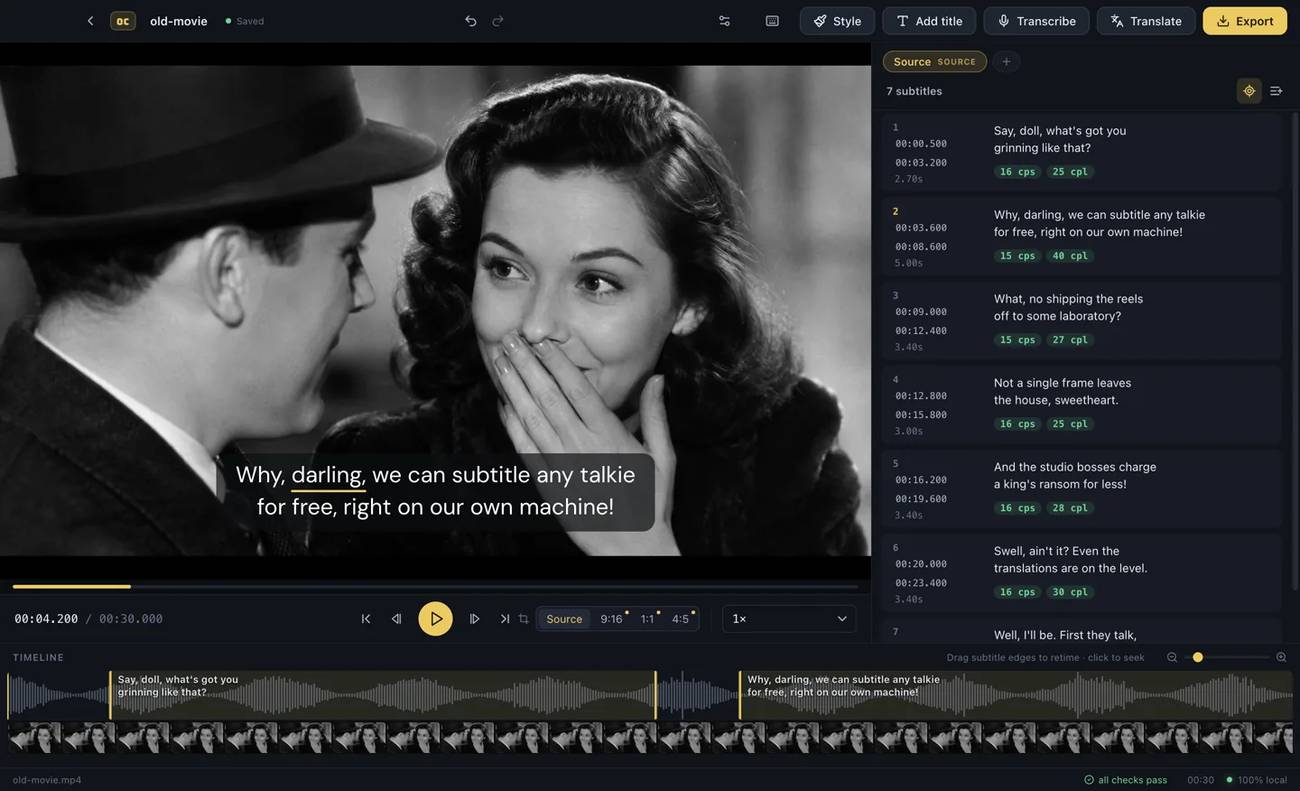 Features: • Automatic on-device transcription with word-level timing • Works completely offline for its core transcription, editing and translation features • Keeps video and audio files on your computer instead of uploading them to a web service • No account required • No time limit on the free version • No watermark on exported video • Built-in subtitle editor • Waveform-based subtitle retiming • Frame filmstrip for visual timing reference • Inline subtitle text editing • Instant find and replace • Keyboard-oriented editing workflow • Live reading-speed checks • Live subtitle line-length checks • Grammar-aware subtitle line breaking for supported languages • Dedicated word segmentation for Chinese, Japanese, Burmese, Cantonese, Khmer, Lao and Thai • Local subtitle translation using models from Mozilla and Google • Side-by-side translation editing • Imports and exports SRT subtitle files • Imports and exports VTT subtitle files • Supports plain-text subtitle content • Opens SRT and VTT files without requiring an accompanying video • Hardware-accelerated subtitle burn-in • Free subtitle burn-in at resolutions up to 1080p • Burned subtitles match the editor preview • Supports vertical, square and widescreen video • Handles audio-only files such as podcasts, recordings and voice notes • Includes titles, lower thirds, name straps and animated callouts • No telemetry unless the user opts in • GPU acceleration is helpful but not required • Additional Pro features are available separately, including dynamic captions, video cuts, 4K and batch export, speaker detection, expanded title tools and higher-quality translation Supported operating systems: • Windows 10, Windows 11 • macOS on Apple Silicon Macs Supported languages: English, Spanish, French, German, Italian, Portuguese, Chinese, Japanese, Korean, Russian, Ukrainian, Polish, Dutch, Turkish, Arabic, Hindi, Indonesian, Vietnamese, Albanian, Azerbaijani, Bangla, Basque, Belarusian, Bosnian, Bulgarian, Burmese, Cantonese, Catalan, Croatian, Czech, Danish, Estonian, Finnish, Galician, Greek, Gujarati, Hebrew, Hungarian, Icelandic, Kannada, Khmer, Lao, Latvian, Lithuanian, Malay, Malayalam, Maltese, Norwegian, Persian, Romanian, Serbian, Slovak, Slovenian, Swedish, Tamil, Telugu, Thai Transcription auto-detection recognizes approximately 100 languages. The developer currently lists 57 languages with specific transcription, translation or smart line-breaking capabilities. Changes: v0.4.0 08-27-26 Batch processing for whole sets of videos. Regional language variants (US/UK English, Brazilian/European Portuguese, Latin American/European Spanish, Canadian/European French). Plain-text transcript export. Better font handling for Chinese, Japanese, Arabic and Hindi subtitles. This download is for the Windows 64bit version (very bottom of page). If you need the macOS ARM64 version, download here. Click here to visit the author's website. Continue below for the main download link. |
||||||||
| Downloads | Views | Developer | Last Update | Version | Size | Type | Rank | |
| 248 | 1,157 | Overcaption | Aug 28, 2026 - 11:07 | 0.4.0 | 138.02MB | EXE |  , out of 4 Votes. , out of 4 Votes. |
|
| File Tags | ||||||||
| translation transcription subtitles Overcaption captions video audio offline editor SRT VTT speech waveform privacy macOS Windows | ||||||||
Click to Rate File Share it on Twitter → Tweet
|


