|

|
Processed through Paypal No account required. |








Buy our over-priced crap to help pay the bills.



|
|
Processed through Paypal No account required. |
| File - Download NegPy v0.59.0 | ||||||||
| Description | ||||||||
|
A plea... Deanna and I have been running this site since 2008 and lately we're seeing a big increase in users (and cost) but a decline in percentage of users who donate. Our ad-free and junkware-free download site only works if everyone chips in to offset the revenue that ads on other sites bring in. Please donate at the bottom of the page. Every little bit helps. Thank you so much. Sincerely, your Older Geeks: Randy and Deanna Always scroll to the bottom of the page for the main download link. We don't believe in fake/misleading download buttons and tricks. The link is always in the same place. NegPy v0.59.0 👉 Powerful open-source darkroom-style software for converting, processing, repairing and printing scanned film negatives and transparencies. NegPy is a specialized film-processing application designed to turn scanned negatives into finished positives using a non-destructive, darkroom-style workflow. Rather than simply inverting an image, it models film and photographic paper behavior in density space, automatically neutralizes the orange mask and provides Auto Density and Auto Grade controls for establishing useful starting points. It can work with camera scans, dedicated film scanners, RAW and TIFF images, slide film, narrowband and trichrome scans, and specialized scanner formats. NegPy also includes extensive tools for dust repair, dodge and burn, color management, soft proofing, metadata, batch processing and print-ready exporting. Original source files are never modified, with edits and history stored separately in a local database. 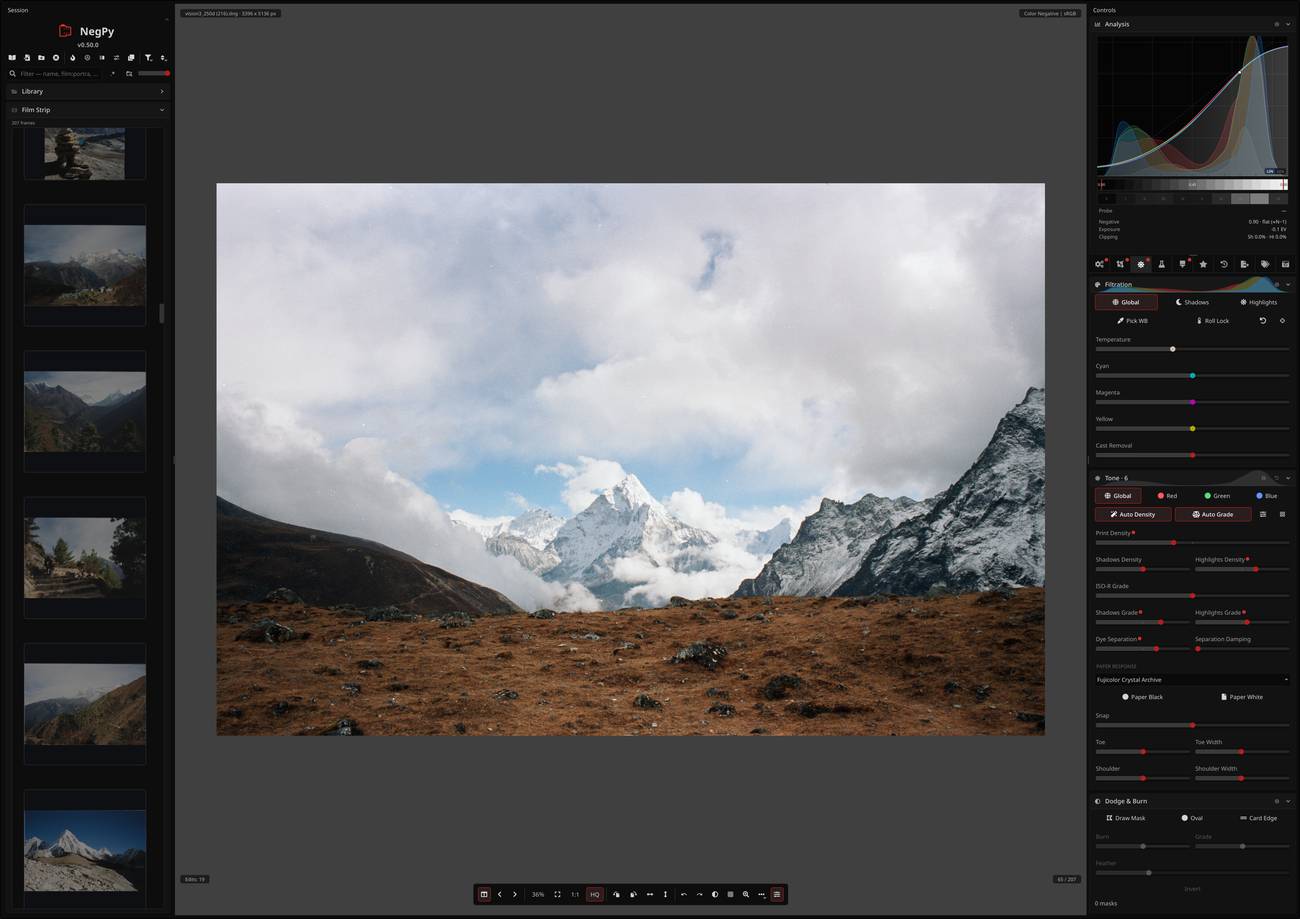 Features: • Converts scanned film negatives using a film and photographic-paper simulation rather than simple image inversion • Neutralizes the orange mask mathematically using channel sensitometry without requiring camera profiles or border color picking • Models film H&D characteristic curves in density space with toe, linear and shoulder response • Per-frame Auto Density and Auto Grade analyze negatives for automatic brightness and contrast starting points • Darkroom paper profiles provide paper-specific curve shaping, channel gamma and base tint • Dedicated transparency support for positive and slide film with optional normalization for faded or expired film • Process option allows already-finished positive images to bypass unnecessary as-captured lift and highlight roll-off • Supports standard RAW and TIFF files along with specialized formats such as Kodak Pakon scanner RAW files • Direct scanner control for supported film scanners including Plustek and Nikon Coolscan models • Nikon Coolscan strip scanning includes automatic frame detection, roll-wide offset and drift controls, plus individual per-frame registration • Supports 16-bit monochrome TIFF scanning for single-record film • Camera scanning can capture negatives directly from a tethered camera on supported platforms • Trichrome scanning combines separate red, green and blue narrowband exposures with automatic sub-pixel alignment • Flat-field correction compensates for light-source or scanner illumination falloff and vignetting • Per-frame half-frame splitting supports automatically detected or manually positioned gutters • Dodge and Burn tools provide darkroom-style local lightening and darkening with feathered freehand masks • Automatic and manual dust removal uses healing and grain synthesis to repair defects while retaining natural film texture • Painted healing strokes are processed incrementally for improved performance • Batch normalization analyzes loaded images and applies averaged normalization across a roll • GPU acceleration provides real-time processing and export rendering using Vulkan or Metal • Color management includes ICC profiles, automatic monitor-profile detection and printer/paper soft proofing • Soft proofing includes rendering intent, black point compensation, paper-white simulation, ink-black simulation and gamut warnings • Printability analysis identifies areas that cannot be reproduced by the selected proof profile • Print-ready exports include borders, ICC color management, filename templates, presets and contact sheets • Exports JPEG, TIFF, PNG, WebP and JPEG XL formats • Supports 8-bit and 16-bit output where available, along with configurable TIFF, PNG and JPEG options • Creates flat, neutral, wide-gamut 16-bit TIFF digital intermediates for further editing in programs such as Lightroom, Darktable or Photoshop • Non-destructive editing leaves original source files untouched • Stores edits as recipes in a local SQLite database identified by file hash, allowing source files to be moved or renamed without losing work • Persistent undo, redo and editing history stores up to 100 edits per file and survives application restarts • Metadata and Gear Library can record original film cameras, lenses, film stocks, capture dates and locations • Writes camera, lens, ISO and scan metadata into exported files • Built-in update system checks for new releases and can install updates from within NegPy Supported operating systems: Windows 10/11 macOS ARM64 Linux Supported languages: English Changes: v0.59.0 09-14-26 New: Per-frame registration in the Coolscan strip preview — every frame tile gets its own offset slider on top of the roll-wide Offset and Drift, for a splice or a mis-fired advance; tiles gain a size slider, the detected boundary is outlined in the accent color, a measured strip finds its frames as the dialog opens, and a moved offset re-cuts the tile. Needs nkscan 0.11.0, which also fixes tile pitch and low-DPI scans on the LS-5000. New: TIFF (mono) scan format — one 16-bit gray plane for single-record film, a third the size; NegPy reads its own mono scans back. New: Positive — a Process toggle beside Normalize for a source that is already a finished positive: it decodes the file's own profile and skips the as-captured lift and highlight roll-off. New: Per-frame half-frame splits — a scan can use its own detected gutter or a hand-set one, applied to the current, selected or all frames; heal strokes, spots, lines and masks re-anchor across a split or crop change. Change: Painted heal strokes bake incrementally — a new stroke no longer re-runs every earlier one. Change: Lower memory for Linear DNG decoding and CPU export. Fix: Optical Removal's Threshold reaches past 12σ — the top of the slider now runs to 48σ, where a specular highlight or a rail edge sits, so those can be gated out; a setting at or below the default renders as before. Fix: Stale Narrowband flag tinted a slide green — the flag is now inert on a transparency everywhere. Fix: Peek Negative renders the way the negative looks — as-shot multipliers fold in and the view gets a brightness level, so an orange mask reads as one. Fix: Linear Output records the demosaic algorithm it ran. Fix: Arrow keys step a slider by its declared step — fractional sliders moved by 1/precision, so a Grade press moved 0.01 ISO-R. Fix: No traceback while dragging Border Width — a retired texture could be drawn from between frames. Fix: Filename and contact-sheet path fields keep the cursor while typing. Fix: Scanlight v4b recognized — the newer v4 PCB has white LEDs, so the W slider and the White Light preset work. Fix: JPEG exports with GPS or PrintImageMatching tags are readable — high-numbered camera tags broke IFD0 order and the dates and coordinates after it. Fix: Exported files carry the source's filesystem dates — mtime, and the creation date on macOS. 👉 This download is for the Windows 64bit installer version (very bottom of page). All other download assets are below: macOS: NegPy-0.59.0-macOS-arm64.dmg NegPy-0.59.0-macOS-x86_64.dmg Linux: NegPy-0.59.0-x86_64.AppImage Click here to visit the author's website. Continue below for the main download link. |
||||||||
| Downloads | Views | Developer | Last Update | Version | Size | Type | Rank | |
| 954 | 5,973 | marcinz606 | Sep 17, 2026 - 11:52 | 0.59.0 | 171.58MB | EXE |  , out of 14 Votes. , out of 14 Votes. |
|
| File Tags | ||||||||
| trichrome slide ICC color restoration dust processing conversion darkroom TIFF RAW scanner negative photography film NegPy Coolscan | ||||||||
Click to Rate File Share it on Twitter → Tweet
|


