|

|
Processed through Paypal No account required. |








Buy our over-priced crap to help pay the bills.



|
|
Processed through Paypal No account required. |
| Files | ||||
| File Name | Rating | Downloads | ||
 |
ControlMyMonitor v1.43 ControlMyMonitor v1.43 👉 View and modify your monitor's DDC/CI settings from a graphical interface or the command line. ControlMyMonitor is a freeware NirSoft utility that lets you view and change supported monitor settings, also known as VCP features, such as brightness, contrast, sharpness, RGB color balance, OSD language, and input source. It can manage monitor settings from a simple GUI or from the command line, and it can also export a monitor's settings to a configuration file and later load them back. Features: • View monitor VCP features such as brightness, contrast, sharpness, color balance, OSD language, and input port • Change supported monitor settings from a graphical interface • Control monitor settings from the command line • Export monitor settings to a configuration file • Load saved configuration settings back into a monitor • Support for multiple monitors with selectable monitor identifiers • Save monitor settings to text, tab-delimited, CSV, HTML, and JSON-compatible export formats • Includes command-line options for setting values, changing values, reading values, switching values, and turning monitors on or off Supported operating systems: • Windows Vista, Windows 7, Windows 8, Windows 8.1, Windows 10, Windows 11 Supported languages: Arabic, Brazilian Portuguese, Dutch, French, German, Greek, Hungarian, Italian, Japanese, Korean, Persian, Russian, Simplified Chinese, Slovak, Spanish, Traditional Chinese Changes: v1.43 Added 'Black Background' option (Under the View menu). When it's turned on, the main table is displayed in black background and white text, instead of default system colors. Click here to visit the author's website. |
 |
6,739 | Aug 14, 2026 Nir Sofer 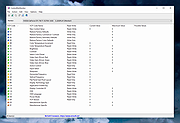 |
 |
InstallerClean v3.3.0 InstallerClean v3.3.0 👉 Safely clean orphaned Windows Installer files and reclaim disk space. InstallerClean is a modern, open-source tool for cleaning unneeded files from the hidden C:\Windows\Installer folder. It scans for orphaned .msi and .msp files, checks them against the Windows Installer database, and lets you delete them to the Recycle Bin or move them to a folder you choose. Features: • Scans C:\Windows\Installer for unneeded installer and patch files • Detects orphaned MSI and MSP files • Detects superseded patches, including Adobe Acrobat patches • Uses the Windows Installer API instead of guessing by file names or dates • Shows needed and removable files with sizes • Delete sends files to the Recycle Bin • Move option lets you keep removed files in a safe folder • GUI and command-line versions included • No telemetry, no network activity, no background service, no scheduled task Supported operating systems: • Windows 10, Windows 11 Supported languages: Indonesian, German, English, Spanish, French, Italian, Dutch, Polish, Brazilian Portuguese, Vietnamese, Turkish, Russian, Ukrainian, Japanese, Simplified Chinese, Traditional Chinese, Korean Changes: v3.3.0 10-13-26 Added InstallerClean can now be shown in Traditional Chinese, written for Taiwan's usage with the words Windows itself uses there: every window, dialog, tooltip, button and screen-reader label, the command-line tool's text and the setup wizard. A Windows set to Traditional Chinese shows it automatically, and it can be picked from the main-window language menu. Like the other machine-drafted languages it is published beside the English in docs/translations/zh-Hant.md for anyone who reads it to check, and the README has a Traditional Chinese edition, which the app's README links open. Where the languages stand: Natively done Live machine-translated README only * English · Italian · Japanese · Dutch Simplified Chinese · Traditional Chinese · Russian · Spanish · Brazilian Portuguese · Polish · Turkish · Korean · French · German · ... |
|
1,144 | Oct 13, 2026 no-faff  |
|
JMoveIt v1.00 JMoveIt v1.00 👉 A lightweight multi-monitor utility that moves windows between displays while preserving their relative size and position. JMoveIt is a multi-monitor utility designed to solve two common display-management problems: programs changing size when moved between monitors with different scaling or resolution settings, and Windows relocating open programs when a monitor’s power state changes. It can move programs to other monitors while maintaining the same relative size and position, and its optional Monitor Watcher feature can detect monitor power changes and restore windows to their original locations after Windows moves them. JMoveIt runs in the background, supports command line control, global hotkeys, and quick mouse-friendly interaction through a small window. Features: • Move program windows between monitors while preserving relative size and position • Helps prevent programs from growing or shrinking when moved to displays with different scaling or resolution settings • Optional Monitor Watcher detects monitor power state changes • Restores windows to their original monitor locations after Windows moves them • Supports command line options for moving programs • Includes global hotkeys for moving programs quickly • Runs in the background for convenient everyday use • Mouse-friendly interface with a single small window for quick interactions • No installation required, with an optional setup program included • Delphi XE2 source code included Supported operating systems: • Windows XP, Windows Vista, Windows 7, Windows 8, Windows 10 Supported languages: • English Changes: v1.00 04-02-26 First Release Note: This file has three hits on VirusTotal. We have confirmed these to be false positives. The file is safe. Click here to visit the author's website. |
|
667 | Apr 08, 2026 joejoesoft.com 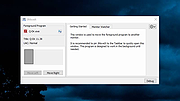 |
|
MultiMonitorTool v2.25 MultiMonitorTool v2.25 👉 Manage and control multiple monitors from a simple, portable Windows utility. MultiMonitorTool is a small, portable tool that allows you to manage multiple monitors connected to your system. It lets you enable or disable monitors, set the primary monitor, save and load monitor configurations, and move windows from one monitor to another. MultiMonitorTool can also be used from the command line, making it ideal for automation scripts and advanced users. Features: • Enable or disable specific monitors • Set the primary monitor • Save and load monitor configurations • Move windows from one monitor to another • Change monitor resolution, color depth, and refresh rate • View detailed information about connected monitors • Command-line support for scripting and automation • Portable application (no installation required) Supported operating systems: • Windows 2000, Windows XP, Windows Server 2003, Windows Vista, Windows 7, Windows 8, Windows 10, Windows 11 Supported languages: Arabic, Brazilian Portuguese, Czech, Dutch, French, German, Greek, Hungarian, Italian, Japanese, Korean, Persian, Polish, Romanian, Russian, Simplified Chinese, Slovak, Spanish, Traditional Chinese, Turkish, Ukrainian Changes: v2.25 07-04-26 Added new options: 'Switch To Selected Window', 'Close Selected Windows', 'Minimize Selected Windows', 'Restore Selected Windows'. This download is for the Windows 64bit version (very bottom of page). If you need the Windows 32bit version, download here. Click here to visit the author's website. |
|
10,346 | Jul 17, 2026 Nir Sofer 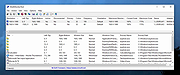 |
|
Quarkdown v2.4.0 Quarkdown v2.4.0 👉 Markdown-based typesetting system for creating books, documents, and PDFs with advanced layout features. Quarkdown is a modern, Markdown-based typesetting system designed for writing books, technical documents, reports, and PDFs with professional-quality layout and styling. It extends standard Markdown with powerful features such as variables, templates, components, conditionals, and advanced formatting controls, allowing you to structure complex documents while keeping your source files clean and readable. Quarkdown focuses on simplicity for authors while providing the flexibility of a programmable document engine. It can generate beautifully formatted PDFs and other output formats, making it suitable for documentation, publishing workflows, academic writing, and long-form content creation. Features: • Markdown-based document authoring • Advanced typesetting and layout control • Variables and reusable components • Templates for consistent document styling • Conditional content support • Book and multi-file project support • PDF generation • Cross-platform command-line interface • Open-source project Supported operating systems: • Windows 10, Windows 11 • macOS • Linux Supported languages: English Changes: v2.4.0 07-13-26 • Added experimental element styling, allowing Markdown elements to be extended with custom behavior and appearance. • Added new primitive functions: .paragraph, .math, and .link. • Added full styling support for .heading, .paragraph, .math, and .link. • Added conditional .extend support using the new where parameter. • Added the .match function for regular expression matching and replacement of inline content. • Simplified inline lambda syntax by making the @lambda prefix optional. • Improved body argument binding for native functions. • Optimized function argument binding for better performance. • Added support for body arguments in inline function calls. Requirements: • Java 17 or newer (JDK or JRE) must be installed. • Verify Java installation by opening Command Prompt or Terminal and typing: java -version • If Java is not installed, download a compatible OpenJDK build from a trusted provider such ... |
|
1,005 | Jul 14, 2026 Giorgio Garofalo  |
|
Rclone v1.75.0 Rclone v1.75.0 👉 Command-line tool for syncing, copying, mounting, and managing files across cloud storage and local systems. Rclone is a command-line program to manage files on cloud storage. It can sync files and directories to and from many different cloud storage providers, copy new or changed files, perform one-way or two-way synchronization, mount cloud storage as a disk, verify file integrity with hashes, and serve local or remote files over HTTP, WebDAV, FTP, SFTP, and DLNA. It is widely used for backup, restore, migration, and cloud-to-cloud transfers, with support for encryption, compression, chunking, and many standard transfer protocols. Features: • Syncs files and directories to and from cloud storage • Copies only new or changed files • Supports one-way sync and two-way bisync • Verifies file integrity with MD5 and SHA-1 hashes • Preserves timestamps on files • Mounts cloud storage as a network disk • Serves files over HTTP, WebDAV, FTP, SFTP, and DLNA • Supports encryption, compression, chunking, hashing, and union backends • Works with local filesystems, cloud services, and standard protocols • Useful for backup, restore, migration, and cloud-to-cloud transfers View instructions here. Supported operating systems: • Windows 10 or higher, Windows Server 2016 or higher • macOS 12 Monterey or higher • Linux Kernel 3.2 or higher • FreeBSD 12.2 or higher • OpenBSD 6.9 or higher • NetBSD • Plan 9 • Solaris Supported languages: English Changes: v1.75.0 07-31-26 New S3 Providers Scality (RING / ARTESCA) Zero Services (ZERO-Z3) Security archive: Don't crash on malformed squashfs images GHSA-6jcg-q3wp-x2f4 CVE-PENDING (Nick Craig-Wood) ftp: Fix ftp command injection when encoding doesn't include CRLF GHSA-8c48-q9wj-3w37 CVE-PENDING (Nick Craig-Wood) lib/http: Use TLS on all --addr listeners when --cert and --key are set ... |
|
5,176 | Aug 03, 2026 Nick Craig-Wood 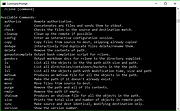 |
|
Shutdown Timer Classic v1.3.2 Shutdown Timer Classic v1.3.2 👉 Simple shutdown timer for Windows with tray controls and optional command-line use. Shutdown Timer Classic is a small Windows application that lets you set a countdown to shut down, restart, hibernate, sleep, or lock your PC. It includes a compact UI, a handy tray menu for controlling an active timer, and a “graceful” option when you don’t want apps to be force-closed. It also supports launching with command-line arguments for scripted or automated use. Features: • Countdown to Shutdown, Restart, Hibernate, Sleep, or Lock • Tray menu controls (stop/restart/view timer, show/hide countdown window) • “Run in background” option while keeping tray/menu access • Graceful mode option to avoid force-closing apps (when appropriate) • Command-line arguments for launching with preset actions/timers and modes • CLI “time of day” target mode (added in v1.3.2) Supported operating systems: • Windows 10 (Version 1709 / Build 15063) or later (minimum recommended) • Windows 11 Supported languages: • English Changes: v1.3.2 02-03-26 • Introduces: "Time of day"-mode for CLI • Fixes: Restarting a paused timer causing time skip (#54) • Fixes: Cancelling the countdown update dialog causing an exception (#55) • Fixes: Tab order of UI elements (#57) • Fixes: Fallback to CJK-compatible font causing incorrect form layout (#56) • Fixes: Application crashing on Windows 7 (#48) • Plus: Smaller code refinements and UI polishes Click here to visit the author's website. |
|
670 | Mar 05, 2026 Lukas Langrock 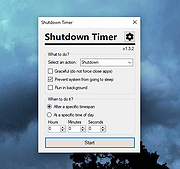 |
|
SoundVolumeView v2.53 SoundVolumeView v2.53 👉 View and change Windows sound volume from a GUI or command line. SoundVolumeView is a simple tool for Windows that displays general information and current volume levels for all active sound components on your system, and allows you to mute and unmute them instantly. SoundVolumeView can also save a sound profile to a file, including current volume levels, mute/unmute states, and default sound devices, then restore those same settings later. It also includes extensive command-line support for saving and loading profiles, changing volume, muting, unmuting, enabling, disabling, and setting audio devices without displaying the user interface. Features: • View all active sound components on your system • See current volume levels and mute status • Mute or unmute sound components instantly • Save and restore complete sound profiles • Change volume from the GUI or command line • Set default sound devices • Enable or disable audio devices • Create desktop shortcuts for common sound actions • Export sound item information to text, CSV, HTML, XML, or JSON • Supports 32-bit and 64-bit Windows Supported operating systems: • Windows Vista, Windows 7, Windows 8, Windows Server 2008, Windows 10, Windows 11 Supported languages: Arabic, Brazilian Portuguese, Dutch, Finnish, French, German, Greek, Hungarian, Italian, Japanese, Korean, Persian, Polish, Portugal Portuguese, Romanian, Russian, Simplified Chinese, Slovak, Spanish, Swedish, Traditional Chinese, Turkish Changes: v2.53 Fixed the /SetAllowExclusive and /SetExclusivePriority commands to set the value correctly. 👉 This download is for the Windows 64bit version (very bottom of page). All other download assets are below: Other Windows: soundvolumeview.zip (32bit) Click here to visit the author's website. |
|
6,314 | Sep 18, 2026 Nir Sofer 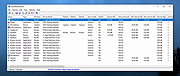 |
| Showing rows 1 to 8 of 8 | Showing Page 1 of 1 | 1 |
OlderGeeks.com Copyright (c) 2026
