|

|
Processed through Paypal No account required. |








Buy our over-priced crap to help pay the bills.



|
|
Processed through Paypal No account required. |
| Files | ||||
| File Name | Rating | Downloads | ||
 |
FileVoyager v26.9.6.0 FileVoyager v26.9.6.0 👉 A powerful dual-pane file manager and viewer for Windows. FileVoyager is a freeware Orthodox file manager (OFM) for Microsoft Windows that uses a dual-pane layout to make browsing, organizing, comparing, and transferring files easier. It can browse disks, folders, shares, archives, and FTP/FTPS locations in one unified interface, while also offering built-in viewers, archive handling, folder synchronization, file comparison, hashing, and media playback support. Features: • Dual-pane Orthodox file manager layout • Browse disks, folders, virtual folders, shares, archives, and FTP/FTPS locations • Multiple view modes, including report and thumbnail views • Rename, copy, move, link, delete, and recycle files • Pack and unpack ZIP, 7Zip, GZip, BZip2, XZ, Tar, and WIM archives • Unpack ARJ, CAB, XAR, Z, RAR, LZH, LZMA, ISO, WIM, and many other formats • Built-in file and folder comparison • Folder synchronization tools • Duplicate file finder • Advanced search and filtering • Quick preview for many file formats • Multimedia playback using installed codecs, Windows Media Player, and VLC support • Ebook and comic book viewing, including PDF, EPUB, MOBI, FB2, DJVU, CBR, CBZ, and XPS • Syntax highlighting for many source code formats • Hexadecimal and flat file viewing modes • Hash tool with VirusTotal-powered malware report • Dark Mode and customizable themes • Available as Setup or Portable editions • Optional VLC codec packages Supported operating systems: • Windows 10, Windows 11 • Should also run on Windows Vista, Windows 7, Windows 8.x, but these are not tested Supported languages: Arabic, Chinese Simplified, Czech, Danish, Dutch, English, French, German, Greek, Hungarian, Italian, Japanese, Korean, Polish, Portuguese, Portuguese (Brazil), Russian, Slovak, Slovenian, Spanish, Swedish Changes: v26.9.6.0 09-06-26 + New: Viewer: The main new feature in this release is folder analytics in the Viewer, with a dedicated panel providing key metrics and insights about a folder selected. + New: Browse: Added Archive & Unarchive commands in the Central toolbar, under Tools. ~ Chg: Global: Mask labels, visible in the various filter ... |
 |
5,777 | Sep 11, 2026 FileVoyager 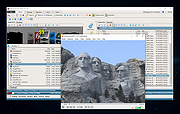 |
 |
Multi Commander v16.5 Multi Commander v16.5 👉 Dual-pane, multi-tabbed file manager for Windows power users. Multi Commander is a multi-tabbed file manager and Windows Explorer alternative using an efficient dual-panel layout. It includes standard file management tools such as copy, move, rename, and view, along with advanced tools for archive browsing, FTP/SFTP access, Registry browsing, file searching, batch renaming, scripting, plug-ins, and portable use. Features: • Dual-pane, tabbed file manager interface • Commander-style or Windows Explorer-style keyboard and mouse setup • View files in detail, list, or thumbnail modes • Browse local drives, network shares, FTP with SSL/TLS, SFTP/SCP, archives, Windows Registry, and Windows Portable Devices • Archive support for Zip, 7-Zip, Rar, Tar, gz, bz2, tar.gz, and tar.bz2 • Background file operations so the interface does not freeze • Copy/move filters, queues, auto-unpacking, auto-sorting, presets, and overwrite handling • Powerful Multi-Rename tool for batch renaming • Built-in file viewer with ASCII, UTF-8, Unicode, Binary, and Hex viewing • Search by file contents, attributes, size, date, regular expressions, duplicates, empty folders, and inside archives • Picture tools for converting, rotating, EXIF viewing/removal, and EXIF date adjustment • Audio tools for viewing audio properties and editing MP3 tags • Built-in scripting, extensions, plug-ins, and SDK support • Portable version available; unpack and run MultiCommander.exe Supported operating systems: • Windows Vista, Windows Server 2008 R2, Windows 7, Windows 8.x, Windows 10, Windows 11, Windows Server 2012 R2 • Note: The normal version does not work on Windows XP anymore. Multi Commander XP is available separately for Windows XP users. Supported languages: English, Bulgarian, Catalan, Chinese (Simplified), Chinese (Traditional), Czech, Dutch, Finnish, French, German, Hungarian, Italian, Japanese, Korean, Lithuanian, Norwegian, Polish, Portuguese (Brazil), Portuguese (Portugal), Romanian, Russian, Slovenian, Spanish, Swedish, Turkish, Ukrainian Changes: v16.5 09-11-26 ADDED - WebView and what formats should be opened in WebView can now be configured in Options in FileViewer. FIXED - Linked navigation now works again. Can be enabled from View mode popup. FIXED ... |
|
6,843 | Sep 25, 2026 Mathias Svensson 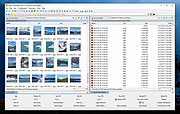 |
|
Superfile v1.6.0 Superfile v1.6.0 👉 A modern, terminal-based file manager built for speed and keyboard-driven efficiency. Superfile is a powerful cross-platform file manager designed to run inside your terminal, offering a fast, keyboard-focused alternative to traditional graphical file explorers. It features a clean interface with customizable themes, intuitive navigation, and efficient file operations, making it ideal for developers, system administrators, and power users who prefer working in the command line. Superfile combines performance with flexibility, allowing users to manage files, browse directories, preview content, and execute commands without leaving the terminal environment. Its lightweight design ensures minimal system resource usage while still delivering advanced functionality and smooth workflow integration. Features: • Fast, keyboard-driven navigation • Multi-panel file browsing • File preview support for various formats • Customizable themes and appearance • Cross-platform compatibility • Copy, move, rename, and delete file operations • Directory bookmarks for quick access • Lightweight and efficient resource usage • Designed for terminal environments • Open source and actively maintained Supported operating systems: • Windows 10, Windows 11 • macOS 12 or higher • Linux (major distributions) Supported languages: English Changes: v1.6.0 06-07-26 This release focuses on preview reliability, richer file metadata, configurable sidebar behavior, and a refreshed website and logo design, alongside navigation improvements, better error messages, refactoring, dependency updates, and bug fixes. Highlights Improved image and file preview reliability through the Bubble Tea v2 migration. Thanks @lazysegtree for the implementation New website & logo design. Thanks @elvisdragonmao for the implementation Added richer file metadata, including binary architecture detection for ELF/PE/Mach-O, Linux attributes, and file type byte support in the permissions column. Thanks @barsaskn, @xelavopelk, and @booth-w for the implementation Sidebar sections can now be configured for visibility and ordering. Thanks @Mjoyufull for the implementation Improved file operation error messages for delete, paste, and file text preview failures. Thanks @xelavopelk for the implementation ... |
|
1,563 | Jun 27, 2026 Yorukot 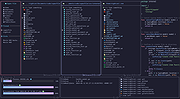 |
|
Tablacus Explorer v26.6.11 Tablacus Explorer v26.6.11 👉 Customizable tabbed file manager with extensive add-on support. Tablacus Explorer is a portable, open source tabbed file manager for Windows that supports add-ons, multiple languages, Unicode, customizable menus, keys, mouse gestures, aliases, and extra columns such as total file size and labels. It is designed for users who want a highly flexible alternative to standard Windows File Explorer. Features: • Tabbed interface • Add-on support • Completely portable with no installation required • Multiple language and Unicode support • Extra columns including total file size and label • Customizable associations, menus, keys, mouse gestures, and aliases • Open source • Available in both 32-bit and 64-bit versions Supported operating systems: • Windows XP, Windows Vista, Windows 7, Windows 8, Windows 8.1, Windows 10, Windows 11 Supported languages: English, Japanese, Spanish, Korean, German, Greek, French, Italian, Portuguese, Russian, Simplified Chinese, Traditional Chinese, Turkish Changes: v26.6.11 06-11-26 • Added ARM64 support. (Backup recommended) • Added an ARM64 version of Tablacus Explorer. • The developer does not have a Windows ARM device, so this build has not been tested by the developer. • Windows ARM users can download tearm_260611.zip, extract it over their existing installation, and run TEARM64.exe. • The developer is requesting feedback from ARM64 users about whether the build works correctly or if any problems occur. Click here to visit the author's website. |
|
6,983 | Aug 14, 2026 Gaku 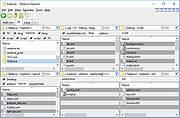 |
|
Waydir v0.22.0 Waydir v0.22.0 👉 A fast, keyboard-first dual-pane file manager for Linux, Windows and macOS. Waydir is a cross-platform desktop file manager built for users who prefer speed, direct control and fewer trips to the mouse. It combines classic dual-pane file management with tabs, live search, network drives, Quick Look previews, archive browsing, a built-in terminal and a native Rust core that keeps heavy file work off the interface thread. Features: • Dual-pane file browsing with tabs in each pane • Keyboard-driven navigation, selection, copying, moving, renaming and searching • Command palette for actions, bookmarks, drives, recent locations, files and plugin commands • Fast live recursive search with substring, regex and glob matching • Quick Look previews for images, PDFs, text, code and file details • Browse ZIP and TAR archives without extracting first • SMB and SFTP network drive support • Built-in terminal per pane • WSL file browsing and terminal support on Windows • Git status, branch switching and stash management • Light, Dark, Nord and One Dark themes, plus custom themes • Lua plugin support for actions, buttons, shortcuts and status bars • Free and open source under the MIT License Supported operating systems: • Windows • macOS • Linux Ubuntu, Debian, Fedora, RHEL, openSUSE and other Linux distributions using AppImage or portable tarball Supported languages: English Changes: v0.22.0 06-29-26 Added duplicate selected files and folders in place with Ctrl+Shift+D, available from the keyboard, command palette and context menu. Faster file copying, especially on Windows and when copying lots of small files. Renamed the "Kind" column to "Format". This download is for the Windows installer version (very bottom of page). All other download assets are below: Other Windows: waydir-0.22.0+29-windows.zip macOS: waydir-0.22.0+29-macos.dmg Linux: waydir-0.22.0+29-linux.AppImage waydir-0.22.0+29-linux.deb waydir-0.22.0+29-linux.rpm waydir-0.22.0-linux-x64.tar.gz Click here to visit the author's website. |
|
394 | Jul 02, 2026 Mikolaj Badyl 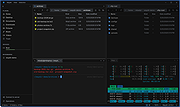 |
|
WinSetView v3.1.8 WinSetView v3.1.8 👉 Set default File Explorer folder views across Windows with just a few clicks. WinSetView is a free, portable utility that provides an easy way to configure default folder views throughout Windows File Explorer. You can apply a preferred view such as Details, List, Tiles or Icons globally, while assigning different settings to specific folder types such as Documents, Pictures, Music, Videos, Downloads, Libraries, OneDrive folders and search results. The program can customize displayed columns, column order, widths, sorting and grouping for each folder type. It also covers File Open and Save dialogs, connected devices such as phones and many virtual Windows folders that are not affected by File Explorer's standard Apply to Folders option. WinSetView works by configuring registry values that File Explorer already supports. It does not modify Explorer, install services or leave background tasks running. Existing folder-view settings can be backed up before changes are applied, restored later or reset to the original Windows defaults. The program can be used as a portable application from a local folder, flash drive or network location. An optional installer is also available for users who prefer a conventional installation. Portable use does not require administrator rights, although individual Explorer options marked with a shield may require elevation. Features: • Set a global default view for Windows File Explorer folders • Choose Details, List, Tiles, Content or multiple icon sizes • Configure every supported Windows folder type individually • Customize column headings, order, width, sorting and grouping • Apply separate views to File Open and Save dialogs • Configure views for Documents, Pictures, Music, Videos and Downloads • Supports Libraries, OneDrive, search results, Quick Access and user folders • Apply General Items column settings to connected MTP devices such as phones • Enable or disable folder thumbnails • Show hidden files, file extensions and other Explorer options • Restore the classic Windows 10 context menu ... |
|
4,555 | Jul 24, 2026 LesFerch 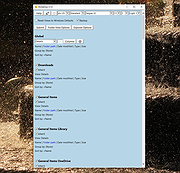 |
| Showing rows 1 to 6 of 6 | Showing Page 1 of 1 | 1 |
OlderGeeks.com Copyright (c) 2026
