|

|
Processed through Paypal No account required. |








Buy our over-priced crap to help pay the bills.



|
|
Processed through Paypal No account required. |
| Files | ||||
| File Name | Rating | Downloads | ||
 |
2Shoot_Dual_Intervalometer_ISO_Bracketing.zip 2Shoot Dual Intervalometer & ISO Bracketing v1.0.0 👉 A portable Windows tool for wireless interval shooting and ISO bracketing with supported Sony cameras. 2Shoot Dual Intervalometer & ISO Bracketing is a lightweight photography utility that controls supported Sony cameras from a Windows PC over Wi-Fi. It provides both an intervalometer and true ISO bracketing while keeping the interface simple and focused. Photographers can create timed shooting sequences, distribute a selected number of shots across a specified duration, or capture 3, 5, or 9 images at different ISO values while maintaining the same shutter speed and aperture. The program currently supports the Sony α1 (ILCE-1) and Sony α7 IV (ILCE-7M4), provides live camera information, works with autofocus or manual focus, and requires no traditional installation. Features: • Wireless control of supported Sony cameras over Wi-Fi • Interval Mode for setting the delay between consecutive photographs • Duration Mode for distributing a selected number of shots over a total duration • Time controls adjustable in 0.5-second steps • ISO bracketing with 3, 5, or 9-shot sequences • ISO bracket steps of 0.3 EV, 0.7 EV, or 1.0 EV • Uses the camera's current ISO as the center value of an ISO bracket • Displays the calculated ISO scale in real time • Keeps shutter speed and aperture unchanged during ISO bracketing • Automatically restores the camera's original ISO after a bracketing sequence • Supports RAW, RAW + JPG, and JPG operation • Supports autofocus and manual-focus shooting • Displays live ISO, shutter speed, and aperture information • Monitors actual shutter speed for interval timing checks • Automatically opens the destination folder after a successfully completed sequence • Automatically retries a camera connection up to two times after the initial attempt • Includes an Abort Connection control • Built-in Help and About windows • Supports Sony α1 (ILCE-1) and Sony α7 IV (ILCE-7M4) • Portable 64-bit Windows application with no traditional installer required Supported operating systems: • ... |
 |
77 | Sep 20, 2026 Cristoforo Bonissone 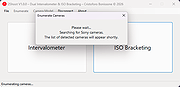 |
 |
digiKam v9.1.0 digiKam v9.1.0 👉 Professional photo management with the power of open source. digiKam is an advanced open-source digital photo management application for importing, organizing, editing, and sharing photos and RAW files. It provides tools for managing large photo collections, editing metadata, tagging and rating images, handling RAW camera formats, previewing media, geolocation, batch processing, export tools, and AI-assisted photo workflows. Features: • Import, organize, and manage massive collections of photos, RAW images, and videos • Supports albums, tags, labels, ratings, comments, and hierarchical organization • Advanced metadata management including EXIF, IPTC, XMP, and GPS geotagging • Integrated map tools for assigning and editing geographic coordinates • Powerful RAW image processing using the Libraw engine • Built-in image editor with cropping, resizing, sharpening, curves, color correction, filters, and restoration tools • Includes Showfoto stand-alone image editor • AI-assisted face recognition and automatic face tagging • AI tools for image quality sorting, aesthetic detection, red-eye correction, and auto-rotation • Batch Queue Manager for automating large-scale image processing operations • Advanced search and filtering using metadata, tags, ratings, colors, and custom properties • Duplicate detection and similarity matching tools • Flexible file renaming with advanced rename templates and date formatting • Side-by-side comparison and new Survey tool for reviewing media collections • Enhanced preview system with exposure indicators, magnifier, gestures, OSD overlays, and color management • Slideshow tools with transition and transparency customization • Versioning support and non-destructive workflow options • Integrated export and sharing plugins for online services and remote storage • Database support using SQLite, MySQL, and MariaDB • Multi-core processing acceleration for thumbnail generation, AI tasks, and database operations • Supports hundreds of digital cameras and image formats Supported operating systems: • Windows 10 or later 64-bit • macOS Silicon 11.3 or later • macOS Intel 10.15 or later • Linux 64-bit AppImage, glibc 2.31 or later Supported languages: • Basque, Brazilian Portuguese, Bulgarian, Catalan, Chinese Simplified, Chinese Traditional, Croatian, Czech, Danish, Dutch, English, Esperanto, Estonian, Finnish, French, Galician, ... |
|
4,287 | Sep 28, 2026 digiKam Team 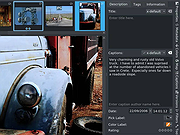 |
|
FastStone Image Viewer v8.5 FastStone Image Viewer v8.5 👉 Fast, stable image browser, editor and batch converter. FastStone Image Viewer is a fast, stable, user-friendly image browser, converter and editor. It includes image viewing, management, comparison, red-eye removal, emailing, resizing, cropping, retouching and color adjustments. Its full-screen mode gives quick access to EXIF information, thumbnail browsing and major tools through hidden edge toolbars. It also includes a high quality magnifier, musical slideshow with 150+ transition effects, lossless JPEG transformations, drop shadows, image annotation, scanner support, histogram display, batch conversion and batch renaming. Features: • Windows Explorer-like image browser and viewer • Supports BMP, JPEG, HEIC, WEBP, GIF, PNG, PCX, PDF, PSD, EPS, TIFF, WMF, ICO, CUR, TGA and many RAW camera formats • Full-screen viewer with zoom support and fly-out menu panels • Resize, rotate, crop, sharpen, blur, color correction, curves and levels tools • Clone Stamp, Healing Brush and red-eye removal • Draw text, lines, highlights, rectangles, ovals and callouts • Compare up to 4 images side-by-side • Batch convert and batch rename files • Slideshow with music and 150+ transition effects • Scanner support with batch scanning to PDF, TIFF, JPEG and PNG • Contact sheet creation, printing tools and image emailing • Portable version available Supported operating systems: • Windows XP, Windows Vista, Windows 7, Windows 8, Windows 10, Windows 11 Supported languages: Bulgarian, Chinese (Simplified), Chinese (Traditional), Czech, Danish, Dutch, Finnish, French, German, Hungarian, Italian, Japanese, Korean, Norwegian (Norsk bokmεl), Polish, Portuguese, Russian, Spanish, Swedish, Ukrainian Changes: v8.5 06-24-26 Added support for SVG format Added Start importing automatically and Handle duplicate file names automatically options to the Import Photos and Videos tool WebP files can now be rotated and saved with a single click Enhanced dark theme support in the PDF viewer Fixed a bug where some links in PDF files were not clickable Other improvements and bug fixes 👉 This download is for the Windows portable version (very bottom of page). All other download ... |
|
11,648 | Oct 07, 2026 FastStone Soft 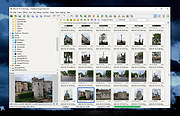 |
|
HDD Raw Copy Tool v1.20 HDD Raw Copy Tool v1.20 A free, portable utility for low-level, sector-by-sector hard disk duplication and image creation. HDD Raw Copy tool makes an exact duplicate of a SATA, IDE, SAS, SCSI or SSD hard disk drive. Will also work with any USB and FIREWIRE external drive enclosures as well as SD, MMC, MemoryStick and CompactFlash media. • Supported interfaces: S-ATA (SATA), IDE (E-IDE), SCSI, SAS, USB, FIREWIRE. • Big drives (LBA-48) are supported. • Supported HDD/SSD Manufacturers: Intel, OCZ, Samsung, Kingston, Maxtor, Hitachi, Seagate, Samsung, Toshiba, Fujitsu, IBM, Quantum, Western Digital, and almost any other not listed here. • The program also supports low-level duplication of FLASH cards (SD/MMC, MemoryStick, CompactFlash, SmartMedia, XD) using a card-reader. The tool creates a sector-by-sector copy of all areas of the hard drive (MBR, boot records, all partitions as well as space in between). HDD Raw Copy does not care about the operating system on the drive – it could be Windows, Linux, Mac, or any other OS with any number of partitions (including hidden ones). Bad sectors are skipped by the tool. If your media has a supported interface then it can be copied with HDD Raw Copy! In addition, HDD Raw Copy can create an exact raw (dd) or compressed image of the entire media (including service data such as MBR, Boot records, etc). Again, all filesystems (even hidden) are supported. Examples of possible uses: • Data recovery: make a copy of the damaged drive to attempt recovery on the copy • Data recovery: copy a damaged hard drive and skip bad sectors • Migration: completely migrate from one hard drive to another • ... |
|
1,980 | Nov 10, 2023 HDDGURU.COM 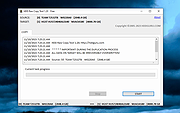 |
|
ImageGlass v10.0.6.906 ImageGlass v10.0.6.906 👉 A lightweight, versatile image viewer for Windows. ImageGlass is a feature-rich, simple-to-use image viewer with a clean, modern interface and support for over 90 image formats, including WEBP, GIF, SVG, PNG, JXL, HEIC, RAW formats and more. Features: • Supports over 90 common image formats • Fast image switching with a clean, minimal interface • Supports animated formats including GIF, WEBP, APNG and SVG • Multi-frame image support with frame navigation tools • Drag-and-drop and clipboard image opening • Six zoom modes including Auto Zoom, Lock Zoom, Scale to Width, Scale to Height, Scale to Fit and Scale to Fill • Full screen, frameless and window-fit viewing modes • Slideshow view with countdown timer • Fast thumbnail previews • Built-in color picker • EXIF metadata viewing with ExifGlass • Basic editing tools including rotate, flip, crop, resize and lossless compression • Custom themes, language packs, icon packs, layout and toolbar options • Keyboard and mouse action customization • External app integration through custom hotkeys • Color management and color channel viewing Supported operating systems: • Windows 10 64-bit version 1809 or later, Windows 11 64-bit Supported languages: Arabic, Armenian, Asturian, Azerbaijani, Belarusian, Bengali, Bulgarian, Catalan, Chinese Simplified, Chinese Traditional, Croatian, Czech, Danish, Dutch, Esperanto, Finnish, French, German, Greek, Hebrew, Hungarian, Icelandic, Indonesian, Irish, Italian, Japanese, Khmer, Korean, Kurmanji Kurdish, Kyrgyz, Lithuanian, Malay, Mongolian, Norwegian Bokmal, Persian, Polish, Portuguese, Brazilian Portuguese, Romanian, Russian, Serbian Cyrillic, Serbian Latin, Sinhala, Slovak, Slovenian, Spanish, Swedish, Tamil, Thai, Turkish, Ukrainian, Vietnamese Changes: v10.0.6.906 09-05-26 New • ImageGlass.SDK updated to 1.2.0 • Bumped plugin ABI version from 1.0.0 to 1.2.0 • Added IGHdrTransferFn.ScRgb photo metadata support for rendering HDR images from codec plugins • Added DecodeStaticRasterScaled API for requesting scaled thumbnail images from codec plugins • Added Linux AppImage package support Improvements • Updated Avalonia to 12.1.2 • Updated Magick.NET to 14.17.1 ... |
|
4,505 | Oct 06, 2026 Duong Dieu Phap 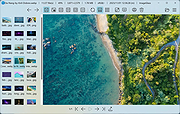 |
|
Imagine v2.7.0 Imagine v2.7.0 👉 Fast freeware image and animation viewer for Windows with broad format and plugin support. Imagine is a freeware image and animation viewer for Windows that focuses on speed while supporting a huge range of image, animation, archive, and RAW camera formats. It includes a thumbnail browser, slideshow, batch conversion and rename tools, screen capture, basic paint tools, color corrections, ICC color management, and optional add-on plugins plus Total Commander integration. Features: • View and save image and animation files with very fast speed • Supports many image and animation formats (including ANI, GIF, PNG, SVG, TIF, WEBP, and more) • Supports digital camera RAW formats (including ARW, CR2, CR3, DNG, NEF, ORF, RAF, SRW, and more) • Supports archive formats (ZIP, RAR, 7Z, ALZ, HV3, CBZ, CBR, CB7) • Extract single or all frames from animation files • Shows detailed file information plus Exif, IPTC, DICOM, and Comment information • Thumbnail browser • Basic paint tools, color corrections, and ICC color management • Batch conversion and batch rename • Slideshow and tiled view • Screen capture • Create animations, multiple page images, and panorama images • Customizable keyboard and mouse shortcuts, plus command line parameter support • Shell extension support, add-on plugin support, and Total Commander Lister, Packer, and Content plugin support • INI-based configuration (does not write unnecessary registry entries) • Native builds for x86, x64, and ARM64 Supported operating systems: • Windows 95, Windows 98, Windows ME, Windows NT 4.0, Windows 2000, Windows XP, Windows 2003, Windows Vista, Windows 7, Windows 8, Windows 10, Windows 11 Supported languages: • Arabic, Czech, Danish, Dutch, French, German, Italian, Japanese, Korean, Polish, Portuguese (Brazil), Portuguese (Portugal), Romanian, Russian, Simplified Chinese, Slovenian, Spanish, Traditional Chinese, Turkish, Ukrainian, Uzbek (O'zbekcha) Changes: v2.7.0 09-12-26 - Added: Antialiasing support for 32-bit alpha blended image - Added: 'Apply to all users'/'Current user only' option (Installer) - Added: Determine whether encoding can be skipped ... |
|
6,937 | Sep 13, 2026 Sejin Chun 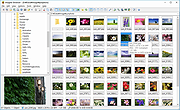 |
|
NegPy v0.59.0 NegPy v0.59.0 👉 Powerful open-source darkroom-style software for converting, processing, repairing and printing scanned film negatives and transparencies. NegPy is a specialized film-processing application designed to turn scanned negatives into finished positives using a non-destructive, darkroom-style workflow. Rather than simply inverting an image, it models film and photographic paper behavior in density space, automatically neutralizes the orange mask and provides Auto Density and Auto Grade controls for establishing useful starting points. It can work with camera scans, dedicated film scanners, RAW and TIFF images, slide film, narrowband and trichrome scans, and specialized scanner formats. NegPy also includes extensive tools for dust repair, dodge and burn, color management, soft proofing, metadata, batch processing and print-ready exporting. Original source files are never modified, with edits and history stored separately in a local database. Features: • Converts scanned film negatives using a film and photographic-paper simulation rather than simple image inversion • Neutralizes the orange mask mathematically using channel sensitometry without requiring camera profiles or border color picking • Models film H&D characteristic curves in density space with toe, linear and shoulder response • Per-frame Auto Density and Auto Grade analyze negatives for automatic brightness and contrast starting points • Darkroom paper profiles provide paper-specific curve shaping, channel gamma and base tint • Dedicated transparency support for positive and slide film with optional normalization for faded or expired film • Process option allows already-finished positive images to bypass unnecessary as-captured lift and highlight roll-off • Supports standard RAW and TIFF files along with specialized formats such as Kodak Pakon scanner RAW files • Direct scanner control for supported film scanners including Plustek and Nikon Coolscan models • Nikon Coolscan strip scanning includes automatic frame detection, roll-wide offset and drift controls, plus individual per-frame registration • Supports 16-bit monochrome TIFF scanning for single-record film • Camera scanning can capture negatives directly from a tethered camera on supported platforms • ... |
|
961 | Sep 17, 2026 marcinz606 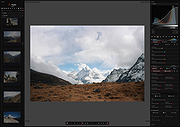 |
| Showing rows 1 to 7 of 7 | Showing Page 1 of 1 | 1 |
OlderGeeks.com Copyright (c) 2026
