|

|
Processed through Paypal No account required. |








Buy our over-priced crap to help pay the bills.



|
|
Processed through Paypal No account required. |
| File - Download Chrono Mock v0.3.0 | ||||||||
| Description | ||||||||
|
A plea... Deanna and I have been running this site since 2008 and lately we're seeing a big increase in users (and cost) but a decline in percentage of users who donate. Our ad-free and junkware-free download site only works if everyone chips in to offset the revenue that ads on other sites bring in. Please donate at the bottom of the page. Every little bit helps. Thank you so much. Sincerely, your Older Geeks: Randy and Deanna Always scroll to the bottom of the page for the main download link. We don't believe in fake/misleading download buttons and tricks. The link is always in the same place. Chrono Mock v0.3.0 👉 Test how a Windows application behaves at another date without changing your computer’s clock. Chrono Mock runs an application with its own simulated date and time while Windows and your other programs continue using the real clock. It is designed for developers and testers checking things such as trial expiration, licence behaviour, reminders, certificate dates, month-end processing, and the Year 2038 boundary. Instead of changing the system clock and disrupting other software, you choose the application and the time it should see. The simulated clock can run normally, freeze, or move faster than real time. You can also jump forward or backward during a session to see how an application responds to a sudden clock change. Chrono Mock follows child processes and provides a separate time zone offset for the session. Its built-in audit reports which time sources it reached, which it missed, and whether the result works, works partially, or does not work. That verdict matters: an application may obtain time from a server or another source that a local tool cannot change. 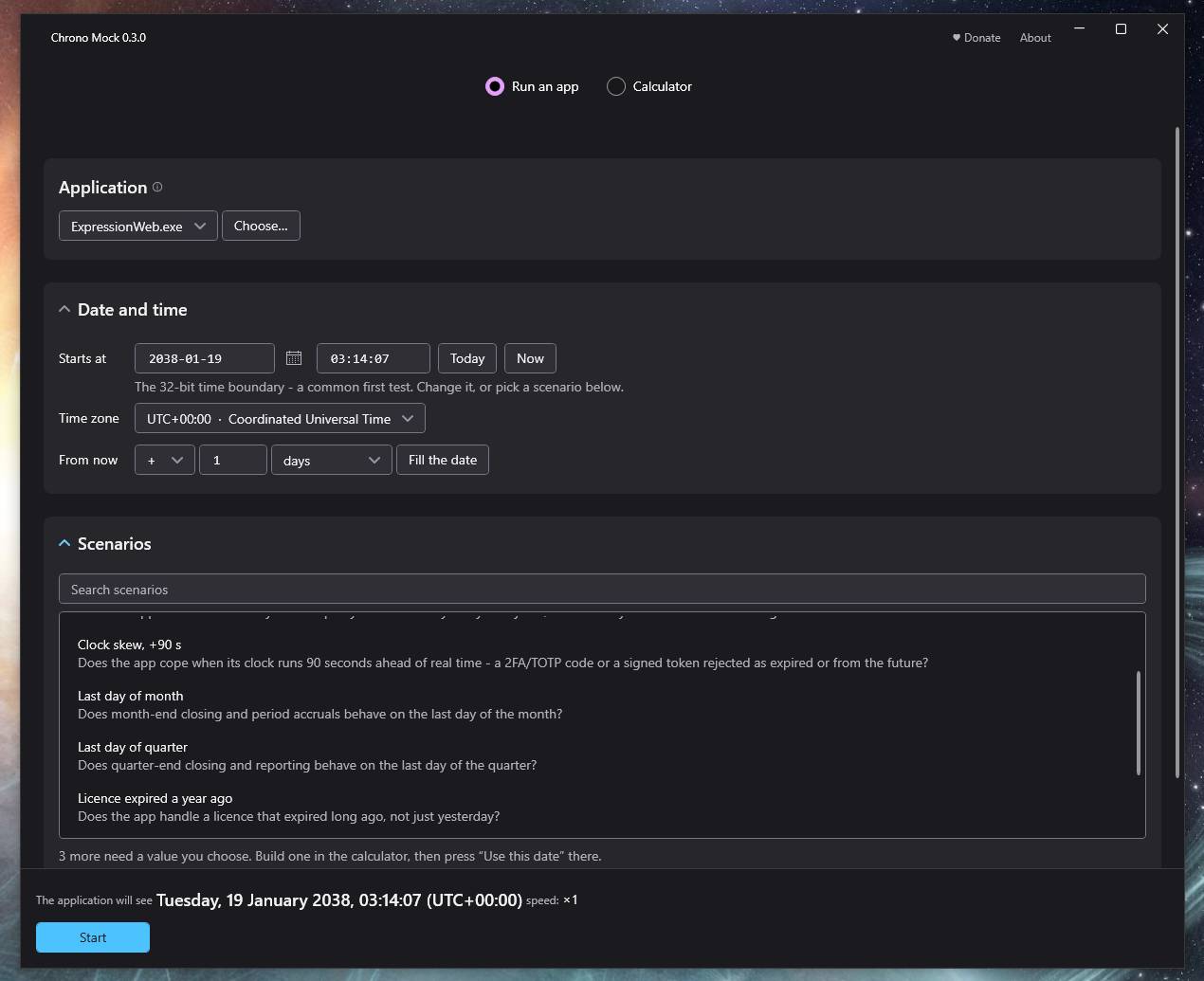 A date calculator helps prepare tests around trial deadlines, business days, holidays, quarter closes, and year-end changes. Chrono Mock offers a desktop interface and a command-line tool for scripts and automated testing. Both are portable. Support for native Windows applications is the most thoroughly tested; the developer marks several other application types, including .NET, Java, Python, and Electron, as experimental. Before testing an application at a future date, back up its data. The application may permanently save future-dated records or trigger licence rollback protection even after the session ends. Antivirus software may also flag the library Chrono Mock injects into applications. The developer documents these limitations and recommends checking each session’s audit. Features: • Runs a selected application at a specified date and time without changing the Windows system clock. • Accepts an exact date or a relative shift, such as moving forward 30 days. • Runs the simulated clock at normal speed, freezes it, or accelerates it to test long periods in less time. • Jumps to another date or shifts time forward or backward while a session is running. • Shows the application’s clock and the real clock side by side, including elapsed time. • Applies a separate, fixed time zone offset to the tested process. The simulated zone does not reproduce daylight saving transitions. • Follows child processes launched by the application, helping cover installers and other programs that start additional processes. • Audits the time sources an application uses, shows call counts and missed coverage, and gives a clear session verdict. • Provides scenarios for trial deadlines, month-end and year-end changes, and the Year 2038 boundary. • Calculates dates using business days and United States or Polish holidays, then displays the result in several common formats. • Can reach web pages inside supported WebView2 and Qt WebEngine applications, with the remaining coverage limits identified in the audit. • Offers experimental support for Electron and Chromium applications through a separate debugging mechanism. • Includes a desktop interface and a command-line tool with reports, JSON output, and exit codes for automated tests. • Runs from extracted ZIP files without an installer or administrator rights. Supported operating systems: Windows 64-bit Supported languages: English Changes: v0.3.0 09-22-26 • Rebuilt the window around separate Setup, Session, and Result screens. • Added search to the scenario list, including keyboard selection of the first match. • Added the ability to jump to a specified date during a running session. • Added elapsed-time readings to both session clocks. • Added coverage for web pages inside applications using WebView2 or Qt WebEngine, with page-level audit details and warnings about its limits and the local debugging port. • Added tables identifying processes that remained on the real clock and web engines reached during a session. • Changed the initial speed to real time and the default time zone to UTC. • Revised the setup labels, audit descriptions, result display, calculator layout, and keyboard controls for clarity. 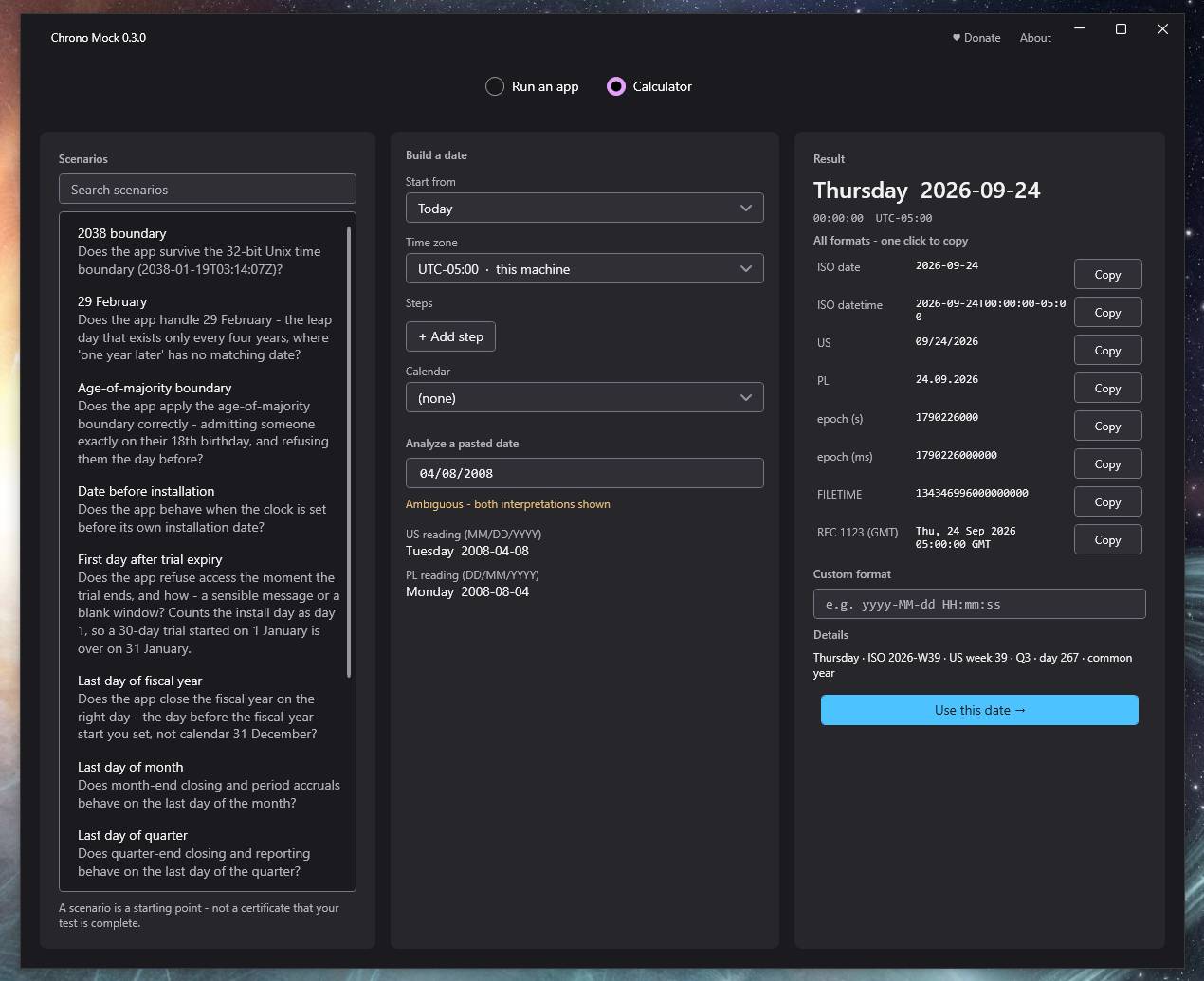 Important notes from the author: 1. An application running in 2028 will write 2028 dates wherever it stores its data: its database, its configuration, its cache, its license file. Those values stay there after you return to real time. For applications with license protection this can be permanent. "Clock rollback detected → license invalidated" is a standard industry pattern, and it will do exactly what it was designed to do. Back up the application's data directory before your first future-dated session. Chrono Mock leaves nothing behind in your system - no persistent hooks, no registry entries, and nothing outside its own folder except three things it will name for you: the session history and the diagnostics log, which move to %LOCALAPPDATA%\ChronoMock\ when the tool's own folder is not writable (a USB stick, or Program Files without admin), and, for an Electron or Chromium target, a throwaway browser profile under %TEMP% that is deleted when the session ends - and reported in the session summary if it could not be. That guarantee covers the tool. It does not, and cannot, cover the application under test. 2. Antivirus software may flag the injected library. That is expected, and explained below: Antivirus and Microsoft Defender Chrono Mock shifts time by injecting a small library into the target process. That is a legitimate, documented Windows technique - and it is also one that malware uses, so antivirus software, Microsoft Defender included, may flag or quarantine the injected library or block the injection outright. This is a false positive triggered by the technique, not by anything the tool does to your machine. If a session fails to start and Defender reports a threat, add an exclusion in Windows Security (Virus and threat protection, Manage settings, Exclusions, Add an exclusion), or run it on a machine where you are permitted to do so. The tool is open source under GPL-3.0 - the injected library is chrono_hook.dll, built from the code in this repository, and you can rebuild it yourself. Exclude the library, not the folder. Choose File and give the full path to the injected library - core\x64\chrono_hook.dll in the GUI package, chrono_hook.dll in the CLI one, plus the x86 copy if you test 32-bit targets. Microsoft's own guidance is that every exclusion is a protection gap, so it is worth keeping this one as small as it can be. There is a specific reason here: a Folder exclusion turns the Chrono Mock directory into a place nothing is scanned - and that is the same directory the tool loads chrono_hook.dll from and injects into every application you point it at. Excluding the one file leaves the rest of the folder watched. If the narrower exclusion is not enough for your Defender configuration, the folder exclusion is the fallback, not the starting point. The Chromium / Electron mode does not inject at all. It launches the target with a debug port and a clean isolated profile (see the support matrix), so it is not affected by this. An application with an embedded web engine gets both: the native hook in the application, and the pages inside it reached over the engine's own debugging port. That port is opened by the engine at the session's request (two environment variables the target inherits) and stays open, to any program on this computer, for as long as the engine runs - the report says so, names the port, and --no-embedded (or the checkbox in the window) leaves the pages on the real clock and opens nothing. The engine's helper processes and the renderer's own native reads stay on the real clock, so such a session is reported as PARTIAL with the reason spelled out. An application running elevated is out of reach: the engine ignores the variables there. 👉 This download is for the Windows graphical version (very bottom of page). All other download assets are below: Other Windows: ChronoMock-cli-win.zip (Command-line version) Click here to visit the author's website. Continue below for the main download link. |
||||||||
| Downloads | Views | Developer | Last Update | Version | Size | Type | Rank | |
| 9 | 78 | DonislawDev | Sep 24, 2026 - 14:04 | 0.3.0 | 69.57MB | ZIP |  , out of 1 Votes. , out of 1 Votes. |
|
| File Tags | ||||||||
| Chrono Mock Windows time simulation clock testing date calculator software development portable automation | ||||||||
Click to Rate File Share it on Twitter → Tweet
|


