|

|
Processed through Paypal No account required. |








Buy our over-priced crap to help pay the bills.



|
|
Processed through Paypal No account required. |
| Files | ||||
| File Name | Rating | Downloads | ||
 |
AMD Ryzen Master v3.1.1.5502 AMD Ryzen Master v3.1.1.5502 👉 Unlock, monitor, and tune AMD Ryzen processor performance. AMD Ryzen Master is AMD's official utility for controlling and monitoring supported AMD Ryzen processors. It provides access to overclocking, system telemetry, automatic tuning, performance profiles, CPU and RAM views, integrated Radeon graphics tuning, PBO and Curve Optimizer settings, and real-time monitoring for clock rates, temperatures, and voltages. Features: • Official AMD utility for supported Ryzen processors • Redesigned interface for essential controls and telemetry • Basic and Advanced modes • Automatic CPU and RAM overclocking • Real-time per-core clock monitoring • Temperature and voltage monitoring • Average and peak readings • Custom monitoring views • Multiple performance profiles • Tune Ryzen CPU settings • Adjust integrated Radeon graphics frequency • Adjust DDR5 memory timings • Workspace for immediate tuning adjustments • Integrated Radeon graphics overclocking on supported processors • PBO and Curve Optimizer adjustment options • CPU CCD monitoring views • RAM views focused on EXPO parameters Supported operating systems: • Windows 10 64-bit, Windows 11 64-bit Supported languages: English, German, French, Simplified Chinese Changes: v3.1.1.5502 07-22-26 Release Highlights Added support for the Curve Shaper feature – a fine‑grain voltage/frequency tuning capability that allows selective voltage adjustments across temperature and frequency bands; applicable to the AMD Ryzen™ 9000 Series. Known Issues The application may take a bit longer to load on systems with higher core count CPUs In certain scenarios, when Ryzen Master is launched from AMD Software: Adrenalin Edition™, Ryzen Master Dashboard may not display accurate metric values. As a workaround, restart your system, and then launch Ryzen Master before starting AMD Software: Adrenalin Edition™. This download is for the Ryzen 5000 Series processors and later version (very bottom of page). All other download assets are below: For Ryzen 3000 Series to 4000 Series processors version: amd_ryzen_master_2.14.3.5040.exe For Ryzen 2000 Series processors and earlier version: amd-ryzen-master-2-13-1-3097.exe Click here to visit the author's website. |
 |
23,802 | Sep 16, 2026 Advanced Micro Devices, Inc 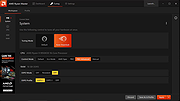 |
 |
Chrono Mock v0.3.0 Chrono Mock v0.3.0 👉 Test how a Windows application behaves at another date without changing your computer’s clock. Chrono Mock runs an application with its own simulated date and time while Windows and your other programs continue using the real clock. It is designed for developers and testers checking things such as trial expiration, licence behaviour, reminders, certificate dates, month-end processing, and the Year 2038 boundary. Instead of changing the system clock and disrupting other software, you choose the application and the time it should see. The simulated clock can run normally, freeze, or move faster than real time. You can also jump forward or backward during a session to see how an application responds to a sudden clock change. Chrono Mock follows child processes and provides a separate time zone offset for the session. Its built-in audit reports which time sources it reached, which it missed, and whether the result works, works partially, or does not work. That verdict matters: an application may obtain time from a server or another source that a local tool cannot change. A date calculator helps prepare tests around trial deadlines, business days, holidays, quarter closes, and year-end changes. Chrono Mock offers a desktop interface and a command-line tool for scripts and automated testing. Both are portable. Support for native Windows applications is the most thoroughly tested; the developer marks several other application types, including .NET, Java, Python, and Electron, as experimental. Before testing an application at a future date, back up its data. The application may permanently save future-dated records or trigger licence rollback protection even after the session ends. Antivirus software may also flag the library Chrono Mock injects into applications. The developer documents these limitations and recommends checking each session’s audit. Features: • Runs a selected application at a specified date and time without changing the Windows ... |
|
10 | Sep 24, 2026 DonislawDev 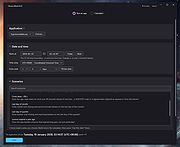 |
|
Desktop Clock Widget v1.0.0 Desktop Clock Widget v1.0.0 A minimalist, transparent, and undraggable clock widget for your Windows desktop, built with Electron. Desktop Clock Widget is designed to blend seamlessly with your wallpaper, just like a Rainmeter skin, without interfering with your workflow. Features: 🖥️ Seamless Desktop Integration: Appears directly on your desktop wallpaper, not as an overlay on top of other windows. 🪟 Transparent & Frameless: No visible window borders or backgrounds, just your clock content. 🖱️ Undraggable & Non-Interactive: Clicks pass through the widget, allowing you to interact with desktop icons and windows behind it without interference. 🖋️ Customizable Font: Easily change the font to match your desktop aesthetic. 📍 Fixed Position: Configured to appear at a specific, non-intrusive position (20% from the top, horizontally centered). 🧊 Resource Friendly: Optimized to have minimal impact on your PC's resources. Usage: • Launch the "Desktop Clock" application from your Start Menu or desktop shortcut. • The clock widget will appear on your desktop, centered horizontally and positioned 20% from the top of your screen. • It will automatically update every minute. • Clicks will pass through the widget to your desktop icons. • To quit the clock, right-click the tray icon and select Quit Clock. Click here to visit the author's website. |
|
1,722 | Jul 25, 2025 nicocodes9 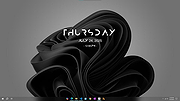 |
|
Digi Flip Screensaver v1.0 Digi Flip Screensaver v1.0 👉 Free digital flip clock screensaver for Windows. Digi Flip Screensaver is a free digital clock screensaver for Windows that displays the current time using animated flipping digits updated in real time. It features a sleek, modern look designed to add a fun and interactive clock display to your desktop or laptop while the screensaver is active. The program is built with the OpenGL framework and is designed to work with a wide range of screen resolutions, including HD and 4K. Features: • Real-time digital flip clock display • Animated flipping digits • Smooth 3D effects • OpenGL-based screensaver • Install and uninstall support • Compact size and fast installation • Supports HD and 4K screen resolutions • Free to download and use Supported operating systems: • Windows XP, Windows Vista, Windows 7, Windows 8, Windows 10, Windows 11 Supported languages: English Changes: Not Provided Click here to visit the author's website. |
|
630 | Mar 29, 2026 saversplanet.com 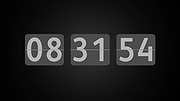 |
|
Digital Clock v5.1.4 Digital Clock v5.1.4 A beautiful and highly customizable clock with plugins. Just launch it and enjoy! When it starts, apart from the clock itself, a small tray icon appears. This tray icon can be used to call the clock configuration dialog. Also this dialog can be called using clock context menu. Features: • full compatibility with old skin format • good font rendering (minimal difference with text editors) • good Unicode support (including emoji) • font-like rendering for image-based skins due to skin format extension • gradient filling for numbers and background • multiple time zones (or just multiple windows) support • tray icon displays local time (implemented just-for-fun) Changes: v5.1.4 added configurable tray icon actions (Windows only) added option to hide the clock improved macOS packaging fixed compatibility issues related to 'any_zoom' fixed widget alignment options saving (for plugins) added 'ip_address' plugin (improved version) added leading zero option for 'countdown_timer' This download is for the Windows portable version (very bottom of page). All other download assets are below: Windows: digital_clock_5-x64.msi (installer) macOS: digital_clock_5-macos.dmg Click here to visit the author's website. |
|
1,023 | Apr 04, 2025 Nick Korotysh 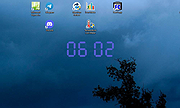 |
|
File Order Randomizer v1.0 File Order Randomizer v1.0 👉 Adds random numbers to the start of filenames to randomize play order on simple music players. File Order Randomizer is a small, portable utility intended for devices (like some car radios or clock radios) that cannot play tracks in random order from a USB stick. It generates random numbers and puts them in front of every file in a specified folder, so you can create a new play order by running it again. Features: • Adds random numbers in front of filenames in a selected folder • Designed to help create a “random” track order for cheap/basic music players using USB media • Simple run-to-rerandomize workflow (run again whenever you want a new order) Supported operating systems: • Windows 2000 SP4 • Windows XP • Windows Vista • Windows 7 • Windows 8 / 8.1 • Windows 10 • Windows 11 Supported languages: • English Click here to visit the author's website. |
|
760 | Jun 29, 2026 Lumpiluk 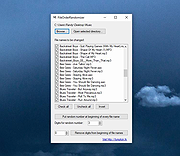 |
|
Free Alarm Clock v5.2 Free Alarm Clock v5.2 A free, full-featured, and user-friendly alarm clock for Windows. Free Alarm Clock allows you to set as many alarms as you want. You can set one-time alarms or repeating alarms - activate only from Monday through Friday and give you a chance to sleep on the weekends. Label different alarms to indicate activities you must do at the sound of the alarm. After you set the time and sound for each alarm, you can use a text field to write a note to yourself as a reminder about the alarm's purpose. • Plays MP3 music files You can select the sound you want to wake up to. Free Alarm Clock comes with several tones and offers full access to your music library. Wakes up your system from a Sleep mode Have you ever wondered if it's possible to wake up your system from a suspended power conservation mode using a resident program and not waste all that energy? The answer is yes, it is possible! Free Alarm Clock will let you do it. This feature is PC-dependent and only possible for PCs that can go to sleep mode. • Turns on the volume Free Alarm Clock will automatically turn up the volume if you have it on mute by accident. When the alarm is played, the program can turn up the volume of Windows forcefully. Additionally, you can set a comfortable sound volume. Run it from your portable USB flash drive You can put Free Alarm Clock on a flash drive and run it directly from there. In this way, all your alerts will always be with you; the settings will be stored in the file Data.ini. Click here to visit the author's website. |
|
3,478 | Jul 07, 2023 Comfort Software Group 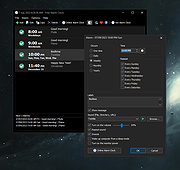 |
|
Investor`s Clock v1.09 Investor`s Clock v1.09 Shows the time in different time zones on the Windows Desktop. This program was designed for Wall Street traders and investors but can be useful for anyone. Supported operating systems: Windows 64bit 7, 8.1, 10, 11 Click here to visit the author's website. |
|
1,290 | Apr 23, 2024 Sergejs Bure 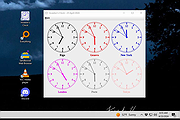 |
|
Large System Tray Clock v1.0.0.4 Large System Tray Clock v1.0.0.4 Replace the original clock in the Windows System Tray with a larger one to improve visibility. Large System Tray Clock also includes several accessibility features related to clock visibility. Microsoft provides very few customization options for the appearance of the Windows 10/11 system tray clock. There are also no accessibility settings available for customizing its appearance. The idea for the Large System Tray Clock came from a few visually impaired users who requested a highly visible clock that could replace the default system tray clock. Features: • The Large System Tray Clock appears in the notification area of the taskbar. This ensures that the large, easy-to-read clock is always available. In full-screen mode (e.g., YouTube videos), the clock remains hidden together with the taskbar. • All taskbar functions remain available. When necessary, the clock hides automatically and reappears after a user-defined delay. • Besides taskbar mode, the software can display the clock in the screen corners or in full-screen mode. • The Large System Tray Clock is completely free to use and contains no restrictions. It does not collect data, display advertisements, or perform any harmful background operations. • The software consists of a single executable file (largetrayclock.exe) and does not require installation. Clock Display Components: • System Tray: The clock displayed in the taskbar notification area. You can customize the font, font size, and horizontal position. By default, the clock uses the full width of the notification area. When the mouse cursor is placed above the taskbar, the clock hides for a short (configurable) time, making the entire notification area accessible. • Full Screen: After a configurable period of inactivity, the clock appears in full-screen mode. Full-screen mode can be disabled or adjusted. ... |
|
1,122 | Dec 28, 2025 Peter Panisz  |
|
Shutdown Clock v1.5 Shutdown Clock v1.5 Shutdown Clock is a free application that will help you schedule PC tasks like shutdown, restart, log off, lock and hibernate at any time. By defining a set of tasks Shutdown Clock monitors your system time and executes these tasks when needed. You can define tasks starting at some specific date and time or tasks that execute at daily basis. Also, tasks can be executed depending on your PC idle time or battery percentage. Shutdown Clock is really easy to use. Once you define your tasks Shutdown Clock can work in the background waiting for the right time to execute those tasks. You are also able to use this application to perform PC shutdown operations instantly (right click on the Shutdown Clock taskbar icon). Shutdown Clock is also able to start with Windows (automatically minimized) and can give you a warning before executing each of the tasks, giving you enough time to finish and save your work or cancel the task altogether. Try it! It’s FREE! |
|
5,949 | Jul 02, 2020 vclexamples.com 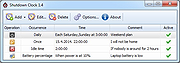 |
|
Simple BIG Clock v1 Simple BIG Clock v1 YOU FINALLY FOUND IT!!!! You found that giant, honkin' clock for your Windows desktop! Go, you!! It's packed with all of these features: Abandon all hope of ever moving it. No bothersome customizations. It's big. Pick from as many as one color pallet. Hide up to 20 desktop icons from day to day use. Viewable from up to 7,200 feet away. Great for building-sized doomsday clocks. Controls: Left-click sbc.exe to open. ESC key to close. Warnings: Virus total has two hits from MaxSecure and SecureAge, the gems of antivirus engines that once found malware in Randy's picture of his mom. Screenshot: (HOLY COW!) Click here to visit the author's website. |
|
2,560 | Sep 21, 2022 Chis Bonas 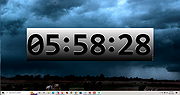 |
| Showing rows 1 to 11 of 11 | Showing Page 1 of 1 | 1 |
OlderGeeks.com Copyright (c) 2026
