|

|
Processed through Paypal No account required. |








Buy our over-priced crap to help pay the bills.



|
|
Processed through Paypal No account required. |
| File - Download KillerPDF v1.7.3 | ||||||||
| Description | ||||||||
|
Always scroll to the bottom of the page for the main download link. We don't believe in fake/misleading download buttons and tricks. The link is always in the same place. KillerPDF v1.7.3 👉 Portable PDF editor for viewing, annotating, editing, and signing PDFs. KillerPDF is a free and open-source PDF viewer, annotator, and editor for Windows that provides PDF viewing, annotation, text editing, OCR, forms, signatures, page organization, transformation, printing, and flattening in a compact native executable. It can be run as a portable application or installed, requires no account or subscription, contains no ads, and sends no telemetry. PDFium provides document rendering while Tesseract provides built-in OCR, with additional OCR language models available on demand. 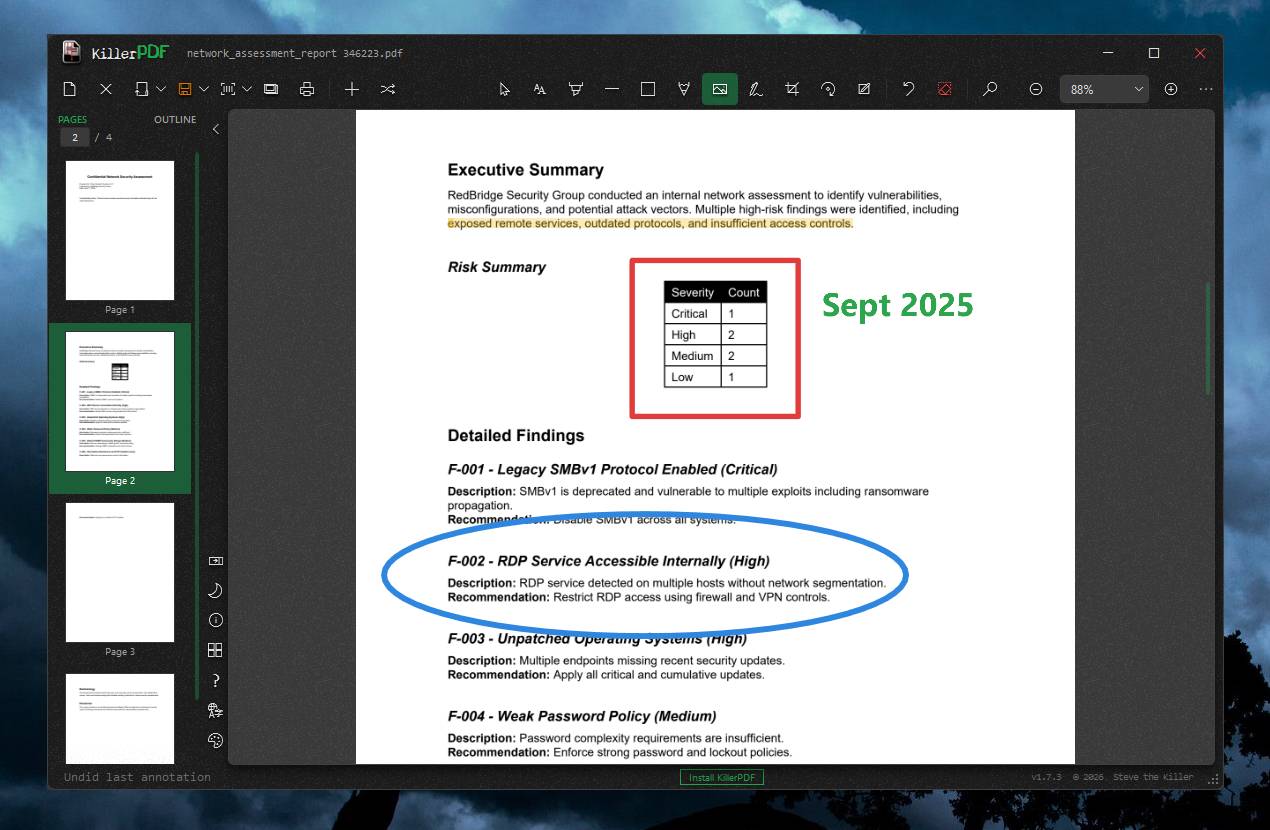 Features: • High-quality PDF rendering using PDFium • Single-page, continuous scroll, two-page, book layout, and page grid viewing • Open multiple PDF documents in tabs • Split-pane mode displays two documents side by side in the same window • Each split pane maintains independent viewing and inverted-color settings • Drag tabs between split panes • Search an entire document with results highlighted while scrolling • Text selection follows columns and document reading order • Navigate outlines, bookmarks, clickable links, and internal references • Edit existing PDF text inline with font matching • Add resizable text boxes • Add freehand drawings, straight lines, shapes, and highlights • Adjust annotation colors, opacity, and line widths • Full RGB color picker for annotation colors • OCR an entire page or a selected region • Copy OCR results directly to the clipboard • Make scanned PDFs searchable by adding an invisible text layer • Extract all recognized text to a file • Built-in Tesseract OCR with additional language models available on demand • Fill and save PDF forms • Draw and reuse signatures • Import signatures from image files • Digitally sign PDFs using Certum SimplySign cloud certificates • Support for click-to-sign PDF form fields • Merge multiple PDF documents • Split and extract PDF pages • Drag and drop pages to rearrange them • Insert, rotate, move, extract, and delete pages • Drop folders or ZIP archives into the program to work with contained PDFs and images • Crop PDF pages • Rotate and scale pages • Flip pages • Straighten crooked scans by drawing a level line • Correct perspective distortion • Adjust black point, white point, and midtones to improve difficult scans • Live preview of page transformations • Add page numbers across a selected page range • Add customizable text watermarks • View and edit PDF title, author, subject, keywords, and creator metadata • Open password-protected PDF documents • Repair damaged or broken PDF files • In-app print preview • Select printer paper size and paper source • Control print scale, margins, pages per sheet, subsets, duplex, and other output options • Print documents at 300 DPI • Flatten PDFs into non-editable documents • Export PDF pages as images • Command-line support for merging, splitting, decrypting, resizing, flattening, printing, OCR, and batch resaving • Thirteen selectable interface themes • Six accent colors for the three base themes • Portable operation from a single executable • Built-in per-user installation without administrator privileges • Optional installation for all users with administrator privileges • No accounts, subscriptions, advertisements, or telemetry Supported operating systems: • Windows 10, Windows 11 (64-bit) Supported languages: English, Bengali, Czech, German, Spanish, French, Japanese, Polish, Turkish, Chinese (Simplified), Chinese (Traditional) Changes: v1.7.3 08-15-26 Fixed the active tab ring and underline so they now follow the selected accent color instead of remaining on the theme's base color. Restored the live preview pane to image-selection dialogs for image imports, image signatures, image stamps, and Insert Image. Click here to visit the author's website. Continue below for the main download link. |
||||||||
| Downloads | Views | Developer | Last Update | Version | Size | Type | Rank | |
| 1,027 | 5,798 | SteveTheKiller | Aug 17, 2026 - 11:35 | 1.7.3 | 16.17MB | EXE |  , out of 8 Votes. , out of 8 Votes. |
|
| File Tags | ||||||||
| annotator repair KillerPDF PDF editor portable PDF editor Windows PDF PDF PDF merge PDF split PDF forms PDF editor watermark OCR viewer print signature | ||||||||
Click to Rate File Share it on Twitter → Tweet
|


