|

|
Processed through Paypal No account required. |








Buy our over-priced crap to help pay the bills.



|
|
Processed through Paypal No account required. |
| Files | ||||
| File Name | Rating | Downloads | ||
 |
KillerPDF v1.7.3 KillerPDF v1.7.3 👉 Portable PDF editor for viewing, annotating, editing, and signing PDFs. KillerPDF is a free and open-source PDF viewer, annotator, and editor for Windows that provides PDF viewing, annotation, text editing, OCR, forms, signatures, page organization, transformation, printing, and flattening in a compact native executable. It can be run as a portable application or installed, requires no account or subscription, contains no ads, and sends no telemetry. PDFium provides document rendering while Tesseract provides built-in OCR, with additional OCR language models available on demand. Features: • High-quality PDF rendering using PDFium • Single-page, continuous scroll, two-page, book layout, and page grid viewing • Open multiple PDF documents in tabs • Split-pane mode displays two documents side by side in the same window • Each split pane maintains independent viewing and inverted-color settings • Drag tabs between split panes • Search an entire document with results highlighted while scrolling • Text selection follows columns and document reading order • Navigate outlines, bookmarks, clickable links, and internal references • Edit existing PDF text inline with font matching • Add resizable text boxes • Add freehand drawings, straight lines, shapes, and highlights • Adjust annotation colors, opacity, and line widths • Full RGB color picker for annotation colors • OCR an entire page or a selected region • Copy OCR results directly to the clipboard • Make scanned PDFs searchable by adding an invisible text layer • Extract all recognized text to a file • Built-in Tesseract OCR with additional language models available on demand • Fill and save PDF forms • Draw and reuse signatures • Import signatures from image files • Digitally sign PDFs using Certum SimplySign cloud certificates • Support for click-to-sign PDF form fields • Merge multiple PDF documents • Split and extract PDF pages • Drag and drop pages to rearrange them • Insert, rotate, move, extract, and delete pages • Drop folders or ZIP archives into the program to work with contained PDFs and images • Crop ... |
 |
1,026 | Aug 17, 2026 SteveTheKiller 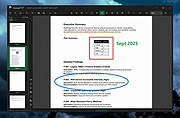 |
 |
OpenPdfEdit v1.0.2 OpenPdfEdit v1.0.2 👉 View, edit, annotate, and organize PDF files on your computer. OpenPdfEdit is a free, open-source PDF editor for macOS and Windows. It lets you view PDFs, edit text and images, add annotations, redact content, fill and sign forms, reorganize pages, merge or split documents, and compare files. Documents are opened, edited, and saved on your computer rather than uploaded to a server. OCR and watermarking are available as optional paid tools. Features: • View and navigate PDF documents • Edit text and images in PDF files • Add annotations and markups • Redact sensitive content • Fill forms and place saved signatures • Reorder, rotate, and remove pages • Merge, split, and compare PDF files • Save and work with documents locally; files are not uploaded • Optional paid tools for OCR and watermarking Supported operating systems: macOS 10.13 or later (Apple silicon and Intel), Windows 10 64-bit, Windows 11 64-bit Supported languages: English, German, Spanish, Japanese, Korean, Portuguese, Chinese (Simplified), Chinese (Traditional) Changes: v1.0.2 10-12-26 Added the first Windows build. The Mac build now supports Intel Macs as well as Apple silicon. Saved signatures can be placed by tapping the page. Ticked form checkboxes retain their on-state when saved. Flattening now includes form fields without a drawn appearance. 👉 This download is for the Windows version (very bottom of page). All other download assets are below: Other Windows: OpenPdfEdit Installer.exe (Microsoft Store Installer) macOS: OpenPdfEdit_1.0.2_universal.dmg Chrome Edge Extension: openpdfedit-extension-1.0.1-chrome-edge.zip Click here to visit the author's website. |
|
26 | Oct 15, 2026 OpenPdfEdit 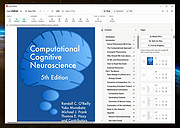 |
|
PDF4QT v1.6.0.0 PDF4QT v1.6.0.0 👉 Open-source PDF editor, viewer, and toolkit for Windows and Linux. PDF4QT is an open-source PDF editor powered by the Qt framework. It provides a robust C++ library, intuitive applications for viewing and editing PDF documents, and a command-line tool for script integration. The suite includes tools for advanced PDF viewing, lightweight document viewing, page organization, and PDF comparison, making it useful for both regular users and developers. Features: • Advanced PDF viewer with zoom, rotation, page layout modes, and navigation tools • Full PDF editing capabilities including modifying document structure and content elements • Annotation tools such as highlights, notes, shapes, and markup editing • Interactive form filling and support for AcroForms • Digital signature support including signing documents and validating signatures • Encryption support with password protection and public key security • Embedded file attachments handling within PDF documents • Built-in text-to-speech engine for reading PDF content aloud • Powerful search functionality including regular expression support • PDF document comparison tool to detect differences between files • Page management tools including merge, split, reorder, rotate, clone, and insert pages • Document optimization features for reducing file size and improving performance • Internal PDF object structure inspector for advanced users and developers • Command-line interface for automation and batch processing tasks • Static XFA form support (read-only for simple XFA documents) • Multiple viewer applications included (advanced viewer and lightweight viewer modes) • Cross-platform support built on the Qt framework Supported operating systems: •Windows 10/11 •Linux Supported languages: • Czech, English, French, German, Korean, Russian, Simplified Chinese, Spanish, Traditional Chinese, Turkish Changes: v1.6.0.0 06-14-26 Major image compression and optimization update for PageMaster and assembled PDF documents. Improved PageMaster with drag and drop, recent files, page cropping, save/restore, rotation and size indicators, new icons, and faster output previews. Added image optimization feedback for final resolution and DPI. Added Advanced Find wildcard mode and Enter-to-search. Added fullscreen viewing, side-to-side scrolling, smoother scrolling, text selection, snapping, and improved keyboard ... |
|
1,149 | Aug 26, 2026 Jakub Melka 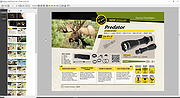 |
|
PDFgear v2.1.19 PDFgear v2.1.19 👉 Free all-in-one PDF editor, reader, converter, OCR tool and AI assistant. PDFgear is a free PDF editor and management suite for viewing, editing, converting, creating, annotating, signing, organizing and protecting PDF documents. It allows existing PDF text and images to be edited directly, includes OCR for scanned documents, supports batch conversions and provides PDFgear Copilot for working with documents using natural-language commands. PDFgear does not require an account, places no watermarks on exported documents and does not impose file-size or file-number limits on its desktop software. Features: • View and read PDF documents with multiple reading and navigation options • Directly edit, replace, add and delete existing PDF text • Change fonts, font sizes, styles and other text formatting • Add, replace, reposition and edit images and other PDF objects • Add text boxes, hyperlinks and customizable shapes • Highlight, underline and strike through text • Add notes, comments, stamps, watermarks and freehand drawings • Fill interactive PDF forms • Add signatures and certificate-based digital signatures • Secure eSign for signing documents with greater security and confidence • Request signatures from multiple parties • OCR scanned PDFs and image-based documents • Extract text from selected areas with OCR • OCR supports more than 30 languages during PDF conversion • Convert PDFs to Word, Excel, PowerPoint, TXT, images and other formats • Create PDF documents from multiple file formats • Batch convert multiple PDF documents • Merge and split PDF files • Rearrange, rotate, crop, extract, duplicate, insert and delete PDF pages • Add customizable page numbers to headers or footers • Compress PDF documents • View and manage PDF attachments • Redact sensitive information • Manage PDF properties • PDFgear Copilot accepts natural-language instructions for PDF tasks • AI tools can summarize, analyze, translate, rewrite and proofread document content • Search and replace text in PDF documents • Dark mode for PDF viewing • Process ordinary PDF editing tasks locally on the computer • No account required • No ... |
|
2,474 | Aug 20, 2026 PDF Gear Tech PTE. LTD. 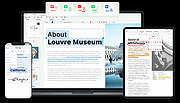 |
| Showing rows 1 to 4 of 4 | Showing Page 1 of 1 | 1 |
OlderGeeks.com Copyright (c) 2026
