|

|
Processed through Paypal No account required. |








Buy our over-priced crap to help pay the bills.



|
|
Processed through Paypal No account required. |
| File - Download Thoth v1.1.0 | ||||||||
| Description | ||||||||
|
Always scroll to the bottom of the page for the main download link. We don't believe in fake/misleading download buttons and tricks. The link is always in the same place. Thoth v1.1.0 👉 Local-first AI knowledge assistant with RAG, document search, and cited answers powered by Ollama. Thoth is a local-first, privacy-focused AI knowledge assistant that uses Retrieval-Augmented Generation (RAG) to help you search, organize, and interact with your information. Running entirely on your own computer with Ollama, it keeps your documents and conversations private while providing AI-powered answers complete with source citations. You can upload your own documents, search Wikipedia, browse academic papers from arXiv, perform web searches, and maintain persistent conversations without relying on cloud-hosted language models. Thoth indexes your files into a local vector database for fast semantic searches, intelligently combines information from multiple sources, and lets you switch between compatible Ollama models to best suit your hardware and workload. It is designed for researchers, students, developers, and anyone who wants a private AI assistant that can accurately answer questions using both local documents and trusted online resources. 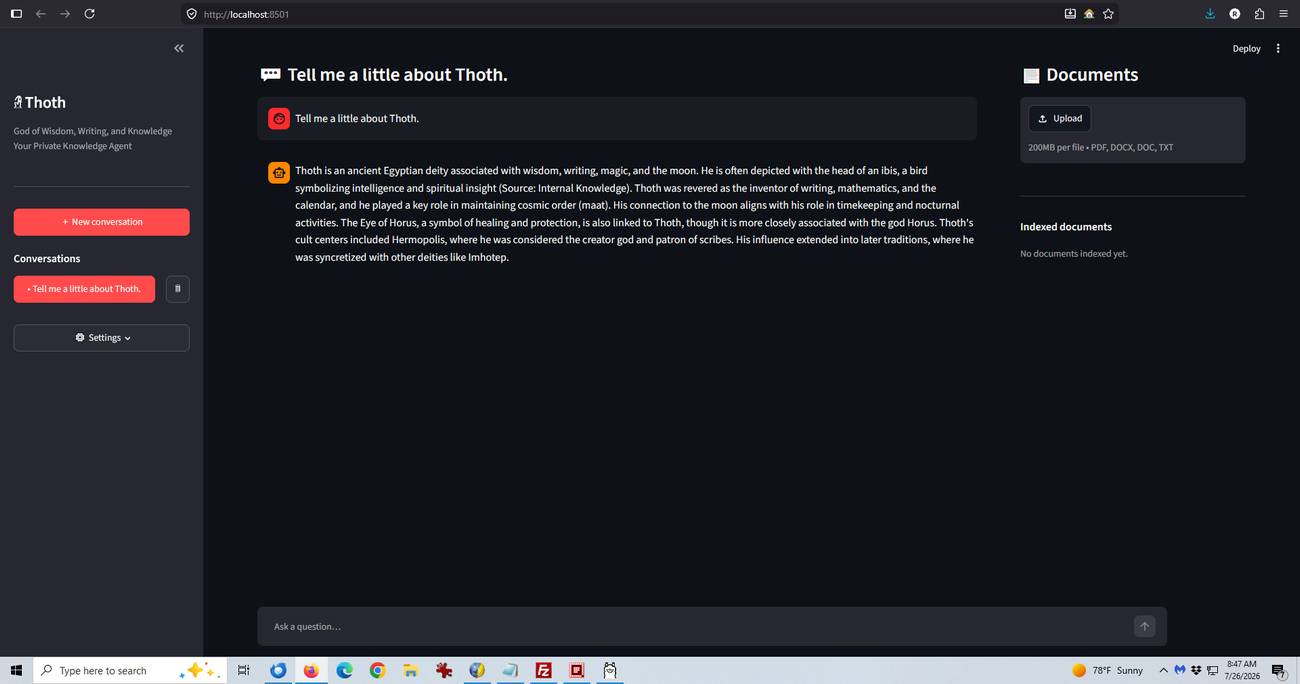 Features: • Runs completely locally using Ollama with no cloud AI required • Privacy-focused design that keeps documents and conversations on your PC • Retrieval-Augmented Generation (RAG) for context-aware answers • Upload and index PDF, DOCX, DOC, and TXT documents • Local FAISS vector database for fast semantic document searching • Multi-source retrieval from local documents, Wikipedia, arXiv, and Tavily web search • Automatic source citations for every generated response • Persistent multi-turn conversations stored locally • Automatic follow-up question rewriting for improved search accuracy • Contextual compression retrieves only the most relevant document sections • Parallel retrieval from multiple enabled sources for faster responses • Intelligent duplicate removal across retrieval results • Automatic context trimming for efficient long conversations • Supports dynamic switching between 30+ Ollama models • Automatic download of supported Ollama models • Built-in API key management through the Settings panel • Automatic conversation naming • Embedded Python runtime included with the Windows installer • Smart context assessment minimizes unnecessary searches • Improved automatic chat scrolling Supported operating systems: • Windows 10 (64-bit), Windows 11 (64-bit) Supported languages: English Getting Started / Important Information: • The recommended installer automatically installs Ollama, an embedded Python runtime, required packages, and desktop/start menu shortcuts. • The first launch may take several minutes because the default Ollama model (qwen3:8b) is downloaded automatically (approximately 5 GB). • A free Tavily API key is only required if you want to use the Web Search feature. Document search, Wikipedia, and arXiv retrieval work without it. • Configure your Tavily key from Settings → API Keys after launching the program. • Documents become searchable immediately after they are uploaded and indexed. • Retrieval sources (Documents, Wikipedia, arXiv, and Web Search) can be enabled or disabled individually from the Settings panel. • All conversations are saved automatically and remain available after restarting the program. • Windows may display a SmartScreen warning because the installer is currently unsigned. Choose More info → Run anyway if you trust the download. • Very large PDF documents may require additional time to process and index. • All AI inference runs locally. External network access occurs only when using enabled online retrieval sources such as Tavily, Wikipedia, or arXiv. Changes: v1.1.0 02-28-26 • Added contextual compression retrieval using ContextualCompressionRetriever and LLMChainExtractor. • Added automatic query rewriting for follow-up questions. • Implemented parallel retrieval across all enabled retrieval sources. • Added embedding-based context deduplication within retrievals and across conversation turns. • Added character-based context and message trimming for long conversations. • Improved context assessment using embedding similarity before invoking the LLM. • Added automatic chat auto-scroll for new responses and thinking indicator. Note: You will need to have a very fast computer with a high-end graphics card to use this software. We're not kidding. Click here to visit the author's website. Continue below for the main download link. |
||||||||
| Downloads | Views | Developer | Last Update | Version | Size | Type | Rank | |
| 846 | 3,441 | Siddharth Sachar | Jul 26, 2026 - 13:56 | 1.1.0 | 1.19GB | EXE |  , out of 3 Votes. , out of 3 Votes. |
|
| File Tags | ||||||||
| Local Privacy Tavily Arxiv Wikipedia FAISS Search Vector PDF Documents Assistant Knowledge RAG AI Ollama Thoth | ||||||||
Click to Rate File Share it on Twitter → Tweet
|


