|

|
Processed through Paypal No account required. |








Buy our over-priced crap to help pay the bills.



|
|
Processed through Paypal No account required. |
| Files | ||||
| File Name | Rating | Downloads | ||
 |
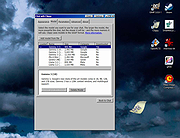
BingGPT v0.3.4 BingGPT v0.3.4 Desktop application of Bing's AI-powered chat (Windows, Mac, Linux) 1. Get access to the early preview of new Bing 2. Sign in to your Microsoft account 3. Start chatting Features • Chat with new Bing without installing Microsoft Edge or browser plugins • Export full conversation to Markdown, PNG or PDF • Customize appearance (theme & font size) • Keyboard shortcuts • Multi-platform Warning: Avoid direct eye contact. This download is for the Windows installer version. All other download assets are below: Windows: BingGPT-0.3.4-win32-x64.zip BingGPT-0.3.4-win32-arm64-Setup.exe BingGPT-0.3.4-win32-arm64.zip macOS: BingGPT-0.3.4-darwin-x64.dmg BingGPT-0.3.4-darwin-arm64.dmg Linux: BingGPT-0.3.4-linux-x64.deb BingGPT-0.3.4-linux-x64.rpm BingGPT-0.3.4-linux-arm64.deb BingGPT-0.3.4-linux-arm64.rpm Click here to visit the author's website. |
 |
2,205 | Apr 26, 2023 Microsoft Corporation |
 |
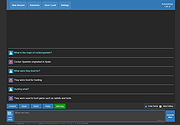
Clippy v0.4.3 Clippy v0.4.3 👉 A retro-style local AI chat app that runs GGUF large language models on your computer. Clippy lets you run a variety of large language models locally on your computer while using a nostalgic 1990s-style interface. It supports GGUF models through llama.cpp, includes one-click installation support for select models, and is designed as both a fun homage to Microsoft Office’s classic Clippy assistant and a reference implementation for Electron-based local LLM apps. Features: • Simple, familiar, and classic chat interface for chatting with local models. • Runs a variety of GGUF large language models locally on your computer. • Uses llama.cpp and node-llama-cpp to automatically discover the most efficient runtime path, such as Metal, CUDA, or Vulkan. • Includes one-click installation support for Google Gemma3, Meta Llama 3.2, Microsoft Phi-4, and Qwen Qwen3. • Lets you load your own downloaded models. • Allows custom prompts and parameter adjustments. • Works offline and locally, with the only network request being update checks, which can be disabled. • Styled as a love letter and homage to the late, great Clippy and 1990s Microsoft visual design. • Intended as a reference implementation of @electron/llm for developers building Electron apps with local language models. Supported operating systems: • Windows • macOS (Apple Silicon), macOS (Intel) • Linux (RPM, x64), Linux (Debian, x64) Supported languages: English Changes: v0.4.3 05-08-25 We still had issues with the incorrect native binaries making it into the build, breaking Clippy for Macs with Intel processors. This should finally be fixed. We figured it out! To move the Clippy icon to another position on your desktop: Left click on the icon, hold and drag it like normal but you have to hover your cursor over a part of Clippy that doesn't show a question mark. Like this: This download is for the Windows 64bit installer version (very bottom of page). All other download assets are below: Other Windows: Clippy-win32-x64-0.4.3.zip macOS: Clippy-darwin-arm64-0.4.3.zip Clippy-darwin-x64-0.4.3.zip Linux: clippy_0.4.3_amd64.deb Clippy-0.4.3-1.x86_64.rpm Click here to visit the author's ... |
|
838 | Mar 25, 2026 Felix Rieseberg |
 |
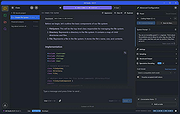
KoboldCpp v1.87.4 KoboldCpp v1.87.4 Run GGUF models easily with a KoboldAI UI. One File. Zero Install. KoboldCpp is an easy-to-use AI text-generation software for GGML and GGUF models, inspired by the original KoboldAI. It's a single self-contained distributable from Concedo, that builds off llama.cpp and adds many additional powerful features. Features: • Single file executable, with no installation required and no external dependencies • Runs on CPU or GPU, supports full or partial offloaded • LLM text generation (Supports all GGML and GGUF models, backwards compatibility with ALL past models) • Image Generation (Stable Diffusion 1.5, SDXL, SD3, Flux) • Speech-To-Text (Voice Recognition) via Whisper • Text-To-Speech (Voice Generation) via OuteTTS • Provides many compatible APIs endpoints for many popular webservices (KoboldCppApi OpenAiApi OllamaApi A1111ForgeApi ComfyUiApi WhisperTranscribeApi XttsApi OpenAiSpeechApi) • Bundled KoboldAI Lite UI with editing tools, save formats, memory, world info, author's note, characters, scenarios. • Includes multiple modes (chat, adventure, instruct, storywriter) and UI Themes (aesthetic roleplay, classic writer, corporate assistant, messsenger) • Supports loading Tavern Character Cards, importing many different data formats from various sites, reading or exporting JSON savefiles and persistent stories. • Many other features including new samplers, regex support, websearch, RAG via TextDB and more. • Ready-to-use binaries for Windows, MacOS, Linux, Android (via Termux), Colab, Docker, also supports other platforms if self-compiled (like Raspberry PI). • Need help finding a model? Read this! This download is for the Windows version (very bottom of page). All other download assets are below: Windows (other): koboldcpp_cu12.exe koboldcpp_nocuda.exe koboldcpp_oldcpu.exe macOS: koboldcpp-mac-arm64 Linux: koboldcpp-linux-x64-cuda1150 koboldcpp-linux-x64-cuda1210 koboldcpp-linux-x64-nocuda Click here to visit the author's website. |
|
1,041 | Apr 07, 2025 LostRuins |
 |
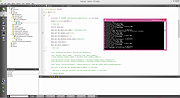
LM Studio v0.3.36 LM Studio v0.3.36 Your free, local AI toolkit. Run gpt-oss, Qwen, Gemma, DeepSeek on your Windows, Mac or Linux computer. Discover and download open source models, use them in chats or run a local server. LM Studio is free for home and work use. Terms Features: Run LLMs on Your Laptop or PC: Easily run LLMs like Llama and DeepSeek on your computer. No expertise required. Discover New and Noteworthy LLMs: Download and run any compatible llama.cpp or MLX model from Hugging Face. Power Apps Using the Local LLM Server: LM Studio comes with a built-in local server. You can use our SDKs or the OpenAI compatibility API. Chat with Your Local Documents (RAG): Attach PDFs, .docx and other files and process them locally and securely. Cross-platform local AI SDK: LM Studio SDK: Build local AI apps without dealing with dependencies. Changes: v0.3.36 12-18-25 Build 1 Support for Google's FunctionGemma (270M) This download is for the Windows 64bit version (very bottom of page). All other download assets are below: Windows: LM-Studio-0.3.36-1-arm64.exe (Windows ARM64) macOS: LM-Studio-0.3.36-1-arm64.dmg (Mac ARM64) Linux: LM-Studio-0.3.36-1-x64.AppImage (Linux 64bit) LM-Studio-0.3.36-1-arm64.AppImage Click here to visit the author's website. |
|
1,517 | Dec 30, 2025 Element Labs, Inc. |
 |
OpenNN v5.0.5 OpenNN v5.0.5 OpenNN is a software library written in C++ for advanced analytics. It implements neural networks, the most successful machine learning method. The main advantage of OpenNN is its high performance. This library outstands in terms of execution speed and memory allocation. It is constantly optimized and parallelized in order to maximize its efficiency. Some typical applications of OpenNN are business intelligence (customer segmentation, churn prevention...), health care (early diagnosis, microarray analysis,...) and engineering (performance optimization, predictive maintenance...). The documentation can be found at the official OpenNN site. CMakeLists.txt are build files for CMake, it is also used by the CLion IDE. The .pro files are project files for the Qt Creator IDE, which can be downloaded from its site. Note that OpenNN does not make use of the Qt library. This download is for the Windows version. If you need the Linux version, download here. Click here to visit the author's website. |
|
3,738 | Apr 22, 2021 Artelnics |
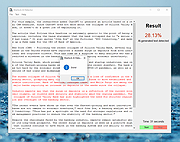 |
Sherlock AI Detector v1.0 Sherlock AI Detector v1.0 Your Powerful Ally Against AI-Generated Texts. Introducing Sherlock AI Detector, an innovative tool employing cutting-edge technology to fight against one of the most pressing modern threats to academic integrity and business authenticity: AI-generated text fraud. Protect your institution, organization, or business from AI-produced texts, ensuring human authenticity and safeguarding your trustworthiness. Essential for the Modern Digital Landscape The rise of advanced artificial intelligence has brought along the challenge of distinguishing between human-written and AI-generated texts. AI-produced content can infringe upon academic integrity, mislead business communication, or even manipulate public perception. The Sherlock AI Detector is your defence in this high-tech era, providing a robust, easy-to-use solution. Promote Academic Integrity Sherlock AI Detector is an indispensable tool for educators seeking to maintain academic integrity. It helps detect and deter the use of AI-generated texts in academic submissions, promoting honesty and fairness in educational institutions. Preserving the integrity of academia is essential in the face of evolving technological landscapes. The rise of AI-generated text presents a new challenge to educators worldwide, but with Sherlock AI Detector, maintaining academic integrity just got easier. Features • Adaptive Learning Algorithms – Sherlock AI Detector uses human-built algorithms that are constantly adjusted and improved with each new piece of AI data, enhancing increased accuracy over time with multiple AI text generators. • Real-time AI Detection – The software performs real-time analysis of text files to immediately find patterns and other markers to detect that the text or part of it was created by artificial intelligence. • Secure and Compliant – We ensure that Sherlock AI Detector complies with all industry standards and regulations to guarantee your data’s privacy and security. To use... • Simply copy and paste text into the programs window or open an existing .txt file from your computer. • Click Start and let the program finish scanning. • Text highlighted ... |
|
3,949 | Sep 01, 2023 essayrewriteai.com |
 |
Thoth v1.1.0 Thoth v1.1.0 👉 Local-first AI knowledge assistant with RAG, document search, and cited answers powered by Ollama. Thoth is a local-first, privacy-focused AI knowledge assistant that uses Retrieval-Augmented Generation (RAG) to help you search, organize, and interact with your information. Running entirely on your own computer with Ollama, it keeps your documents and conversations private while providing AI-powered answers complete with source citations. You can upload your own documents, search Wikipedia, browse academic papers from arXiv, perform web searches, and maintain persistent conversations without relying on cloud-hosted language models. Thoth indexes your files into a local vector database for fast semantic searches, intelligently combines information from multiple sources, and lets you switch between compatible Ollama models to best suit your hardware and workload. It is designed for researchers, students, developers, and anyone who wants a private AI assistant that can accurately answer questions using both local documents and trusted online resources. Features: • Runs completely locally using Ollama with no cloud AI required • Privacy-focused design that keeps documents and conversations on your PC • Retrieval-Augmented Generation (RAG) for context-aware answers • Upload and index PDF, DOCX, DOC, and TXT documents • Local FAISS vector database for fast semantic document searching • Multi-source retrieval from local documents, Wikipedia, arXiv, and Tavily web search • Automatic source citations for every generated response • Persistent multi-turn conversations stored locally • Automatic follow-up question rewriting for improved search accuracy • Contextual compression retrieves only the most relevant document sections • Parallel retrieval from multiple enabled sources for faster responses • Intelligent duplicate removal across retrieval results • Automatic context trimming for efficient long conversations • Supports dynamic switching between 30+ Ollama models • Automatic download of supported Ollama models • Built-in API key management through the Settings panel • Automatic conversation naming • Embedded Python runtime included with the Windows installer • Smart context assessment minimizes unnecessary searches • Improved automatic chat scrolling Supported operating systems: • Windows ... |
|
844 | Jul 26, 2026 Siddharth Sachar |
| Showing rows 1 to 7 of 7 | Showing Page 1 of 1 | 1 |
OlderGeeks.com Copyright (c) 2026
