|

|
Processed through Paypal No account required. |








Buy our over-priced crap to help pay the bills.



|
|
Processed through Paypal No account required. |
| File - Download FullUpdatesHistoryView v1.00 | ||||||||
| Description | ||||||||
|
Always scroll to the bottom of the page for the main download link. We don't believe in fake/misleading download buttons and tricks. The link is always in the same place. FullUpdatesHistoryView v1.00 A simple, free tool for Windows 11 that displays the history of Windows updates on your system. For every Windows update history record, the following information is displayed: Update Time, Title, Description, Information URL, Category, KB Number, Update ID, Provider ID, and more... 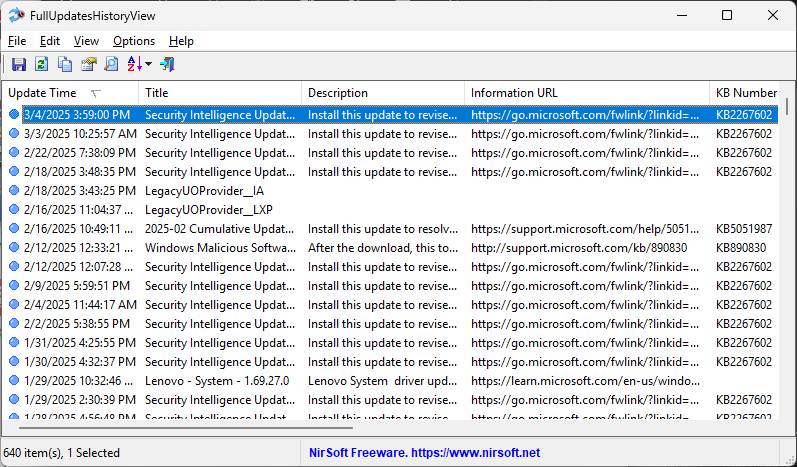 System Requirements The FullUpdatesHistoryView tool uses a new database available only on Windows 11 ( C:\ProgramData\USOPrivate\UpdateStore\store.db ), so you cannot use it for previous versions of Windows. For viewing the Windows updates history on older versions of Windows you can use this tool: Windows Updates History Viewer. FullUpdatesHistoryView vs Previous Tool The previous tool for viewing the Windows updates history (Windows Updates History Viewer) reads the updates by using Windows API or by reading the database file directly from C:\Windows\SoftwareDistribution\DataStore\DataStore.edb, depending on what you choose in the 'Advanced Options' window. However, every time that a major update of Windows 11 is installed (e.g: 23H2, 24H2), all previous updates are deleted from the database by Windows operating system, so the previous tool cannot display the updates installed on your system before the last major update of Windows. Windows 11 has a new updates history database on C:\ProgramData\USOPrivate\UpdateStore\store.db which keeps all updates history records. So the FullUpdatesHistoryView uses this database to show you the full updates history information. Start Using FullUpdatesHistoryView FullUpdatesHistoryView doesn't require any installation process or additional DLL files. In order to start using it, simply run the executable file - FullUpdatesHistoryView.exe After running FullUpdatesHistoryView, it automatically loads the Windows updates history from the local database ( C:\ProgramData\USOPrivate\UpdateStore\store.db ) and displays all records in the main window. If you want to watch the Windows updates history from another system, open the 'Advanced Options' window (F9), choose the 'Load Windows updates history from external database file' option and then type the desired database file. If you want to filter some types of Windows Updates, you can use the following options under the Options menu: 'Hide Definition Category', 'Hide Driver Category', 'Hide Other Category'. Optionally, you can export the Windows updates history to csv/tab-delimited/xml/html5/JSON file by using the 'Save Selected Items' option (Ctrl+S) or the 'Save All Items' option (Shift+Ctrl+S). You can also copy the selected Windows update records to the clipboard (Ctrl+C) and then paste them to Excel or any other application. License This utility is released as freeware. You are allowed to freely distribute this utility via CD-ROM, DVD, Internet, or in any other way, as long as you don't charge anything for this and you don't sell it or distribute it as a part of commercial product. If you distribute this utility, you must include all files in the distribution package, without any modification ! Disclaimer The software is provided "AS IS" without any warranty, either expressed or implied, including, but not limited to, the implied warranties of merchantability and fitness for a particular purpose. The author will not be liable for any special, incidental, consequential or indirect damages due to loss of data or any other reason. Feedback If you have any problem, suggestion, comment, or you found a bug in this utility, you can send a message to support@nirsoft.net Click here to visit the author's website. Continue below for the main download link. |
||||||||
| Downloads | Views | Developer | Last Update | Version | Size | Type | Rank | |
| 969 | 4,651 | Nir Sofer | Mar 20, 2025 - 11:41 | 1.00 | 222.9KB | ZIP |  , out of 26 Votes. , out of 26 Votes. |
|
| File Tags | ||||||||
| FullUpdatesHistoryView v1.00 | ||||||||
Click to Rate File Share it on Twitter → Tweet
|


