|

|
Processed through Paypal No account required. |








Buy our over-priced crap to help pay the bills.



|
|
Processed through Paypal No account required. |
| File - Download OSE File and Text Encryption v1.11 | ||||||||
| Description | ||||||||
|
Always scroll to the bottom of the page for the main download link. We don't believe in fake/misleading download buttons and tricks. The link is always in the same place. OSE File and Text Encryption v1.11 Free tool to encrypt files and text using any one of a number of ciphers and modes provided by OpenSSL. 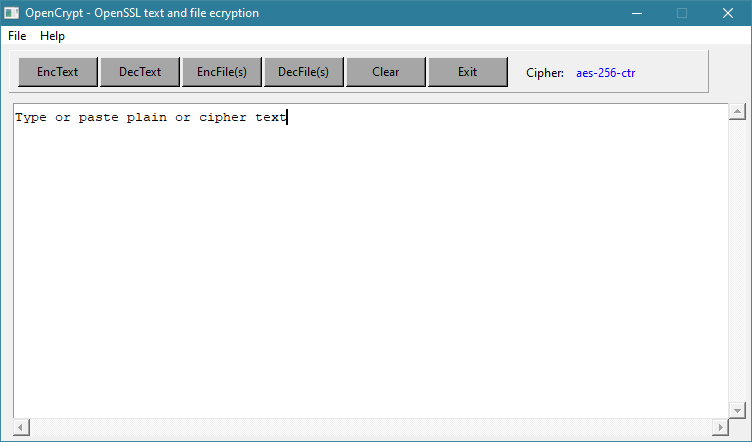 Features • Completely portable • Ideal for Tails persistent storage • Very fast encryption Note from the author: OSE, A Graphical Frontend to OpenSSL's symmetric encryption OSE will encrypt files and text using any one of a number of ciphers and modes provided by OpenSSL, and its use is quite self explanatory. OSE is completely self contained and portable, making it ideal for USB flash drives and Tails persistent storage. It will create one file in the working directory, ".ose_cipher", which simply keeps track of the last used cipher. It is not necessary, just there for convenience, and if it's removed or not there, OSE will simply create another one defaulting to aes-128-ecb. Of course, OpenSSL must be present for OSE to work, and additionally, it makes calls to the system utility "echo" when encrypting text, so: Linux - OpenSSL and echo are already part of every distribution Windows - OpenSSL is probably not installed on your system, and the Windows "echo" call is inadequate for use by OSE. OSE, when launched, will spawn both openssl.exe and echo.exe in the working directory. (echo.exe is a Windows port of the UNIX/Linux echo) OSE will clean up these files upon terminating. Notes on long text strings: While you can encrypt a lot of text with the "echo" pipe, it's not unlimited. If you run into the case where OSE informs of a too long text string, an option is included to encrypt text using the TCL AES package using a 256 bit keystream and cbc mode. The password hashing and salting using this mode are extremely robust; you lose no security. Using this mode, the length of the plain text to encrypt is limited only by your computers' memory. Additionally, the plain text is compressed before encryption, reducing the size of the result ciphertext. Have fun 08 July 2022 Dana Booth Changes: 1.11 - First public offering, simply cleaned up code 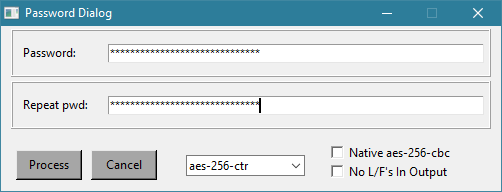 This download is for the Windows version. If you need the Linux version, download here. Click here to visit the author's website. Continue below for the main download link. |
||||||||
| Downloads | Views | Developer | Last Update | Version | Size | Type | Rank | |
| 2,729 | 6,072 | Dana Booth | Feb 06, 2024 - 12:31 | 1.11 | 9.59MB | ZIP |  , out of 74 Votes. , out of 74 Votes. |
|
| File Tags | ||||||||
| OSE File and Text Encryption v1.11 | ||||||||
Click to Rate File Share it on Twitter → Tweet
|


