|

|
Processed through Paypal No account required. |








Buy our over-priced crap to help pay the bills.



|
|
Processed through Paypal No account required. |
| File - Download Desktop Restore v1.7.2 | ||||||||
| Description | ||||||||
|
Always scroll to the bottom of the page for the main download link. We don't believe in fake/misleading download buttons and tricks. The link is always in the same place. Desktop Restore v1.7.2 This tiny application operates as a Shell extension. It records the layout and positions of icons and programs on the Windows Desktop, and permits restoration of the layout. From the author: "I wrote this program after severe frustration of having my layout trashed every time I switched screen resolutions. Sometimes other programs will switch screen size and trash your layout as well. This program is an answer to this problem, and I thought other people might find it useful too." TIP: Even with Desktop restore installed, does Windows seem to scramble your icons now every time you reboot, or press F5 to refresh? If so, after you restore your icons the way you want them, manually move one icon a space or two over and then move it back. After that Windows should remember their placement for a much longer time. Usage After installation, three new items are available in the desktop context menu (right-click menu): Save Desktop… , Restore Desktop and Custom Save and Restore… Right-clicking on the desktop and choosing Save Desktop… stores the current desktop layout into the registry (after verifying that this is what you want), using the current screen resolution as the name. Once this has been performed, choosing Restore Desktop, will recall the stored layout (for the current screen resolution) even if the icons have been scrambled all over the screen. You should always re-save the desktop after adding an icon and after changing a desktop icon’s position. Custom Save and Restore… allows you to: · Choose the saved layout to restore. · Store the current layout under a name of your choosing. · Delete an existing layout. · Save to a layout file of your choice. · Restore from a saved layout file · Force all layouts into a Vista compatible format. When this option is chosen, each desktop icon must have a unique name in order to be saved and restored reliably. When you restore a layout that contains unmatched, conflicting icons; the conflicting icons are placed in an unoccupied postion on the screen. Unmatched icons are caused by icons being added to the desktop after the last Save Desktop operation. In this case, some icons may conflict with stored icon positions. If your restore a drastically different layout than was saved at the current resolution, you may find that some icons are placed out of the viewable area. In this case you can restore a different layout or toggle Arrange Icons By -> Auto-arrange. Be sure to toggle it back afterward. To use this application you should not have Auto-arrange set in the desktop menu, “Arrange Icons by”, and it is recommended that you do turn on Align to Grid. You can un-install Desktop Icon Save and Restore at any time by using the Control Panel Add/Remove program facility. Tech. Notes: The application is named dkticnsr.dll, and is installed to the Windows System ShellExt folder. The module is registered with the system as a COM component. The registry key used for storage is: HKEY_CURRENT_USER\Software\JOConnell\DeskTop. Each desktop icon is stored as a binary data in a key under this location (under Vista it is stored as a name, DWORD encoded value). When multiple monitors are detected, the information saved includes the relative positions of the monitors as well as the positions of the icons. This means that each new monitor position requires a new save of the icon layout before restoration is possible. This is the only reliable way to store icon positions across monitors. Even a slight adjustment in the monitor settings will likely require a custom save for the layout. You can find the current monitor coordinate relationships by choosing Custom Save and Restore… Change History 10 January 2020 – Version 1.7.2: Maintenance Release. Platform Windows 7, Win 8, Win 8.1, Win 10 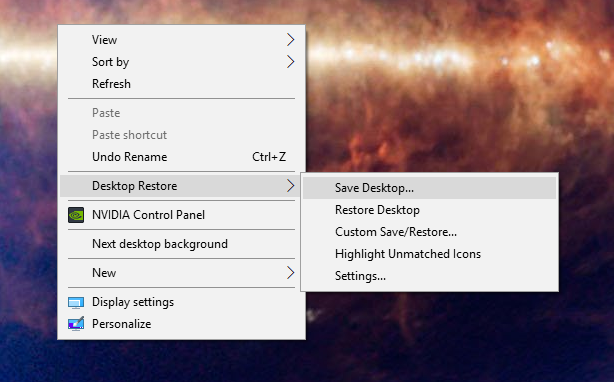 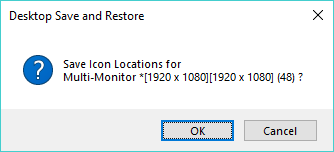 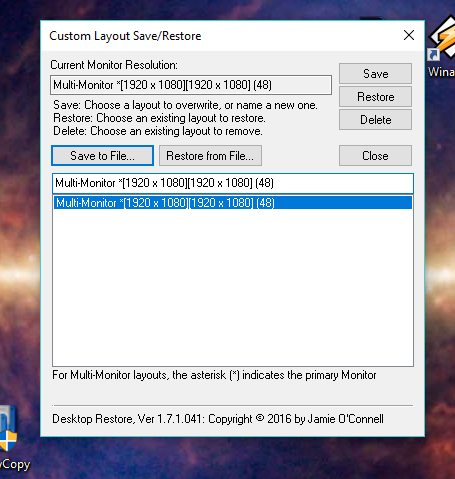 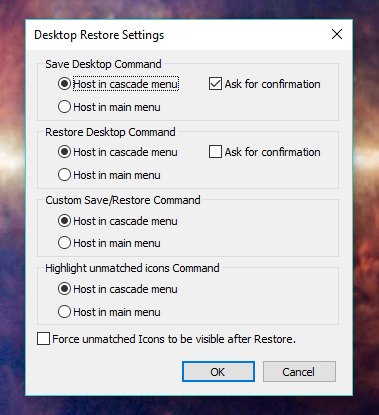 Continue below for the main download link. |
||||||||
| Downloads | Views | Developer | Last Update | Version | Size | Type | Rank | |
| 6,622 | 16,839 | Jamie O'Connell | Jul 02, 2020 - 19:57 | 1.7.2 | 1.72MB | EXE |  , out of 77 Votes. , out of 77 Votes. |
|
| File Tags | ||||||||
| Desktop Restore v1.7.2 | ||||||||
Click to Rate File Share it on Twitter → Tweet
|


