|

|
Processed through Paypal No account required. |








Buy our over-priced crap to help pay the bills.



|
|
Processed through Paypal No account required. |
| Files | ||||
| File Name | Rating | Downloads | ||
 |
Endstate v3.10.0 Endstate v3.10.0 👉 Save your Windows apps and settings, then quickly rebuild them on a new PC. Endstate is a free, local-first Windows setup and recovery tool that records the applications installed on your computer along with settings for supported programs, then uses that information to rebuild your setup on a fresh Windows installation. Instead of copying installed program files from one PC to another, Endstate identifies your software and uses Windows Package Manager (winget) to reinstall available applications cleanly. You can scan an existing computer and save its setup to a portable file that you control. On a new or freshly installed Windows PC, load that saved setup and Endstate compares it with the new machine, shows which applications are missing and lets you choose what to install and which supported settings to restore. Scanning and saving can be performed offline, while reinstalling applications requires an internet connection to download their installers. No Endstate account is required. Features: • Automatically scans your Windows PC and detects installed applications • Detects traditional EXE/MSI-installed software and Microsoft Store applications • Uses winget to reinstall supported applications from their normal installation sources • Captures and restores settings for more than 300 supported applications • Settings support includes editors, IDEs, terminals, creative applications, media players, emulators, note-taking programs and more • Settings capture is optional and can be selected per application • Saves your setup to portable files that you control • Saved setups can be copied, backed up or moved to another computer • No mandatory cloud storage is required • No account is required for the free local product • Provides both a graphical interface and command-line interface • Supports capture, restore, profiles and manifests • Preview mode compares a computer against a saved setup without making changes • Shows which applications need to be installed and which are already present • Applications are installed individually rather than silently ... |
 |
326 | Aug 11, 2026 Substrate Systems 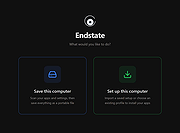 |
 |
Flyoobe v3.03.100 Flyoobe v3.03.100 👉 A Windows setup and upgrade toolkit for reviewing, customizing and applying Windows 11 settings from one streamlined interface. Flyoobe is a Windows setup assistant that brings Windows settings, applications, personalization, bloatware management and upgrade tools together in one place. It uses a signature-driven checklist approach to show what is currently configured, what differs from its recommendations and what can be changed. Users can apply individual settings, restore defaults, create portable setup recipes, install apps through winget, review removable preinstalled apps and access common Windows workflows without replacing Windows Settings. The built-in Flyby11 upgrade path also helps Windows 10 systems that do not meet every Windows 11 requirement move to Windows 11. Features: • Unified overview for Windows settings, apps, personalization, bloatware and system tasks • Signature-driven Windows configuration using the editable Flyoobe.ini file • Portable setup recipes that can be saved, imported, reviewed and applied on another PC • Recipe review mode lets you inspect and discard staged changes before applying them • Individual Apply and Restore default controls for supported Windows settings • Searchable winget application installer using an editable Apps.ini catalog • Detects matching preinstalled Windows apps using Bloatware.ini and offers optional removal • Detects installed web browsers and provides quick access to Windows default-app settings • Personalization controls for Windows mode, app mode, taskbar alignment, transparency and wallpaper • Quick access to account, device, network and Windows Update workflows • Integrated Flyby11 upgrade path for Windows 10 PCs that do not meet every Windows 11 requirement • Read-only compatibility checks for TPM, Secure Boot, memory, architecture, storage and Windows version • Optional AI explanations for individual settings without allowing AI to apply changes • Native WinForms interface with improved high-DPI scaling • Editable configuration files keep recommendations, app catalogs, bloatware signatures and upgrade limits separate from the executable Supported operating systems: • Windows 10, Windows 11 Supported languages: • English, German Changes: v3.03.100 09-28-26 [Added] ... |
|
3,870 | Sep 30, 2026 Builtbybel 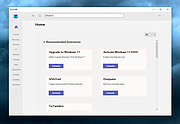 |
|
Ultimate Settings Panel v8.0.0 Ultimate Settings Panel v8.0.0 👉 Access 250+ Windows settings, tools, diagnostics and commands from one searchable panel. Ultimate Settings Panel brings hundreds of Windows settings, administrative tools, diagnostic commands and system utilities together in one convenient interface. The completely rebuilt application provides instant searching and direct access to Windows Settings pages, Control Panel items, networking tools, diagnostics, PowerShell, Windows Terminal, system administration utilities and more. The native Windows version requires no installation and launches tools and settings directly from its interface. A separate portable web edition is also available. Features: • More than 250 Windows settings, tools, diagnostics and commands • Instant search across tool names, descriptions and commands • 13 categories including Windows Settings, Windows Tools, Control Panel, Networking, Diagnostics, Power & Session, Server Administration, Terminal & Shell, Outlook/Office, Browsers and more • Direct access to approximately 70 Windows 11 Settings pages using ms-settings links • Launch Windows utilities and settings directly from the native application • Built-in access to SFC, DISM, battery reports, energy reports and other diagnostic tools • Wi-Fi reporting, Winsock reset and TCP/IP reset commands • Windows Terminal, PowerShell 7 and winget tools • Save frequently used items as Favorites • Light and dark themes with automatic system theme detection • Copy commands for use elsewhere • Export commands as batch files from the web edition • Native application requires no installation • Portable web edition works offline • No analytics, tracking or telemetry Supported operating systems: • Windows 10, Windows 11 Supported languages: English Changes: v8.0.0 08-07-26 Complete ground-up rebuild replacing the original C#/WinForms application. Added a native Windows application using Microsoft Edge WebView2. Added a self-contained portable web edition that can operate offline. Added instant searching of names, descriptions and underlying commands. Added a Windows 11 Settings category with approximately 70 direct Settings links. Added a Terminal & Shell category covering Windows Terminal, PowerShell 7 and winget. Added modern system diagnostics including SFC, DISM, battery and energy reports, Wi-Fi reporting, Winsock reset ... |
|
5,100 | Aug 19, 2026 TechyGeeksHome  |
|
UniGetUI v2026.2.7.0 UniGetUI v2026.2.7.0 👉 Manage, install, update, and remove software from multiple package managers through one powerful interface. UniGetUI is a free, open-source package manager frontend that makes installing, updating, and removing software simple by bringing multiple package managers together into a single, modern interface. Instead of learning command-line syntax for each package manager, UniGetUI provides an intuitive graphical environment that lets you search, compare, and manage thousands of applications from one place. It is maintained by Devolutions and supports Windows, macOS, and Linux through a modern cross-platform interface. UniGetUI can search across multiple repositories simultaneously, display detailed package information, install or uninstall applications individually or in batches, detect available updates, and automate software maintenance. It supports popular package managers including WinGet, Chocolatey, Scoop, Pip, NPM, .NET Tool, PowerShell Gallery, Homebrew, APT, DNF, Pacman, Flatpak, and Snap, depending on the operating system. Advanced users can view or execute the underlying package manager commands, while new users benefit from an easy-to-use graphical interface. Software bundles allow you to export a collection of installed applications and quickly recreate the same environment on another computer, making UniGetUI particularly useful for technicians, developers, IT administrators, and anyone who frequently configures or rebuilds systems. The application also includes package filtering, update scheduling, notification controls, customizable installation options, and integrated release notes to simplify long-term software maintenance. Features: • Unified interface for multiple package managers • Search thousands of software packages from multiple repositories • Install, update, and uninstall applications individually or in batches • Supports WinGet, Chocolatey, Scoop, Pip, NPM, .NET Tool, PowerShell Gallery, Homebrew, APT, DNF, Pacman, Flatpak, and Snap (platform dependent) • Export and import software bundles for rapid system deployment • Automatic update detection and notifications • View package details, release notes, and version history • Custom installation parameters and package filtering • Manual install, update, and uninstall modes for greater control • NativeAOT builds for faster startup ... |
|
434 | Aug 19, 2026 Devolutions 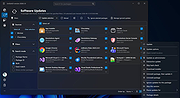 |
|
Winhance v26.06.12 Winhance v26.06.12 👉 Enhance, debloat, and customize Windows with powerful system tweaks. Winhance is a Windows optimization and customization tool designed to help users debloat, fine-tune, and enhance their Windows experience. It provides a structured interface to adjust privacy settings, remove unwanted apps, optimize performance, and configure various system components in a safe and organized way. Winhance simplifies advanced Windows configuration by grouping hundreds of commonly used tweaks, optimizations, and customization options into an intuitive interface. It can remove unnecessary Windows components, improve privacy, adjust gaming and performance settings, install or remove software, customize Explorer and the Start menu, and generate reusable configuration files for deploying the same settings across multiple computers. Winhance is open source and supports both installed and portable operation. Features: • Remove preinstalled Windows apps, optional features, and unwanted components • Apply privacy, security, gaming, and performance optimizations • Customize the taskbar, Start menu, Explorer, desktop, and Windows appearance • Install or uninstall popular third-party software from a built-in catalog • Configure Windows services, power settings, networking, and system behavior • Create reusable Winhance configuration files and unattended Windows deployment files • Review and track applied changes with a built-in change history log • Available as both an installed and portable application • Open source with support for Windows 10 and Windows 11 Supported operating systems: • Windows 10 x64 (22H2), Windows 11 (23H2, 24H2, 25H2) Supported languages: Arabic, Bulgarian, Chinese (Simplified), Chinese (Traditional), Croatian, Czech, Danish, Dutch, English, Finnish, French, German, Greek, Hebrew, Hungarian, Italian, Japanese, Korean, Norwegian Bokmεl, Polish, Portuguese (Brazil), Portuguese (Portugal), Romanian, Russian, Serbian, Slovak, Spanish, Turkish, Ukrainian Changes: v26.06.12 06-12-26 • Added Builder Mode for creating Winhance configuration files and autounattend.xml files without modifying the current PC • Added a Sponsors & Supporters page and a Change History log that records all applied settings and app installations/removals • Added Hebrew language support, bringing the total to 29 supported languages • Added new Explorer ... |
|
1,105 | Jun 29, 2026 Marco du Plessis 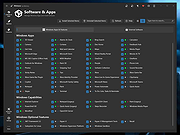 |
| Showing rows 1 to 5 of 5 | Showing Page 1 of 1 | 1 |
OlderGeeks.com Copyright (c) 2026
