|

|
Processed through Paypal No account required. |








Buy our over-priced crap to help pay the bills.



|
|
Processed through Paypal No account required. |
| Files | ||||
| File Name | Rating | Downloads | ||
 |
2Shoot_Dual_Intervalometer_ISO_Bracketing.zip 2Shoot Dual Intervalometer & ISO Bracketing v1.0.0 👉 A portable Windows tool for wireless interval shooting and ISO bracketing with supported Sony cameras. 2Shoot Dual Intervalometer & ISO Bracketing is a lightweight photography utility that controls supported Sony cameras from a Windows PC over Wi-Fi. It provides both an intervalometer and true ISO bracketing while keeping the interface simple and focused. Photographers can create timed shooting sequences, distribute a selected number of shots across a specified duration, or capture 3, 5, or 9 images at different ISO values while maintaining the same shutter speed and aperture. The program currently supports the Sony α1 (ILCE-1) and Sony α7 IV (ILCE-7M4), provides live camera information, works with autofocus or manual focus, and requires no traditional installation. Features: • Wireless control of supported Sony cameras over Wi-Fi • Interval Mode for setting the delay between consecutive photographs • Duration Mode for distributing a selected number of shots over a total duration • Time controls adjustable in 0.5-second steps • ISO bracketing with 3, 5, or 9-shot sequences • ISO bracket steps of 0.3 EV, 0.7 EV, or 1.0 EV • Uses the camera's current ISO as the center value of an ISO bracket • Displays the calculated ISO scale in real time • Keeps shutter speed and aperture unchanged during ISO bracketing • Automatically restores the camera's original ISO after a bracketing sequence • Supports RAW, RAW + JPG, and JPG operation • Supports autofocus and manual-focus shooting • Displays live ISO, shutter speed, and aperture information • Monitors actual shutter speed for interval timing checks • Automatically opens the destination folder after a successfully completed sequence • Automatically retries a camera connection up to two times after the initial attempt • Includes an Abort Connection control • Built-in Help and About windows • Supports Sony α1 (ILCE-1) and Sony α7 IV (ILCE-7M4) • Portable 64-bit Windows application with no traditional installer required Supported operating systems: • ... |
 |
24 | Sep 20, 2026 Cristoforo Bonissone 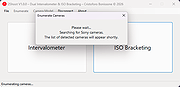 |
 |
Android Webcam System v1.0.6 Android Webcam System v1.0.6 👉 Turn an Android phone into a high-quality Windows webcam over USB or Wi-Fi. Android Webcam System is a free and open-source webcam solution that uses an Android smartphone as a webcam for a Windows computer. The system consists of the AWA Android app, which streams video from the phone, and the AWC desktop client, which receives the stream and provides a virtual webcam device that can be selected by compatible Windows applications. Everything operates locally without requiring a cloud streaming service. The project supports both USB and Wi-Fi connections. USB provides lower latency and improved stability without requiring Wi-Fi, while wireless mode lets the phone and computer communicate over the same local network. The Android app supports resolutions from 480p through 4K and allows switching between the phone's front and rear cameras. The virtual webcam can be used with programs such as Zoom, Microsoft Teams, Google Meet, Discord, OBS Studio and Skype, as well as other Windows programs capable of selecting a webcam device. Features: • Turns an Android smartphone into a Windows webcam • Includes AWA, a Kotlin-based Android camera and streaming application • Includes AWC, the desktop client that receives the phone's video stream • Creates a virtual webcam device for compatible Windows applications • Supports USB and Wi-Fi connections • USB mode offers lower latency and improved connection stability • Wi-Fi mode provides completely wireless operation over the local network • Supports 480p, 720p, 1080p and 4K video resolutions • Supports front and rear Android cameras • Displays real-time connection status • Provides desktop connection statistics • Designed for low battery usage on the Android device • Works with Zoom, Microsoft Teams, Google Meet, Discord, OBS Studio and Skype • Can be used by other applications that support standard webcam devices • Uses a fully local, serverless architecture • No cloud video relay is required • No advertisements • Free and open-source under the ... |
|
224 | Aug 09, 2026 Soubhagyajit Borah  |
|
Apple iPad 9th Gen. Wi-Fi A2602 820-02558 boardview & images. Apple iPad 9th Gen. Wi-Fi A2602 820-02558 boardview & images. Boardview & images for Apple iPad 9th Gen. Wi-Fi A2602 820-02558 mainboard. Note: Used in Apple iPad 9th Gen. Wi-Fi A2602 tablet. Use FlexBV5 to view the boardview file. Click here to visit the author's website. |
|
803 | May 16, 2026 Apple Corp. 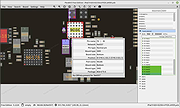 |
|
Block Nearby WiFi v1.0 Block Nearby WiFi v1.0 Block Nearby WiFi v1 is a freeware portable app to manage nearby wifi connections. You can block or allow a wifi name. In this way you can create easily Blacklist and Whitelist. Important: To run this app, right click file and choose "Run as Administrator". Note: When Windows SmartScreen pops up and says "Microsoft Defender SmartScreen prevented an unrecognized app from starting...", you will have to click "More info" and then choose "Run anyway". This app is safe, Microsoft has just not added to the list of safe apps yet. |
|
4,673 | Apr 06, 2020 Gaetano D'Aquila 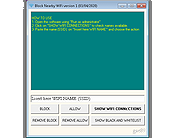 |
|
NETworkManager v2026.2.22.0 NETworkManager v2026.2.22.0 👉 Powerful open-source network management and troubleshooting tool. NETworkManager is a comprehensive open-source application designed to help administrators and power users manage, analyze, and troubleshoot network environments. It provides a wide range of built-in tools within a single, modern interface, making it easier to monitor connections, configure network settings, and diagnose connectivity issues without switching between multiple utilities. NETworkManager supports remote connections and offers advanced features for managing IP addresses, DNS, WiFi networks, ports, and more. With its modular design and extensive toolset, it is well-suited for both everyday network diagnostics and more advanced administrative tasks. Supported languages: • English, German, Spanish, French, Italian, Russian, Chinese (Simplified), Chinese (Traditional), Japanese, Korean, Portuguese, Polish Changes: v2026.2.22.0 02-22-26 Breaking Changes Migrated from .NET 8.0 (LTS) to .NET 10.0 (LTS). Upgrade your .NET Desktop Runtime to version 10.0 (LTS) - x64 before you install this version. AWS Session Manager feature has been removed. Profile and settings files have been migrated from XML to JSON. Existing files will be automatically converted to JSON on first load after the update. You should back up your settings and profile file before installing. New Features System-Wide Policies for enterprise deployment and management. Administrators can now configure system-wide policies via a config.json file in the application directory to control specific settings for all users. DNS Lookup now allows direct input for dns server ip|host:port (port - is optional) Remote Desktop connect admin (console) session Migrated Dialogs to ChildWindows This download is for the Windows portable version (very bottom of page). If you need the Windows installer version, download here. Click here to visit the author's website. |
|
4,067 | Jul 05, 2026 BornToBeRoot 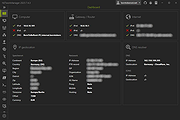 |
|
Recall Wifi v1.0.0 Recall Wifi v1.0.0 A utility to recover the passwords of wireless networks saved on your computer. Features: • Recover WEP, WPA, WPA, WPA2 and WPA3 passwords. • Perform security analysis to help you identify vulnerable or insecure passwords. • Import or export saved networks to file with optional encryption (AES 256-bit) for use on another computer. • Delete saved networks. • Connect/Disconnect to or from saved networks. • Optionally view saved networks on disabled network devices. • Portable, single executable. System Requirements: • Windows XP or later (64-bit) • 16MB disk space Click here to visit the author's website. |
|
813 | Jun 26, 2025 Mechanika Design 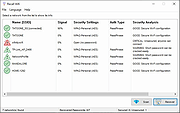 |
|
Virtual WiFI v3.2.1 Virtual WiFI v3.2.1 Virtual WiFI is a free program for Windows that has the main objective to create wireless(Wi-Fi) hotspots hosted by the wireless adapter board (if the device supports this kind of operation). Using the program you can create two types of Wi-Fi networks: A simple local network or ad-hoc - that can be used as a way to connect computers in order to transfer files for one computer to another, or to share software(services, programs) or hardware(eg. printer) resources of a computer with other computers from the network. A local network with internet access - used as a way to share an Ethernet LAN, wireless, or 3G / 4G /5G modem internet connection to all the devices from the network, keeping all the benefits of an ad-hoc connection - sharing files and resources. For example it's possible to share the internet of a LAN (Local Area Network) or USB modem connection with up to 100 computers, tablets, smartphones, etc. The program can create and manage Wi-Fi hotspots and shows the devices that are connected to the network, identified by IP and MAC addresses. Other features are: Simple and easy to use; Available in multiple languages: English, Romanian, French, Polish, Vietnamese; Detects fastest internet connection automatically; Share the internet connection of the computer with all types of portable devices (smartphones, tablet, smartwatch, smart TV) that has wireless capability; Can be use as a substitute for the internal GUI interface 'Create an ad hoc network' existing in Windows Vista and 7, but not in newer versions, such as Windows 8, 8.1 and 10; No need of keeping 'Virtual WiFi' active in memory - once a hotspot is ... |
|
6,601 | Dec 31, 2018 Adi Barbu's Software Lab 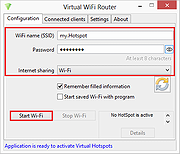 |
|
Wifi Password Revealer 1.0.0.6 Wifi Password Revealer 1.0.0.6 WiFi password revealer is a small freeware utility which will show you all your saved WiFi passwords. If you forgot or lost password to your wireless network - this tool is for you. For Windows XP and 2003 Server users. your passwords will be recovered as 64 HEX digits, and not exact password which you have entered. This is NOT a bug. Windows XP automatically converts them into this form, and it can't be converted back. But you can still use this HEX digits instead of real password in order to connect to your wirelesss network. Administrator rights are required on your PC in order to decrypt stored passwords. |
|
9,858 | Jan 21, 2014 Magical Jelly Bean |
|
WifiInfoView v3.00 WifiInfoView v3.00 👉 Scan and analyze nearby wireless networks with detailed Wi-Fi information. WifiInfoView is a free, portable utility that scans all wireless networks within range and displays detailed technical information about each one. It provides network names (SSID), MAC addresses, signal strength, channel numbers, frequencies, PHY types, maximum supported speeds, security status, router manufacturer, and other useful details for troubleshooting or optimizing wireless networks. Advanced users can also inspect the raw Wi-Fi information elements transmitted by each access point in hexadecimal format. WifiInfoView includes a summary mode that groups detected networks by channel, router manufacturer, PHY type, or maximum speed, making it easy to identify congested channels and optimize wireless performance. Features: • Portable application requiring no installation • Scans and displays nearby wireless networks in real time • Shows SSID, MAC address, PHY type, RSSI, signal quality, frequency, and channel • Displays router manufacturer, model, and name when available • Shows network security status and maximum supported connection speed • Summary mode groups networks by channel, manufacturer, PHY type, or speed • View raw Wi-Fi information elements in hexadecimal format • Export selected information to multiple file formats • Filter, sort, and search detected wireless networks • Supports both 32-bit and 64-bit Windows systems Supported operating systems: • Windows Vista, Windows Server 2008, Windows 7, Windows 8, Windows 10, Windows 11 Supported languages: • Arabic, Basque, Bulgarian, Catalan, Chinese Simplified, Chinese Traditional, Croatian, Czech, Danish, Dutch, English, Finnish, French, German, Greek, Hebrew, Hungarian, Italian, Japanese, Korean, Norwegian, Persian, Polish, Portuguese, Portuguese (Brazil), Romanian, Russian, Slovak, Slovenian, Spanish, Swedish, Thai, Turkish, Ukrainian, Vietnamese Changes: v3.00 06-10-26 • Added "Keep Selected Item Visible" option. When enabled, the selected item always remains visible. Note: This file has two hits on VirusTotal. We have confirmed these to be false positives. The file is safe. This download is for the Windows 64bit version (very bottom of page). If you need the Windows 32bit version, ... |
|
6,720 | Jun 23, 2026 Nir Sofer 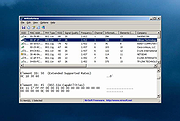 |
|
Wireless Network Watcher v2.45 Wireless Network Watcher v2.45 👉 Scans your wireless network and displays a list of all devices currently connected. Wireless Network Watcher is a lightweight network monitoring tool that scans your wireless network and displays a list of all computers and devices currently connected. The program quickly identifies devices on your network and provides useful information such as IP address, MAC address, device name, network adapter company, and connection status. Wireless Network Watcher can be useful for detecting unauthorized devices connected to your wireless network. It works by scanning a defined IP address range and presenting the results in a clear list, making it easy to identify computers, smartphones, tablets, routers, and other network hardware that are currently active. The utility is portable and does not require installation. It can also play a sound alert when a new device connects to the network and allows exporting the device list to various formats for reporting or monitoring purposes. Features: • Scans wireless networks and detects connected devices • Displays device information including IP address, MAC address, and device name • Identifies network adapter manufacturer from MAC address • Detects computers, phones, tablets, and other network hardware • Sound notification when new devices connect to the network • Export results to HTML, XML, CSV, or text files • Portable application that does not require installation • Simple interface designed for quick network scanning Supported operating systems: • Windows XP, Windows Vista, Windows 7, Windows 8, Windows 10, Windows 11 Supported languages: Arabic, Basque, Brazilian Portuguese, Bulgarian, Catalan, Croatian, Czech, Dutch, Finnish, French, German, Greek, Gujarati, Hebrew, Hellenic, Hungarian, Indonesian, Italian, Japanese, Korean, Latvian, Norwegian, Persian, Polish, Portuguese, Romanian, Russian, Serbian, Simplified Chinese, Slovak, Slovenian, Spanish, Swedish, Traditional Chinese, Thai, Turkish, Ukrainian, Valencian, Vietnamese Changes: v2.45 06-27-26 When a randomized MAC address is detected, it's displayed in the 'Network Adapter Company' column. Updated the internal MAC addresses database. This download is for the ... |
|
12,474 | Jul 01, 2026 Nir Sofer 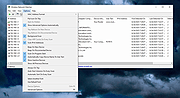 |
|
Wireshark v4.6.7 Wireshark v4.6.7 👉 Analyze and troubleshoot network traffic with the industry's leading protocol analyzer. Wireshark is a free and open-source network protocol analyzer used by network administrators, security professionals, developers, students, and IT enthusiasts to capture, inspect, and analyze network traffic in real time or from previously saved capture files. It supports hundreds of protocols and provides powerful filtering, coloring, and statistical analysis tools to help diagnose network problems, investigate security issues, debug applications, and understand how network protocols work. Wireshark can capture traffic from wired and wireless network interfaces, display packet details down to the individual protocol fields, reconstruct conversations, and export captured data in multiple formats. Its flexible display filters, extensive protocol support, customizable interface, and built-in analysis tools make it an essential utility for anyone working with computer networks. Features: • Capture live network traffic from Ethernet, Wi-Fi, Bluetooth, USB, and many other interface types • Open and analyze previously captured packet trace files • Decode hundreds of network protocols with detailed packet inspection • Powerful display filters for quickly isolating specific traffic • Colorize packets for improved readability and faster analysis • Follow TCP, UDP, HTTP, HTTP/2, TLS, QUIC, WebSocket, and other protocol streams • Generate protocol hierarchy, endpoint, conversation, I/O, and flow graphs • Inspect packet contents down to individual protocol fields • Search captured traffic by protocol, address, port, payload, or custom criteria • Support for decryption of supported encrypted protocols when appropriate keys are available • Extensive capture and display customization options • Export captured packets and analysis results in multiple formats • Extensible through Lua scripting and plugins • Cross-platform interface with consistent functionality Supported operating systems: • Windows 10, Windows 11 • macOS 12 Monterey or higher • Linux (major distributions including Debian, Ubuntu, Fedora, Red Hat Enterprise Linux, openSUSE, Arch Linux, and others) • FreeBSD, NetBSD, OpenBSD Supported languages: English, Chinese (Simplified), Chinese (Traditional), French, German, Italian, Japanese, Korean, Polish, Russian Changes: v4.6.7 07-02-26 Bug Fixes The ... |
|
10,933 | Jul 09, 2026 Gerald Combs 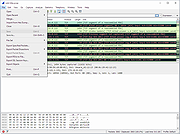 |
|
Wise WiFi Password Viewer v1.0 Wise WiFi Password Viewer v1.0 👉 Portable tool to show and recover saved WiFi passwords in Windows. Wise WiFi Password Viewer helps you recover and view saved wireless network keys stored on your Windows PC. It is designed to quickly display previously connected WiFi network names and passwords, perform local-only scans, and export the results to TXT or CSV for backup or record keeping. Features: • One-click recovery of saved WiFi credentials • Displays previously connected wireless network names and passwords • Local-only scanning with no cloud uploads or external transmissions • Export support for TXT and CSV formats • Portable utility with no installation required • Clear organized list for quick viewing and saving of credentials Supported operating systems: • Windows 7, Windows 8, Windows 8.1, Windows 10, Windows 11 • 32-bit, 64-bit Supported languages: English Changes: v1.0 04-16-26 Not Provided. Note: You MUST right click the file and Run as Administrator for it to work properly. Click here to visit the author's website. |
|
684 | Apr 17, 2026 WiseCleaner.com 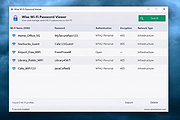 |
| Showing rows 1 to 12 of 12 | Showing Page 1 of 1 | 1 |
OlderGeeks.com Copyright (c) 2026
