|

|
Processed through Paypal No account required. |








Buy our over-priced crap to help pay the bills.



|
|
Processed through Paypal No account required. |
| Files | ||||
| File Name | Rating | Downloads | ||
 |
Alchemy v008 Alchemy v008 Experimental open source drawing and sketching software for exploring creative ideas. Alchemy is an open source drawing application designed to help artists, designers, and creative thinkers generate ideas during the earliest stages of the creative process. Rather than focusing on producing polished artwork, Alchemy encourages experimentation through a collection of unique drawing modules that introduce randomness, symmetry, procedural shapes, voice interaction, and other unconventional techniques. The intentionally minimalist interface removes distractions such as undo and object editing, allowing users to rapidly explore concepts and discover unexpected forms. Built in Java, Alchemy is cross-platform and extensible through a modular plugin system, making it easy for developers and artists to create and share their own drawing modules. Features: • Experimental sketching environment focused on concept generation • Minimal interface designed to reduce distractions • Modular architecture with removable and expandable drawing modules • Random and procedural shape generation • Real-time mirror drawing for symmetrical artwork • Blind drawing mode for creative experimentation • Voice-controlled drawing modules • Session recording with automatic PDF snapshots • Automatic canvas clearing at configurable intervals • Export artwork as SVG, PDF, PNG, and JPEG • Adjustable export image scaling • Horizontal and vertical canvas flipping • Smooth, Ribbon Shapes, Limit, and Splatter Shapes modules • Configurable background transparency • Open source and extensible through custom Java modules Supported operating systems: • Windows • macOS • Linux • Requires Java Runtime Environment 1.5 or higher required Supported languages: • English, Persian Changes: v008 • Added SVG export and switching support using the Batik library • Added export image scaling for JPEG and PNG • Added horizontal and vertical canvas flipping • Added Smooth, Ribbon Shapes, Limit, and Splatter Shapes modules • Added configurable background transparency • Added Persian localization • Added outline-only rendering option for Shapes module while drawing • Alchemy now remembers the export directory between sessions • Fixed Mirror and Color Switcher coloring issues • Improved Color Palette positioning • Updated the JPen tablet library • Fixed fullscreen transparent mode rendering • Fixed ... |
 |
4,318 | Jun 25, 2026 Karl D.D. Willis/Jacob Hina 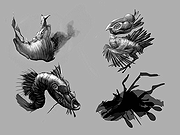 |
 |
Inkscape v1.4.4 Inkscape v1.4.4 👉 Professional quality vector graphics editor for illustrations, logos, diagrams, icons, maps and web graphics. Inkscape is a free and open source vector graphics editor that uses SVG as its native file format. It is built for creating and editing scalable artwork such as illustrations, icons, logos, diagrams, maps, charts, technical drawings, line art and web graphics. Features: • Create and edit SVG vector graphics • Draw with pencil, pen and calligraphy tools • Use rectangles, ellipses, stars, polygons, spirals and 3D boxes • Edit paths and nodes with precision • Boolean path operations including union, difference, intersection and exclusion • Layers and object organization • Text tools with text on path support • Gradients, patterns, markers, clones, clipping and masking • Bitmap tracing for converting raster images to vector paths • Import and export many common vector and image formats • PDF import and export support • Extensions and command line options for advanced workflows Supported operating systems: • Windows 10, Windows 11, Windows on Arm • macOS • Linux Supported languages: English, Basque, Brazilian Portuguese, Bulgarian, Croatian, Dutch, Finnish, French, German, Hebrew, Hungarian, Italian, Latvian, Polish, Portuguese, Romanian, Russian, Simplified Chinese, Slovenian, Spanish, Swedish, Traditional Chinese, Ukrainian, Vietnamese Changes: v1.4.4 05-06-26 Maintenance and bugfix release. 20 crash fixes. More than 25 bug fixes and performance improvements. A couple small new features. 26 updated translations. First release to provide packages for Windows on Arm. Faster zooming in documents with many paths. Faster copy and paste of large numbers of objects with gradients. Faster Layers and Objects dialog when many objects are selected. Faster Object Properties dialog when selecting paths. Faster Gradient Tool editing. New button to rotate selected stars or polygons into an upright position. Added Elementary OS color palette. Fixed multiple crashes involving startup, recent files, graphics tablets, pages, PDF files, broken SVG markers, export dialog use, raster image sizing, Tweak tool, Connector Tool, PowerStroke Live Path Effect, Corners Live Path Effect, gradients, Break Apart and raster tracing. Windows on Arm builds ... |
|
7,859 | May 07, 2026 Inkscape 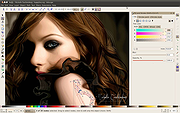 |
|
LibreCAD v2.2.1.5 LibreCAD v2.2.1.5 👉 Free and open-source 2D CAD application for technical drawing and design. LibreCAD is a free, open-source computer-aided design (CAD) application focused on creating precise 2D technical drawings, schematics, floor plans, mechanical parts, and engineering diagrams. Built using the Qt framework, LibreCAD provides a lightweight yet powerful drafting environment suitable for hobbyists, students, architects, engineers, and professionals who need accurate 2D design tools without the complexity or cost of larger CAD suites. LibreCAD supports the DXF file format natively and offers a customizable interface with layers, snapping tools, measurement utilities, advanced selection controls, and extensive drawing commands. The program is designed to be fast and efficient even on older hardware, making it ideal for both modern and legacy systems. Features: • Create precise 2D technical drawings and CAD designs • Native DXF file format support • Layer management system for organized projects • Advanced snapping tools for accurate drawing placement • Tools for lines, circles, arcs, splines, hatches, and dimensions • Customizable interface and command-line style input • Print and export drawing support • Measurement and modification utilities • Support for plugins and community extensions • Lightweight performance suitable for older computers • Multi-document workflow support • Extensive keyboard shortcuts and drafting tools Supported operating systems: • Windows 7, Windows 8, Windows 10, Windows 11 • macOS • Linux Supported languages: English, German, French, Spanish, Italian, Portuguese, Russian, Chinese, Japanese, Korean, Dutch, Polish, Czech, Hungarian, Turkish, Ukrainian, Swedish, Danish, Finnish, Greek, Romanian, Catalan, and more Changes: v2.2.1.5 06-02-26 • Various bug fixes and stability improvements • Updated translations • Improved compatibility and usability enhancements This download is for the Windows 64bit version (very bottom of page). All other download assets are below: Other Windows: LibreCAD-v2.2.1.5-msvc.exe (32bit) macOS: LibreCAD-v2.2.1.5-arm64.dmg LibreCAD-v2.2.1.5.dmg Linux: LibreCAD-v2.2.1.5-x86_64.AppImage LibreCAD-v2.2.1.5-aarch64.AppImage LibreCAD-v2.2.1.5.snap Click here to visit the author's website. |
|
7,270 | Jun 02, 2026 LibreCAD 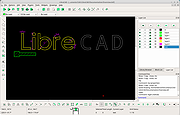 |
|
OpenToonz v1.8.0 OpenToonz v1.8.0 👉 Open-source 2D animation production software. OpenToonz is software for the production of 2D animation, based on Toonz, originally developed by Digital Video S.p.A. in Italy and customized by Studio Ghibli for many years of animation production. It can be used free of charge for both commercial and non-commercial projects, and its source code is available for modification under an open-source license. ©2025 Jorge del Campo Andrade Features: • Professional 2D animation production tools • Based on Studio Ghibli-customized Toonz software • Free for commercial and non-commercial use • Open-source code that can be modified freely • GTS scanning tool for animation workflows • Digital painting with anti-aliased lines • Xsheet and timeline interfaces • Node-tree based effects compositing • Supports raster and vector images • Plug-in effect SDK for adding image-processing effects Supported operating systems: • Windows 7 SP1, Windows 8.1, Windows 10 64-bit • macOS 10.14 Mojave or later Supported languages: English, German, Spanish, French, Italian, Russian, Japanese, Chinese Changes: v1.8.0 06-19-26 Features / Enhancements Drawing / Animation Tools Assistant Tool improvements by @blackwarthog in #4852, #5039, #5066, #5071, #5100, #5125 Brush & Paintbrush Tools enhancements by @Abel032 in #5838, #5890, #5988, #5989, #6075, #6079, #6224 Brush Tool (Stroke Replication) feature by @blackwarthog in #5069 Brushes enhancements and refactoring by @andeon in #5295, #5733 Fill Tool improvements and features by @Abel032 in #5828, #5979, #6088, #6090, #6105, #6111, #6113, #6154, #6158, #6164, #6181, #6193, #6196, #6221, #6252 Finger Tool options and improvements by @Abel032 in #5902, #6224 Geometric Tool enhancements by @Abel032 in #5762, #5838, #5999 Tape Tool enhancements by @Abel032 in #6090, #6874 Screentones feature by @andeon in #4911 Straight Line (Angle Snap): Prevent CTRL activating draw straight line angle snap by @konero in #4885 ... |
|
634 | Oct 02, 2026 DWANGO Co., Ltd. 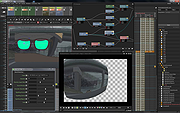 |
|
PhotoSuite v0.9.7 PhotoSuite v0.9.7 👉 A desktop image editor for layered photo editing, digital artwork, and native PSD files. PhotoSuite is a desktop image editor built around a familiar Photoshop-style workspace. It uses PSD as its native document format, preserving layers, masks, blending modes, text, vector paths, and other document data when opening and saving files. It also supports PSB for large documents. The editor brings photo retouching, painting, vector drawing, typography, filters, and document layout into one workspace. You can work with layers and masks, make selections, paint or repair parts of an image, add text and shapes, and revisit earlier work through the History palette. Smart Objects and Smart Filters provide options for editing without permanently changing the original layer. PhotoSuite runs locally as a desktop application. According to the developer, it requires no cloud account and collects no telemetry. Features: • Open, edit, and save layered PSD documents as a native format • Work with PSB files for large documents • Create raster layers, vector layers, layer groups, clipping masks, and layer masks • Use blending modes and layer styles such as Drop Shadow, Inner Shadow, glows, overlays, Bevel & Emboss, and Stroke • Edit with Smart Objects and Smart Filter stacks • Save different document arrangements with layer comps • Make selections with Marquee, Lasso, and Magic Wand tools • Paint and retouch with Brush, Clone Stamp, Healing Brush, Eraser, Blur, Sharpen, Dodge, and Burn tools • Crop images and apply gradients • Draw paths and shapes with the Pen and shape tools • Add text with support for text along a path, text warp, ligatures, and kerning • Pan, zoom, and rotate the canvas; use rulers, guides, and a pixel grid • Revisit edits with the History palette and snapshots • Apply filters, use Liquify, and make lens corrections • Open and export formats including PNG, APNG, JPEG, WebP, AVIF, TIFF, GIF, BMP, TGA, SVG, and ... |
|
109 | Sep 24, 2026 eolix 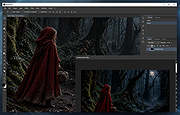 |
|
PixiEditor v2.1.2.4 PixiEditor v2.1.2.4 👉 A free, open-source universal 2D graphics editor for pixel art, painting, image editing, vector art, procedural art, and animations. PixiEditor is a universal 2D graphics editor made for all your 2D creative needs. Create sprites for games, frame-by-frame animations, edit images, draw, paint, make logos, work with vectors, and build non-destructive procedural graphics using its node graph system. Features: • Pixel art, painting, vector art, image editing, procedural art, and animation tools • Node Graph for non-destructive procedural graphics and animations • Dedicated pixel art toolset with palette management • Painting tools with soft brushes and anti-aliased shapes • Vector shapes and paths that can be mixed with raster artwork • Frame-by-frame animation support • Node-based Brush Engine for creating custom brushes • Extension Browser for browsing and installing extensions • Desktop native, cross-platform, and works offline • Export support for PNG, JPG, SVG, GIF, MP4, and more • Pixel Art — Dedicated Pixel Art toolset and advanced palette management. Create pixel art with a dedicated toolset. Perfect for game sprites, animations, or nostalgic artwork. Enjoy features like pixel-perfect pen mode for clean edges. • Animations — Bring stories to life with frame-by-frame Animations. Turn your drawings into moving stories! Create smooth frame-by-frame animations with tools that make it fun and easy to bring your art to life. • Procedural Art — Create non-destructible, procedural graphics with Node Graph. Node Graph allows for creating fully non-destructible graphics and animations. Connect nodes to easily compose complex visuals. From pre-built effects to custom shaders, the possibilities are endless! • Image Editing — Select, delete, clip, resize - everything you need for Image Editing. Use raster tools to edit images, sketch or paint. Whether you're doodling or making a masterpiece, PixiEditor is there for you! • Vector Art — Create and edit Vectors. Snapping included. Craft logos, icons, and illustrations with our flexible curve tool and vector shapes. Your designs ... |
|
1,153 | Sep 18, 2026 Pixi Labs Sp. z o.o 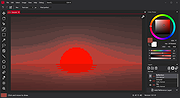 |
|
SnipSVG v2.3 SnipSVG v2.3 👉 A free screen capture and graphics editor built around sharp, fully editable SVG vector images. SnipSVG is a free screen capture and graphics editor for Windows and macOS that uses SVG vector images as its primary format. Unlike traditional JPG and PNG screenshots, SVG images remain sharp at any zoom level while individual elements remain editable. SnipSVG provides tools for capturing, cropping and annotating screenshots, obscuring sensitive information, adding formatted text, creating numbered documentation graphics and sharing finished images with other applications. It can also create animated and interactive SVG content using CSS and JavaScript. Features: • Capture and edit screenshots • Uses scalable SVG vector graphics as its primary image format • Keeps individual SVG elements separately editable • Maintains sharp image quality at different zoom levels and resolutions • Crop screenshots and physically resize large photos • Blur or obscure sensitive information in screenshots • Add HTML-formatted text to images • Add lines, arrows, shapes, highlights and other annotations • Auto-incrementing numbering tags for tutorials and documentation • Generate reference tables from numbered image tags • Integrated syntax highlighting for source code examples • Extract text from images using Windows OCR on Windows 10 and Windows 11 • Create animated SVG objects using CSS and JavaScript • Add interactive elements and hyperlinks to SVG images • Share images with HTML editors, word processors and other applications • Supports SVG and SnipX image formats • Integrates with the Help+Manual documentation authoring suite • Free for private and commercial use • Windows installer supports portable installation Supported operating systems: • Windows 7, Windows 8, Windows 10, Windows 11 • macOS 11 Big Sur or higher, Intel/Apple Silicon Supported languages: English, German, French Changes: v2.3 08-03-26 • Flipping of line and arrow objects did not work correctly when the line was rotated. • Full lasso selection on the canvas selected the picture frame, it now selects objects inside the picture frame (same as CTRL + A to select ... |
|
1,788 | Sep 14, 2026 EC Software GmbH 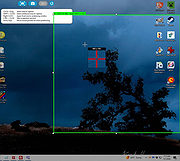 |
 |
Thoth v1.1.0 Thoth v1.1.0 👉 Local-first AI knowledge assistant with RAG, document search, and cited answers powered by Ollama. Thoth is a local-first, privacy-focused AI knowledge assistant that uses Retrieval-Augmented Generation (RAG) to help you search, organize, and interact with your information. Running entirely on your own computer with Ollama, it keeps your documents and conversations private while providing AI-powered answers complete with source citations. You can upload your own documents, search Wikipedia, browse academic papers from arXiv, perform web searches, and maintain persistent conversations without relying on cloud-hosted language models. Thoth indexes your files into a local vector database for fast semantic searches, intelligently combines information from multiple sources, and lets you switch between compatible Ollama models to best suit your hardware and workload. It is designed for researchers, students, developers, and anyone who wants a private AI assistant that can accurately answer questions using both local documents and trusted online resources. Features: • Runs completely locally using Ollama with no cloud AI required • Privacy-focused design that keeps documents and conversations on your PC • Retrieval-Augmented Generation (RAG) for context-aware answers • Upload and index PDF, DOCX, DOC, and TXT documents • Local FAISS vector database for fast semantic document searching • Multi-source retrieval from local documents, Wikipedia, arXiv, and Tavily web search • Automatic source citations for every generated response • Persistent multi-turn conversations stored locally • Automatic follow-up question rewriting for improved search accuracy • Contextual compression retrieves only the most relevant document sections • Parallel retrieval from multiple enabled sources for faster responses • Intelligent duplicate removal across retrieval results • Automatic context trimming for efficient long conversations • Supports dynamic switching between 30+ Ollama models • Automatic download of supported Ollama models • Built-in API key management through the Settings panel • Automatic conversation naming • Embedded Python runtime included with the Windows installer • Smart context assessment minimizes unnecessary searches • Improved automatic chat scrolling Supported operating systems: • Windows ... |
|
844 | Jul 26, 2026 Siddharth Sachar 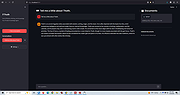 |
| Showing rows 1 to 8 of 8 | Showing Page 1 of 1 | 1 |
OlderGeeks.com Copyright (c) 2026
