|

|
Processed through Paypal No account required. |








Buy our over-priced crap to help pay the bills.



|
|
Processed through Paypal No account required. |
| Files | ||||
| File Name | Rating | Downloads | ||
 |
Classic Shell v4.3.1 Classic Shell v4.3.1 Classic Shell™ is free software that improves your productivity, enhances the usability of Windows and empowers you to use the computer the way you like it. The main features are: Highly customizable start menu with multiple styles and skins Quick access to recent, frequently-used, or pinned programs Find programs, settings, files and documents Start button for Windows 7, Windows 8, Windows 8.1 and Windows 10 Toolbar and status bar for Windows Explorer Caption and status bar for Internet Explorer Classic Shell is no longer in development so OlderGeeks.com is adding this incredible program for preservation. It still works with the following versions of Windows but no other updates can be expected. Classic Shell works on Windows 7, Windows 8, Windows 8.1, Windows 10 and their server counterparts (Windows Server 2008 R2, Windows Server 2012, Windows Server 2012 R2, Windows Server 2016). Both 32 and 64-bit versions are supported. The same installer works for all versions. Note: Windows RT is not supported. |
 |
5,580 | Apr 12, 2019 Ivo Beltchev 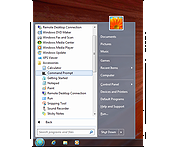 |
 |
DeskRealm v0.5.8 DeskRealm v0.5.8 👉 Give each Windows virtual desktop its own real Desktop folder, icon layout and hotkeys. DeskRealm turns Windows virtual desktops into separate Desktop “realms,” each with its own Desktop folder, icon layout and optional direct hotkeys. Instead of every Win + Tab workspace showing the same desktop clutter, DeskRealm redirects the current user’s Windows Desktop Known Folder to the folder assigned to the active virtual desktop. Features: • Assigns separate Desktop folders to Windows virtual desktops • Synchronizes realm folder names with Windows Task View desktop names • Saves and restores per-realm Desktop icon layouts • Automatic icon layout autosave with change detection • Configurable global hotkeys for jumping to numbered desktops • Tray menu with status, refresh, sync, pause/resume, logs, config and restore options • Optional startup with Windows • Preserves the original Desktop folder instead of moving files during onboarding • Refuses OneDrive Desktop redirection by default • Refuses duplicate virtual desktop names and unsafe folder conflicts • Includes emergency restore script for returning the original Desktop path • Portable ZIP and install-bundle release options Supported operating systems: • Windows 10, Windows 11 Supported languages: English Changes: v0.5.8 06-12-26 Fixed: • Reworked first-run onboarding so DeskRealm no longer moves files from the original Windows Desktop into a managed realm folder. • The selected virtual desktop realm now points directly to the original Desktop folder, preserving the normal Desktop when DeskRealm is closed or disabled. • Added absolute-path realm assignments so a realm can safely use an existing external folder such as the original Desktop. • Prevented duplicate assignment of the original Desktop path to multiple virtual desktops. Changed: • The first-run wizard now describes the safe association model instead of file migration. • Config migration v6 disables the legacy initialDesktopImportMoveFiles flag. • Documentation, installation notes, safety notes and release process now describe the no-move onboarding model. Safety: • DeskRealm must not silently move user Desktop files during onboarding. Existing files remain in the original Desktop folder. ... |
|
616 | Jun 12, 2026 Ayahua Ekimaku  |
|
Fido v1.70 Fido v1.70 👉 PowerShell tool for downloading official Microsoft Windows retail ISO and UEFI Shell images. Fido is a PowerShell script designed primarily for use with Rufus, but it can also be used standalone to automate access to official Microsoft Windows retail ISO download links and provide convenient access to bootable UEFI Shell images. It helps simplify the process of obtaining official Windows installation media directly from Microsoft, while also offering command-line options for selecting Windows version, release, edition, language, architecture, or just retrieving the direct download URL. Features: • Automates access to official Microsoft Windows retail ISO download links • Can also download bootable UEFI Shell images • Works as a standalone PowerShell script or alongside Rufus • Supports command-line mode as well as GUI operation • Lets you choose Windows version, release, edition, language, and architecture • Can display the direct download URL instead of starting the download automatically • Attempts to match the system locale for language selection when not specified • Attempts to match the current system architecture when not specified Supported operating systems: • Windows 8, Windows 8.1, Windows 10, Windows 11 Supported languages: • English Changes: v1.70 03-30-26 Add Windows 11 23H2 v2 downloads (with thanks to @ave9858) 1 👉 2 👉 3 👉 4 👉 5 👉 6 👉 Click here to visit the author's website. |
|
4,423 | Apr 23, 2026 Pete Batard 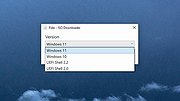 |
|
FileTypesMan v2.01 FileTypesMan v2.01 👉 View and edit Windows file extensions, associations and actions. FileTypesMan is a portable alternative to the File Types manager previously included with Windows Folder Options. It displays detailed information about every file extension and file type registered on your computer, including the type name, description, MIME type, perceived type, default icon, browser flags, Registry key and associated applications. The program uses a two-pane interface. The upper pane lists registered extensions and file types, while the lower pane shows the actions available for the selected item, such as Open, Edit, Print and other context-menu commands. You can edit file type properties, change icons, add or remove actions, replace an extension's assigned file type and open related entries directly in Registry Editor. FileTypesMan requires no installation and can be run directly after extracting the downloaded ZIP file. Separate 32-bit and 64-bit downloads are available. Features: • Displays all registered file extensions and file types • Shows type names, descriptions, MIME types and perceived types • Lists default icons, flags, browser flags and Registry keys • Displays associated applications and available file actions • Adds, edits or removes Open, Edit, Print and other actions • Changes file type properties, flags and default icons • Replaces the assigned file type for a selected extension • Detaches shared file types from individual extensions • Supports Windows UserChoice and SystemFileAssociations entries • Opens file type and action entries directly in Registry Editor • Copies actions from one file type and pastes them into another • Runs with TrustedInstaller privileges when protected entries must be modified • Exports information to text, CSV, tab-delimited, HTML or XML files • Provides command-line options for selecting and exporting extensions • Automatically refreshes the desktop after association changes • Offers optional icon-loading controls to prevent hangs or crashes • Includes a black-background viewing mode • Portable and requires no installation or additional DLL files Supported operating systems: • Windows XP, Windows Vista, ... |
|
10,321 | Jul 27, 2026 Nir Sofer 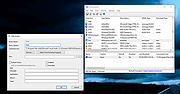 |
|
Link Shell Extension 32bit v3.9.2.9 Link Shell Extension 32bit v3.9.2.9 The NTFS file system implemented in NT4, Windows 2000, Windows XP, Windows XP64, and Windows7/8/10 supports a facility known as hard links (referred to herein as Hardlinks). Hardlinks provide the ability to keep a single copy of a file yet have it appear in multiple folders (directories). They can be created with the POSIX command ln included in the Windows Resource Kit, the fsutil command utility included in Windows XP or my command line ln.exe utility Thus, using standard Windows facilities Hardlinks can only be created at the command prompt, which can be tedious, especially when Hardlinks to multiple files are required or when one only makes occasional use of Hardlinks. Support for Junctions in standard Microsoft software offerings is even more limited than that offered for Hardlinks. Link Shell Extension (LSE) provides for the creation of Hardlinks , Junctions , Volume Mountpoints , and Windows7/8's Symbolic Links, (herein referred to collectively as Links) a folder cloning process that utilises Hardlinks or Symbolic Links and a copy process taking care of Junctions, Symbolic Links, and Hardlinks. LSE, as its name implies is implemented as a Shell extension and is accessed from Windows Explorer, or similar file/folder managers. The extension allows the user to select one or many files or folders, then using the mouse, complete the creation of the required Links - Hardlinks, Junctions or Symbolic Links or in the case of folders to create Clones consisting of Hard or Symbolic Links. LSE is supported on all Windows versions that support NTFS version 5.0 or later, including Windows XP64 and Windows7/8/10. Hardlinks, Junctions and Symbolic Links are NOT supported on FAT file systems, and nor is the Cloning and Smart Copy process supported on FAT file systems. Within this document ... |
|
9,890 | Nov 15, 2019 Hermann Schinagl 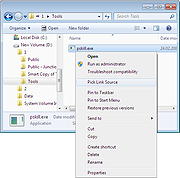 |
|
Link Shell Extension 64bit v3.9.2.9 Link Shell Extension 64bit v3.9.2.9 The NTFS file system implemented in NT4, Windows 2000, Windows XP, Windows XP64, and Windows7/8/10 supports a facility known as hard links (referred to herein as Hardlinks). Hardlinks provide the ability to keep a single copy of a file yet have it appear in multiple folders (directories). They can be created with the POSIX command ln included in the Windows Resource Kit, the fsutil command utility included in Windows XP or my command line ln.exe utility Thus, using standard Windows facilities Hardlinks can only be created at the command prompt, which can be tedious, especially when Hardlinks to multiple files are required or when one only makes occasional use of Hardlinks. Support for Junctions in standard Microsoft software offerings is even more limited than that offered for Hardlinks. Link Shell Extension (LSE) provides for the creation of Hardlinks , Junctions , Volume Mountpoints , and Windows7/8's Symbolic Links, (herein referred to collectively as Links) a folder cloning process that utilises Hardlinks or Symbolic Links and a copy process taking care of Junctions, Symbolic Links, and Hardlinks. LSE, as its name implies is implemented as a Shell extension and is accessed from Windows Explorer, or similar file/folder managers. The extension allows the user to select one or many files or folders, then using the mouse, complete the creation of the required Links - Hardlinks, Junctions or Symbolic Links or in the case of folders to create Clones consisting of Hard or Symbolic Links. LSE is supported on all Windows versions that support NTFS version 5.0 or later, including Windows XP64 and Windows7/8/10. Hardlinks, Junctions and Symbolic Links are NOT supported on FAT file systems, and nor is the Cloning and Smart Copy process supported on FAT file systems. Within this document ... |
|
9,937 | Nov 15, 2019 Hermann Schinagl |
|
Open-Shell v4.4.198 Open-Shell v4.4.198 Bring back the classic Windows Start menu and shell experience. Open-Shell is an open-source continuation of the popular Classic Shell project, designed to restore familiar Windows interface elements that many users prefer over the newer default layouts found in modern versions of Windows. It gives users deep control over the Start menu appearance and behavior while adding classic Explorer enhancements that improve usability and workflow efficiency. Open-Shell can replicate the appearance and functionality of classic Start menus from Windows 7, Windows XP and even older Microsoft operating systems while still supporting the latest versions of Windows 10 and Windows 11. Users can customize nearly every aspect of the Start menu, including styles, skins, icons, button graphics, menu behavior, search settings, animations and shortcuts. Beyond the Start menu itself, Open-Shell includes Explorer enhancements such as a customizable toolbar, additional status bar information and improved file management conveniences. The software is lightweight, fast and designed to integrate naturally into Windows without consuming excessive system resources. The project is maintained by the open-source community and continues to receive updates for compatibility with new Windows releases and user-requested improvements. Features: • Restore classic-style Start menus on Windows 10 and Windows 11 • Multiple Start menu layouts inspired by Windows 7, XP and Classic styles • Highly customizable skins, themes and Start button replacements • Drag-and-drop organization for Start menu items • Fast application and file search functionality • Customizable menu behavior, animations and hotkeys • Explorer toolbar with common file operation buttons • Enhanced Explorer status bar information • Optional classic copy and file operation interface • Extensive settings for power users and advanced customization • Lightweight and low system resource usage • Community-maintained open-source project • Supports Windows ARM systems • Backup and restore Start menu configuration settings • Multi-language interface support Supported operating systems: • Windows 7 • Windows 8 • Windows 8.1 • Windows 10 • Windows 11 • Windows on ARM Supported languages: English, German, French, Spanish, ... |
|
7,093 | Jun 05, 2026 Open-Shell  |
|
PropertySystemView v1.22 PropertySystemView v1.22 👉 View and edit Windows file and window properties with ease. PropertySystemView is a lightweight portable utility that allows you to view and modify the properties of files and Windows using the Windows Property System. It can edit metadata stored in media files, Office documents, images, and other supported file types, including fields such as Title, Comments, Authors, Tags, Date Taken, Media Created, Date Imported, Content Created Date, and many more. It also supports working with Windows properties, such as setting the System.AppUserModel.ID property of a window to customize taskbar behavior. The program supports both an easy-to-use graphical interface and a powerful command-line mode for automation. Features: • View and modify Windows Property System metadata for supported files. • Edit media, image, and Microsoft Office document properties. • Modify timestamps such as Media Created, Date Taken, and Date Imported. • View and edit Windows window properties. • Add, edit, and remove supported properties. • Drag-and-drop file loading. • Browse and display all properties available on your system. • Powerful command-line interface for scripting and automation. • Portable application with no installation required. • Available in both 32-bit and 64-bit versions. Supported operating systems: • Windows Vista, Windows 7, Windows 8, Windows 8.1, Windows 10, Windows 11 (32-bit and 64-bit) Supported languages: English, Brazilian Portuguese, Dutch, French, German, Hungarian, Italian, Japanese, Persian, Russian, Simplified Chinese, Slovak, Traditional Chinese, Turkish Changes: v1.22 07-11-26 Added 'Black Background' option (under the View menu). When enabled, the main table is displayed with a black background and white text instead of the default system colors. This download is for the Windows 64bit version (very bottom of page). If you need the Windows 32bit version, download here. Click here to visit the author's website. |
|
4,739 | Jul 17, 2026 Nir Sofer 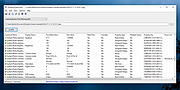 |
|
Rebuild Shell Icon Cache v1.2 Rebuild Shell Icon Cache v1.2 If one or more of your icons are not displaying correctly, or that your icon cache is corrupted, then you might consider rebuilding the icon cache to reset and reload the icon images into the icon cache. The Icon Cache or IconCache.db is a special database file that Windows utilizes to keep copies of each icon handy Having to retrieve all possible icon images from hard disk and to render them dynamically can consume lots of system resources. As a result, Windows save icons it’s already retrieved in its memory. When Windows needs to draw an icon, it uses the copy from the cache instead of retrieving the icon image from the original application file. This helps in making Windows draw the icons faster. Rebuild Shell Icon Cache is a Portable freeware and have ability to Refresh the Windows’s icon cache. Usage of the Application is quite simple, just double click on it that’s all. You can use Rebuild Shell Icon Cache with Command Prompt here are the supported parameters Supported operating systems: Windows 10 , Windows 8.1 , Windows 8 , Windows 7 , Windows Vista , Windows Xp – (x86 & x64) File: ReIconCache_x64.exe MD5: 54c8696fd59174bc1c234c9caf50db1e SHA1: 3cb2713fd7842231a496e1629e61bbe4c428dc4f File: ReIconCache.exe MD5: 12a1e66ed6be57d9fb53705d177abb62 SHA1: 42f0c970e1e3fea6fb17a30ec0ab09208297e7eb Click here to visit the author's website. |
|
4,646 | Nov 03, 2019 Sordum.org 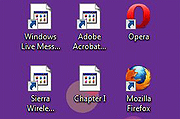 |
|
Right-Click Tools v2.0.4 Right-Click Tools v2.0.4 👉 Add powerful administrative and maintenance tools to the Windows Explorer right-click menu. Right-Click Tools adds a collection of useful commands to the Windows File Explorer context menu, providing quick access to command prompts, PowerShell, Registry Editor, ownership controls, elevated file managers, shell maintenance tools and other frequently needed Windows functions. The tools can be accessed by right-clicking a folder, drive or the background of an open Explorer window. Features: • Adds a customizable collection of tools to the Windows Explorer context menu • Opens Command Prompt or PowerShell in the selected folder • Opens Command Prompt or PowerShell with Administrator privileges • Opens Command Prompt or PowerShell with TrustedInstaller privileges • Supports Windows Terminal, Console Host and optional PowerShell Core configuration • Opens Registry Editor as a standard user, Administrator or TrustedInstaller • Takes ownership of folders and grants access using SetACL • Supports folders containing Unicode characters and long file paths • Adds or removes the selected folder from the user or system PATH variable • Toggles the display of hidden and protected system files • Clears recent items, auto-suggest entries, temporary files and Windows Defender history • Clears the Windows Defender quarantine folder • Refreshes the Windows shell after icon or display changes • Resets the Windows icon and thumbnail caches • Restarts Windows Explorer and reopens the selected folder • Opens a preferred file manager with Administrator or TrustedInstaller privileges • Supports both standard and administrator Windows accounts • Supports multiple user accounts on the same computer • Optional scheduled task reduces repeated UAC prompts • Uses registry-based menu entries instead of a continuously running context menu handler • Adds no background process or significant overhead when opening the context menu • Supports the Windows 11 modern context menu through Custom Context Menu • Automatically detects and supports Windows dark mode • Allows context menu labels and translations to be edited in Language.ini • Available as an installer or portable application • ... |
|
976 | Oct 13, 2026 LesFerch 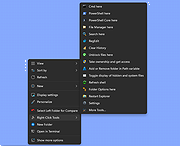 |
|
Shell WebP Converter v2.5.1 Shell WebP Converter v2.5.1 👉 Lightweight Windows shell extension for fast WebP image conversion directly from the right-click menu. Shell WebP Converter is a simple and efficient Windows shell extension that allows you to convert images to and from the WebP format directly from the Windows context menu. Once installed, it integrates seamlessly into File Explorer, enabling quick conversions without opening a separate application. Designed to be lightweight and easy to use, Shell WebP Converter supports bulk image processing and preserves image quality through configurable settings. It is ideal for users who regularly work with WebP images and want a fast, no-nonsense way to convert formats straight from the desktop. Features: • Adds right-click context menu integration in Windows Explorer • Convert images to WebP format • Convert WebP images to common formats such as PNG and JPEG • Batch conversion support for multiple selected files • Lightweight and fast performance • Simple, user-friendly operation • Maintains image quality with configurable compression options Supported operating systems: • Windows 10, Windows 11 Supported languages: English, Russian, Arabic, German, Spanish, French, Hindi, Hungarian, Italian, Japanese, Korean, Portuguese, Slovak, Turkish, Chinese Changes: v2.5.1 05-08-26 GUI fixes Note: This file has one hit on VirusTotal. We have confirmed this to be a false positive. The file is safe. Click here to visit the author's website. |
|
766 | Jun 27, 2026 SchwarzFuchs 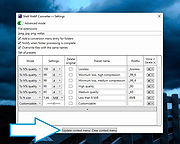 |
|
Windows 11 Context Menu Manager v1.0.1 Windows 11 Context Menu Manager v1.0.1 👉 Disable unwanted items in Windows 11 right-click context menu. Windows 11 Context Menu Manager is a simple utility that lets you turn off unwanted entries in Windows 11 right-click context menu. It is designed to help clean up the newer Windows 11 context menu so you can reduce clutter and keep only the items you want visible. Features: • Disable unwanted entries in the Windows 11 Explorer new right-click context menu • Focuses specifically on the newer Windows 11 right-click menu • Simple interface built for quickly managing context menu visibility • Helps reduce right-click menu clutter in File Explorer • Designed for modern 64-bit Windows 11 systems • Offered as a standalone desktop utility • Open-source software released under the MIT License Supported operating systems: • Windows 11 x64, Windows 11 ARM64 Supported languages: Operating System Language Changes: v1.0.1 03-25-26 fix: missing package This download is for the Windows 11 64bit version (very bottom of page). If you need the Windows 11 ARM64 version, download here. Click here to visit the author's website. |
|
731 | Apr 15, 2026 Brandon Hill 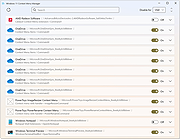 |
| Showing rows 1 to 12 of 12 | Showing Page 1 of 1 | 1 |
OlderGeeks.com Copyright (c) 2026
