|

|
Processed through Paypal No account required. |








Buy our over-priced crap to help pay the bills.



|
|
Processed through Paypal No account required. |
| Files | ||||
| File Name | Rating | Downloads | ||
 |
Delta v0.1.8 Delta v0.1.8 👉 Disk space analyzer with historical snapshot comparison. Delta is a disk space analysis tool that allows you to scan your drives, save storage snapshots, and compare changes over time. It helps you quickly identify which folders and files have grown or shrunk between scans. Designed to work fully offline, Delta stores scan data locally and focuses on lightweight performance with a modern user interface. Features: • Scan drives and analyze folder and file size usage • Save disk usage snapshots for historical tracking • Compare past and current scans to detect size changes • Fully offline operation with no telemetry • Lightweight application built with Rust and Tauri • Modern interface powered by React Supported operating systems: • Windows 10, Windows 11, Linux Supported languages: English Changes: v0.1.8 05-31-26 • Bug fixes • Added sorting improvements • UI changes Note: This file has one hit on VirusTotal. We have confirmed this to be a false positive. The file is safe. This download is for the Windows 64bit setup version (very bottom of page). All other download assets are below: Other Windows: delta_0.1.8_x64_en-US.msi Linux: delta-disk-analyzer_0.1.8_amd64.deb delta-disk-analyzer-0.1.8-1.x86_64.rpm delta-disk-analyzer_0.1.8_amd64.AppImage Click here to visit the author's website. |
 |
798 | Jul 11, 2026 Austin Bian 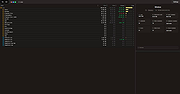 |
|
EntropyVerify v1.0.0 EntropyVerify v1.0.0 👉 Portable, high-performance storage validation utility for verifying drive capacity and integrity. EntropyVerify is an open source, cross-platform storage validation utility written in Rust. Designed as a modern alternative to H2testw, it verifies the true capacity and integrity of storage devices by writing hardware-accelerated, incompressible AES-CTR data and validating it using BLAKE3 block checksums. The program is optimized for modern high-speed NVMe SSDs while remaining compatible with virtually any storage device. It features a real-time terminal dashboard, detailed verification reports, built-in safeguards to prevent accidental testing of system drives, and configurable command-line options for advanced users. Features: • Verifies the true capacity and integrity of storage devices. • High-performance asynchronous I/O for Windows and Linux. • Hardware-accelerated AES-128-CTR data generation. • BLAKE3 block-level integrity verification. • Real-time terminal dashboard with throughput graphs, progress bars, and ETA. • Automatically detects CPU topology and assigns worker threads to physical cores. • Built-in safety checks to prevent overwriting system drives and protected mount points. • Supports write-only and verify-only testing modes. • Generates detailed Markdown verification reports. • Automatically removes test files after a successful validation pass while retaining failed data for analysis. • Interactive controls for pausing, resuming, changing displayed units, and aborting tests. Supported operating systems: • Windows 10, Windows 11 Supported languages: • English Changes: v1.0.0 06-23-26 • Initial public release. • Introduced high-performance storage validation with asynchronous I/O. • Added hardware-accelerated AES-CTR data generation and BLAKE3 verification. • Added interactive terminal dashboard, Markdown reporting, and built-in safety protections. Click here to visit the author's website. |
|
474 | Jun 23, 2026 blamie 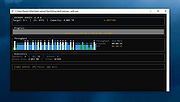 |
|
Grayslate v0.4.0 Grayslate v0.4.0 👉 A fast, free developer scratchpad for working with code, data, text and large files. Grayslate is a free and open source, cross-platform developer scratchpad designed for the small jobs that come up while coding or working with data. Paste an API response, inspect JSON, explore a large CSV, transform or encode text, preview Markdown, work with code snippets or simply capture a quick thought. Grayslate recognizes the content you are working with and puts appropriate transformations at your fingertips. New slates are automatically given useful names and extensions, saved locally as you type and made searchable for later use. Files opened from elsewhere on your computer are only changed when you explicitly save them. All transformations run locally, with no account, cloud upload or telemetry required. Features: • Automatically recognizes pasted or opened content and suggests relevant transformations • Includes more than 80 built-in transformations for code, data and text • Recognizes more than 40 programming, markup and data languages/formats from file extensions, shebangs or content • Automatically names new slates, chooses useful file extensions and saves them locally as you type • Browse recent slates or search saved slates by name and content • Opens text and CSV files up to 200 MB • Rust-backed, virtualized CSV table handles files containing hundreds of thousands of rows while keeping scrolling responsive • JSON tools include formatting, minifying, validation, key sorting, JSON/YAML conversion, JSON-to-CSV, JSON-to-TypeScript and JSON Lines conversion • Right-click JSON keys or values to copy the JSON path, key or value • CSV-to-JSON conversion with automatic delimiter detection • Base64 and Base64URL encoding and decoding • Gzip/Base64 conversion, hexadecimal/ASCII conversion, URL encoding/decoding and HTML entity encoding/decoding • Decode JWT data without verification • Generate SHA-256, SHA-512, SHA-1, MD5 and CRC32 hashes • Text tools include upper, lower, Title, camel, snake, kebab and sPoNgE case conversions • Sort and reverse lines, reverse strings, remove duplicate ... |
|
184 | Aug 27, 2026 Shriram Ethiraj 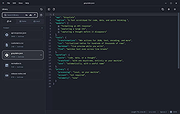 |
|
Griddy McGridFace v0.1.1 Griddy McGridFace v0.1.1 👉 Create high-quality photo collages with intelligent automatic layouts. Griddy McGridFace is an open-source desktop application for creating professional-looking photo collages quickly and easily. Simply import a folder of images, choose a page size, and let the application generate attractive layouts automatically. Built with Tauri, Rust, and SvelteKit, it runs natively across multiple platforms while providing a responsive interface and high-quality export options. The software includes intelligent face-aware cropping to help keep people properly framed, along with tools for repositioning, swapping, locking, and resizing individual photos. Projects can be saved and reopened later, making it suitable for both casual users and print-ready collage creation. Features: • Automatically generates photo collage layouts • Face-aware cropping helps keep subjects properly framed • Drag-and-drop image importing • Supports custom page sizes • Lock individual photos in place • Zoom, reposition, and swap photos within the layout • Create larger featured center images • Shuffle layouts instantly • Save and reopen projects • Autosave and crash recovery • Sort images by color, including dark-to-light and rainbow order • Export to PNG, JPEG, WebP, and PDF • Built with Tauri 2, Rust, and SvelteKit • Open source Supported operating systems: • Windows 10, Windows 11 • macOS 13 Ventura or higher • Linux (64-bit Debian-based distributions, 64-bit Arch Linux) Supported languages: English Changes: v0.1.1 07-09-26 Added drag-and-drop image import. Improved layout generation speed for larger image collections. Added per-photo fit controls. Added autosave and recovery. Added color sorting, including dark-to-light and rainbow ordering. Various bug fixes and improvements. Note: This file has two hits on VirusTotal. We have confirmed these to be false positives. The file is safe. This download is for the Windows setup version (very bottom of page). All other download assets are below: Other Windows: Griddy-McGridFace_0.1.1_x64_en-US.msi macOS: Griddy-McGridFace_0.1.1_aarch64.dmg Linux: Griddy-McGridFace_0.1.1_amd64.deb Click here to visit the author's website. |
|
472 | Jul 10, 2026 g33kphr33k  |
|
HelixNotes v1.3.3 HelixNotes v1.3.3 👉 A fast, local-first Markdown note-taking application with powerful organization tools. HelixNotes is a privacy-focused, open-source Markdown note-taking application that stores your notes as standard .md files on your own computer instead of locking them into a proprietary database or cloud service. Built with Rust and Tauri for excellent performance and low resource usage, it combines a clean WYSIWYG editor with the flexibility of raw Markdown editing. Features such as wiki links, graph visualization, task management, version history, full-text search, Mermaid diagrams, KaTeX math, optional WebDAV synchronization, and optional AI integration make it suitable for everything from simple note-taking to large personal knowledge bases. Features: • Plain Markdown (.md) file storage with no proprietary database • Clean WYSIWYG editor with optional raw Markdown source mode • Slash commands, tables, syntax-highlighted code blocks, and live KaTeX math • Wiki links with automatic interactive graph view • Centralized task management with priorities, due dates, and calendar view • Daily notes with integrated calendar • Fast local full-text search • Native Mermaid diagram rendering • Version history with automatic backups and diff viewer • Optional WebDAV synchronization • Optional AI integration using Ollama or your own API key • Obsidian import support • Outline panel and tag autocomplete • Custom themes, fonts, accent colors, and interface scaling • Built with Rust and Tauri for fast startup and low memory usage Supported operating systems: • Windows 10, Windows 11 • macOS (Apple Silicon and Intel with Rosetta 2) • Linux (AppImage, Debian/Ubuntu APT, Arch Linux, Fedora 43+, openSUSE Tumbleweed, Solus) • Android 16 or later Supported languages: • English Changes: v1.3.3 06-30-26 Android: removed the Updates tab from Settings, since updates are handled by the ArkHost F-Droid repo or Obtainium. Editor: the inline task tokens (!high, due:2026-06-12) are now dimmed in the rich editor so they're less distracting while staying readable. Fixed the desktop app showing the mobile layout (no sidebar or top bar) on some Linux systems such as CachyOS. (community ... |
|
480 | Jul 03, 2026 ArkHost 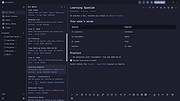 |
 |
HookEcho v0.12.0 HookEcho v0.12.0 👉 Advanced weather radar, storm tracking and severe weather analysis for your desktop or Android device. HookEcho is a free, open-source NEXRAD weather radar viewer and severe weather analysis program built from scratch in Rust using wgpu and egui. It combines detailed Level 2 and Level 3 radar analysis with national weather information, forecasts, storm tracking, warning intelligence, historical weather replay and tools for storm spotters, weather enthusiasts and storm chasers. Live radar products include reflectivity, velocity, storm-relative velocity and dual-polarization data, with tools for examining multiple elevation tilts, cross-sections, CAPPI altitude slices and 3D radar volumes. HookEcho can detect tornado debris signatures, analyze rotation, track storm cells and display information including hail, storm tops, movement and other severe-weather indicators. National situational-awareness layers include MRMS radar products, precipitation, lightning, hail, rotation tracks, satellite imagery, surface observations, tropical weather and aviation information. Forecast tools include numerical weather models, future radar, severe-weather outlooks, atmospheric parameters and point forecasts. Sounding tools provide Skew-T diagrams, hodographs and severe-weather indices. Warnings are integrated directly into the map. HookEcho displays National Weather Service warning polygons and bulletins, follows storm motion and can monitor saved locations for approaching severe weather. Alerting options include sounds, spoken warnings, desktop and Android notifications, configurable alert rules and optional push notifications. Historical weather can be explored using archived NEXRAD data. Radar, warnings, storm reports, satellite imagery and other available information can be synchronized along the timeline to examine past severe-weather events. Events can also be saved for later replay. HookEcho's interface places the weather map edge to edge with floating controls for searching, layers, alerts and the radar timeline. Multiple panes can display different radar sites, products, tilts, thresholds, layers and map styles simultaneously. A searchable command interface provides quick access to tools and settings. The program also includes features for storm chasing, such as live ... |
|
739 | Aug 28, 2026 David-d4vid87 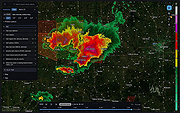 |
|
JSON Studio v1.0.0 JSON Studio v1.0.0 👉 A private, lossless desktop workspace for large JSON files. JSON Studio is a free, open source desktop application for working with large JSON files. It enables you to explore, search, query, compare, and inspect JSON, JSONL, and NDJSON files up to 500 MB entirely on your own machine. Designed for developers working with large, sensitive, or precision-critical data, JSON Studio keeps the original data intact by preserving big integers, high-precision decimals, key order, and the original source text without rounding, reordering, or reformatting. The application provides multiple ways to view and analyze JSON data, including tree, raw source, and table views. It features fast searching across keys and values, RFC 9535 JSONPath query support, structural document comparison, JSONL/NDJSON table inspection, inline image previews for supported embedded image formats, and automatic session restoration. Because it runs completely offline, there are no accounts, uploads, telemetry, analytics, or network calls, ensuring your files and settings remain private. Features: • Open JSON, JSONL, and NDJSON files up to 500 MB • Preserves big integers, high-precision decimals, key order, and original source text • Tree, raw source, and table views • Collapse and expand navigation with expand-to-depth support • Syntax highlighting, line numbers, wrapping, and parse error reporting • Fast searching with case-sensitive, whole-field, regular expression, and subtree search options • RFC 9535 JSONPath query support with history, execution timing, and result export • Structural JSON comparison with configurable array matching and optional key-order ignoring • Virtualized table view for JSONL and NDJSON files with field statistics and invalid-row highlighting • Inline preview of embedded PNG, JPEG, GIF, WebP, and SVG images • Multiple document tabs, scratch workspace, session restore, and live file reload • Fully offline operation with no uploads, analytics, telemetry, or network access Supported operating systems: • Windows • macOS • Linux Supported languages: • English Changes: v1.0.0 06-26-26 Initial release. Note: This file has two hits on VirusTotal. We have confirmed ... |
|
499 | Jun 27, 2026 Anton Liberant 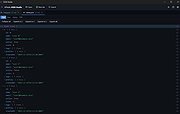 |
|
Mouzi v0.1.3 Mouzi v0.1.3 👉 Automatically organizes your Downloads folder from the system tray. Mouzi is a free, privacy-first file organizer that quietly runs from the Windows system tray and automatically sorts downloaded files by type. It can monitor selected folders, apply customizable rules, move files into organized subfolders, keep a local history of actions, and undo moves when needed. Everything stays on your computer, with no cloud uploads and no telemetry by default. Features: • Automatically organizes new downloads as they arrive • Runs quietly in the background from the system tray • Custom rules using file extensions, regex patterns, and destination folders • Dynamic paths such as {year}, {month}, {day}, {extension}, and {filename} • Built-in rules for images, documents, archives, installers, music, video, and other files • One-click Clean Now option for organizing existing files • Local history with one-click undo • Per-folder ignore rules using .mouziignore • Dark Mode support with system theme detection • 100% offline with local SQLite storage • Portable version available Supported operating systems: • Windows 10, Windows 11 Supported languages: English, Polish, Italian, German, French, Russian, Japanese Changes: v0.1.3 06-13-26 Bug Fixes Clean Now no longer processes folders set to Paused mode. Empty (0 B) files are now sorted correctly. .mouziignore patterns with multiple wildcards and spaces now work reliably. Folders are scanned for existing files when added or refreshed. NSIS installer now closes a running Mouzi instance before installing. UI / UX New warm color theme matching mouzi.cc. Added dedicated About tab in Settings. Tray tooltip now shows the number of pending files waiting for Clean Now. Added Open folder buttons in Recent Actions and History. Improved empty states with icons. Revert All button is disabled when there is nothing ... |
|
943 | Jun 15, 2026 Krystian Welcel 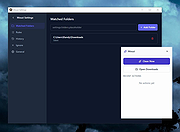 |
|
OpenCalc v1.1.10 OpenCalc v1.1.10 👉 A modern, open source recreation of the classic Windows 95 Calculator with plenty of useful improvements. OpenCalc is a from-scratch reimplementation of the classic Windows 95 Calculator, preserving its familiar look and interaction while adding modern capabilities. Written in Rust, it provides Standard and Scientific calculator modes along with improved expression parsing, calculation history, graph plotting, localization, modern keyboard support and high-DPI rendering. OpenCalc goes beyond simple button-by-button calculations with a full expression parser. Expressions can contain nested parentheses, positive and negative signs, exponentiation, square roots, mathematical functions, trigonometric and logarithmic functions, constants such as pi, factorials, percentages, scientific notation, multiple number bases and bitwise operations. Features: • Faithful recreation of the classic Windows 95 Calculator interface • Standard and Scientific calculator modes • Financial calculation mode • Complete mathematical expression parsing • Nested parentheses and unary positive and negative signs • Exponentiation using ^ or ** • Square roots and mathematical functions • Trigonometric and logarithmic functions • Mathematical constants such as pi • Factorial and percentage operators • Scientific notation • Binary, octal, decimal and hexadecimal numbers • Bitwise operations • Calculation history • Undo and redo support • Graph manager and graph plotting • Memory operations and statistics window • Configurable decimal separator • Extensive keyboard controls • Improved font rendering and DPI-aware classic controls Supported operating systems: • Windows 10, Windows 11 • Linux distributions with GTK 4 support Supported languages: English, German, French, Italian, Spanish, Russian, Japanese, Chinese (Simplified), Chinese (Traditional) Changes: v1.1.10 09-13-26 Bug fixes. Financial Mode added. This download is for the Windows version (very bottom of page). All other download assets are below: Linux: OpenCalc-v1.1.10-buildfix171-Linux.tar.gz Click here to visit the author's website. |
|
321 | Sep 14, 2026 NMagic 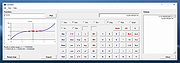 |
|
Waydir v0.22.0 Waydir v0.22.0 👉 A fast, keyboard-first dual-pane file manager for Linux, Windows and macOS. Waydir is a cross-platform desktop file manager built for users who prefer speed, direct control and fewer trips to the mouse. It combines classic dual-pane file management with tabs, live search, network drives, Quick Look previews, archive browsing, a built-in terminal and a native Rust core that keeps heavy file work off the interface thread. Features: • Dual-pane file browsing with tabs in each pane • Keyboard-driven navigation, selection, copying, moving, renaming and searching • Command palette for actions, bookmarks, drives, recent locations, files and plugin commands • Fast live recursive search with substring, regex and glob matching • Quick Look previews for images, PDFs, text, code and file details • Browse ZIP and TAR archives without extracting first • SMB and SFTP network drive support • Built-in terminal per pane • WSL file browsing and terminal support on Windows • Git status, branch switching and stash management • Light, Dark, Nord and One Dark themes, plus custom themes • Lua plugin support for actions, buttons, shortcuts and status bars • Free and open source under the MIT License Supported operating systems: • Windows • macOS • Linux Ubuntu, Debian, Fedora, RHEL, openSUSE and other Linux distributions using AppImage or portable tarball Supported languages: English Changes: v0.22.0 06-29-26 Added duplicate selected files and folders in place with Ctrl+Shift+D, available from the keyboard, command palette and context menu. Faster file copying, especially on Windows and when copying lots of small files. Renamed the "Kind" column to "Format". This download is for the Windows installer version (very bottom of page). All other download assets are below: Other Windows: waydir-0.22.0+29-windows.zip macOS: waydir-0.22.0+29-macos.dmg Linux: waydir-0.22.0+29-linux.AppImage waydir-0.22.0+29-linux.deb waydir-0.22.0+29-linux.rpm waydir-0.22.0-linux-x64.tar.gz Click here to visit the author's website. |
|
436 | Jul 02, 2026 Mikolaj Badyl 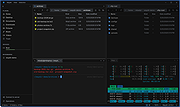 |
| Showing rows 1 to 10 of 10 | Showing Page 1 of 1 | 1 |
OlderGeeks.com Copyright (c) 2026
