|

|
Processed through Paypal No account required. |








Buy our over-priced crap to help pay the bills.



|
|
Processed through Paypal No account required. |
| Files | ||||
| File Name | Rating | Downloads | ||
 |
Librer v1.0979.518 Librer v1.0979.518 👉 Cross-platform GUI file cataloging with powerful search and custom metadata extraction. Librer is a cross-platform GUI file cataloging program designed to catalog files (especially on removable media like memory cards and portable drives), add metadata via custom data extractors, and perform fast multi-core searches across saved records. Features: • Catalog file systems into portable record files (great for removable media) • Add custom metadata (Custom Data) by running user-selected commands or scripts per file • Search using regular expressions, glob expressions, and fuzzy matching (filenames and custom data) • Export and import created records for sharing or backups • Import data from other catalogers including Where Is It?, Cathy (.caf), and VVV (CSV) • Highly optimized record format for fast access, compression, and repository portability • Portable by design: writes logs, configuration, and data into its own folders at runtime Supported operating systems: • Linux • Windows 10, Windows 11 Changes: v1.0979.518 06-24-26 refactoring of opening paths and URLs check xdg-open bump pyinstaller, tkinterdnd2, pywin32, dateparser better messages Note: This file has one hit on VirusTotal. We have confirmed this to be a false positive. The file is safe. This download is for the Windows portable version (very bottom of page). If you need the Linux portable version, download here. Click here to visit the author's website. |
 |
1,681 | Jun 27, 2026 Piotr Jochymek 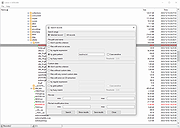 |
|
OpenCloseDriveEject v3.55 OpenCloseDriveEject v3.55 👉 Quickly open, close, and safely eject drives and removable media in Windows. OpenCloseDriveEject is a small Windows tool that lets you open and close DVD, CD, and Blu-ray drives, and safely eject removable storage like USB, SD, and SSD devices. It can run as a portable app, includes optional To-Tray/hidden startup behavior, and also offers command-line options for simple automation. Features: • Open and close optical drive trays (CD, DVD, Blu-ray) • Safely eject removable media (USB, SD, SSD, external drives) • Portable application, no installation required • Command-line support (start hidden, start to tray, custom INI path) • Optional start minimized or in system tray • Multilingual interface Supported operating systems: • Windows XP, Windows Vista, Windows 7, Windows 8.1, Windows 10, Windows 11 • Windows Server 2012, Windows Server 2016, Windows Server 2019, Windows Server 2022, Windows Server 2025 Supported languages: German, English, French, Greek, Traditional Chinese, Bulgarian, Korean, Russian, Japanese, Polish, Turkish, Italian, Dutch, Swedish, Norwegian, Portuguese, Danish, Irish, Thai, Spanish (Venezuela), Persian, Arabic, Hebrew, Finnish, Czech, Simplified Chinese, Bosnian, Croatian, Serbian, Catalan Changes: v3.55 05-02-26 • Important tests of the OpenCloseDriveEject app for the next MS Windows 11 build • Update of the OpenCloseDriveEject.exe language files A simple example of using the "Open Close Eject the Drive Tool" This download is for the Windows 64bit portable version. If you need the Windows 32bit portable version, download here. Click here to visit the author's website. |
|
5,534 | Jul 11, 2026 Nenad Hrg 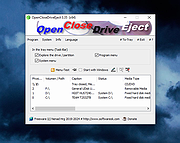 |
|
USBDeview v3.10 USBDeview v3.10 👉 View, manage, enable, disable, uninstall, and export USB device history. USBDeview is a small utility that lists all USB devices currently connected to your computer, as well as USB devices previously used on the system. For each USB device, it displays extended information including device name, description, device type, serial number, added date/time, Vendor ID, Product ID, and more. USBDeview can also uninstall previously used USB devices, disconnect currently connected USB devices, and disable or enable USB devices. It can also be used on a remote computer when logged in with administrator rights. Features: • Lists currently connected and previously used USB devices • Displays device name, description, type, serial number, Vendor ID, Product ID, and more • Uninstall previously used USB devices • Disconnect currently connected USB devices • Disable and enable USB devices • Remote computer support with administrator login • Command-line options for exporting, sorting, enabling, disabling, removing, and checking USB device status • Export USB device lists to text, tab-delimited, CSV, HTML, and XML files • Available in 32-bit and 64-bit versions Supported operating systems: • Windows 2000, Windows XP, Windows Server 2003, Windows Vista, Windows Server 2008, Windows 7, Windows 8, Windows 10, Windows 11 • 32-bit and 64-bit systems supported Supported languages: English, Arabic, Brazilian Portuguese, Bulgarian, Czech, Danish, Dutch, Euskera, Finnish, French, Galician, German, Greek, Hnidi, Hungarian, Italian, Japanese, Korean, Norwegian, Persian, Polish, Romanian, Russian, Simplified Chinese, Slovak, Spanish, Swedish, Traditional Chinese, Thai, Turkish, Ukrainian, Valencian Changes: v3.10 05-14-26 Added 'Black Background' option (Under the View menu). When it's turned on, the main table is displayed in black background and white text, instead of default system colors. Added 'Save All Items' option (Shift+Ctrl+S). Note: Th3 32bit version of this file has one hit on VirusTotal. We have confirmed this to be a false positive. The file is safe. This download is for the Windows 64bit version (very bottom of ... |
|
10,278 | May 22, 2026 Nir Sofer 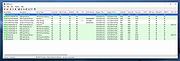 |
| Showing rows 1 to 3 of 3 | Showing Page 1 of 1 | 1 |
OlderGeeks.com Copyright (c) 2026
